The Wiert Corner – irregular stream of stuff

Jeroen W. Pluimers on .NET, C#, Delphi, databases, and personal interests

  • My badges

  • Twitter Updates

  • My Flickr Stream

  • Pages

  • All categories

  • Enter your email address to subscribe to this blog and receive notifications of new posts by email.

    Join 1,839 other subscribers

Archive for the ‘Windows’ Category

Windows PPTP – How to Create a VPN Server on Your Windows Computer Without Installing Any Software

Posted by jpluimers on 2016/07/18

Windows has the built-in ability to function as VPN server, although this option is hidden. This trick works on both Windows 7 and Windows 8. The server uses the point-to-point tunneling protocol (PPTP.)

Source: How to Create a VPN Server on Your Windows Computer Without Installing Any Software

One day this might come in handy though I need to investigate a bit more on PPTP security issues first: might need to go for L2TP/IPsec instead.

Later: indeed, I should follow Don’t use PPTP, and don’t use IPSEC-PSK either (via: CloudCracker blog)

–jeroen

Posted in IPSec, Network-and-equipment, Power User, PPTP, VPN, Windows, Windows 10, Windows 7, Windows 8, Windows 8.1 | 1 Comment »

Sysinternals Suite – lots of tools are now available as 64-bit as well

Posted by jpluimers on 2016/07/08

In the past the Sysinternals Suite used to have only a few 64-bit versions of their tools, but recently they added many more.

The documentation doesn’t reflect this yet, but the online versions do:

These are 64-bit:

     Wednesday, June 29, 2016  9:42 PM       403120 accesschk64.exe
     Wednesday, June 29, 2016  9:42 PM       841904 Autoruns64.exe
     Wednesday, June 29, 2016  9:42 PM       742064 autorunsc64.exe
     Wednesday, June 29, 2016  9:42 PM       154792 Clockres64.exe
     Wednesday, June 29, 2016  9:42 PM       268960 Contig64.exe
     Wednesday, June 29, 2016  9:42 PM       158376 diskext64.exe
     Wednesday, June 29, 2016  9:42 PM       190104 du64.exe
     Wednesday, June 29, 2016  9:42 PM       169136 FindLinks64.exe
     Wednesday, June 29, 2016  9:42 PM       226464 handle64.exe
     Wednesday, June 29, 2016  9:42 PM       164520 hex2dec64.exe
     Wednesday, June 29, 2016  9:42 PM       236200 junction64.exe
     Wednesday, June 29, 2016  9:43 PM       220336 Listdlls64.exe
     Wednesday, June 29, 2016  9:43 PM       156840 LoadOrd64.exe
     Wednesday, June 29, 2016  9:43 PM       188584 LoadOrdC64.exe
     Wednesday, June 29, 2016  9:43 PM       249536 logonsessions64.exe
     Wednesday, June 29, 2016  9:43 PM       154792 movefile64.exe
     Wednesday, June 29, 2016  9:43 PM       265904 notmyfault64.exe
     Wednesday, June 29, 2016  9:43 PM       271032 notmyfaultc64.exe
     Wednesday, June 29, 2016  9:43 PM       158896 ntfsinfo64.exe
     Wednesday, June 29, 2016  9:43 PM       156336 pendmoves64.exe
     Wednesday, June 29, 2016  9:43 PM       234160 pipelist64.exe
     Thursday, April 28, 2016 12:25 AM       310440 procdump64.exe
     Wednesday, June 29, 2016  9:43 PM       374944 PsExec64.exe
     Wednesday, June 29, 2016  9:43 PM       168608 psfile64.exe
     Wednesday, June 29, 2016  9:43 PM       326824 PsGetsid64.exe
     Wednesday, June 29, 2016  9:43 PM       351912 PsInfo64.exe
     Wednesday, June 29, 2016  9:43 PM       318624 pskill64.exe
     Wednesday, June 29, 2016  9:43 PM       202400 pslist64.exe
     Wednesday, June 29, 2016  9:43 PM       170160 PsLoggedon64.exe
     Wednesday, June 29, 2016  9:43 PM       168616 pspasswd64.exe
     Wednesday, June 29, 2016  9:43 PM       293032 psping64.exe
     Wednesday, June 29, 2016  9:43 PM       210608 PsService64.exe
     Wednesday, June 29, 2016  9:43 PM       321704 pssuspend64.exe
     Wednesday, June 29, 2016  9:43 PM       164024 RegDelNull64.exe
     Wednesday, June 29, 2016  9:43 PM       160400 ru64.exe
     Wednesday, June 29, 2016  9:43 PM       165544 sdelete64.exe
     Wednesday, June 29, 2016  9:43 PM       856752 sigcheck64.exe
     Wednesday, June 29, 2016  9:43 PM       153768 streams64.exe
     Wednesday, June 29, 2016  9:43 PM       162472 strings64.exe
     Wednesday, June 29, 2016  9:43 PM       158360 sync64.exe
     Thursday, April 28, 2016 12:25 AM       862888 Sysmon64.exe
    Tuesday, February 2, 2016 10:04 PM       221360 Testlimit64.exe
     Wednesday, June 29, 2016  9:43 PM       169648 Volumeid64.exe
     Wednesday, June 29, 2016  9:43 PM       169632 whois64.exe

These do not have 64-bit equivalents yet or (like procexp.exe) have 64-bit versions embedded (some will likely never get them):

  Wednesday, November 1, 2006  1:06 PM       174968 AccessEnum.exe
 Wednesday, November 14, 2012 10:22 AM       479832 ADExplorer.exe
    Tuesday, October 27, 2015 12:13 AM      2425496 ADInsight.exe
  Wednesday, November 1, 2006  1:05 PM       150328 adrestore.exe
   Tuesday, February 22, 2011  2:18 PM       148856 Autologon.exe
    Tuesday, October 27, 2015 11:28 PM      2049168 Bginfo.exe
  Wednesday, November 1, 2006  1:06 PM       154424 Cacheset.exe
      Monday, August 18, 2014  7:29 PM       892088 Coreinfo.exe
  Wednesday, November 1, 2006  1:05 PM       150328 ctrl2cap.exe
     Monday, December 3, 2012 10:10 AM       468056 Dbgview.exe
  Wednesday, November 1, 2006  9:06 PM       158520 DEFRAG.EXE
  Wednesday, October 17, 2012  5:28 PM       116824 Desktops.exe
  Wednesday, November 1, 2006  1:06 PM       224056 Diskmon.exe
    Wednesday, March 24, 2010  1:00 PM       580984 DiskView.exe
      Wednesday, May 20, 2015  2:24 AM       146232 efsdump.exe
  Wednesday, November 1, 2006  1:06 PM       154424 ldmdump.exe
   Tuesday, December 17, 2013  4:01 PM       559808 livekd.exe
  Wednesday, November 1, 2006  1:06 PM       215928 pagedfrg.exe
     Friday, January 13, 2012  4:35 PM       451392 portmon.exe
   Thursday, February 4, 2016 10:19 PM      2694816 procexp.exe
        Friday, June 12, 2015 12:34 AM      2046608 Procmon.exe
      Tuesday, April 27, 2010 10:04 AM       178040 psloglist.exe
     Monday, December 4, 2006  4:53 PM       207664 psshutdown.exe
    Tuesday, February 2, 2016 10:04 PM       625816 RAMMap.exe
  Wednesday, November 1, 2006  9:05 PM       146232 Reghide.exe
    Tuesday, February 2, 2016 10:04 PM       117920 regjump.exe
  Wednesday, November 1, 2006  1:07 PM       334720 RootkitRevealer.exe
  Wednesday, November 1, 2006  1:07 PM       260976 ShareEnum.exe
 Wednesday, February 27, 2008  5:51 PM       103464 ShellRunas.exe
     Wednesday, July 28, 2010  2:47 PM       199544 tcpvcon.exe
        Monday, July 25, 2011 11:40 AM       300832 Tcpview.exe
        Monday, July 20, 2015 11:45 PM      1194128 vmmap.exe
       Tuesday, June 18, 2013  2:12 PM       596160 ZoomIt.exe

–jeroen

Posted in Power User, SysInternals, Windows | Leave a Comment »

case insensitive files systems and git – Lesson Learned – I Can’t Get My Git Repo Clean! | DrupalEasy

Posted by jpluimers on 2016/07/06

via: Lesson Learned – I Can’t Get My Git Repo Clean! | DrupalEasy

One file kept getting added to the git modified list: service/src/main/MySOAPdefinition.pas.

It was part of a repository that had been migrated from SVN (more on that in a future blog post) and along the way been renamed in directory service/src/main from MySOAPdefinition.pas to MySoapDefinition.pas. SVN (and TortoiseSVN) don’t object to this. But git does.

You’d see this on the command-line:

>git status
On branch develop
Your branch is up-to-date with 'origin/develop'.
Changes not staged for commit:
  (use "git add ..." to update what will be committed)
  (use "git checkout -- ..." to discard changes in working directory)

        modified:   service/src/main/MySOAPdefinition.pas

no changes added to commit (use "git add" and/or "git commit -a")

>git add service\src\main\MySoapDefinition.pas

>git status
On branch develop
Your branch is up-to-date with 'origin/develop'.
Changes not staged for commit:
  (use "git add ..." to update what will be committed)
  (use "git checkout -- ..." to discard changes in working directory)

        modified:   service/src/main/MySOAPdefinition.pas

no changes added to commit (use "git add" and/or "git commit -a")

Basically the add would do nothing.

On Windows, this is how to get around this:

Read the rest of this entry »

Posted in Delphi, Delphi XE8, Development, git, Mac OS X / OS X / MacOS, OS X 10.9 Mavericks, Power User, Software Development, Source Code Management, SourceTree, Windows, Windows 7 | 1 Comment »

windows 7 – Available memory differs by several GiB from what is installed – Super User

Posted by jpluimers on 2016/07/01

Very interesting question and answers: windows 7 – Available memory differs by several GiB from what is installed – Super User.

Basically the missing memory can be due to:

  • Windows licensing limitations
  • Mapping of device memory into virtual memory space (especially on x86 systems)

This affects both server and client versions of Windows. Client versions are more restrictive because of the vast amounts of potentially faulty drivers involved.

Some links (read the full question for details):

–jeroen

Posted in Power User, SysInternals, Windows, Windows 7, Windows 8, Windows 8.1, Windows 9, Windows NT, Windows Server 2000, Windows Server 2003, Windows Server 2003 R2, Windows Server 2008, Windows Server 2008 R2, Windows Server 2012, Windows Server 2012 R2, Windows Vista, Windows XP | Leave a Comment »

Some notes on tfpt.exe from Microsoft Visual Studio Team Foundation Server (2010/2013/2015) Power Tools extension

Posted by jpluimers on 2016/06/23

Some links.

First tfpt:

Old name: Microsoft Team Foundation Server 2010 Power Tools.

Then witAdmin:

With API:


–jeroen

via: Microsoft Visual Studio Team Foundation Server 2013 Power Tools extension.

Links to past posts about tfpt:

Posted in .NET, Development, Power User, PowerToys, Software Development, Source Code Management, TFS (Team Foundation System), Visual Studio and tools, Windows | Leave a Comment »

On Windows 7, Visual Studio 2015 wanted Internet Explorer 10… here are the direct links to download it

Posted by jpluimers on 2016/06/20

Boy, don’t you dislike how hard it is to find direct download links

Well, thanks to kenorb and jjlin (slightly edited):

Check: IE6, IE7, IE8, IE9, IE10, IE11 Offline Installers Download Links – kenorb Mar 20 ’15 at 13:39 – http://www.itechtics.com/download-internet-explorer-all-versions/ – note this does not provide hashes.

jjlin:

Try these Microsoft offline installer links:

These may refuse to work if you already have IE 11 installed, though. If it is refused, try this: http://stackoverflow.com/questions/20043971/how-to-downgrade-from-internet-explorer-11-to-internet-explorer-10

And in case these links ever stop working and you must obtain a copy from a non-Microsoft source, here are the SHA-512 hashes for posterity:

  • 32-bit: d89ba3f9978be428ac05b182481198ab0f7b0c0651e4716e63cd0cf907d739cbc30f44ec9c444da683869473a548cd99e5c396467b2898f7c382b6345b3e70d2
  • 64-bit: f1752bb6517fe15071e5f7a4fee4b8680da1bdad1df7054ab22bab78fe0f46aee177787f60ea2cfc86a2db2b08429e2cba3cfdd20ba6a2ab69e091c7784dfdae

Source: internet explorer 10 – Does Microsoft still have a link to download IE10 for Windows 7? – Super User

–jeroen

Posted in .NET, Development, Internet Explorer, Power User, Software Development, Visual Studio 2015, Visual Studio and tools, Web Browsers, Windows, Windows 7 | Leave a Comment »

HP Color LaserJet 9500HDN and stock Windows 8.1 x64 drivers: PCL XL error Warning: IllegalMediaSource – via: Server Fault

Posted by jpluimers on 2016/06/20

HP Printers, PCL6 and drivers are always a fight to get right.

In this case the Microsoft stock Windows 8.1 x64 drivers always result in my HP LaserJet 9500 HDN printing a page like this from the same tray the last print job ran:

PCL XL error

        Warning: IllegalMediaSource

I’ve seen similar results with other Windows, printer and driver combinations (not limited to Microsoft drivers, but always PCL related), but never knew the solution.

Reading the answer, I totally recognise it: always some form of PCL6 driver was involved, and switching to PostScript solved it.

Note that there are three varieties of the HP Universal Print Driver for Windows:

  • PCL5
  • PCL6
  • PostScript

So now I know to always install the first and the last (:

–jeroen

via: windows xp – PCL XL error Warning: IllegalMediaSource – Server Fault.

Posted in HP Printer Drivers, Power User, Printer drivers, Windows, Windows 7, Windows 8, Windows 8.1, Windows Vista, Windows XP | Leave a Comment »

(Roaming) Profile and Folder Redirection

Posted by jpluimers on 2016/06/17

The article I quote from is about Windows Server 2003 and Windows XP, but still holds for modern Windows Server and Client versions:

After you enable roaming profiles for a couple of users, the first thing that you will probably notice is that logins and log offs become extremely slow for those users. […]

The solution to obscenely long logons and log offs is to use folder redirection. Folder redirection allows you to save portions of the user’s profile in a different location on the network. […]

You can’t redirect every folder in a user’s profile.[…] The folders that you can redirect are:

  • Application Data,
  • Desktop,
  • My Documents, and
  • Start Menu.

[…] I recommend creating a share point on the server to which you can redirect these folders.  […]

To redirect a folder, open the Group Policy Editor and navigate to User Settings | Windows Settings | Folder Redirection. The group policy requires you to redirect each of the four folders separately, but the procedure for doing so is the same for each folder:

  1. Set the folder’s Setting option to “Basic – Redirect Everyone’s Folder To The Same Location”.
  2. Next, select the Create A Folder For Each User Under The Root Path option from the Target Folder Location drop down list.
  3. Finally, enter your root path in the place provided.

–jeroen

via: Profile and Folder Redirection In Windows Server 2003 :: Windows 2003 :: Articles & Tutorials :: WindowsNetworking.com.

Posted in Power User, Windows, Windows 7, Windows 8, Windows 8.1, Windows 9, Windows Server 2003, Windows Server 2003 R2, Windows Server 2008, Windows Server 2008 R2, Windows Server 2012, Windows Server 2012 R2, Windows Vista, Windows XP | Leave a Comment »

Links for when I get `Not enough storage is available to process command` again

Posted by jpluimers on 2016/06/13

No, it’s not the Delphi Global Atom issue. I think it was having ran AQtime for too long.

–jeroen

Posted in Power User, Windows, Windows 7 | Leave a Comment »

ThinkPad X201: fixing the “black screen” (without mouse pointer) after upgrading to Windows 10

Posted by jpluimers on 2016/06/10

After this Windows 10 boot screen the display goes blank without a mouse cursor.

After this Windows 10 boot screen the display goes blank without a mouse cursor.

So you upgraded your X201 from Windows 7 to Windows 10 even though it’s not in the listed on the Lenovo supported models page.

Now it gets through the boot screen, flashes the CapsLock/NumLock LEDS, blanks the screen (no mouse cursor) and continues booting without any visual feedback apart from the HDD LED flashing until it is finished booting

Since Windows 10 by default does not enable the F8 option any more, you need some more severe measures.

BIOS update

The first was to get the BIOS up to date. At the time of writing that was 1.40-1.15 from BIOS Update Bootable CD for Windows 8 (32-bit, 64-bit), 7 (32-bit, 64-bit), Vista (32-bit, 64-bit), XP – ThinkPad – Lenovo Support (US):

Then I had to burn the ISO. Which was a bit picky because most of my infrastructure is VM based and none of the physical machines had a DVD or CD-drive any more. Luckily I found a LiteOn SLW 831SX which Windows detects as Slimtype DVDRW SLW-831S USB Device. ImgBurn worked with that (elevated to Administrative mode that is: it requires that both for burning and grabbing an ISO image).

Upgrading the BIOS went fine, but the symptoms stayed.

Removing/re-inserting battery

Removing the battery for a while, then reinserting was suggested at one of the sites.  It didn’t help.

Force into Repair Mode

Then I read this:

If the system can’t load the necessary configuration more than two times, the system will  direct the display to Windows RE(Recovery environment).

Source: Windows 10 – How to enter Safe Mode if I can’t boot the system successfully?

They also have: Windows 10 – If I can’t enter the system, how can I restore the Windows 10 laptop or PC to default settings?

This very easy to do:

Prepairing Automatic Repair

Prepairing Automatic Repair

  1. Keep the power button down to power off the machine
  2. Power up the machine
  3. Wait for the boot screen to appear, then
    1. Keep the power button down to power off the machine
  4. Power up the machine
  5. Wait for the boot screen to appear, then
    1. Keep the power button down to power off the machine
  6. Wait for the “Prepairing Automatic Repair” to finish
  7. Wait for the “Diagnosing your PC” to finish
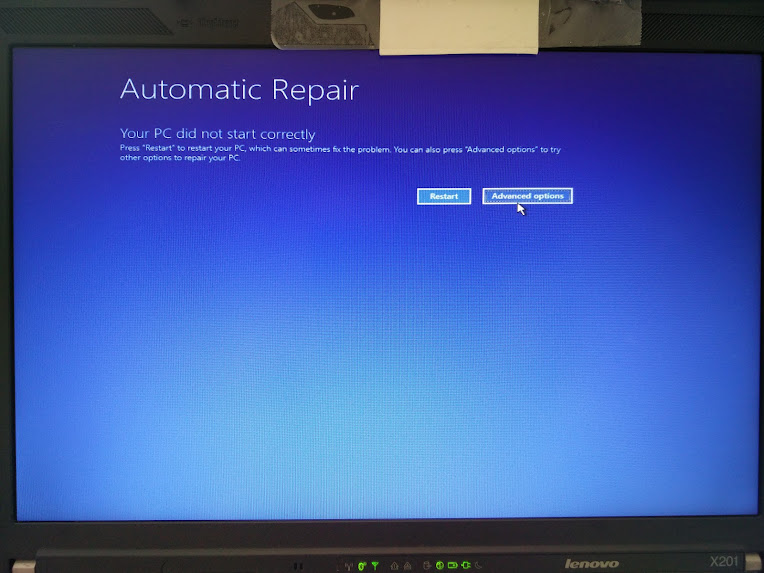
  8. Wait for the “Automatic Repair” to appear, then
    1. Wiggle with the mouse to get a mouse cursor
  9. Press the “Advanced Options” button
  10. Choose “Troubleshoot”
  11. Choose “Advanced Options”
  12. Choose “Startup Settings”
  13. Choose “Restart”
  14. Wait for the reboot and “Startup Settings” to appear (note: no mouse cursor)
  15. Hit F5 for “Enable Safe Mode with Networking”
  16. Wait for it to reboot twice.

This didn’t work as well as I hoped as now I was at the failure point as well.

But now at least I had a starting point to trip Windows into booting any way I wanted. I now only had to find which function key would get me into a state where I could see what was going on.

And the good things: The “Diagnosing your PC” only required one ‘manual power down” to appear.

  • F9 – Disable automatic restart after failure
  • F8 – Disable early launch anti-malware protection
  • F7 – Disable driver signature enforcement
  • F6 – Enable Safe Mode with Command Prompt
  • F5 – Enable Safe Mode with Networking
  • F4 – Enable Safe Mode
  • F3 – Enable low-resolution video
  • F2 – Enable boot logging
  • F1 – Enable debugging

F3 finally got me to the VIDEO_DRIVER_INIT_FAILURE (BSOD STOP 0x000000B4) which indicated the machine was so hosed that I had to to a clean install.

–jeroen

Automatic Repair - wiggle with the mouse and you have a cursor too!

Automatic Repair – wiggle with the mouse and you have a cursor too!

–jeroen

Images via:

Posted in BIOS, Boot, Power User, ThinkPad, UEFI, Windows, Windows 10, Windows 7, X201 | Leave a Comment »