The Wiert Corner – irregular stream of stuff

Jeroen W. Pluimers on .NET, C#, Delphi, databases, and personal interests

  • My badges

  • Twitter Updates

  • My Flickr Stream

  • Pages

  • All categories

  • Enter your email address to subscribe to this blog and receive notifications of new posts by email.

    Join 1,860 other subscribers

Archive for the ‘Windows’ Category

Windows: killing the Zone.Identifier NTFS alternate data stream from a file to prevent security warning popup

Posted by jpluimers on 2011/11/25

The Zone.Identifier NTFS alternate data stream (ADS) is appended to Internet downloads by browsers, and inserted by most decompressors when expanding such downloads.

NTFS alternate data streams are a perfect way to hide data, support Mac OS data forks (which used them to support resource fork meta data tagging long before NTFS alternate data streams were introduced), or to append meta-data to files.

It is a known ADS used to show a security warning when you run executable content that has been downloaded.
That warning can be annoying, or hang your application which it is started from a service, so further below is a batch file that kills the stream.

You cannot use type for displaying NTFS alternate data streams, but redirection through more or using notepad is fine.

This shows the Zone.Identifier NTFS alternate data stream for a single file:

more < %1:Zone.Identifier

When you want to see the ADS of many files, then just use NirSoft’s AlternateDateStreams utility.

You should only kill an Zone.Identifier NTFS alternate data stream when you have verified that the downloaded executable content (which nowadays is much more than just an executable) is verified to be safe.

An easy way to kill any NTFS alternate data stream is to copy it to a FAT32 device and back: FAT does not support alternate data streams. Drawback: it modifies the timestamp of your file as FAT has a smaller time resolution than NTFS has.

This batch file kills  the Zone.Identifier NTFS alternate data stream using the SysInternals streams tool:

@echo off
  if !%1!==!! goto :end
  :: use caret before pipe to hide the pipe from the outermost command in the batch file
  for /f "usebackq tokens=1" %%d in (`streams.exe %1 ^| find "Zone.Identifier:$DATA"`) do (
    goto :kill
  )
  goto :end
:kill
  streams -d %1
:end

and this batch file lists the Zone.Identifier NTFS alternate data streams:

@echo off
  if !%1!==!! goto :end
  :: use caret before pipe to hide the pipe from the outermost command in the batch file
  for /f "usebackq tokens=1" %%d in (`streams.exe %1 ^| find "Zone.Identifier:$DATA"`) do (
    goto :list
  )
  goto :end
:list
  streams.exe %1 | find ":"
:end

Note that the $DATA in the above batch files is not part of the NTFS alternate data stream name, but explains what kind of data is in the stream.
I have not found other types yet, but if you do, please leave a comment (preferably with a link).

–jeroen

Posted in Batch-Files, Development, Power User, Scripting, Software Development, Windows, Windows 7, Windows Vista, Windows XP | 2 Comments »

Not so convenient: after XP there is no more WebCam viewer in Windows (via: How can I take a picture with my webcam in Windows 7? – Super User)

Posted by jpluimers on 2011/11/14

Microsoft removed the WebCam viewer from Windows on all versions released after XP.
Very inconvenient, as it was very light weight, and most webcam software isn’t.

William describes in his answer to How can I take a picture with my webcam in Windows 7?, there is a small AMcap sample in the Microsoft DirectX SDK that works very well.
He also points to 2 download locations where you can get the compiled version (the SDK only has the source code).

–jeroen

Via: How can I take a picture with my webcam in Windows 7? – Super User, there is a

Posted in Power User, Windows, Windows 7, Windows Vista | Leave a Comment »

Running OS X Lion 10.7 on VMware Workstation 7.1.4 and 8.0 (via: How to Install Retail OS X 10.6 under VMware Workstation or Player – InsanelyMac Forum)

Posted by jpluimers on 2011/10/14

This might not be strictly legal, but it is supposed to be possible to run the retail OS X Lion 10.7 under VMware Workstation 8 (or VMware Fusion 4) and VMware Workstation 7.1.4 (or VMware Player 3.1.4) on a regular PC (if that PC Supports VT) running Windows 7 x64.

Since Apple MacBook still don’t come with a TrackPoint (and having suffered from RSI, that is about the only pointing device I can use) there are only two options for me:

  1. Go the route described above
  2. Use an external USB TrackPoint keyboard with a Mac
    (traveling with a huge external USB keyboard, I’d look like my long time friend Mark Miller from DevExpress, who also suffered from RSI)
    (boy I wish there was a wireless ThinkPad TrackPoint keyboard)

–jeroen

Via: How to Install Retail OS X 10.6 under VMware Workstation or Player – InsanelyMac Forum and 
How to Install Retail OS X 10.6 “Snow” and OS X 10.7 “Lion” under VMware Workstation 8 and Fusion 4, A simple set of instructions – InsanelyMac Forum

Posted in Apple, Keyboards and Keyboard Shortcuts, Power User, RSI, UltraNav keyboards, VMware, Windows, Windows 7 | 1 Comment »

Why can’t I move the Program Files directory via the unattend file? – via: The Old New Thing – Site Home – MSDN Blogs

Posted by jpluimers on 2011/10/07

You cannot move the C:\Program Files directory to another volume without installing Windows on that volume.

A small abstract from the explanation by Raymond Chen: The symbiotic relation between C:\Windows\WinSxS and C:\Program Files through NTFS hard links prevents you to move C:\Program Files (nor WinSxS) to a different disk volume. Both directories need to be on the same volume because of the NTFS hard link limitation.

NTFS hardlinks do save a ton of diskspace, even though WinSxS will keep growing over time, which means you need to do some careful disk volume planning, especially on SSD drives.

–jeroen

via: Why can’t I move the Program Files directory via the unattend file? – The Old New Thing – Site Home – MSDN Blogs.

Posted in Microsoft Surface on Windows 7, Power User, Windows, Windows 7, Windows 8, Windows Server 2000, Windows Server 2003, Windows Server 2003 R2, Windows Server 2008, Windows Server 2008 R2, Windows Vista, Windows XP | Leave a Comment »

C#/Windows: why LastWriteTime can be earlier than CreationTime

Posted by jpluimers on 2011/10/05

I was wondering about file times like these:

CreationTime....: 5-10-2011 10:00:13
LastAccessTime..: 5-10-2011 12:05:58
LastWriteTime...: 5-10-2011 10:00:10

I found the answer on stackoverflow.

If a file is copied to another file, the new file retains the LastWriteTime of the source but the CreationTime will be the time of the copy.

And indeed: the file had been copied from a local directory to a central network location.

–jeroen

via c# – Windows: How to determine if a file has been modified since a given date – Stack Overflow.

Posted in .NET, C#, Development, Power User, Software Development, Windows, Windows 7, Windows 8, Windows Vista, Windows XP | Leave a Comment »

Download: Microsoft Remote Desktop Connection Client for Mac 2.1.1 (via Microsoft Office for Mac Downloads and Updates | Office For Mac)

Posted by jpluimers on 2011/09/30

If you use Mac and Windows machines, then – despite the Mac keyboards – it sometimes is handy to use Mac to remote login to a Windows machine.

For that, the Microsoft Remote Desktop Connection Client for Mac 2.1.1 (especially the download <g>) comes in handy.

–jeroen

via: Microsoft Office for Mac Downloads and Updates | Office For Mac.

Posted in Apple, LifeHacker, Mac OS X 10.5 Leopard, Mac OS X 10.6 Snow Leopard, Mac OS X 10.7 Lion, Power User, Usability, Windows, Windows 7, Windows 8, Windows Vista, Windows XP | Leave a Comment »

Windows “Device Manager” – expand all nodes

Posted by jpluimers on 2011/09/23


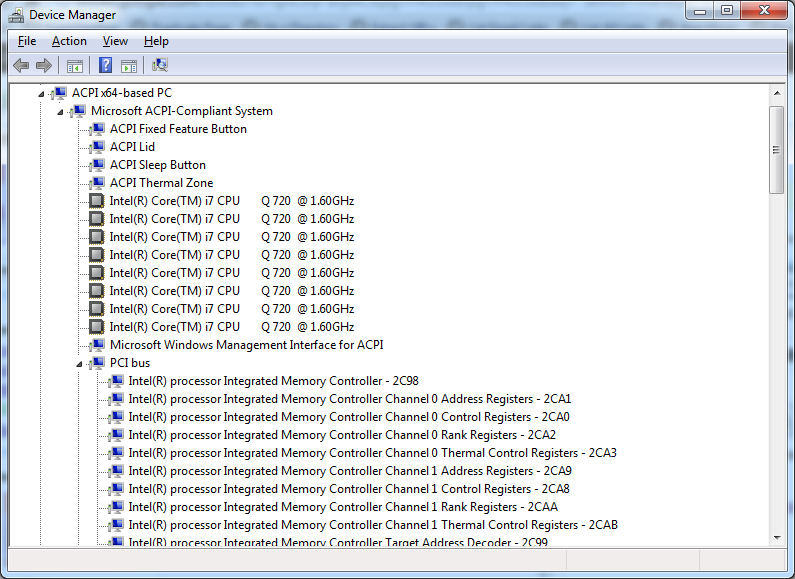
Expanded Windows Device Manager


With the increasing number of devices, it really helps to expand all nodes in the Device Manager’s tree view.

You cannot do this with the mouse, as none of the menu options contain an “Expand All” option.

But since the treeview, is the built-in Windows treeview (used in many places, like Windows explorer), you can use these shortcuts to expand/collapse nodes:

  • Numeric Keypad *: Expands everything under the current selection
  • Numeric Keypad +: Expands the current selection
  • Numeric Keypad -: Collapses the current selection.
  • RIGHT ARROW: Expands the current selection if it is not expanded, otherwise goes to the first child
  • LEFT ARROW: Collapses the current selection if it is expanded, otherwise goes to the parent

This not only works in Microsoft Windows 7: Visual … – Google Books, I think it has been introduced as far back as Windows 95.

–jeroen

Posted in Keyboards and Keyboard Shortcuts, Power User, Windows, Windows 10, Windows 7, Windows 8, Windows 8.1, Windows 9, Windows Server 2003, Windows Server 2003 R2, Windows Server 2008, Windows Server 2008 R2, Windows Server 2012, Windows Server 2012 R2, Windows Vista, Windows XP | 1 Comment »

Comparison of PDF printer drivers

Posted by jpluimers on 2011/09/16

A long time ago I showed a list of PDF printer drivers.

In the mean time, FreewareGenius did a comparison of free PDF printer drivers in june 2011.

Time to go to the BullZip site and try the download of their Free PDF Printer :)

–jeroen

Posted in Power User, Windows, Windows 7, Windows Vista, Windows XP | Leave a Comment »

Windows Metro Style Apps Developer Downloads: very early version of Windows 8

Posted by jpluimers on 2011/09/14

The download page states

The Windows Developer Preview is a pre-beta version of Windows 8 for developers.

But of course this is also interesting to designers and regular users: getting a hands-on impression of what Metro will bring to Windows 8.

–jeroen

via: Windows Metro Style Apps Developer Downloads.

Posted in .NET, Delphi, Development, Power User, Software Development, Windows, Windows 8 | 2 Comments »

solution for: “Not enough server storage is available to process this command”: restart “Server” service and “Computer Browser”

Posted by jpluimers on 2011/09/12

Recently I got this error when copying a huge number of files from Windows XP x86 to Windows 7 x64

System error 1130 has occurred.

Not enough server storage is available to process this command.

Instead of changing the IRPStackSize as mentioned at
PChucks Network: Server Functionality Affected By IRPStackSize, I just restarted the “Server” service (and the depending “Computer Browser” service) on the Windows 7 system, and everything worked dandy.

–jeroen

Posted in Power User, Windows 7, Windows XP | Leave a Comment »