Archive for the ‘Windows 8’ Category
Posted by jpluimers on 2017/06/26
Source: The Most Common VPN Error Codes Explained
- VPN Error 800 “Unable to establish connection”
- VPN Error 619 “A connection to the remote computer could not be established”
- VPN Error 51 “Unable to communicate with the VPN subsystem”
- VPN Error 412 “The remote peer is no longer responding”
- VPN Error 721 “The remote computer did not respond”
- VPN Error 720 “No PPP control protocols configured”
- VPN Error 691 “Access denied because username and/or password is invalid on the domain”
- VPN Errors 812, 732 and 734 “The connection was prevented because of a policy configured on your RAS/VPN server”
- VPN Error 806 “A connection between your computer and the VPN server has been established but the VPN connection cannot be completed.”
–jeroen
via: Could be useful. – Joe C. Hecht – Google+
Posted in Power User, Windows, Windows 10, Windows 7, Windows 8, Windows 8.1, Windows Server 2008, Windows Server 2008 R2, Windows Server 2012, Windows Server 2012 R2, Windows Vista, Windows XP | Leave a Comment »
Posted by jpluimers on 2017/06/05
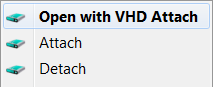 Brilliant:
This is small tool that adds Attach and Detach option to contextual (aka right-click) menu of Virtual disk (vhd) files. That enables those operations to be done without trip to Disk Management console. Detach option is available on hard drive contextual menu also (if selected in options).
Source:
–jeroen
Posted in Power User, Windows, Windows 10, Windows 7, Windows 8, Windows 8.1, Windows Server 2012, Windows Server 2012 R2 | Leave a Comment »
Posted by jpluimers on 2017/05/26
 Source:
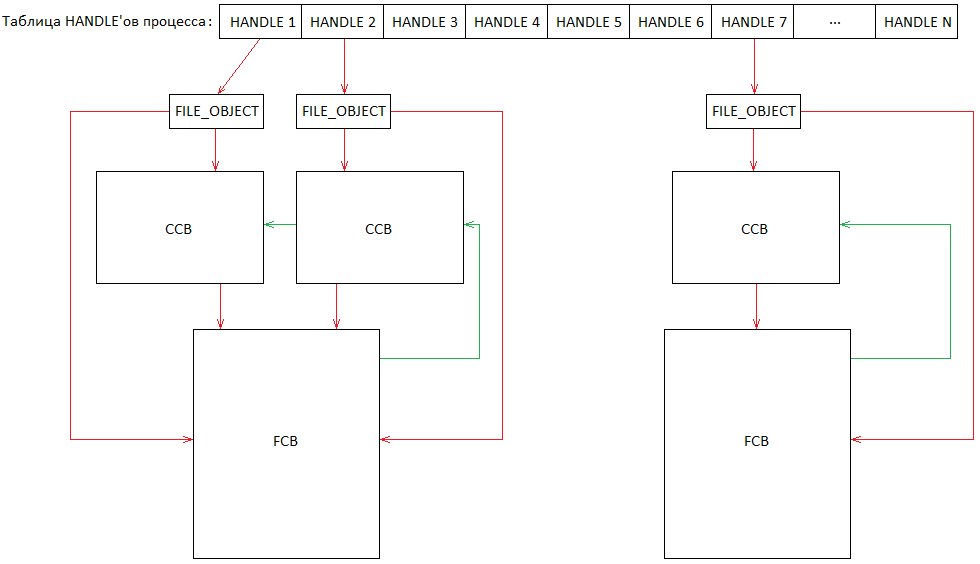
History repeating itself: [Archive.is] 31607 – C:\nul\nul crashes/BSOD then, now it’s this:
Via:
All versions prior to Windows 10 and Windows Server 2016 seem vulnerable.
So add $MFT to this list:
Oh BTW: history repeated itself this year too. With NUL
In short, Steven Sheldon created a rust package named nul which broke the complete package manager on Windows:
BTW: one of my gripes on learning new languages is that they come with a whole new idiom of their ecosystem: rust, cargo, crates, all sound like being a truck mechanic to me.
–jeroen
Read the rest of this entry »
Posted in Development, Microsoft Surface on Windows 7, NTFS, Power User, Security, Software Development, The Old New Thing, Windows, Windows 10, Windows 7, Windows 8, Windows 8.1, Windows 9, Windows 95, Windows 98, Windows Defender, Windows Development, Windows ME, Windows NT, Windows Server 2000, Windows Server 2003, Windows Server 2003 R2, Windows Server 2008, Windows Server 2008 R2, Windows Server 2012, Windows Server 2012 R2, Windows Server 2016, Windows Vista, Windows XP | Leave a Comment »
Posted by jpluimers on 2017/05/15
PatchCleaner just cleaned out 10-20 gigabyte per VM for most of my Windows 7-8.x VMs. After that, the updates still worked fine.
So it indeed does:
Safely remove all orphaned patch and installer files from your windows installer directory in one easy click
–jeroen
Download: https://sourceforge.net/projects/patchcleaner/
Posted in Power User, Windows, Windows 7, Windows 8, Windows 8.1, Windows 9 | Leave a Comment »
Posted by jpluimers on 2017/05/01
In addition to the two methods mentioned at Two Quick Methods for Finding Shared Folders in Windows (use net share or compmgmt.msc) I like this one:
fsmgmt.msc
It directly gets you to the “Shared Folders” inside compmgmt.msc
–jeroen
Posted in Power User, Windows, Windows 7, Windows 8, Windows 8.1, Windows Server 2000, Windows Server 2003, Windows Server 2003 R2, Windows Server 2008, Windows Server 2008 R2, Windows Server 2012, Windows Server 2012 R2, Windows Vista, Windows XP | Leave a Comment »
Posted by jpluimers on 2017/04/14
A while ago I had some intermittent network issues resulting in these Windows Update error numbers:
- 80244019 (some traffic made it through)
- 80072EE2 (no traffic made it through)
- 8??????? (DNS traffic didn’t make it through)
–jeroen
Posted in Power User, Windows, Windows 10, Windows 7, Windows 8, Windows 8.1 | Leave a Comment »
Posted by jpluimers on 2017/03/27
Nice html report of your battery state in Windows 8 and 10 where 14 is the number of days:
powercfg /batteryreport /output "%temp%\battery_report.html" /Duration 14

start "View Report" "%temp%\battery_report.html"
Source: Battery history on Windows 10 (and maybe older versions?) I was wondering if I…
–jeroen
Posted in Power User, Windows, Windows 10, Windows 8, Windows 8.1 | Leave a Comment »
Posted by jpluimers on 2017/01/30
Windows Search: Windows.edb
If you use Windows Search (I don’t: I use Everything by VoidTools), your Windows.edb can grow ridiculously large. It is a single file, though it appears to be in two places because there is a symbolic link from C:\Users\All Users to C:\ProgramData :
C:\ProgramData\Microsoft\Search\Data\Applications\Windows\Windows.edb

C:\Users\All Users\Microsoft\Search\Data\Applications\Windows\Windows.edb
This is how to reduce its size:
How to offline defrag the index
- Change the Windows Search service so that it does not automatically start. To do this, run the following command in cmd.exe:
sc config wsearch start= disabled
- Run the following command to stop the Windows Search service:
- Run the following command to perform offline compaction of the Windows.edb file:
esentutl.exe /d %AllUsersProfile%\Microsoft\Search\Data\Applications\Windows\Windows.edb
- Run the following command to change the Windows Search service to delayed start:
sc config wsearch start= delayed-auto
- Run the following command to start the service:
Notes:
- I did not perform the last 2 steps as I’ve kept Windows Search disabled.
- If you want to reduce the size of the
C:\ProgramData\Microsoft\Search\Data\Applications\Windows\Projects\SystemIndex\Indexer\CiFiles\ directory:
- Before step 1, choose what kind of Windows Search indexing options you want
- Between step 3 and 4, delete the directory
Windows Update: DataStore.edb
Windows Update uses the same database structure and is a single file:
C:\Windows\SoftwareDistribution\DataStore\DataStore.edb
This is how I reduced its size:
net stop wuauserv
net stop bits
esentutl.exe /d C:\Windows\SoftwareDistribution\DataStore\DataStore.edb
net start bits
net start wuauserv
Talking about Windows Update: you might also want to Clean Up the WinSxS Folder
–jeroen
Read the rest of this entry »
Posted in Everything by VoidTools, Power User, Windows, Windows 10, Windows 7, Windows 8, Windows 8.1, Windows 9, Windows Server 2008, Windows Server 2008 R2, Windows Server 2012, Windows Server 2012 R2, Windows Vista | Leave a Comment »


 The Wiert Corner - irregular stream of stuff