


The trick is to use the choice command; see [WayBack] if statement – How to ask for batch file user input with a timeout – Stack Overflow
–jeroen
Posted by jpluimers on 2019/05/14
The trick is to use the choice command; see [WayBack] if statement – How to ask for batch file user input with a timeout – Stack Overflow
–jeroen

Posted in Batch-Files, Development, Microsoft Surface on Windows 7, Power User, Scripting, Software Development, Windows, Windows 10, Windows 7, Windows 8, Windows 8.1, Windows 9, Windows Server 2000, Windows Server 2003, Windows Server 2003 R2, Windows Server 2008, Windows Server 2008 R2, Windows Server 2012, Windows Server 2012 R2, Windows Server 2016, Windows Vista, Windows XP | Leave a Comment »
Posted by jpluimers on 2018/06/25
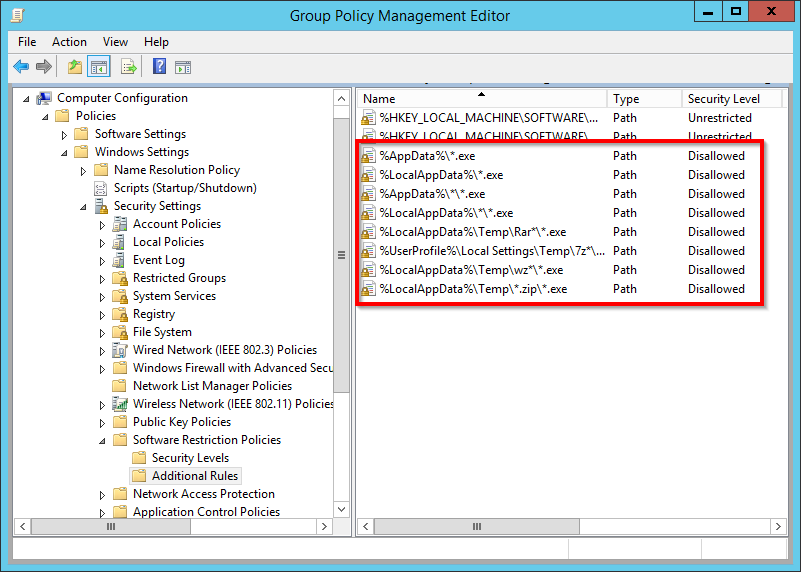
Interesting: [Ardhive.is] Use Software Restriction Policies to block viruses and malware | Branko Vucinec
via: [WayBack] Ransomware treft Tweede Kamer – Malware versleutelt overheidsbestanden – IT Pro – Nieuws – Tweakers
–jeroen

Posted in Microsoft Surface on Windows 7, Power User, Windows, Windows 10, Windows 7, Windows Server 2003, Windows Server 2003 R2, Windows Server 2008, Windows Server 2008 R2, Windows Server 2012, Windows Server 2012 R2, Windows Server 2016, Windows Vista, Windows XP | Leave a Comment »
Posted by jpluimers on 2018/02/02
Here’s how you can find out when your domain password will expire.
net user %USERNAME% /domain
It figures this out for the current logon domain (so it doesn’t work cross-domain) but it is a great help, especially when filtering out just the password information:
net user %USERNAME% /domain | findstr "Password"
This can be done in a more complex way with dsquery or adinfo that are tools to query
Posted in Power User, Windows, Windows 10, Windows 7, Windows 8, Windows 8.1, Windows 9, Windows Server 2000, Windows Server 2003, Windows Server 2003 R2, Windows Server 2008, Windows Server 2008 R2, Windows Server 2012, Windows Server 2012 R2, Windows Server 2016, Windows Vista, Windows XP | Leave a Comment »
Posted by jpluimers on 2017/09/25
For my link archive: Can I invoke Windows Update from the command line? – Super User [WayBack]
–jeroen
Posted in Power User, Windows, Windows 10, Windows 7, Windows 8, Windows 8.1, Windows 9, Windows Server 2003, Windows Server 2003 R2, Windows Server 2008, Windows Server 2008 R2, Windows Server 2012, Windows Server 2012 R2, Windows Server 2016, Windows Vista, Windows XP | Leave a Comment »
Posted by jpluimers on 2017/05/26
 Source:
History repeating itself: [Archive.is] 31607 – C:\nul\nul crashes/BSOD then, now it’s this:
Via:
All versions prior to Windows 10 and Windows Server 2016 seem vulnerable.
So add $MFT to this list:
The following device names have been known to render a system unstable: CON,
NUL, AUX, PRN, CLOCK$, COMx, LPT1, and CONFIG$.
In short, Steven Sheldon created a rust package named nul which broke the complete package manager on Windows:
nul is not a valid name in windows 10, so cargo fails to update the registry, and then aborts whatever it was doing (building, searching, ect.).I think this project should be re-published to crates.io under a new name, something like null-strings perhaps?https://github.com/rust-lang/crates.io-indexBTW: one of my gripes on learning new languages is that they come with a whole new idiom of their ecosystem: rust, cargo, crates, all sound like being a truck mechanic to me.
–jeroen

Posted in Development, Microsoft Surface on Windows 7, NTFS, Power User, Security, Software Development, The Old New Thing, Windows, Windows 10, Windows 7, Windows 8, Windows 8.1, Windows 9, Windows 95, Windows 98, Windows Defender, Windows Development, Windows ME, Windows NT, Windows Server 2000, Windows Server 2003, Windows Server 2003 R2, Windows Server 2008, Windows Server 2008 R2, Windows Server 2012, Windows Server 2012 R2, Windows Server 2016, Windows Vista, Windows XP | Leave a Comment »
Posted by jpluimers on 2017/05/19
[Archive.is] Working Windows XP & 7 demos. #FRENCHMAFIA: WannaCry — Decrypting files with WanaKiwi + Demos – Comae Technologies:
TL;DR;
DO NOT REBOOT your infected machines and TRY wanakiwi ASAP*!
*ASAP because prime numbers may be over written in memory after a while.
Via:[WayBack] A French researcher says he’s found a tool that could help some fraction of victims running that older Windows version. Just don’t reboot! WannaCry Ransomware Victims Might Have Some Hope–If They’re on Windows XP | WIRED
–jeroen
Posted in Power User, Windows, Windows 7, Windows Server 2003, Windows Server 2003 R2, Windows Server 2008, Windows Server 2008 R2, Windows Vista, Windows XP | Leave a Comment »
Posted by jpluimers on 2017/05/01
In addition to the two methods mentioned at Two Quick Methods for Finding Shared Folders in Windows (use net share or compmgmt.msc) I like this one:
It directly gets you to the “Shared Folders” inside compmgmt.msc
–jeroen
Posted in Power User, Windows, Windows 7, Windows 8, Windows 8.1, Windows Server 2000, Windows Server 2003, Windows Server 2003 R2, Windows Server 2008, Windows Server 2008 R2, Windows Server 2012, Windows Server 2012 R2, Windows Vista, Windows XP | Leave a Comment »
Posted by jpluimers on 2016/10/27
Slightly updated the answer the /D Y part will recursively accept taking ownership when directory listing is denied in the permissions:
To fix really broken permissions, the best is to run these two commands one after the other:
takeown /F /D Y "C:\path\to\folder" /R
icacls "C:\path\to\folder" /reset /T
The first one will give you ownership of all the files, however that might not be enough, for example if all the files have the read/write/exec permissions set to “deny”. You own the files but still cannot do anything with them.
In that case, run the second command, which will fix the broken permissions.
via: permissions – recursively change owner windows 7 – Super User
–jeroen
Posted in Batch-Files, Development, Power User, Scripting, Software Development, Windows, Windows 10, Windows 7, Windows 8, Windows 8.1, Windows 9, Windows Development, Windows Server 2000, Windows Server 2003, Windows Server 2003 R2, Windows Server 2008, Windows Server 2008 R2, Windows Server 2012, Windows Server 2012 R2, Windows Vista, Windows XP | Leave a Comment »
Posted by jpluimers on 2016/09/20
I wrote two tiny batch files that would dump the environment variables from the registry.
Various reasons:
show-user-environment-variables.bat:
reg query "HKCU\Environment"
show-system-environment-variables.bat:
reg query "HKLM\SYSTEM\CurrentControlSet\Control\Session Manager\Environment"
Filtered results:
Posted in Batch-Files, Development, Power User, Scripting, Software Development, Windows, Windows 7, Windows 8, Windows 8.1, Windows 9, Windows NT, Windows Server 2000, Windows Server 2003, Windows Server 2003 R2, Windows Server 2008, Windows Server 2008 R2, Windows Server 2012, Windows Server 2012 R2, Windows Vista, Windows XP | Leave a Comment »
Posted by jpluimers on 2016/08/29

Sometimes RDP limits you to 2048 pixels vertical (or 4096 pixels horizontal)
Just found out why on some Windows versions, the RDP sessions form my 4K monitor has some small black bands on top/bottom: older versions of Windows limit their RDP server to 4096 x 2048.
A 4K monitor will not hit the width limit (as 4K cheats: it is usually “just” 3840 pixels wide), but it does hit the height limitation (2160 is slightly more than 2048: you miss 112 pixels that show as two small black bands).
A 5K monitor is worse: it will hit both limits (5K does not cheat: at 5120 × 2880 it is exactly 5*1024 pixels wide) so you miss 124 pixels horizontally and a whopping 832 pixels vertically.
Don’t buy a 5K monitor yet if you do a lot of RDP work to older Windows versions.
The link below has a table listing various Windows versions, but it omits end-of-life versions so I’ve done some testing: Windows XP, Windows Vista, Windows Server 2003 and Windows Server 2003 R2 share the same limitations as Windows Server 2008 most likely because their latest service packs share the same RDP 6.1 version.
I updated this in the table:

Posted in 4K Monitor, 5K monitor, Displays, Hardware, Microsoft Surface on Windows 7, Power User, Windows, Windows 10, Windows 7, Windows 8, Windows 8.1, Windows 9, Windows Server 2003, Windows Server 2003 R2, Windows Server 2008, Windows Server 2008 R2, Windows Server 2012, Windows Server 2012 R2, Windows Vista, Windows XP | Leave a Comment »
 The Wiert Corner - irregular stream of stuff