The Wiert Corner – irregular stream of stuff

Jeroen W. Pluimers on .NET, C#, Delphi, databases, and personal interests

  • My badges

  • Twitter Updates

  • My Flickr Stream

  • Pages

  • All categories

  • Enter your email address to subscribe to this blog and receive notifications of new posts by email.

    Join 1,861 other subscribers

Archive for the ‘Windows XP’ Category

Microsoft Security Advisory: Microsoft Office File Validation for Office 2003, 2007 Office, and Office 2010: April 12, 2011

Posted by jpluimers on 2011/07/01

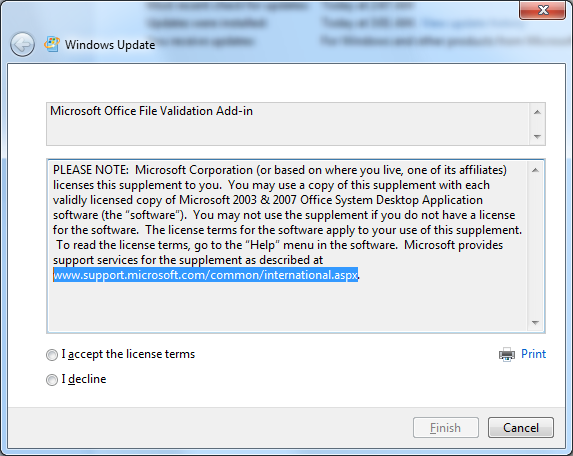
Unlike most updates marked as “Important Update”, this one requires a manual license agreement confirmation:

Microsoft Office File Validation Add-in

PLEASE NOTE:  Microsoft Corporation (or based on where you live, one of its affiliates) licenses this supplement to you.  You may use a copy of this supplement with each validly licensed copy of Microsoft 2003 & 2007 Office System Desktop Application software (the “software”).  You may not use the supplement if you do not have a license for the software.  The license terms for the software apply to your use of this supplement.  To read the license terms, go to the “Help” menu in the software.  Microsoft provides support services for the supplement as described at www.support.microsoft.com/common/international.aspx.

Though the security advisory was more than 2 months ago, it only got pushed to Microsoft update this week.

Good thing though that finally Microsoft is able to check the integrity of their document formats in Office 2007 and 2003: Microsoft Security Advisory: Microsoft Office File Validation for Office 2003, 2007 Office, and Office 2010: April 12, 2011.

–jeroen

Posted in Power User, Windows, Windows 7, Windows Vista, Windows XP | Leave a Comment »

Finding out which client process is using a Windows network share

Posted by jpluimers on 2011/06/16

Sometimes when you want to release a network drive you get an error message that something still uses it:
C:\>net use h: /d
The device is being accessed by an active process.

More help is available by typing NET HELPMSG 2404.

Finding out about that something is the trick.
Luckily, Process Explorer allows you to search for handles pointing to resources that start with \device\lanmanredirector, as ASK-LEO explains.

–jeroen

Posted in Power User, Windows, Windows 7, Windows Vista, Windows XP | Leave a Comment »

How to tell the Windows version and Service Pack number

Posted by jpluimers on 2011/05/27

Sometimes you want to know the Windows Version and Service Pack number.

A GUI version is very simple: run winver.exe, it will give you dialogs like these ad the Microsoft Knowledge Base article 310104 explains.

A console version can be done in several different ways:

–jeroen

via: [WayBackwindows command line: can I tell Service pack number? – Super User.

Posted in Power User, Windows, Windows 7, Windows Vista, Windows XP | 1 Comment »

FAT32 formatting a HDD volume bigger than 32 gigabyte

Posted by jpluimers on 2011/05/02

Most external USB HDDs you buy are way bigger than 32 gigabyte, and factory formatted with NTFS.

Nowadays, many devices (TVs, modems, routers, etc) support attaching HDDs, but not all of them support NTFS, but most of them support FAT32.

My brother has such a TV. He has mental retardation (they have euphemisms for that; he basically has an IQ < 50, which in his means he can live on his own but needs daily visits from people that help him with the more complex things in life).

I’m his legal guardian (Dutch: curator), so my wife and me take care of some of those things.

This included getting his TV to recognize a USB HDD so he can watch his favourite TV series I recorded for him (Knight Rider, Top Gear, etc).

Windows NT and beyond cannot format FAT32 in an easy way.

They can from the commandline using the format command: use FOMAT X: /FS:FAT32 for that, it is slow and as soon as you add the /Q parameter to speed things up, it imposes the 32 gigabyte limit.

Microsoft suggests botting Windows 98 or Windows Me, but those have too many limitations (lack of USB support, no 48-bit LBA, imposing 137 gigabyte HDD limit, etc).

Luckily, Ridgecrop Consultants Ltd has a FAT32FORMAT tool  and accompanying GUI wrapper. They format any HDD using FAT32. Their tools work at least in Windows XP and up (I haven’t tested Windows 2000 and NT 4).

Problem solved: my brother can happily watch his favourite TV series I recorded for him :)

–jeroen

Posted in About, Personal, Power User, Windows, Windows 7, Windows Vista, Windows XP | Leave a Comment »

ISO CD/DVD image mounting tools for Windows

Posted by jpluimers on 2011/03/11

A few tools for mounting ISO CD/DVD images:

–jeroen

Posted in Power User, Windows, Windows 7, Windows Vista, Windows XP | 2 Comments »

ClipName from the PC TimeWatch people – Freeware

Posted by jpluimers on 2011/02/18

Every once in a while I need to copy a bunch of filenames to the clipboard.
This is where the freeware tool [WayBackClipName comes in action: it can copy them in various formats (and works much better than the similar [WayBackClipPath, which can only copy them as CSV)

Quote from the ClipName page:

ClipName is also a Context Menu extension copying the full pathname of the right-clicked file to the clipboard. This new version supports copy of multiple filenames either as a space separated list or as a CRLF separated list. DOS filenames (8.3) can now also be copied as well as the URL encoded name and the UNC name for remote files. Clipname supports a Copy command for filenames without including any path, URL Encoding for multiple selections and style encoding for Microsoft Word, Microsoft OneNote,… A version running under Windows Vista 64-bit is now available. It also allows to copy the UNC name for local files and folders. Version 1.3 adds the capability of copying the target URL for Internet Shortcuts from Windows Explorer and from within the IE Favorites bar.

It comes both in 32-bit x86, and in x64 versions.

–jeroen

via


Posted in Clipboard, Power User, Windows, Windows 7, Windows Vista, Windows XP | 2 Comments »

Increasing your Windows XP NTFS disk size under VMware Workstation 7

Posted by jpluimers on 2011/02/11

Searching how to increase your Windows XP NTFS partitions of Virtual Machines running under VMware Workstation 7 gets you a truckload of links trying to get you to do all sorts of  command-line like vmware-vdiskmanager and such.
That was indeed the case up till VMware Workstation 6.5, but from version 7 on, it has become much easier.
But the links with difficult steps keep appearing at the top of the search queries.

Hence this blog entry: increasing the NTFS partition size in a Windows VM is easy!

The increase is a two step process:

  1. In VMware Workstation,  increase the size of the physical disk
  2. Increase the NTFS partion on that physical disk

Step 1 has become much easier since VMware Workstation version 7, you can do it from within VMware Workstation now.
Dinesh describes this small process very well in his Expand Disk in VMware Workstation 7 blog postRead the rest of this entry »

Posted in *nix, Power User, VMware, Windows, Windows 7, Windows Vista, Windows XP | 1 Comment »

How to disable Chrome PDF Viewer in Google Chrome and reenable the Acrobat Reader plugin

Posted by jpluimers on 2011/02/07

Google Chrome integrated a PDF viewer that is far less functional than Adobe Reader.

In fact: if you had Adobe Reader as PDF viewer, Google Chrome will just use their own.

One of the things I use a lot is the multi-page view (2 page next to each other; fits nicely on a 1920×1200 screen).

It is actually pretty easy to switch back: Read the rest of this entry »

Posted in Google, Power User, Windows, Windows 7, Windows Vista, Windows XP | Leave a Comment »

batch file scripts to get current date and current time in sortable ISO 8601 format

Posted by jpluimers on 2011/01/10

ISO 8601 is a great format for date and time (and combined) values.
It allows for both interchange of information, and ease of sorting values.

Recently, I had to create some backup and logging scripts for a 3rd party turn-key installation at a client.
You know: the kind of installation where the 3rd party manages to break their own scripts, but at the mean time close the system so much, that you cannot do anything but standard batch-file scripts.

The system runs partially on a Workstation that is based on a Dutch version of Windows XP, and a server that runs an English version of Windows Server 2008.
Recipe for some twiddling in order to keep the scripts working on both systems, and not to get bitten by localization.

This answer to a StackOverflow question got me a nice head-start: it was said to work in both the English and Portugese versions of Windows.
This post is the process to get correctly function batch-files towards the end of the post.

Of course, we Dutch are persistent enough to have yet different output for the %date% pseudo variable and the date and date /t commands.
The same holds for the %time% pseudo variable and the time and time /t commands.
Read the rest of this entry »

Posted in Batch-Files, Development, ISO 8601, Power User, Scripting, Software Development, Windows, Windows 7, Windows Vista, Windows XP | 4 Comments »

Windows XP: changing the HAL to support multiple cores (actually: two CPUs)

Posted by jpluimers on 2010/10/14

A while ago, I moved a single CPU Windows XP VM from VMware Workstation to ESXi 4.1 using the standalone VMware vCenter converter.
In ESXi, I increased the CPU count from 1 to 2, and wanting to to for 4 (since  I had been running Windows on a quadcore CPU before).

Well, that turned out to be harder than I thought… Read the rest of this entry »

Posted in ESXi4, Power User, Reference, Virtualization, VMware, VMware Converter, Windows, Windows 7, Windows Vista, Windows XP | 6 Comments »