The Wiert Corner – irregular stream of stuff

Jeroen W. Pluimers on .NET, C#, Delphi, databases, and personal interests

  • My badges

  • Twitter Updates

  • My Flickr Stream

  • Pages

  • All categories

  • Enter your email address to subscribe to this blog and receive notifications of new posts by email.

    Join 1,854 other subscribers

Archive for the ‘Python’ Category

Exploring Line Lengths in Python Packages

Posted by jpluimers on 2019/09/02

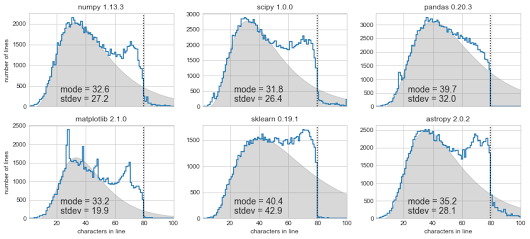
[Archive.is] Exploring Line Lengths in Python Packages is an interesting read.

It explores the relation between actual and “maximum” line lengths in Python in related to the prior 140 Twitter character limit.

via [Archive.is] Exploring Line Lengths in Python Packages – ThisIsWhyICode – Google+

–jeroen

Read the rest of this entry »

Posted in Development, Python, Scripting, Software Development, Static Code Analysis | Leave a Comment »

Passing multiple parameters to a Python method: the * tag

Posted by jpluimers on 2019/08/28

I had to pass parameters to a method so they became a list:

    threadManager.append(
        UrlMonitorThread(monitor, "http://%s" % targetHost),
        SmtpMonitorThread(monitor, targetHost, 25),
        SmtpMonitorThread(monitor, targetHost, 587),
        SshMonitorThread(monitor, targetHost, 22))

This appeared much easier than I anticipated:

    def append(self, *threads):
        for thread in threads:
            self.threads.append(thread)

It uses the * tag which is explained here:

–jeroen

Posted in Development, Python, Scripting, Software Development | Leave a Comment »

Python line continuation: only use backslash if it gives cleaner code

Posted by jpluimers on 2019/08/20

Since Python is a [WayBack] line-oriented programming language, sometimes you want to wrap longer lines into more readable shorter ones.

Many people struggle with this, see for instance these questions (and excellent answers!):

This struggle is likely why it made it to the [WayBack] style guide. Relevant sections are below.

I had this struggle wile passing multiple parameters to a method creating a very long line, but found I did not need a line continuation as the Python language understands this construct perfectly fine:

    threadManager.append(
        UrlMonitorThread(monitor, "http://%s" % targetHost),
        SmtpMonitorThread(monitor, targetHost, 25),
        SmtpMonitorThread(monitor, targetHost, 587),
        SshMonitorThread(monitor, targetHost, 22))

You could use the line continuation backslash to do this, but often that is not needed or a better way exists (for instance wrapping an expression in parentheses), so here are are the relevant style guide sections:

Code lay-out

Indentation

Use 4 spaces per indentation level.

Continuation lines should align wrapped elements either vertically using Python’s implicit line joining inside parentheses, brackets and braces, or using a hanging indent[7]. When using a hanging indent the following should be considered; there should be no arguments on the first line and further indentation should be used to clearly distinguish itself as a continuation line.

Maximum Line Length

Limit all lines to a maximum of 79 characters.

For flowing long blocks of text with fewer structural restrictions (docstrings or comments), the line length should be limited to 72 characters.

Limiting the required editor window width makes it possible to have several files open side-by-side, and works well when using code review tools that present the two versions in adjacent columns.

The preferred way of wrapping long lines is by using Python’s implied line continuation inside parentheses, brackets and braces. Long lines can be broken over multiple lines by wrapping expressions in parentheses. These should be used in preference to using a backslash for line continuation.

Backslashes may still be appropriate at times. For example, long, multiple with-statements cannot use implicit continuation, so backslashes are acceptable:

with open('/path/to/some/file/you/want/to/read') as file_1, \
     open('/path/to/some/file/being/written', 'w') as file_2:
    file_2.write(file_1.read())

Make sure to indent the continued line appropriately.

Should a line break before or after a binary operator?

For decades the recommended style was to break after binary operators. But this can hurt readability in two ways: the operators tend to get scattered across different columns on the screen, and each operator is moved away from its operand and onto the previous line. Here, the eye has to do extra work to tell which items are added and which are subtracted:


To solve this readability problem, mathematicians and their publishers follow the opposite convention. Donald Knuth explains the traditional rule in his Computers and Typesetting series: “Although formulas within a paragraph always break after binary operations and relations, displayed formulas always break before binary operations” [3].

Following the tradition from mathematics usually results in more readable code:

# Yes: easy to match operators with operands
income = (gross_wages
          + taxable_interest
          + (dividends - qualified_dividends)
          - ira_deduction
          - student_loan_interest)

In Python code, it is permissible to break before or after a binary operator, as long as the convention is consistent locally. For new code Knuth’s style is suggested.

–jeroen

Posted in Development, Python, Scripting, Software Development | Leave a Comment »

What is ‘if __name__ == “__main__”‘ for?

Posted by jpluimers on 2019/08/14

One of the things when I learned Python was that in some scripts I found a block starting with a statement like this:

if __name__ == '__main__':

It looked like an idiom to me, and indeed it is: [WayBack] What is ‘if name == “main“‘ for?.

It allows a file to be both used as “main” standalone program file and a module. That section of code will not be executed if it is loaded as a module.

Part of the idiom is also to put your code in a separate method so this block is as short as possible.

if __name__ == '__main__':
main()

Via: [WayBack] Why is Python running my module when I import it, and how do I stop it? (thanks user166390 and Jeremy Banks for the answers there)

–jeroen

Posted in Development, Python, Scripting, Software Development | Leave a Comment »

What’s New In Python 3.0

Posted by jpluimers on 2019/07/30

Old, but I keep bumping in old Python code that needs conversion to work in Python 3.x: [WayBackWhat’s New In Python 3.0 — Python 3.6.3 documentation.

Via: [WayBack] Version 3: History of Python – Wikipedia

–jeroen

Posted in Development, Python, Scripting, Software Development | Leave a Comment »

Convert cURL command syntax to Python requests, Node.js code

Posted by jpluimers on 2019/07/26

Utility for converting curl commands to code

For my link archive: [WayBack] Convert cURL command syntax to Python requests, Node.js code

–jeroen

Posted in *nix, *nix-tools, cURL, Development, JavaScript/ECMAScript, Node.js, Power User, Python, Scripting, Software Development | Leave a Comment »

AlessandroZ/LaZagne: Credentials recovery project

Posted by jpluimers on 2019/04/15

Just when I thought I made a note of a password I hardly ever use, I didn’t, luckily this open source tools understands how to recover many kinds of passwords: AlessandroZ/LaZagne: Credentials recovery project.

–jeroen

Posted in *nix, *nix-tools, Chrome, Development, DVCS - Distributed Version Control, Firefox, git, Internet Explorer, Office, Opera, Outlook, Power User, Python, Scripting, Skype, Software Development, Source Code Management, Web Browsers, WiFi, Windows | Leave a Comment »

Python Data Science Handbook | Python Data Science Handbook

Posted by jpluimers on 2019/03/21

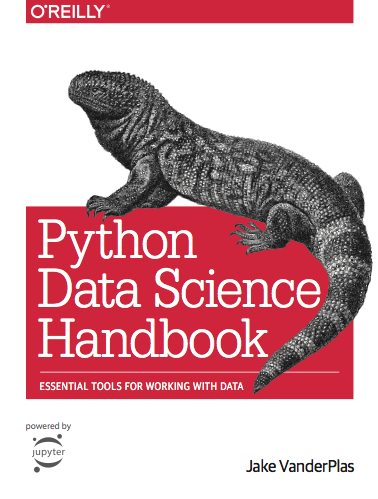
Cool stuff: [WayBackPython Data Science Handbook | Python Data Science Handbook.

Based on that I learned a lot of things on book publishing:

Via: [WayBack] You can read the Python Data Science Handbook by @jakevdp for free on his website  – ThisIsWhyICode – Google+

–jeroen

Posted in Development, Python, Scripting, Software Development | Leave a Comment »

GitHub – ArchiveTeam/googleplus-grab: Archiving Google+.

Posted by jpluimers on 2019/03/18

Soon this is a thing of the past, but for just a few more days, you can help: Archiving Google+.

Either run this project: [WayBack] GitHub – ArchiveTeam/googleplus-grab: Archiving Google+.

Or even better: run the appliance, and help the WayBack machine with any archiving projects setup by the virtual appliance: the [WayBack] ArchiveTeam Warrior – Archiveteam.

See some of their other pages for more background information:

You can donate both to the archive team, and the internet archive:

How is G+ archiving doing?

The tracker is well under way: [WayBack] Googleplus tracker Dashboard. History: archive.is 1; archive.is 2

Read the rest of this entry »

Posted in ArchiveTeamWarrior, Development, G+: GooglePlus, Google, Internet, InternetArchive, Power User, Python, Scripting, SocialMedia, Software Development, WayBack machine | Leave a Comment »

gdbgui – browser based debugger for C, C++, go, rust, Fortran. Modern gdb frontend.

Posted by jpluimers on 2019/03/05

[WayBack] gdbgui – browser based debugger for C, C++, go, rust, Fortran. Modern gdb frontend.: gdbgui (gnu debugger graphical user interface)

Via: [WayBack] Browser-based debugger for C, C++, go, rust, and more – written in Python with Flask. https://github.com/cs01/gdbgui Easy installation via PyPI: pip i… – Joe C. Hecht – Google+

–jeroen

Posted in C, C++, Debugging, Development, Fortran, GDB, Go (golang), Python, Scripting, Software Development | Leave a Comment »