The Wiert Corner – irregular stream of stuff

Jeroen W. Pluimers on .NET, C#, Delphi, databases, and personal interests

  • My badges

  • Twitter Updates

  • My Flickr Stream

  • Pages

  • All categories

  • Enter your email address to subscribe to this blog and receive notifications of new posts by email.

    Join 1,854 other subscribers

Archive for the ‘Python’ Category

How do I drop a bash shell from within Python? – Stack Overflow

Posted by jpluimers on 2022/03/09

I needed this for my blog post tomorrow:

import os
os.system('sh') # or bash, tcsh, zsh, whatever. :-P

[Wayback] How do I drop a bash shell from within Python? – Stack Overflow

Thanks [Wayback] Chris Jester-Young!

This trick works at the Python shell.

–jeroen

Posted in Development, Python, Scripting, Software Development | Leave a Comment »

Egardia/Woonveilig: some notes about logging on a local gateway to see more detailed information on the security system

Posted by jpluimers on 2022/02/23

A follow-up on Source: Some links with notes on WoonVeilig/Egardia security system communications, protocols and support by 3rd party home automation apps:

Notes on the Woonveilig/Egardia GATE-03 model alarm hub (where 192.168.x.y is the IPv4 address that hub):

  1. It still uses the plain-text insecure http to communicate, so it is wise to try and put it in a separate LAN apart from other systems.
  2. Logon is done using HTTP Basic access authentication.
  3. Woonveilig/Egardia by now prefers the XMPP prototol over the CID protocol (the CID protocol is still used by jeroenterheerdt/python-egardia.
    • You can find the configuration at http://192.168.x.y/setting/xmpp.htm.
    • XMPP protocol uses
      • xmpp01.egardia.com as primary and xmpp01.alt.egardia.com as secondary server on port 443.
      • arg-####-auth  where ###### are the last 6 *lowercase* hexadecimal digits of the MAC address of the GATE-03.
      • a long password you can find in the plain-text of the http://192.168.x.y/action/xmppGet http GET request fired by http://192.168.x.y/setting/xmpp.htm.
  4. CID protocol address is ip://######@ics.alt.egardia.com:52010/CID where ###### are the last 6 *uppercase* hexadecimal digits of the MAC address of the GATE-03.
  5. User PIN-codes are not visible at the Woonveilig/Egardia alarm site, but they are at http://192.168.x.y/setting/userCode.htm together with their user names.
  6. Special PIN codes for Installer/Duress/Guard/Master/Temporary are at http://192.168.x.y/setting/codeSetting.htm and obtained via http://192.168.x.y/action/areaListGet and http://192.168.x.y/action/codeSettingGet
  7. On the CID protocol:

I got all of the above via: [Wayback/Archive.is] GATE-03 system does not report to Egardiaserver · Issue #26 · jeroenterheerdt/python-egardia (which by coincidence used the same firmware I had: HSGW 0.0.2.18.1 HPGW-L2-XA35H).

Which brings me to some Google search with some remarkable results:

So I did a quick look at LUPUS XT* based products:

Then at the Woonveilig/Egardia and Climax shops:

Conclusions:

  • Egardia/Woonveilig sensors look remarkably similar to the LUPUS ones
  • LUPUS is a re-brand of Climax with slightly different firmware

Side note on open ports

  • Open ports on the [Wayback] GATE-03 alarm device:
    PORT    STATE    SERVICE      VERSION
    9/tcp   filtered discard
    25/tcp  filtered smtp
    80/tcp  open     http
    445/tcp filtered microsoft-ds
  • Open ports on the [Wayback] CAM-06 outdoor camera:
    PORT      STATE    SERVICE      VERSION
    9/tcp     filtered discard
    21/tcp    open     ftp          oftpd
    25/tcp    filtered smtp
    80/tcp    open     tcpwrapped
    445/tcp   filtered microsoft-ds
    554/tcp   open     rtsp
    711/tcp   open     cisco-tdp?
    1935/tcp  open     rtmp?
    6000/tcp  open     X11?
    49152/tcp open     upnp         Portable SDK for UPnP devices 1.6.17 (Linux 3.4.35; UPnP 1.0)
    

jeroen


Posted in Communications Development, Development, Python, Scripting, Software Development | Leave a Comment »

console convert pcap to wav: not easily possible; use the WireShark GUI to do

Posted by jpluimers on 2021/12/01

Wanting a simple way on the console to convert a .pcap file to a .wav file, I searched for [Wayback] console convert pcap to wav – Google Search.

The reason is that [Wayback] fritzcap (written in Python) sometimes crashes while doing the conversion of a phone recording, so then only the .pcap file is available. I still want to figure this out, but given my health situation, I might not be able to in time.

Read the rest of this entry »

Posted in *nix, *nix-tools, Audio, Development, ffmpeg, Fritz!, Fritz!Box, fritzcap, Hardware, Media, Network-and-equipment, Power User, Python, Scripting, Software Development, Wireshark | Leave a Comment »

Random User Generator | Home

Posted by jpluimers on 2021/11/23

Cool tool for when you ever need random users to test a system [Wayback] Random User Generator | Home:

Random user generator is a FREE API for generating placeholder user information. Get profile photos, names, and more. It’s like Lorem Ipsum, for people.

This was used when extracting Parler data to substantiate evidence around the 20210106 USA Capitol riots.

You can even use a simple HTTP GET like [Wayback] randomuser.me/api and get a JSON result like this.

{"results":[{"gender":"female","name":{"title":"Miss","first":"Malou","last":"Mortensen"},"location":{"street":{"number":2669,"name":"Lyngbyvej"},"city":"Sundby","state":"Syddanmark","country":"Denmark","postcode":48047,"coordinates":{"latitude":"-35.1307","longitude":"113.7480"},"timezone":{"offset":"+1:00","description":"Brussels, Copenhagen, Madrid, Paris"}},"email":"malou.mortensen@example.com","login":{"uuid":"981747de-66fe-40b0-87ea-adfe403fe1be","username":"purpleostrich871","password":"sweets","salt":"x86aQbIB","md5":"55497ac53530b428f98b9d36267ceeef","sha1":"358b94ffabe7d827c34da15791e5d6717c594428","sha256":"6e357e887877e29b7e6d53073f648174382c53c24f83479e25fed9c82075ed32"},"dob":{"date":"1995-06-05T04:50:35.145Z","age":26},"registered":{"date":"2018-07-21T00:59:50.523Z","age":3},"phone":"02990797","cell":"94800012","id":{"name":"CPR","value":"050695-9954"},"picture":{"large":"https://randomuser.me/api/portraits/women/27.jpg","medium":"https://randomuser.me/api/portraits/med/women/27.jpg","thumbnail":"https://randomuser.me/api/portraits/thumb/women/27.jpg"},"nat":"DK"}],"info":{"seed":"8971869bb62b73d7","results":1,"page":1,"version":"1.3"}}

Via:

–jeroen

Read the rest of this entry »

Posted in Communications Development, Development, HTTP, Internet protocol suite, JavaScript/ECMAScript, JSON, Python, REST, Scripting, Software Development, TCP | Leave a Comment »

On my list of things to try: Python with ESXi

Posted by jpluimers on 2021/10/28

After doing a lot of – historically grown – dash scripting for ESXi, I found out there is Python available on ESXi:

  • Python 3.5.10 on VMware ESXi 6.7.0 build-17700523 (VMware ESXi 6.7.0 Update 3)
  • Python 3.5.6 on VMware ESXi 6.5.0 build-13932383 (VMware ESXi 6.5.0 Update 3)
  • VMware 7: to be determined.

Yes I know that Python 3.5 is end-of-life (and 3.5.10 was the latest version), but it is a lot better than shell scripts.

So now some links for my list of things to try in order to use Python for scripting ESXi operations:

–jeroen

Posted in *nix, *nix-tools, ash/dash, ash/dash development, Development, Power User, Python, Scripting, Software Development | Leave a Comment »

Twitter thread by thread by @0xdade; More unicode shit: zero width space and a zero width nonjoiner in filenames

Posted by jpluimers on 2021/09/22

[WayBack] Thread by @0xdade: Today I learned that you can put zero width spaces in file names on Linux. Have fun. I’m playing with this because punycode/IDN is fascinati…

Today I learned that you can put zero width spaces in file names on Linux. Have fun.

I’m playing with this because punycode/IDN is fascinating, and I wanted to know what happened when I started shoving unicode in the path portion of the url, which isn’t part of how browsers try to protect URLs, as far as I can tell

wiki.mozilla.org/IDN_Display_Al…

I think it’s more entertaining to have a file that is named *only* a zero width space, but I think using them throughout a filename is better to break tab completion and not stand out too much. A filename that is just blank looks strange in ls output.
Thank goodness adduser is looking out for our best interests.
Oooh this one is pretty subtle.
Just about pissed myself with this one.

Not related to the terminal fun, but related to zero width characters:

You can:
– Break url previews https://0xda​​​​​​.​de
– @​0xdade without tagging
– Make a word like system​d not searchable twitter.com/search?q=from%…

Okay but back to command line crap. I really like this one. Create a directory named .[ZWS]

One thing that is cool about using zero width spaces is that “ls” has a flag, “-b”, that is meant to escape non-graphic characters. Inserting a newline, for instance, would be escaped to \n. But the zero width space is technically a graphic character, so nothing happens.

Fun.

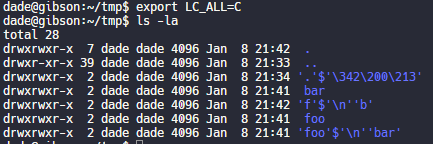
Have no fear, though. It’s not unbeatable. It’s only fun if the language and LC settings are set to support utf-8. If you set LC_ALL=C or whatever that isn’t utf-8, then it looks like this.

Putting a link to this tweet here so that I don’t lose it again in the future.

dade@0xdade

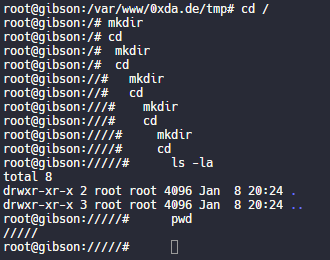
My god, it is beautiful. I mean except all the whitespace I can’t get rid of before the command lmao.

View image on Twitter
But on the other hand if you just have a search for the zws, then whatever you find is probably worth investigating. 
I guess I’ll start the hashtag before @QW5kcmV3 does for #irresponsibleutf8 🤭😏😂 

And these tweets:

[WayBack] Thread by @Plazmaz: @0xdade Was doing some real fucking around with urls recently: gist.github.com/Plazmaz/565a5c… (was gonna flesh it out more but didn’t find…:

mentions Was doing some real fucking around with urls recently:
mentions This one is my fave:
‘⁄’ (\u2044)
or
‘∕’ (\u2215)
Allow for this:
google.com⁄search⁄query⁄.example.com
google.com⁄search⁄query⁄@example.com 

[WayBack] url-screwiness.md · GitHub:

This is a list of methods for messing with urls. These are often useful for bypassing filters, SSRF, or creating convincing links that are difficult to differentiate from legitimate urls.

And a bit of documentation links:

–jeroen


Posted in *nix, .NET, C#, Development, NTFS, Power User, Python, Scripting, Software Development, Windows | Leave a Comment »

Overview of Client Libraries · Internet Archive

Posted by jpluimers on 2021/09/14

Besides manual upload at [Archive.is] Upload to Internet Archive, there are also automated ways of uploading content.

One day I need this to archive pages or sites into the WayBack machine: [WayBack] Overview of Client Libraries · Internet Archive (most of which is Python based):

Read the rest of this entry »

Posted in Bookmarklet, Development, Internet, InternetArchive, Power User, Python, Scripting, Software Development, WayBack machine, Web Browsers | Leave a Comment »

Coming Back to Old Problems: How I Finally Wrote a Sudoku Solving Algorithm – DEV Community 👩‍💻👨‍💻

Posted by jpluimers on 2021/09/02

It is always fun to see how Sudoku solving algorithms are created and implemented. This is no exception: [WayBack] Coming Back to Old Problems: How I Finally Wrote a Sudoku Solving Algorithm – DEV Community 👩‍💻👨‍💻

(backtracking image from Wikimedia commons)

For a visual Sudoku solver, I usually take [WayBack] Sudoku Solver by Andrew Stuart. Shows the logic behind solving Sudoku square by square which is part of [WayBack] SudokuWiki.org – Getting Started having many visual explanations on how to solve these puzzles, for instance:

It’s a kind of sudo ku, but visually and never failed me solve one.

–jeroen

Posted in Algorithms, Development, Python, Scripting, Software Development | Leave a Comment »

Fixing hg.exe “ImportError: DLL load failed: %1 is not a valid Win32 application.”

Posted by jpluimers on 2021/07/21

If you get the below error when running hg.exe, then you are mixing a 64-bit Mercurial with 32-bit dependencies:

C:\>hg --version
Traceback (most recent call last):
  File "hg", line 43, in 
  File "hgdemandimport\demandimportpy2.pyc", line 150, in __getattr__
  File "hgdemandimport\demandimportpy2.pyc", line 94, in _load
  File "hgdemandimport\demandimportpy2.pyc", line 43, in _hgextimport
  File "mercurial\dispatch.pyc", line 22, in 
  File "hgdemandimport\demandimportpy2.pyc", line 248, in _demandimport
  File "hgdemandimport\demandimportpy2.pyc", line 43, in _hgextimport
  File "mercurial\i18n.pyc", line 28, in 
  File "hgdemandimport\demandimportpy2.pyc", line 150, in __getattr__
  File "hgdemandimport\demandimportpy2.pyc", line 94, in _load
  File "hgdemandimport\demandimportpy2.pyc", line 43, in _hgextimport
  File "mercurial\encoding.pyc", line 24, in 
  File "mercurial\policy.pyc", line 101, in importmod
  File "mercurial\policy.pyc", line 63, in _importfrom
  File "hgdemandimport\demandimportpy2.pyc", line 164, in __doc__
  File "hgdemandimport\demandimportpy2.pyc", line 94, in _load
  File "hgdemandimport\demandimportpy2.pyc", line 43, in _hgextimport
  File "mercurial\cext\parsers.pyc", line 12, in 
  File "mercurial\cext\parsers.pyc", line 10, in __load
ImportError: DLL load failed: %1 is geen geldige Win32-toepassing.

The equivalent English error is [WayBack] ImportError: DLL load failed: %1 is not a valid Win32 application.” – Google Search.

The problem is the bitness of hg.exe: [WayBack] python – Error while installing Mercurial on IIS7 64bit: “DLL Load Failed: %1 is not a valid Win32 application” – Stack Overflow

You can quickly figure out the bitness of hg.exe:

C:\>where hg
C:\Program Files\Mercurial\hg.exe

C:\>sigcheck "C:\Program Files\Mercurial\hg.exe"

Sigcheck v2.72 - File version and signature viewer
Copyright (C) 2004-2019 Mark Russinovich
Sysinternals - www.sysinternals.com

c:\program files\mercurial\hg.exe:
        Verified:       Unsigned
        Link date:      17:49 9-7-2019
        Publisher:      n/a
        Company:        n/a
        Description:    Fast scalable distributed SCM (revision control, version control) system
        Product:        mercurial
        Prod version:   5.0.2
        File version:   5.0.2
        MachineType:    64-bit

Forcing x86 of Mercurial

Since I use chocolatey for most my installs, I forced x86 the Chocolatey way:

So after these:

choco uninstall --yes hg
choco install --yes --force86 hg

I got this signature check:

C:\>sigcheck "C:\Program Files (x86)\Mercurial\hg.exe"

Sigcheck v2.72 - File version and signature viewer
Copyright (C) 2004-2019 Mark Russinovich
Sysinternals - www.sysinternals.com

c:\program files (x86)\mercurial\hg.exe:
        Verified:       Unsigned
        Link date:      17:50 9-7-2019
        Publisher:      n/a
        Company:        n/a
        Description:    Fast scalable distributed SCM (revision control, version control) system
        Product:        mercurial
        Prod version:   5.0.2
        File version:   5.0.2
        MachineType:    32-bit

–jeroen

Posted in Development, DVCS - Distributed Version Control, Encoding, Mercurial/Hg, Python, Scripting, Software Development, Source Code Management | Leave a Comment »

GitHub – jjjake/internetarchive: A Python and Command-Line Interface to Archive.org

Posted by jpluimers on 2021/06/16

On my list of things to play with: [WayBack] GitHub – jjjake/internetarchive: A Python and Command-Line Interface to Archive.org.

Via:

Related:

  • [WayBack] The Internet Archive Python Library — Internet Archive item APIs 1.8.5 documentation
  • [WayBack] Command-Line Interface — Internet Archive item APIs 1.8.5 documentation
  • [WayBack] Quickstart — Internet Archive item APIs 1.8.5 documentation, including:

    Configuring

    Certain functionality of the internetarchive Python library requires your archive.org credentials. Your IA-S3 keys are required for uploading, searching, and modifying metadata, and your archive.org logged-in cookies are required for downloading access-restricted content and viewing your task history. To automatically create a config file with your archive.org credentials, you can use the ia command-line tool:

    $ ia configure
    Enter your archive.org credentials below to configure 'ia'.
    
    Email address: user@example.com
    Password:
    
    Config saved to: /home/user/.config/ia.ini
    

    Your config file will be saved to $HOME/.config/ia.ini, or $HOME/.ia if you do not have a .configdirectory in $HOME. Alternatively, you can specify your own path to save the config to via ia --config-file '~/.ia-custom-config' configure.

    If you have a netc file with your archive.org credentials in it, you can simply run ia configure --netrc. Note that Python’s netrc library does not currently support passphrases, or passwords with spaces in them, and therefore not currently suported here.

–jeroen

Read the rest of this entry »

Posted in Development, Internet, InternetArchive, Power User, Python, Scripting, Software Development, WayBack machine | Leave a Comment »