The Wiert Corner – irregular stream of stuff

Jeroen W. Pluimers on .NET, C#, Delphi, databases, and personal interests

  • My badges

  • Twitter Updates

  • My Flickr Stream

  • Pages

  • All categories

  • Enter your email address to subscribe to this blog and receive notifications of new posts by email.

    Join 1,854 other subscribers

Some uptime monitoring tools that are still free and understand more than http/https

Posted by jpluimers on 2022/01/19

Since uptimerobot has slowly moving free features, part of my family uses it to monitor uptime of their personal stuff, and I don’t want to pay for the free monitoring I do on Embarcadero infrastructure (I know that they have been phasing out older useful sites for ages, but even their main sites were down for 2 days about a year ago).

Yes, I know the competitiveness of [Wayback] Website monitoring – Wikipedia, and I’m glad Uptimerobot has been there for a relatively long time, but alas: for personal use…

The list of of the pricing pages of each site, containing a one line summary blurb if it was available:

Via [Wayback] 16 Best Online Services to Monitor Sites Uptime

–jeroen

Posted in *nix, Delphi, Development, Monitoring, Power User, Software Development | Leave a Comment »

ESXi: getting and setting the host name, domain and fqdn

Posted by jpluimers on 2022/01/19

A few links and notes:

  1. [Wayback] Changing the hostname of an ESX or ESXi host (1010821)

    Run these commands to change the hostname in ESXi 5.x, ESXi 6.x,ESXi 7.x, using the command line:

    • esxcli system hostname set –host=hostname
    • esxcli system hostname set –fqdn=fqdn
  2. [Wayback] ESX Host appears as localhost.localdomain in VMware Infrastructure/vSphere client (2009720)

    Cause

    The name resolution parameters were not properly configured during the installation of the ESX host.
  3. [Wayback] Domain repoint for embedded vCenter Server fails with error: “domain_consolidator Failed to set machine id” (71020)

    This issue is caused by a mismatch between the FQDN that was configured as the PNID during the vCenter Server deployment and the hostname that is currently configured.

I had a mismatch happen because of the second entry: a host configured in a different domain than it was deployed to.

Here are the commands to list and change the hosts name, domain and fqdn:

Read the rest of this entry »

Posted in *nix, *nix-tools, ash/dash, ash/dash development, Development, ESXi6, ESXi6.5, ESXi6.7, ESXi7, Power User, Scripting, Software Development, Virtualization, VMware, VMware ESXi | Leave a Comment »

gmail SMTP errors to help clean up your bounces list

Posted by jpluimers on 2022/01/19

From some of the logs:

   ----- Transcript of session follows -----
... while talking to alt1.gmail-smtp-in.l.google.com.:
>>> DATA
<<< 421-4.7.0 [###.###.###.###      15] Our system has detected that this message is
<<< 421-4.7.0 suspicious due to the very low reputation of the sending domain. To
<<< 421-4.7.0 best protect our users from spam, the message has been blocked.
<<< 421-4.7.0 Please visit
<<>> DATA
<<< 550-5.7.1 [###.###.###.###      12] Our system has detected that this message is
<<< 550-5.7.1 likely unsolicited mail. To reduce the amount of spam sent to Gmail,
<<< 550-5.7.1 this message has been blocked. Please visit
<<< 550-5.7.1  https://support.google.com/mail/?p=UnsolicitedMessageError
<<< 550 5.7.1  for more information. c184si14930209pfa.345 - gsmtp
554 5.0.0 Service unavailable

The ###.###.###.### are the outgoing WAN IP addresses of our SMTP server.

Basically filtering on .* Our system has detected that this message is helps clearing up a lot of bounce messages until I’ve found better black-lists.

Related:

  • [Wayback] “421-4.7.0” “Our system has detected that this message is” – Google Search
  • [Wayback] “550-5.7.1” “Our system has detected that this message is” – Google Search
    • [Wayback] How to Remove Your IP from the Gmail Blacklist – rackAID

      1. Why is Gmail Blocking My Emails?
      2. Authenticate Your Email
      3. Follow Gmail’s Best Practices
      4. Submit Gmail Blacklist Removal Form
      5. Waiting on the Gmail Blacklist Removal
      6. Get Removed from Gmail’s Blacklist

      421, “4.4.5”, Server busy, try again later.
      421, “4.7.0”, IP not in whitelist for RCPT domain, closing connection.
      421, “4.7.0”, Our system has detected an unusual rate of unsolicited mail originating from your IP address. To protect our users from spam, mail sent from your IP address has been temporarily blocked. Review our Bulk Senders Guidelines.
      421, “4.7.0”, Temporary System Problem. Try again later.
      421, “4.7.0”, TLS required for RCPT domain, closing connection.
      421, “4.7.0”, Try again later, closing connection. This usually indicates a Denial of Service (DoS) for the SMTP relay at the HELO stage.
      450, “4.2.1” The user you are trying to contact is receiving mail too quickly. Please resend your message at a later time. If the user is able to receive mail at that time, your message will be delivered. For more information, review this article.
      450, “4.2.1”, The user you are trying to contact is receiving mail at a rate that prevents additional messages from being delivered. Please resend your message at a later time. If the user is able to receive mail at that time, your message will be delivered. For more information, review this article.
      450, “4.2.1”, Peak SMTP relay limit exceeded for customer. This is a temporary error. For more information on SMTP relay limits, please contact your administrator or review this article.
      451, “4.3.0”, Mail server temporarily rejected message.
      451, “4.3.0”, Multiple destination domains per transaction is unsupported. Please try again.
      451, “4.4.2”, Timeout – closing connection.
      451, “4.5.0”, SMTP protocol violation, see RFC 2821.
      452, “4.2.2”, The email account that you tried to reach is over quota. Please direct the recipient to this article.
      452, “4.5.3”, Domain policy size per transaction exceeded, please try this recipient in a separate transaction.
      452, “4.5.3”, Your message has too many recipients. For more information regarding Google’s sending limits, review this article.
      454, “4.5.0”, SMTP protocol violation, no commands allowed to pipeline after STARTTLS, see RFC 3207.
      454, “4.7.0”, Cannot authenticate due to temporary system problem. Try again later.
      454, “5.5.1”, STARTTLS may not be repeated.
      501, “5.5.2”, Cannot Decode response.
      501, “5.5.4”, HELO/EHLO argument is invalid, please review this article.
      502, “5.5.1”, Too many unrecognized commands, goodbye.
      502, “5.5.1”, Unimplemented command.
      502, “5.5.1”, Unrecognized command.
      503, “5.5.1”, “EHLO/HELO first.
      503, “5.5.1”, MAIL first.
      503, “5.5.1”, RCPT first.
      503, “5.7.0”, No identity changes permitted.
      504, “5.7.4”, Unrecognized Authentication Type.
      530, “5.5.1”, Authentication Required. Learn more here.
      530, “5.7.0”, Must issue a STARTTLS command first.
      535, “5.5.4”, Optional Argument not permitted for that AUTH mode.
      535, “5.7.1”, Application-specific password required. Learn more here.
      535, “5.7.1”, Please log in with your web browser and then try again. Learn more here.
      535, “5.7.1”, Username and Password not accepted. Learn more here.
      550, “5.1.1”, The email account that you tried to reach does not exist. Please try double-checking the recipient’s email address for typos or unnecessary spaces. For more information, review this article.
      550, “5.2.1”, The email account that you tried to reach is disabled.
      550, “5.2.1”, The user you are trying to contact is receiving mail at a rate that prevents additional messages from being delivered. For more information, review this article.
      550, “5.4.5”, Daily sending quota exceeded. Learn more here.
      550, “5.4.5”, Daily SMTP relay limit exceeded for user. For more information on SMTP relay sending limits please contact your administrator or review this article.
      550, “5.7.0”, Mail relay denied.
      550, “5.7.0”, Mail Sending denied. This error occurs if the sender account is disabled or not registered within your G Suite domain.
      550, “5.7.1”, Email quota exceeded.
      550, “5.7.1”, Invalid credentials for relay.
      550, “5.7.1”, Our system has detected an unusual rate of unsolicited mail originating from your IP address. To protect our users from spam, mail sent from your IP address has been blocked. Review our Bulk Senders Guidelines.
      550, “5.7.1”, Our system has detected that this message is likely unsolicited mail. To reduce the amount of spam sent to Gmail, this message has been blocked. For more information, review this article.
      550, “5.7.1”, The IP you’re using to send mail is not authorized to send email directly to our servers. Please use the SMTP relay at your service provider instead. For more information, review this article.
      550, “5.7.1”, The user or domain that you are sending to (or from) has a policy that prohibited the mail that you sent. Please contact your domain administrator for further details. For more information, review this article.
      550, “5.7.1”, Unauthenticated email is not accepted from this domain.
      550, “5.7.1”, Daily SMTP relay limit exceeded for customer. For more information on SMTP relay sending limits please contact your administrator or review this article.
      552, “5.2.2”, The email account that you tried to reach is over quota.
      552, “5.2.3”, Your message exceeded Google’s message size limits. Please review our size guidelines.
      553, “5.1.2”, We weren’t able to find the recipient domain. Please check for any spelling errors, and make sure you didn’t enter any spaces, periods, or other punctuation after the recipient’s email address.
      554, “5.6.0”, Mail message is malformed. Not accepted.
      554, “5.6.0”, Message exceeded 50 hops, this may indicate a mail loop.
      554, “5.7.0”, Too Many Unauthenticated commands.
      555, “5.5.2”, Syntax error.

–jeroen

Posted in Uncategorized | Leave a Comment »

Get Formatted Value of Cell in Excel – Stack Overflow

Posted by jpluimers on 2022/01/18

It’s odd, but facing a potentially lot shorter life expectancy, I need to prepare to become more expendable in personal life.

This means that I need to document or/and automate a lot of duties.

In this case, it is administrative work as custodian for my brother that is based on scripts, Excel sheets and manual steps.

In order to lessen these steps, I wanted to get the formatted value of certain Excel WorkSheet cells so I could concatenate them in other places.

It appears that neither the CONCATENATE function (nor the more recently introduced CONCAT function) nor  & concatenation operator just take the unformatted value of the cell and put that in as text.

Note that the TEXTJOIN function is basically a CONCATENATE function with an extra delimiter parameter, so it does not format text.

One format I needed was YYYY-MM-DD, basically the ISO-8601 date format.

The Excel format string for this is yyyy-mm-dd;@, and the corresponding formula to apply it on cell L5 is =TEXT(J5, "yyyy-mm-dd;@")

Based on [Wayback] Get Formatted Value of Cell in Excel – Stack Overflow:

Use the TEXT() function:
TEXT(value, format_text)
So if the value is 23.5 and you pass =TEXT(A1, "$0.00") it will return $23.50
Source: http://office.microsoft.com/en-us/excel-help/text-function-HP010062580.aspx

At a later stage, I will look into the actual format strings.

References:

–jeroen

Posted in Development, Excel, Office, Power User, Software Development | Leave a Comment »

Need to revisit osquery: SQL powered operating system instrumentation, monitoring, and analytics supports more platforms and also aggregates to central log locations

Posted by jpluimers on 2022/01/18

Almost two years ago, GitHub – facebook/osquery: SQL powered operating system instrumentation, monitoring, and analytics published from the automatic blog queue.

It was in the midst of my rectum cancer treatment, so I was glad the blog queue back then was still about 18 months deep.

This meant I looked into osquery in 2018, which I remember because I needed it on MacOS as I did not want to remember the syntax for MacOS specific commands on getting system information. It also coincides with how much my repository fork was behind: [Wayback: jpluimers/osquery commits/Archive: jpluimers/osquery commits].

Fast forward to now, the breath of systems I’m involved with has widened, so I was glad to see that Kristian Köhntopp mentioned it:

So time to try it again (:

The links he mentioned:

  • [Wayback/Archive] Welcome to osquery – osquery

    osquery is an operating system instrumentation framework for Windows, OS X (macOS), Linux, and FreeBSD. The tools make low-level operating system analytics and monitoring both performant and intuitive.

  • [Wayback/Archive] Welcome to osquery – osquery: High Level Features
    The high-performance and low-footprint distributed host monitoring daemon, osqueryd, allows you to schedule queries to be executed across your entire infrastructure. The daemon takes care of aggregating the query results over time and generates logs which indicate state changes in your infrastructure. You can use this to maintain insight into the security, performance, configuration, and state of your entire infrastructure. osqueryd‘s logging can integrate into your internal log aggregation pipeline, regardless of your technology stack, via a robust plugin architecture.
    The interactive query console, osqueryi, gives you a SQL interface to try out new queries and explore your operating system. With the power of a complete SQL language and dozens of useful tables built-in, osqueryi is an invaluable tool when performing incident response, diagnosing a systems operations problem, troubleshooting a performance issue, etc.
  • [Wayback/Archive] osqueryd (daemon) – osquery
  • [Wayback/Archive] osqueryi (shell) – osquery
  • [Wayback/Archive] Aggregating Logs – osquery
  • [Wayback/Archive] AWS Logging – osquery

Main site: [Wayback/Archive] osquery | Easily ask questions about your Linux, Windows, and macOS infrastructure

Repository: [Wayback/Archive] osquery/osquery: SQL powered operating system instrumentation, monitoring, and analytics.

–jeroen

Posted in *nix, *nix-tools, Apple, Development, DevOps, Facebook, Infrastructure, Mac, Mac OS X / OS X / MacOS, Power User, SocialMedia, Software Development, Windows | Leave a Comment »

ESXi: persistent files you can edit to apply settings during boot

Posted by jpluimers on 2022/01/18

Since ESXi boots from RAM, most files in /etc are not persisted after modification.

The files that are persisted, are only persisted once every hour by auto-backup.sh, so better run auto-backup.sh by hand if you want to reboot after changing them.

The auto-backup.sh script is ran every hour at 1 minute past the hour as per below crontab.

Default ESXi crontab in /var/spool/cron/crontabs/root:

#min hour day mon dow command
1    1    *   *   *   /sbin/tmpwatch.py
1    *    *   *   *   /sbin/auto-backup.sh
0    *    *   *   *   /usr/lib/vmware/vmksummary/log-heartbeat.py
*/5  *    *   *   *   /bin/hostd-probe.sh ++group=host/vim/vmvisor/hostd-probe/stats/sh
00   1    *   *   *   localcli storage core device purge

Schedules deciphered via [Wayback] Crontab.guru – The cron schedule expression editor:

  • [Wayback] Every day at 01:01: “This module removes stale temporary files”
    1    1    *   *   *   /sbin/tmpwatch.py
  • [Wayback] Every hour at *:01: saves backup to /bootbank/state.tgz.
    1    *    *   *   *   /sbin/auto-backup.sh
  • [Wayback] Every hour at *:00 logs heartbeat messages to /var/log/vmksummary.log like 2021-02-23T19:00:02Z heartbeat: up 577d2h37m16s, 9 VMs; [[2802426 vmx 4194304kB] [6176344 vmx 4194304kB] [68997 vmx 8388608kB]] [[2802426 vmx 0%max] [6176344 vmx 0%max] [68997 vmx 0%max]]
    0    *    *   *   *   /usr/lib/vmware/vmksummary/log-heartbeat.py
  • [Wayback] Every 5th minute logs to /var/log/hostd-probe.log.
    */5  *    *   *   *   /bin/hostd-probe.sh ++group=host/vim/vmvisor/hostd-probe/stats/sh
  • [Wayback] Every day at 01:00: Removes storage devices which have not been seen in some time interval.
    00   1    *   *   *   localcli storage core device purge

Note that localcli commands are the same as esxcli; for esxcli, a running hostd is required; localcli can run without hostd. See:

–jeroen

Posted in *nix, *nix-tools, ash/dash, ash/dash development, Development, ESXi6, ESXi6.5, ESXi6.7, ESXi7, Power User, Scripting, Software Development, Virtualization, VMware | Leave a Comment »

A Redditor visits the iconic Windows XP “Bliss” hill in Microsoft Flight Simulator and recaptures the magic – NotebookCheck.net News

Posted by jpluimers on 2022/01/17

[Wayback] A Redditor visits the iconic Windows XP “Bliss” hill in Microsoft Flight Simulator and recaptures the magic – NotebookCheck.net News

XP:

2020:

Via: (note the wrong Windows version) [Archive.is] Stonehead on Twitter: “Zo ziet het Windows 95-bureaublad er tegenwoordig uit trouwens. Klimaatverandering is overal… “

–jeroen

Read the rest of this entry »

Posted in History, Power User, Windows, Windows XP | Leave a Comment »

ESXi ash/dash/busybox shell getting current timestamp in UTC ISO8601 format without colons or dashes

Posted by jpluimers on 2022/01/17

On VMware ESXi, with the  Busybox ash/dash shell, I wanted to get the current UTC timestamp in ISO 8601 format without dashes (-) or especially colons (:) and plus-signs (+) you have to back-slash escape colons or double quote parameters, which is often can be a pain).

This is why we can’t have good things: Getting the UTC 8610 timestamp was far less easy than I hoped for.

First of all, Busybox only allows for a precision of seconds, not milliseconds, and the specification format needs better documentation as per [Wayback] embedded linux – How to get ISO8601 seconds format from “date” in busybox? – Stack Overflow:

Read the rest of this entry »

Posted in *nix, *nix-tools, ash/dash, ash/dash development, Development, ESXi6, ESXi6.5, ESXi6.7, ESXi7, Power User, Scripting, sed, sed script, Software Development, Virtualization, VMware, VMware ESXi | Leave a Comment »

Streaming Setup, Iterated (reminder to self, as it might hold for other retro-hardware)

Posted by jpluimers on 2022/01/17

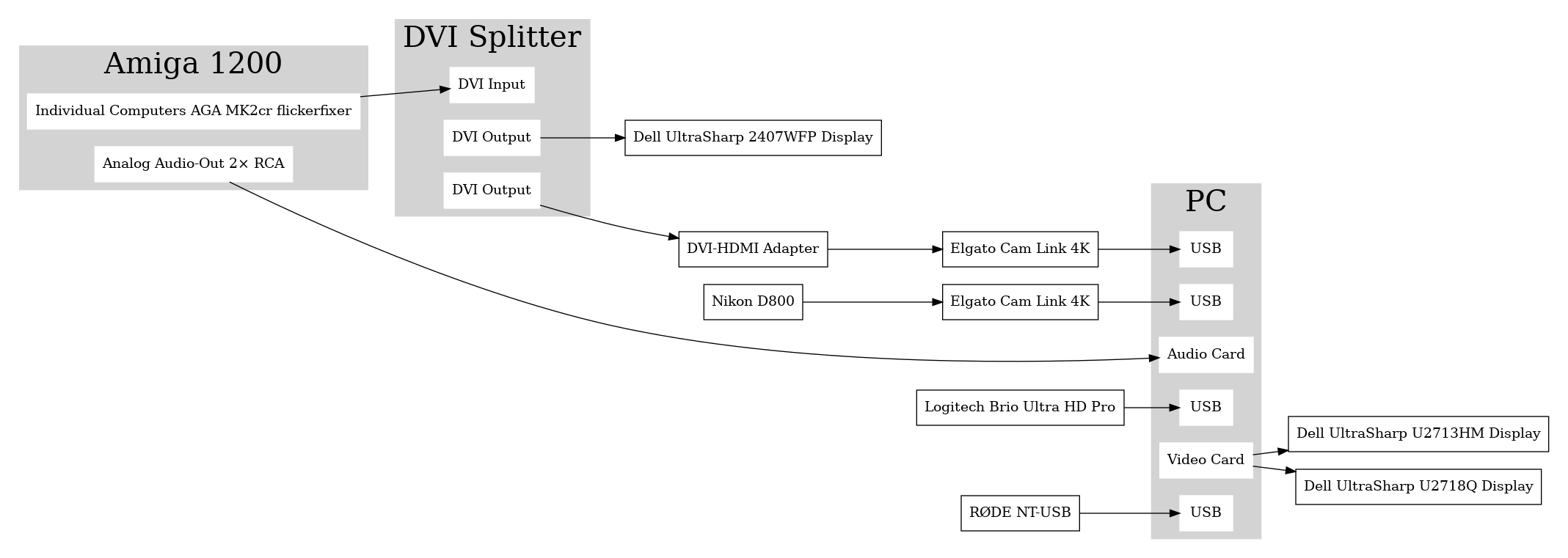
Sebastian Bergmann documented his Twitch streaming setup using digital output from his Amiga 1200 retrocomputing machine: [Wayback] Streaming Setup, Iterated

This might hold for other retro-hardware too, so here is the schema he uses:

[Wayback image]

–jeroen

Read the rest of this entry »

Posted in LifeHacker, Power User | Leave a Comment »

How to Delete Specific Chrome Autofill Suggestions

Posted by jpluimers on 2022/01/14

If use the Chrome web browser, it’s fairly likely you will find Chrome autofill suggestions recommending things for various forms and text entry points. Sometimes those autofill suggestions c…

[Wayback] How to Delete Specific Chrome Autofill Suggestions

Most important are the steps:

  1. Open the related website which has a form entry where autofill suggestions appear
  2. Start typing so that the suggestion shows up as an option in Chrome
  3. Using the keyboard arrows, navigate down the suggestion list to the item(s) you want to remove from the Chrome autofill suggestions
  4. With the suggestion highlighted, use the appropriate keystroke sequence to delete the Chrome suggestion:
    • Mac: Shift + FN + Delete
    • Windows: Shift + Delete
    • Chromebook / Chrome OS: Alt + Shift + Delete
  5. Repeat with other suggestions to delete if desired

Via: [WayBack] edit google chrome autocomplete list – Google Search

–jeroen

Posted in Chrome, Chrome, Google, Power User, Web Browsers | Leave a Comment »