The Wiert Corner – irregular stream of stuff

Jeroen W. Pluimers on .NET, C#, Delphi, databases, and personal interests

  • My badges

  • Twitter Updates

  • Pages

  • All categories

  • Enter your email address to subscribe to this blog and receive notifications of new posts by email.

    Join 1,839 other subscribers

XSLT for DUnit TXMLTestListener output

Posted by jpluimers on 2021/04/21

I totally missed this, even though the file has been around for a very long time:

Related: Some links on DUnit, JUnit and NUnit XSD specifications of their XML formats (JUnit is actually Ant XML)

–jeroen

Posted in Delphi, Development, DUnit, Software Development | Leave a Comment »

Busybox sh (actually ash derivative dash): checking exit codes

Posted by jpluimers on 2021/04/20

Even if you include a double quotes "sh" in a Google search to force only sh (in the early days this was the Thompson shell, but nowadays usually a Bourne shell or derivative) results, almost all unix like scripting examples you find are based on bash (the Bourne again shell), so I was glad I dug a bit deeper into what the actual Busybox shell is.

I wanted to know which shell Busybox uses and what capabilities it has, as ESXi ships with this very slimmed down set of tools (called applets in Busybox speak).

It does not even include ssh: that gap is often filled by [Wayback] Dropbear SSH, which was used by ESXi and named dbclient (I think with ESXi 6.0 it was replaced with a more regular ssh implementation): [Wayback] How to compile a statically linked rsync binary for ESXi.

Busybox shell source code is at [Wayback] ash.c\shell – busybox – BusyBox: The Swiss Army Knife of Embedded Linux and indicates the shell is the ash (the Almquist shell) derivative dash (yes, you guessed it right: the Debian Almquist shell), ported from NetBSD and debianized:

 * Copyright (c) 1997-2005 Herbert Xu <herbert@gondor.apana.org.au>
 * was re-ported from NetBSD and debianized.
...
//config:   The most complete and most pedantically correct shell included with
//config:   busybox. This shell is actually a derivative of the Debian 'dash'
//config:   shell (by Herbert Xu), which was created by porting the 'ash' shell
//config:   (written by Kenneth Almquist) from NetBSD.

nx like systems have a shell hell similar to Windows DLL hell: there are too many, and their differences and be both subtle and frustrating. To get a feel, browse through Source: Comparison of command shells – Wikipedia (yes, some shells from other operating environments like DOS, OS/2, VMS and Windows, but the majority is nx).

Since ash is sufficiently different from bash (for example [Wayback] ash – exit code for a piped process), I always want to know what shell code (which often comes from bash as it is so ubiquitous) will work.

There is hardly any shell documentation at the Busybox site. There is [Wayback] BusyBox – The Swiss Army Knife of Embedded Linux, the source code at [Wayback] ash.c\shell – busybox – BusyBox: The Swiss Army Knife of Embedded Linux does not offer much either,

A manual page of it is at [Archive.is] ash(1) [minix man page]. There you see the age: back then, “exit status” is used where nowadays many people would use “exit code”. It does not explain how to check for specific exit codes.

Because ash is derived from the Bourne shell, this page was of great help for me to grasp exit code handing: [Wayback] Exit Codes – Shell Scripting Tutorial

A Bourne Shell Programming / Scripting Tutorial for learning about using the Unix shell.

Here two examples from that page to get me going:

#!/bin/sh
# Second attempt at checking return codes
grep "^${1}:" /etc/passwd > /dev/null 2>&1
if [ "$?" -ne "0" ]; then
  echo "Sorry, cannot find user ${1} in /etc/passwd"
  exit 1
fi
USERNAME=`grep "^${1}:" /etc/passwd|cut -d":" -f1`
NAME=`grep "^${1}:" /etc/passwd|cut -d":" -f5`
HOMEDIR=`grep "^${1}:" /etc/passwd|cut -d":" -f6`

echo "USERNAME: $USERNAME"
echo "NAME: $NAME"
echo "HOMEDIR: $HOMEDIR"

and

#!/bin/sh
# A Tidier approach

check_errs()
{
  # Function. Parameter 1 is the return code
  # Para. 2 is text to display on failure.
  if [ "${1}" -ne "0" ]; then
    echo "ERROR # ${1} : ${2}"
    # as a bonus, make our script exit with the right error code.
    exit ${1}
  fi
}

### main script starts here ###

grep "^${1}:" /etc/passwd > /dev/null 2>&1
check_errs $? "User ${1} not found in /etc/passwd"
USERNAME=`grep "^${1}:" /etc/passwd|cut -d":" -f1`
check_errs $? "Cut returned an error"
echo "USERNAME: $USERNAME"
check_errs $? "echo returned an error - very strange!"

This basically means that status code handling is the same as in bash, so constructs can be used like [Wayback] bash – How to check the exit status using an if statement – Stack Overflow:

$? is a parameter like any other. You can save its value to use before ultimately calling exit.

exit_status=$?
if [ $exit_status -eq 1 ]; then
    echo "blah blah blah"
fi
exit $exit_status

Read the rest of this entry »

Posted in *nix, *nix-tools, ash/dash, ash/dash development, bash, bash, BusyBox, Development, Power User, Scripting, Software Development, ssh/sshd | 1 Comment »

Windows DLL and EXE rebase

Posted by jpluimers on 2021/04/20

Some links on rebase for Windows DLLs and EXE files, including effects on .NET CLR.

–jeroen

Posted in .NET, Delphi, Development, Software Development, Windows Development | Leave a Comment »

Since when is the PLATFORMTARGETS resource included in non-package binaries?

Posted by jpluimers on 2021/04/20

A while ago, I discovered that most (if not all) Delphi compiled Windows binaries contain the PLATFORMTARGETS resource.

This is a resource introduced in Delphi XE2 meant to be included in package binaries only.

The documentation back then clearly indicates this:

Relatively recent documentation too: [WayBack] 64-bit Windows Application Development – RAD Studio: Making Your Components Available at Design Time and Run Time

Still all my Delphi compiled binaries contain the PLATFORMTARGETS resource.

When did the compiler behaviour change to include PLATFORMTARGETS in ALL binaries?

–jeroen

Read the rest of this entry »

Posted in Delphi, Development, Software Development | Leave a Comment »

Spotlight taking 200% CPU

Posted by jpluimers on 2021/04/19

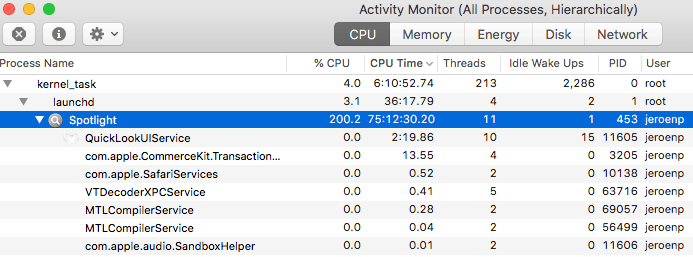
First I thought this was about using 4K resolution and chrome, but later I realized that it wasn’t just Chrome disliking high resolutions Spotlight was using a tremendous amount of CPU, not just while Chrome was running:

This was MacOS “mds_stores” high CPU usage all over again, but with different processe names as pointed to me in a sudo su - shell:

Read the rest of this entry »

Posted in Apple, Mac OS X / OS X / MacOS, Power User, SpotLight | Leave a Comment »

Recovering files with scalpel.

Posted by jpluimers on 2021/04/19

I missed this 2014 article [WayBack] Recovering Deleted Files with Scalpel » Linux Magazine:

The Scalpel file carver helps users restore what they thought were lost files.

Via the now defunct G+ link: https://plus.google.com/+Doortodoorgeek/posts/eskyp8PH57a?_utm_source=1-2-2 from which I saved this quote:

+honkey Magoo recovering with Photorec can be hard, I had a touch more luck with this one

Scalpel File Carver: http://www.linux-magazine.com/Online/Features/Recovering-Deleted-Files-with-Scalpel

I wish it had been maintained longer, as the most recent changes are indeed from 2014: [WayBack] GitHub – sleuthkit/scalpel: Scalpel is an open source data carving tool. (it is now indeed part of Sleuthkit, see [WayBack] Scalpel – ForensicsWiki)

So basically this was a short revival: WayBack: Digital Forensics Solutions: Announcing Scalpel 2.0.

–jeroen

Read the rest of this entry »

Posted in *nix, *nix-tools, Apple, Mac OS X / OS X / MacOS, Power User | Leave a Comment »

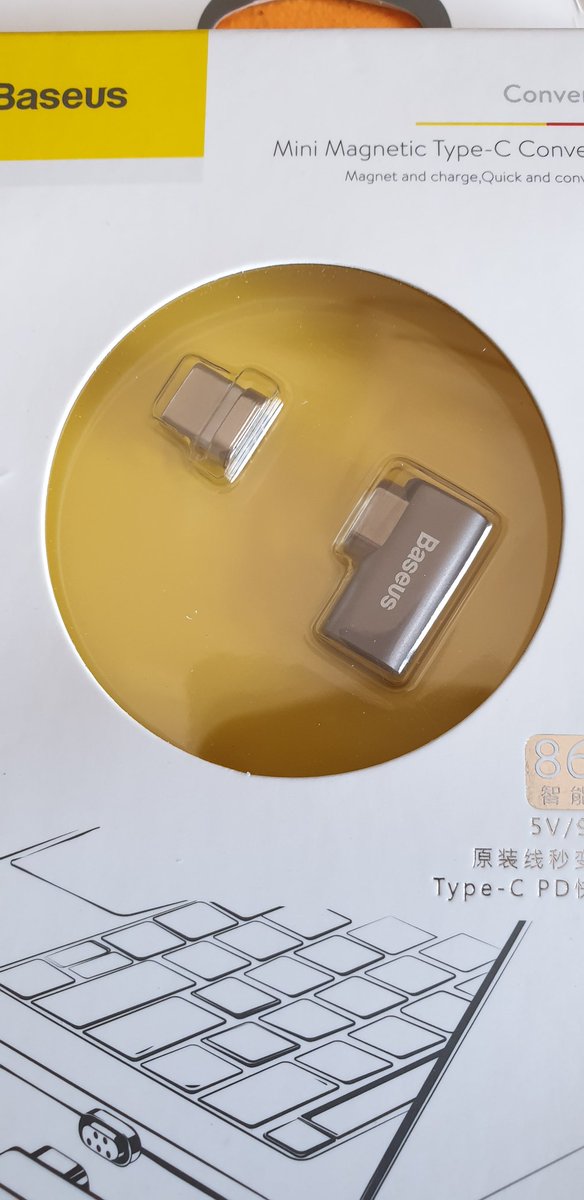
A USB-C magnetic charge contact that when tripping does not make your computer hit the ground (via Hadi Hariri on Twitter)

Posted by jpluimers on 2021/04/19

Want: [WayBack] Hadi Hariri on Twitter: “You know @Apple I actually liked that feature of not pulling the computer off the desk when tripping over the cable. You removed it, I’m getting an add-on. And thanks @bashorov for the recommendation.… https://t.co/Ju036sqRW4”

–jeroen

Posted in Hardware, Power User, USB, USB-C | Leave a Comment »

Stop FortiClient from auto-starting (as it uses a truckload of Windows resources, often including 2 gigabyte of memory for their logger)

Posted by jpluimers on 2021/04/16

I see lot’s of negative reactions on FortiClient, as it is very closed source, many intermittent issues, and is a product that tries to be a jack of all trades (over a couple of versions, in addition of being a proprietary VPN client, they started doing vulnerability scanning, interfering with anti-virus products, they blocked saving of passwords and allowing password managers to paste them, and I could go on).

Sometimes you have to use it in order to access a FortiGate based VPN server, so the best is to defer starting it until as late as possible.

Here are some links to get that configured correctly:

–jeroen

Posted in FortiGate/FortiClient, Network-and-equipment, Power User, VPN | Leave a Comment »

google chrome – How can I selectively disable paste blockers – Super User

Posted by jpluimers on 2021/04/16

For my link archive: [WayBack] google chrome – How can I selectively disable paste blockers – Super User.

Preliminary testing shows that Chrome Extension [Archive.is] “Don’t Fuck with Paste” works with eendagskentekenbewijsaanvragen.rdw.nl

–jeroen

Posted in Chrome, Chrome, Firefox, Google, Power User, Web Browsers | Leave a Comment »

Dockerfile with Bite Size Networking tools from b0rk

Posted by jpluimers on 2021/04/16

[WayBack] Ryan James Spencer on Twitter:

“I wrote a quick Dockerfile so people who purchase Bite Size Networking from  @b0rk can quickly have access to the tools. You can slim the image down to do debugging on docker networks once you get comfortable with which tools are most useful to you.”

He is planning to do more, so maybe a few of [WayBack] wizard zines get encapsulated into dockerfiles as well.

–jeroen

PS: [WayBack] Dockerfile | Docker Documentation


# N.B. The only tool missing here that is mentioned in the document is `zenmap`
# purely because this image is intended to be run via a CLI and `zenmap` is a GUI
# to `nmap` i.e. one can play around with the tools by running:
#
# $ docker build –name bite_size_networking:latest .
# $ docker run –rm -d –name bsn_test bite_size_networking:latest
# $ docker exec -it bsn_test bash
#
# Alternatively, one can change the `ENTRYPOINT` to `["bash"]` and run:
#
# $ docker run -it –name bsn_test bite_size_networking:latest
#
# then later (after exiting the shell):
#
# $ docker start bsn_test
# $ docker attach bsn_test
#
# One can also run this image on a docker network to capture packets and so
# forth for debugging purposes. Once you've found the tooling that best suits
# your needs, it may make sense to make a slimmed down version of this
# Dockerfile and, if wireguard isn't needed, base this image off
# `debian:stable` instead.
#
# Lastly, you can purchase Bite Size Networking or Julia's other fantastic
# zines over at https://wizardzines.com/
# We use `unstable` here since we install `wireguard` below
FROM debian:unstable
RUN apt update && \
DEBIAN_FRONTEND=noninteractive apt install -y \
dnsutils \
curl \
nmap \
tcpdump \
ngrep \
mitmproxy \
iptables \
ethtool \
stunnel \
hping3 \
lsof \
ipcalc \
p0f \
iperf \
apache2-utils \
wget \
python3 \
iftop \
nethogs \
iptraf \
httpie \
nload \
aria2 \
nftables \
tcpflow \
telnet \
openvpn \
links \
wireguard \
tshark
ENTRYPOINT ["sh", "-c", "while true; do sleep $(( 60 * 60 * 24 )); done"]

Posted in *nix, *nix-tools, Cloud, Containers, Docker, Infrastructure, Power User | Leave a Comment »