


Still relevant [WayBack] When did we stop caring about memory management? – Scott Hanselman
Via: [WayBack] Jeroen Wiert Pluimers – Google+
–jeroen
Posted by jpluimers on 2020/09/29
Still relevant [WayBack] When did we stop caring about memory management? – Scott Hanselman
Via: [WayBack] Jeroen Wiert Pluimers – Google+
–jeroen

Posted in Development, Software Development | Leave a Comment »
Posted by jpluimers on 2020/09/29
As a (then) go lang n00b, the less upvoted answers helped me e lot: [WayBack] variables – What is “_,” in a Golang declaration? – Stack Overflow:
The Go compiler won’t allow you to create variables that you never use.
for i, value := range x {
   total += value
}
The above code will return an error message “i declared and not used”.
Since we don’t use i inside of our loop we need to change it to this:
for _, value := range x {
   total += value
}
_is the blank identifier. Meaning the value it should be assigned is discarded.Here it is the value of
examplekey that is discarded. The second line of code would discard the presence boolean and store the value inprs.
So to only check the presence in the map, you can discard the value. This can be used to use a map as a set.
–jeroen

Posted in Development, Go (golang), Software Development | Leave a Comment »
Posted by jpluimers on 2020/09/29
Cool, this works in a Mac and Linux too: mssql extension for VS Code.
Links:
–jeroen
Posted in .NET, Database Development, Development, Software Development, SQL Server, Visual Studio and tools, vscode Visual Studio Code | Leave a Comment »
Posted by jpluimers on 2020/09/28
 Windows 10 comes with a broken Camera viewer and before that, Windows 7 killed the one in Windows XP.
On a Mac you have the open source Quick Camera (which named QCamera before, seeViewing an USB camera on Mac OS X without mirroring and Capturing from a Magewell XI100USB on a Mac using OS X) at [WayBack] GitHub – simonguest/quick-camera.
For Windows 7, a long search initially revealed a lot of bloat-ware, but finally ended to these two both from the same author:
It is not open source (yet?), but since it is .NET, it is reasonable easy to see the innards.
Like QCamera, it does not require installation: just unzip and run. Enjoy!
Yes, I know there are Windows 10 workaround steps via Microsoft.CameraApp.App.ctor, but if you look at [WayBack] Win10 Home N – Camera App fails: System.IO.FileNotFoundException – Microsoft Community you will understand I did not apply them.
Similarly, when you install Skype from the app store, then sign-in, it will tell you that Skype is out of date.
–jeroen
via:

Posted in .NET, Apple, Development, Mac OS X / OS X / MacOS, Power User, Software Development, Windows | Leave a Comment »
Posted by jpluimers on 2020/09/28
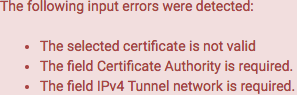
Saving an initial configuration without changing anything gives these errors:
If you are OK with self-signed certificates, then the first is solved by using this as the Server certificate:
The second needs an additional step: you have to select or create a certificate authority first at hostname/system_camanager.php?act=new where hostname is the hostname or IP address of your pfSense configuration.
This order is actually explained in [WayBack] OpenVPN – The Open Source VPN: HOWTO and [WayBack] OpenVPN Configuration (pfSense) – ELITS, but I like stronger security.
For the Internal Certificate Authority (CA), use at least these settings:
2048 bits, but I prefer 3072 bits (to be safe after about 2030) as per
sha256, but I prefer sha512 as it will be safe for a longer period of time.3650 (10 years); can you keep your VM safe for that long? If longer, you can increase the lifetime, but also have to ensure you take large enough values for the Key length and Digest Algorithm.You can view the possible settings in [WayBack] pfsense/system_camanager.php at master · pfsense/pfsense · GitHub.
Use a TLS Key
TLS Key
TLS Key Usage Mode
Peer Certificate Authority
Peer Certificate Revocation list
Use a TLS Key
Use a TLS Key
ECDH Curve
Hardware Crypto
RDRAND instruction is available, this choice allows to use it. I think OpenVPN (via OpenSSL) on BSD uses this in a similar way as Linux: i.e. not as the only source for randomness. See [WayBack] Torvalds shoots down call to yank ‘backdoored’ Intel RdRand in Linux crypto • The Register/usr/bin/openssl engine -t -c command:
DH Parameter Length
This means they can potentially be re-used as an attack-vector, so you need to manually re-generate them as per [WayBack] DH Parameters – pfSense Documentation by using /usr/bin/openssl dhparam
In order to speed that up, you have to either manually add a lot of entropy, or ensure your VM uses the host entropy by installing the open-vm-tools and rebooting.
This can take quite some time as it depends on /dev/random as a pure random number source, which will wait if there is not enough initial entropy available yet (see [WayBack] prng – differences between random and urandom – Stack Overflow).
In order to speed that up, you have to either manually add a lot of entropy, or ensure your VM uses the host entropy by installing the open-vm-tools and rebooting.
On a single-coreIntel(R) Xeon(R) CPU E5-2630L v4 @ 1.80GHz, the timings of these
/usr/bin/openssl dhparam -out /etc/dh-parameters.1024 1024

/usr/bin/openssl dhparam -out /etc/dh-parameters.2048 2048

/usr/bin/openssl dhparam -out /etc/dh-parameters.4096 4096
using the [WayBack] FreeBSD Manual Pages: time command are (each measured twice):






4096Encryption Algorithm
AES.AES-256-GCM (256 bit key, 128 bit block)
AES-128-GCM.Enable NCP(Negotiable Cryptographic Parameters)
NCP Algorithms

AES-256-GCMAES-192-GCMAES-128-GCMAuth digest algorithm
SHA512 (which I use) or SHA256 is fine. Do not use SHA1 unless you need backward compatibility with pre 2.4 OpenVPN installations or pre-configured clients. See [WayBack] How safe to change default SHA1 to other encryption algorithm?Certificate depth
All networks are in CIDR notation, like 192.168.3.0/24.
IPv4 Tunnel network
172.x.y.0 networks as they are far less used than 192.168.x.0 and 10.x.y.0 networks. Note that some networks starting with 172 are in public use, so limit yourself to 172.16.0.0 – 172.31.255.255.IPv6 Tunnel network
IPv4 Local networks
IPv4 Remote networks
IPv4 Remote networks
Concurrent connections
Compression
compression lz4 or compression lz4-v2 in the future.Push compression
Type-of-Service
Inter-client communication
Duplicate Connection
Dynamic IP
Topology: choose subnet (use net30 only for old 2.0.9 client compatibility on Windows; use p2p if you only have non-Windows clients)Advanced client options
Custom options
UDP Fast I/O
Send/Receive Buffer
Gateway creation
BothVerbosity level
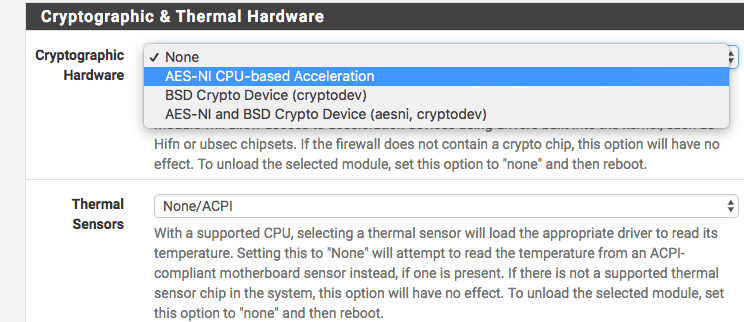
Even if the underlying Intel/AMD processor supports AES, it is not enabled by default in pfSense as per web UI home page:
Intel(R) Xeon(R) CPU E5-2630L v4 @ 1.80GHz
AES-NI CPU Crypto: Yes (inactive)
I was quite surprised, but then remembered that enabling RDRAND in the OpenVPN settings was also non-default and dug a bit deeper into ….
There I found you have to go to the System menu, choose Advanced, then the Miscellaneous tab:
From there, browse down (or search for Hardware) to “Cryptographic & Thermal Hardware”, then enable the CPU based accelleration:
After pressing the Save button at the bottom, you are done:
AES-NI CPU Crypto: Yes (active)
I got this via [WayBack] AES-IN Inactive?, which also mentions this:
- AES-NI loads aesni.ko
- BSD Crypto loads cryptodev.ko
- AES-NI and BSD Crypto loads both
Note that AES – as of FreeBSD-10 – AES-NI and other hardware implementations are only indirectly incorporated into /dev/random. The Linux kernel already did this in an indirect way. I think that is a good idea as when multiple entropy sources are merged together, it makes it much harder to influence to total entropy. FreeBSD implemented this using the Yarrow algorithm – Wikipedia and now has moved to a successor, the Fortuna (PRNG) – Wikipedia.
More background information:
Note there is a message about ACE support on the console and in the boot log that is related to AES:
padlock0: No ACE support.
aesni0: <AES-CBC, AES-XTS, AES-GCM, AES-ICM> on motherboard
The cause is that in the past, VIA PadLock Advanced Cryptography Engine (ACE) in the mid 2000s introduced encryption acceleration (see [WayBack] VIA PadLock support for Linux) a few years before AES-NI, so ACE is incompatible with AES-NI. AES-NI is now much more widespread than ACE, even the wikipedia VIA page padlock information has been removed.
An odd thing: unlike AES-NI which needs to be specifically enabled, VIA Padlock is always enabled, see
Ensure you install the (optional, but highly recommended) [WayBack] OpenVPN Client Export Package:
Allows a pre-configured OpenVPN Windows Client or Mac OS X’s Viscosity configuration bundle to be exported directly from pfSense.
These config files work with Tunnelblick as well, which is a great free and open source OpenVPN tool on Mac OS X / MacOS:
I have yet to cover these two; for now read [WayBack] How to setup OpenVPN on pFSense? | IT Blog and [WayBack] OpenVPN Remote Access Server – pfSense Documentation.
I like this overview a lot:
–jeroen

Posted in Internet, pfSense, routers | Leave a Comment »
Posted by jpluimers on 2020/09/28
[WayBack] Windows 7 Blue Screen Of Death with error 0x7B – twm’s blog:
To allow Windows 7 to boot in IDE as well as AHCI mode, I had to enable the following drivers (by setting “Start” to “0” in the registry, there might be other options to do this):
HKLM\System\CurrentControlSet\services\intelide
HKLM\System\CurrentControlSet\services\pciide
HKLM\System\CurrentControlSet\services\msahci
HKLM\System\CurrentControlSet\services\iastorV
The first two allow Windows 7 to boot from SATA in IDE mode. The second two allow Windows 7 to boot from SATA in AHCI mode.
–jeroen
Posted in Development, Power User, Windows, Windows 10, Windows 7, Windows 8, Windows 8.1, Windows 9 | Leave a Comment »
Posted by jpluimers on 2020/09/25
If during a pfSense reboot you get one or more messages from syslog about “operation not supported by device” on various log files, then they are likely corrupt.
I had this when a pfSense 2.4.x RELEASE version VM was accidentally power-cycled during initial setup.
A side effect was that no logs showed in the web UI either, nor would clog on any file in the /var/log directory.
The solution was to choose option 8 (Shell), then in the /var/log directory, remove all files with extension .log, then reboot.
Now the messages were gone and the web UI showed logs. clog /var/log/system.log showed content as well.
Solution based on these posts:
–jeroen
Posted in Internet, pfSense, Power User, routers | Leave a Comment »
Posted by jpluimers on 2020/09/25
On my list of things to play with is ScreenToGif via [WayBack] Creating animated GIFs from screenshots – twm’s blog
–jeroen
Posted in Power User, Windows | Leave a Comment »
Posted by jpluimers on 2020/09/25
Great answer by Stefan Glienke at [WayBack] What’s the use of AlignAttribute? The documentation only says Internal use only. – 丽丽乌克 – Google+:
It forces the element it annotates to be aligned like specified – valid values are the same as for
$A(1,2,4,8,16)Example:
{$A4}
type
  TMyRecordA = record
    x: Integer;
    y: Int64;
  end;

  TMyRecordB = record
    x: Integer;
    [Align(8)]
    y: Int64;
  end;
var
  a: TMyRecordA;
  b: TMyRecordB;
  offset: Integer;
begin
  offset := PByte(@a.y) - PByte(@a);
  Writeln(SizeOf(a));
  Writeln(offset);
  offset := PByte(@b.y) - PByte(@b);
  Writeln(SizeOf(b));
  Writeln(offset);
this will output:
12

4

16

8
–jeroen
Posted in Delphi, Development, Software Development | Leave a Comment »
Posted by jpluimers on 2020/09/24
At [WayBack] References for “The Future of Programming” you find the links and quotes Bret Victor used for his great talk.
The talk reminds me talks by Kevlin Henney, which combine a historic perspective on software development with how to apply that knowledge.
Time to dig into some more talks by Bret Victor and his site [WayBack] Bret Victor, beast of burden
He has done a lot of things, including designing the great resistor decoder I mentioned at Source: Electronics components and resistor decoder colours.
–jeroen
via: [WayBack] Jonas Bandi on Twitter: “It is easy to adopt new technologies, it can be hard to adopt new ways of thinking. https://t.co/gwbDrpWido”
Posted in Development, History, Software Development | Leave a Comment »







 The Wiert Corner - irregular stream of stuff