The Wiert Corner – irregular stream of stuff

Jeroen W. Pluimers on .NET, C#, Delphi, databases, and personal interests

  • My badges

  • Twitter Updates

  • My Flickr Stream

  • Pages

  • All categories

  • Enter your email address to subscribe to this blog and receive notifications of new posts by email.

    Join 1,839 other subscribers

Delphi SOAP service: only publish WSDL in RELEASE mode

Posted by jpluimers on 2018/08/21

If you want to restrict the WSDL publishing so it only is published in DEBUG mode, then add a [WayBack] TWSDLHTMLPublish to your [WayBackTWebModule descendant, then add this in the [WayBack] OnCreate event handler of that TWebModule descendant:

// Enable/disable handling of "/wsdl*" requests during DEBUG/RELEASE mode. Enabling sends them via
//  Handled := WSDLHTMLPublish1.DispatchRequest(Sender, Request, Response);
{$ifdef DEBUG}
  WSDLHTMLPublish1.WebDispatch.Enabled := True;
{$endif DEBUG}
{$ifdef RELEASE}
  WSDLHTMLPublish1.WebDispatch.Enabled := False;
{$endif DEBUG}
end;

I have limited this because there are so many hard coded strings in the TWSDLHTMLPublish, see the thread by [WayBack] Marjan Venema at [WayBack] Hide WSDL document in SOAP app – delphi

–jeroen

Posted in Conference Topics, Conferences, Delphi, Development, Event, Software Development | Leave a Comment »

Full Duplex Asynchronous Read/Write with Named Pipes – CodeProject

Posted by jpluimers on 2018/08/21

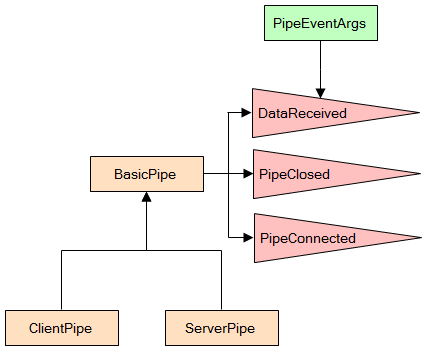
When you run on Windows: [WayBackFull Duplex Asynchronous Read/Write with Named Pipes – CodeProject

via:

–jeroen

Posted in .NET, C#, Development, Software Development, WinForms | Leave a Comment »

For my research list: Delphi and ZeroMQ

Posted by jpluimers on 2018/08/21

Last year, ZeroMQ – of late Pieter Hintjens ancestry – got a decent support library for Delphi https://github.com/grijjy/DelphiZeroMQ.

While writing, there is a reasonable chance I need to do message queue work and ZeroMQ is excellent. I’ve done MQ already in other environments with various projects involving Wintel/iSeries, WebSphere MQ (now IBM MQ, formerly MQSeries), Oracle AQ and Microsofts MSMQ stacks so I’m anxious to see if and how this works out.

via:

–jeroen

https://wiert.me/2017/05/10/one-year-ago-im-writer-and-free-software-author-pieter-hintjens-and-im-dying-of-cancer-ask-me-anything-iama/

Posted in Delphi, Development, Software Development | 2 Comments »

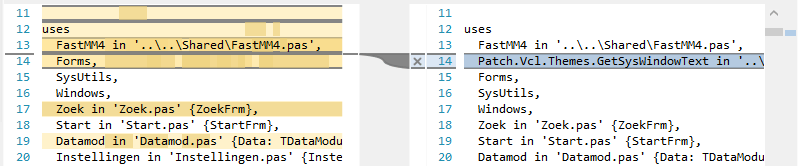
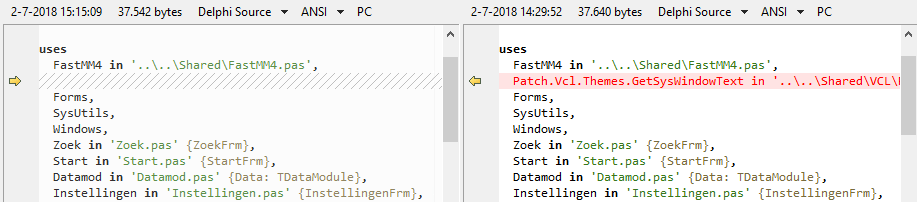
Plastic SCM compare versus Beyond Compare; guess which screenshot I like most

Posted by jpluimers on 2018/08/20

Same difference; two tools.

Plastic SCM compare: lots of clutter

Beyond Compare: just the things that are different.

–jeroen

Posted in Beyond Compare, Development, PlasticSCM, Power User, Source Code Management | 3 Comments »

Drone no-fly zones | ministerie van Infrastructuur en Milieu

Posted by jpluimers on 2018/08/20

If you ever want to fly a drone without a license in The Netherlands, be prepared that the flying zones are very limited, especially in : [Archive.isDrone no-fly zones | ministerie van Infrastructuur en Milieu

The text isn’t very clear, even to Dutch people, so there is some discussion and explanation in these links:

More temporary airspace restrictions are here:

–jeroen

Read the rest of this entry »

Posted in LifeHacker, Power User | Leave a Comment »

when bind named service hasn’t started after OpenSuSE Tumbleweed boots

Posted by jpluimers on 2018/08/20

A while ago, named would not start any more after I rebooted my Tumbleweed systems.

I had this behaviour on multiple systems, each installed quite a while ago and kept up-to-date with zypper dist-upgrade so it looked like a systematic issue.

Below are steps in researching the problem together with the helpful people on the IRC channel opensuse-factory.

Background reading for some of the commands: [WayBackHow To Use Systemctl to Manage Systemd Services and Units | DigitalOcean.

Both systemctl status named.service and systemctl status named would show the same output:

# systemctl status named
● named.service - LSB: Domain Name System (DNS) server, named
   Loaded: loaded (/etc/init.d/named; generated; vendor preset: disabled)
   Active: inactive (dead)
     Docs: man:systemd-sysv-generator(8)

Getting the log from events around a reboot would show a successful shutdown, but no start:

# journalctl --unit named --catalog --pager-end

Apr 28 13:19:27 laurel systemd[1]: Stopping LSB: Domain Name System (DNS) server, named...
-- Subject: Unit named.service has begun shutting down
-- Defined-By: systemd
-- Support: http://lists.freedesktop.org/mailman/listinfo/systemd-devel
-- 
-- Unit named.service has begun shutting down.
Apr 28 13:19:28 laurel named[20360]: no longer listening on 192.168.124.27#53
Apr 28 13:19:32 laurel named[20360]: received control channel command 'stop'
Apr 28 13:19:32 laurel named[20360]: shutting down: flushing changes
Apr 28 13:19:32 laurel named[20360]: stopping command channel on 127.0.0.1#953
Apr 28 13:19:32 laurel named[20360]: no longer listening on ::#53
Apr 28 13:19:32 laurel named[20360]: no longer listening on 127.0.0.1#53
Apr 28 13:19:32 laurel named[20360]: exiting
Apr 28 13:19:34 laurel named[30705]: Shutting down name server BIND  waiting for named to shut down ..done
Apr 28 13:19:34 laurel systemd[1]: Stopped LSB: Domain Name System (DNS) server, named.
-- Subject: Unit named.service has finished shutting down
-- Defined-By: systemd
-- Support: http://lists.freedesktop.org/mailman/listinfo/systemd-devel
-- 
-- Unit named.service has finished shutting down.

Similar results in these files:

  • /var/lib/named/log/general.log

28-Apr-2017 13:19:32.465 general: shutting down: flushing changes
28-Apr-2017 13:19:32.468 general: stopping command channel on 127.0.0.1#953
28-Apr-2017 13:19:32.622 general: exiting

  • /var/lib/named/log/named.log

28-Apr-2017 13:19:32.489 network: no longer listening on ::#53
28-Apr-2017 13:19:32.489 network: no longer listening on 127.0.0.1#53

With systemctl, I got this:

# systemctl is-enabled named
named.service is not a native service, redirecting to systemd-sysv-install.
Executing: /usr/lib/systemd/systemd-sysv-install is-enabled named
enabled
# systemctl is-active named
inactive
# systemctl is-failed named
inactive

After this, I was out of systemd and sysv knowledge, so I asked for help on the #openSUSE-factory IRC channel, where ismail was of great help.

Read the rest of this entry »

Posted in *nix, *nix-tools, bind-named, Linux, openSuSE, Power User, SuSE Linux, Tumbleweed | Leave a Comment »

On Windows Control Flow Guard effects: 24-core CPU and I can’t type an email (part one) | Random ASCII

Posted by jpluimers on 2018/08/19

So many interesting bits on Windows process behaviour investigations: https://randomascii.wordpress.com/2018/08/16/24-core-cpu-and-i-cant-type-an-email-part-one/

Via Check out @BruceDawson0xB’s Tweet:

Posted in Uncategorized | Leave a Comment »

How to check if a binary is 32 or 64 bit on Windows? – Super User

Posted by jpluimers on 2018/08/17

It seems there are a few, but only loading the binary is the sure method to know what the process will be using: [WayBackHow to check if a binary is 32 or 64 bit on Windows? – Super User and [WayBack] How do I determine if a .NET application is 32 or 64 bit? – Stack Overflow.

Details in the answers of these questions, here are a few highlights:

  • The first few characters in the binary header reveal what it was originally designed for.
  • A .NET executable might still have an x64 header for bootstrapping.
  • The Windows SDK has a tool dumpbin.exe with the /headers option.
  • You can use sigcheck.exe from SysInternals.
  • The file utility (e.g. from cygwin, which comes with msysgit) will distinguish between 32- and 64-bit executables.
  • Use the command line 7z.exe on the PE file (Exe or DLL) in question which gives you a CPU line.
  • Virustotal File detail is a way to find out if a binary is 32 bit or 64 bit.
  • Even an executable marked as 32-bit can run as 64-bit if, for example, it’s a .NET executable that can run as 32- or 64-bit. For more information see https://stackoverflow.com/questions/3782191/how-do-i-determine-if-a-net-application-is-32-or-64-bit, which has an answer that says that the CORFLAGS utility can be used to determine how a .NET application will run.

–jeroen

Search terms: win64, win32, x64, x86_64, x86

Posted in Assembly Language, Development, Power User, Windows, x64, x86 | Leave a Comment »

Ziggo – als je geen papieren factuur meer wilt

Posted by jpluimers on 2018/08/17

Als je bij Ziggo geen papieren factuur meer wilt, kun je dat op https://www.ziggo.nl/mijn-ziggo/gegevens/betalingsgegevens-wijzigen/ instellen.

–jeroen

via: [WayBack]

Posted in LifeHacker, Power User | Leave a Comment »

Steve Losh on Twitter: “HTTP status ranges in a nutshell: 1xx: hold on 2xx: here you go 3xx: go away 4xx: you fucked up 5xx: I fucked up”

Posted by jpluimers on 2018/08/17

[WayBackSteve Losh on Twitter:

“HTTP status ranges in a nutshell:

  • 1xx: hold on
  • 2xx: here you go
  • 3xx: go away
  • 4xx: you fucked up
  • 5xx: I fucked up”

–jeroen

via: [WayBack] HTTP status ranges in a nutshell… – This is why I Code – Google+

Read the rest of this entry »
Posted in Communications Development, Development, HTTP, Internet protocol suite, Power User, TCP | Leave a Comment »