The Wiert Corner – irregular stream of stuff

Jeroen W. Pluimers on .NET, C#, Delphi, databases, and personal interests

  • My badges

  • Twitter Updates

  • My Flickr Stream

  • Pages

  • All categories

  • Enter your email address to subscribe to this blog and receive notifications of new posts by email.

    Join 1,854 other subscribers

In this day and age, people still write SQL injection vulnerable code

Posted by jpluimers on 2018/03/20

I keep being amazed that new generations of people keep writing SQL injection vulnerable code, so further below is a repeat of  [WayBack] xkcd: Exploits of a Mom on Little Bobby Tables named Robert '; Drop TABLE Students;--

Take this recent question on G+ for instance: [WayBack] Hi can you help to write correct Query for Filter 3 Data fields for Example Data1 , Data2 , Data2 txt1 = Data1 txt2= data2 txt3 = data3… – Jude De Silva – Google+ with this code fragment:

Tables:

Data1 , Data2 , Data2

Text control contents:

txt1 = Data1
txt2= data2
txt3 = data3

Examples when text property is filled:

ex1: Data1  and Data 3
ex2: Data 3 and Data2
ex3: Data 1, Data 2 Data 3

Code:

Qury.Close;
Query.Sql.Clear;
Qury.Sql.Add (Select * From Table1);
If Not (txt1.text = ' ')then
   Begin
   Qury.Sql.Add(Format ('Where Data1= ' '%s' ' ',[txt1] ));
  end;
If not (txt3.text = ' ') then
   Begin
   Qury.Sql.Add(Format ('and Data3= ' '%s' ' ',[txt1] ));
  end;

This example is wrong on so many levels, to lets explain a few:

  • use name Qury and Query for queries: are they actually two variables?
  • inconsistent keyword capitalisation for both used languages
  • incinsistent indenting and unindenting
  • mixed use of quotes for strings
  • use of space for blank fields
  • getting embedded quotes wrong

The basic solution for solving the actual problem asked is like this (assuming all user input are strings):

  • use
    • where 1=1 for a starting point for and based queries
    • where 1=0 for a starting point of or based queries
  • add a method AddAndClause or AddOrClause taking with parameters Query,  FieldName, ParameterName and ParameterValuethen when ParameterValue is not empty:
    • adds this to the SQL Text:
      • for and based queries:Format('and %s = :%s', [FieldName, ParameterName]);
      • for or based queries:Format('or %s = :%s', [FieldName, ParameterName]);
    • adds a parameter Query.ParamByName(ParameterName).AsString := ParameterValue

SQL Injection: Little Bobby Tables

Back in 2007, SQL Injection was already a very well known vulnerability (they date back to at least 1998), so Randall Munroe published [WayBack] xkcd: Exploits of a Mom on Little Bobby Tables named Robert '; Drop TABLE Students;--


School: “Hi, this is your son’s school. We’re having some computer trouble.”
Mom: “Oh, dear — Did he break something?”
School: “In a way. Did you really name your son Robert'); DROP TABLE Students;-- ?
Mom: “Oh. Yes. Little Bobby Tables we call him.”
School: “Well, we’ve lost this year’s student records. I hope you’re happy.”
Mom: “And I hope you’ve learned to sanitize your database inputs.”
(Alt-text: “Her daughter is named Help I’m trapped in a driver’s license factory.”)

It did not just get explained at [WayBack] 327: Exploits of a Mom – explain xkcd (Explain xkcd is a wiki dedicated to explaining the webcomic xkcd. Go figure.), Little Bobby Tables got his own page there: [WayBack] Little Bobby Tables – explain xkcd.

Like people continuing writing SQL injection vulnerable code, XKCD posted another SQL injection in [WayBack] 1253: Exoplanet Names – explain xkcd by using e'); DROP TABLE PLANETS;-- as name for Planet e of Star Gliese 667.

Preventing SQL Injection

A few years later, around 2009, Bobby Tables inspired [WayBack] bobby-tables.com: A guide to preventing SQL injection explaining:

  • what not to do “Don’t try to escape invalid characters. Don’t try to do it yourself.”
  • what do to: “Learn how to use parameterized statements. Always, every single time.”
bobby-tables.com

bobby-tables.com

It goes on with many examples of parameterised queries in many environments and language, for instance in the language used above: Delphi.

You can contribute new environments and languages as the site has source code at [WayBack] GitHub – petdance/bobby-tables: bobby-tables.com, the site for preventing SQL injections.

Finally, it points to a few more resources:

WayBack bobby-tables.com: A guide to preventing SQL injection in Delphi

Delphi

To use a prepared statement, do something like this:

query.SQL.Text := 'update people set name=:Name where id=:ID';
query.Prepare;
query.ParamByName( 'Name' ).AsString := name;
query.ParamByName( 'ID' ).AsInteger := id;
query.ExecSQL;

–jeroen

Read the rest of this entry »

Posted in Development, Software Development, SQL | Leave a Comment »

Switching from net-tools to iproute2 or not? You probably have no choice, but the iproute2 cheat-sheet is 20+ pages…

Posted by jpluimers on 2018/03/20

Last year I came across this semi-humorous post: [WayBack] Bwahahaha, now that they took your init and replaced it with systemd, they are coming after your ifconfig. Next thing is that they will come after your… – Kristian Köhntopp – Google+

Underneath is a bigger problem: net-tools had been dormant for a long time, which means a lot of people rely on the predictable behaviour – especially by parsing the output for post processing.

Those days are definitely over: net-tools is in more active maintenance now breaking scripts like crazing. So since the foundation of networking on most distributions is now iproute2, it’s better to learn iproute2.

That’s not easy though, so here is some background reading to do:

I got this little translation table from the last link:

program obsoleted by
arp ip neigh
ifconfig ip addr
ipmaddr ip maddr
iptunnel ip tunnel
route ip route
nameif ifrename
mii-tool ethtool

–jeroen


Posted in Uncategorized | Leave a Comment »

Ben, blogging: Show the complete apache config file

Posted by jpluimers on 2018/03/20

Quite a while back, I got attended to Ben, blogging: Show the complete apache config file:

If you really want to see all the complete config settings, there is no existing tool for that. This Stack Overflow page  answered this question pretty well: You can use apachectl -S to see the settings of Virtual Host, or apachectl -M to see the loaded modules, but to see all settings, there is no such tool, you will have to go through all the files , starting from familiar yourself with the  general structure of the httpd config files.
… script …

The usage is simple: Run it as python  CombineApacheConfig.py . Since there is no additional parameters given, it will retrieve the default Ubuntu apache config file from  /etc/apache2/apache2.conf and generate the result complete config file in /tmp/apache2.combined.conf. If your config file is in different location, then give the input file and output file location.

Note: Apache server-info page http://127.0.0.1/server-info also provide similar information, but not in the config file format. It is in human readable format. The page works only when it is open from the same computer.

Since I could not find how to post comments there, and it works better for me having a repo, I put it into a gist with attribution to hist post: https://gist.github.com/jpluimers/fd300f3a500cbc78cd862d2a248e7b03
I need to adapt it for OpenSuSE; until then run it as this:
python CombineApacheConfig.py /etc/apache2/httpd.conf /tmp/apache2.combined.conf

–jeroen


#!/usr/bin/python2.7
# CombineApacheConfig.py
__author__ = 'ben'
import sys, os, os.path, logging, fnmatch
def Help():
print("Usage: python CombineApacheConfig.py inputfile[default:/etc/apache2/apache2.conf] outputfile[default:/tmp/apache2.combined.conf")
def InputParameter():
if len(sys.argv) <> 3:
Help()
return "/etc/apache2/apache2.conf", "/tmp/apache2.combined.conf"
return sys.argv[1], sys.argv[2]
def ProcessMultipleFiles(InputFiles):
Content = ''
LocalFolder = os.path.dirname(InputFiles)
basenamePattern = os.path.basename(InputFiles)
for root, dirs, files in os.walk(LocalFolder):
for filename in fnmatch.filter(files, basenamePattern):
Content += ProcessInput(os.path.join(root, filename))
return Content
def RemoveExcessiveLinebreak(s):
Length = len(s)
s = s.replace(os.linesep + os.linesep + os.linesep, os.linesep + os.linesep)
NewLength = len(s)
if NewLength < Length:
s = RemoveExcessiveLinebreak(s)
return s
def ProcessInput(InputFile):
Content = ''
if logging.root.isEnabledFor(logging.DEBUG):
Content = '# Start of ' + InputFile + os.linesep
with open(InputFile, 'r') as infile:
for line in infile:
stripline = line.strip(' \t')
if stripline.startswith('#'):
continue
if stripline.lower().startswith('include'):
match = stripline.split()
if len(match) == 2:
IncludeFiles = match[1]
IncludeFiles = IncludeFiles.strip('"') #Inserted according to V's comment.
if not IncludeFiles.startswith('/'):
LocalFolder = os.path.dirname(InputFile)
IncludeFiles = os.path.join(LocalFolder, IncludeFiles)
Content += ProcessMultipleFiles(IncludeFiles) + os.linesep
else:
Content += line # if it is not pattern of 'include(optional) path', then continue.
else:
Content += line
Content = RemoveExcessiveLinebreak(Content)
if logging.root.isEnabledFor(logging.DEBUG):
Content += '# End of ' + InputFile + os.linesep + os.linesep
return Content
if __name__ == "__main__":
logging.basicConfig(level=logging.DEBUG, format='[%(asctime)s][%(levelname)s]:%(message)s')
InputFile, OutputFile = InputParameter()
try:
Content = ProcessInput(InputFile)
except Exception as e:
logging.error("Failed to process " + InputFile, exc_info=True)
exit(1)
try:
with open(OutputFile, 'w') as outfile:
outfile.write(Content)
except Exception as e:
logging.error("Failed to write to " + outfile, exc_info=True)
exit(1)
logging.info("Done writing " + OutputFile)

Posted in *nix, *nix-tools, Apache2, Development, Linux, openSuSE, Power User, Python, Scripting, Software Development, SuSE Linux | Leave a Comment »

Just in case you are wondering what these %TEMP%\_MEI* folders are about: Google Drive does not cope well with Windows logoff/shutdown…

Posted by jpluimers on 2018/03/19

From a while back, but still not fixed: [WayBack] Just in case you are wondering what these %TEMP%_MEI* folders are about: Google Drive apparently doesn’t clean up correctly when it exits because you l… – Daniela Osterhagen – Google+

Just in case you are wondering what these %TEMP%\_MEI* folders are about: Google Drive apparently doesn’t clean up correctly when it exits because you log off or shut down Windows.

This is ridiculous. It’s not as if there weren’t any options to let Windows do that cleanup if the program fails.

It is still not fixed:

[WayBack] Just in case you are wondering what these %TEMP%_MEI* folders are about: Google Drive apparently doesn’t clean up correctly when it exits because you l… – Jeroen Wiert Pluimers – Google+

Adrian Meacham:

Still doing it all these years later – only the size of the garbage left behind has changed (Size: 58.4 MB (61,303,879 bytes) Size on disk: 67.7 MB (71,061,504 bytes) 1/3 of which is icons) – why this isn’t committed to Chrome instead of held open in %TEMP% is beyond reasoning +Google Drive

Original forum source: [Archive.is] _MEI folder created at windows start – Google Product Forums

by Martin Friedl 3/17/13

Hi,
I just found out that on windows the google drive tool creates a ‘_MEIxxxxx’ folder on every startup of windows. The xxxxx is a number that differs at every startup. On my PC (with windows 7) this folder is created on ‘C:\’ and has a size of about 35MB. SO with every start of windows google drive occopies 35 additional MB. It looks as the content of the folder is mainly Pyhton-files.

Is there a way to prevent google drive from creating an additional folder with every start of windows?

Best regards
Martin

10/21/13
Klint said:
If you exit Google Drive by right-clicking the Google Drive icon in your Windows 7 notification area, and selecting Exit, then Google Drive shuts down properly and correctly deletes the _MEIxxx folder. Unfortunately, it leaves the folder behind if you leave Google Drive running when you log out or shut down. So, yes, it is a bug in Google Drive. It ought to terminate properly when the user logs out.

–jeroen

Read the rest of this entry »

Posted in Google, GoogleDrive, Power User, Windows | Leave a Comment »

Understanding how Design Thinking, Lean and Agile Work Together | ThoughtWorks

Posted by jpluimers on 2018/03/19

Many more things to learn and practice, especially on how these concepts interact, how to make things quantifiable and especially practice them in ways that people intrinsically understand how to:

The ideas of agile are great. It’s the way it has been codified into rituals and certifications and rolled out mindlessly that misses the point. When people talk about Lean, the conversation often ends at process optimization, waste, and quality, and misses so much of what the Lean mindset offers. Design Thinking is held high as the new magic trick of design facilitators.

Source: [WayBackUnderstanding how Design Thinking, Lean and Agile Work Together | ThoughtWorks.

The article has some nice graphics to illustrate the points (some are below) and points to a lot more links for further learning.

Via [WayBackThoughtWorks on Twitter: “Instead of focusing on applying a process, teams ought to challenge how they think and try new things, embrace the things that work, and learn from the things that don’t. #Agile #DesignThinking “

–jeroen


Posted in Agile, Development, Software Development | Leave a Comment »

macos – How can I list all user accounts in the terminal? – Ask Different

Posted by jpluimers on 2018/03/19

With system account starting with underscore:

dscl . list /Users

Without underscore, so only regular accounts:

dscl . list /Users | grep -v ^_.*

Source: [WayBackmacos – How can I list all user accounts in the terminal? – Ask Different

–jeroen

Posted in Apple, iMac, Mac, Mac OS X / OS X / MacOS, MacBook, MacBook Retina, MacBook-Air, MacBook-Pro, MacMini, macOS 10.12 Sierra, OS X 10.10 Yosemite, OS X 10.11 El Capitan, OS X 10.9 Mavericks, Power User | Leave a Comment »

A beginner’s guide to beefing up your privacy and security online

Posted by jpluimers on 2018/03/19

Want to protect your security and privacy? Here are some places to start:

via: [WayBackI think I’ll keep this article somewhere where I can easily share it with the famz the coming days :) – Roderick Gadellaa – Google+

–jeroen


Posted in Power User, Security | Leave a Comment »

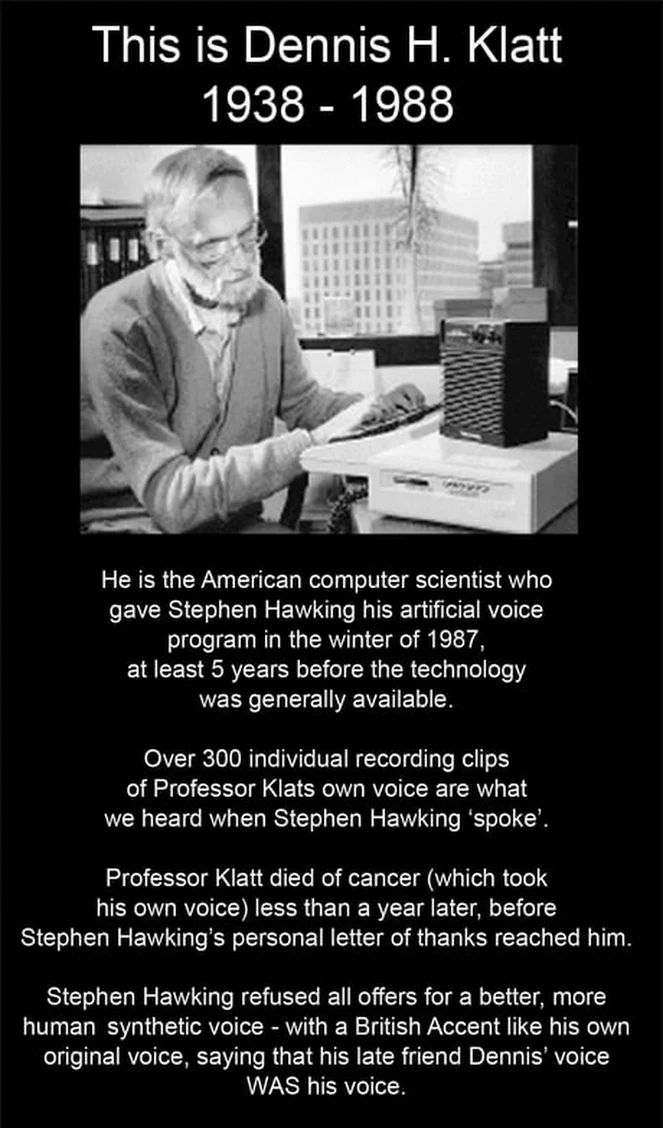
Wolfgang Rupprecht on Dennis H. Klat, Carlos Hawking and Deeklatt – Google+

Posted by jpluimers on 2018/03/18

Wow: [WayBackWolfgang Rupprecht – Google+:

Dennis H. Klatt 1938 – 1988

I knew him at MIT. He was my undergraduate thesis advisor and was a kind and gentle person. When I knew him around 1980 he was about to build the prototype for the first Klatt Talker as it was called then. He had speech samples generated by running his mathematical model of the vocal tract on a large mainframe, but no way to generate speech in real time. I remember being quite happy years later when I heard he had convinced DEC to produce it. The local Boston radio stations would sometimes use it on air when they were goofing around. The initial voice (and the only voice early on) had a bug that made it sound like a Mexican accent to most people. It wasn’t intentional and was a bit of a surprise that a vocal tract modeled from first principles would sound that way. Going with that observation and figuring it was best to advertise bugs as features, the voice was often called “Carlos”. I didn’t realize that Hawking’s voice was also based on the Klatt models (and Klatt’s own voice at that!)

Poking around Google to see what else Google had on him dredged up one more interesting tidbit. There was a character in a TV cartoon called Deeklatt that used his voice. I wonder how many people realize that Deeklatt was a play on D. Klatt. Dennis, we should all be so lucky as to leave a legacy like yours.

–jeroen

Posted in History, LifeHacker, science | 1 Comment »

Opinion needed: DIY or branded scanner for scanning film negatives and slides?

Posted by jpluimers on 2018/03/16

I’ve a ton of slides, negatives and photos to scan and want to automate the process as much as possible. Think thousands.

Opinions are welcome on both the hardware to use and the process.

It looks like for slides and negatives the opinions vary between building your own rig, fiddling with flatbed lighting or buying a tad more expensive one.

But that was 3 years ago. How’s the state of the art right now?

–jeroen

via: [WayBack] Guess I’ve got a lot to do over the holidays… I’m pretty sure #Google…

Posted in LifeHacker, Power User | Leave a Comment »

0x8024400E error with WSUS SP2

Posted by jpluimers on 2018/03/16

From a note a very long time ago: [WayBack0x8024400E error with WSUS SP2

TL;DR:

  1. ensure you have at least KB2938066 installed.
  2. while upgrading WSUS, ensure you reboot the server after each update.

Related: [WayBackwindows – WSUS clients failing to get updates with error 80072EE2 – Server Fault

–jeroen

Posted in Power User, Windows, Windows Server 2008, Windows Server 2008 R2 | Leave a Comment »