


It looks like Ubiquiti UniFi can do this, can others? How good are they? Price points?
If so, please comment.
–jeroen
via: Another update on my Ubiquiti UniFi network, since I today noticed another…
Posted by jpluimers on 2015/12/07
It looks like Ubiquiti UniFi can do this, can others? How good are they? Price points?
If so, please comment.
–jeroen
via: Another update on my Ubiquiti UniFi network, since I today noticed another…

Posted in Power User, Ubiquiti, WiFi | Leave a Comment »
Posted by jpluimers on 2015/12/07
Showing message headers and source used to be easy in early Outlook versions.
But as of Outlook 2007 they hid the internet message headers even further away than in Outlook 2003.
Steps for Outlook 2007+:
Same for the message source:
–jeroen
via:
Posted in Office, Office 2003, Office 2007, Office 2010, Office 2013, Outlook, Power User | Leave a Comment »
Posted by jpluimers on 2015/12/06
Recently I see a lot of people using the ¯_(ツ)_/¯ emoticon as a meme for shrugging arms (though *shrug* is both shorter and easier to type).
It’s based on the Tsu kana (which is has no meaning by itself, but is a mora indicating a glottal stop) and seems to be in use since 2011.
There is also the Shi kana (which also resembles a smiling face), which would lead to ¯_(シ)_/¯.
The fun part is that the for Shi, Wikpedia mentions ㋛ (which is basically Shi enclosed in a circle) it would become ¯_㋛_/¯ which is as short as *shrug* but more visual.
But for Tsu, Wikipedia doesn’t mention ㋡ (maybe coincidentally, the Tsu enclosed in a circle Wiktionary page isn’t there yet as well) which would make ¯_㋡_/¯, again as short as *shrug* but more visual and the one I would prefer.
The below Unicode code points were all added in 1993, quite some time before they got used as emoticons:
–jeroen
PS: there is a little visual trick to cope with shi, tsu, so and n: watch the stroke order and top/left line.
Posted in Emoticons, Fun, Geeky, History | Leave a Comment »
Posted by jpluimers on 2015/12/04
Sounds funny? Well, it’s a way to record sound the Mac produces so you can find out where the sound actually comes from.
I got triggered by this question: osx – What is causing this sound on my Mac? – Ask Different.
The reason is that wasn’t hearing that sound, but a different one.
I tried searching through all audio files on my machine, to no avail.
The sound is now gone, but if it gets back, these are the things I’m going to try:
–jeroen
Posted in Uncategorized | 1 Comment »
Posted by jpluimers on 2015/12/04
Like MSTSC/RDP, I wanted VisionApp to pass Windows specific key combinations (like Alt-Tab, menu key, PrtSc, and of course Windows key combinations) to pass to the remote.
Though the web-search didn’t turn any good information in the high ranked results, this was remarkably easy:
One catch:
this only work for new sessions. So you will have to re-connect existing sessions to apply this change.
Click on the image for a larger version.
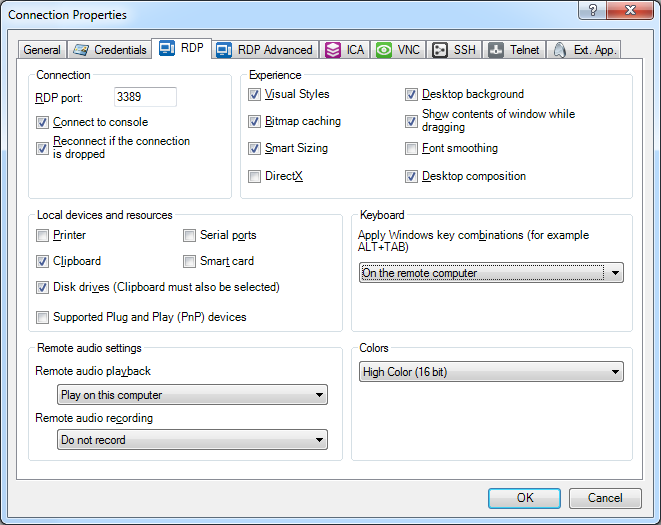
Set “Apply Windows key combinations” to “On the remote computer”
–jeroen

Posted in Power User, Remote Desktop Protocol/MSTSC/Terminal Services, Windows | Leave a Comment »
Posted by jpluimers on 2015/12/03
I wish I had seen this years ago, as I’ve always had a hate-hate relationship with many shells on many OS-es.
I’ve included the ToC; read the rest of BashPitfalls: common errors that Bash programmers make – Greg’s Wiki back-to-back. It’s worth it, really.
Bash Pitfalls
This page shows common errors that Bash programmers make. These examples are all flawed in some way.
You will save yourself from many of these pitfalls if you simply always use quotes and never use WordSplitting for any reason! Word splitting is a broken legacy misfeature inherited from the Bourne shell that’s stuck on by default if you don’t quote expansions. The vast majority of pitfalls are in some way related to unquoted expansions, and the ensuing word splitting and globbing that result.
Contents
Posted in bash, Development, Scripting, Software Development | Leave a Comment »
Posted by jpluimers on 2015/12/03
Nested DataSet fields assume identical naming of fields and parameters as Richard Stevens did comment in So I’m in total n00b mode here. I’m trying to set up a master/detail….
Of course the documentation for that is easy to find. Not.
Even this article by Cary Jensen doesn’t reveal the issue: Nesting DataSets in ClientDataSets.
So thanks Richard for clearing that up!
–jeroen
Posted in Delphi, Delphi 10 Seattle, Delphi 2007, Delphi XE, Delphi XE2, Delphi XE3, Delphi XE4, Delphi XE5, Delphi XE6, Delphi XE7, Delphi XE8, Development, Software Development | Leave a Comment »
Posted by jpluimers on 2015/12/02
Reading a thread with ramblings on failing to understand that packed records overrides the $ALING directive, I found out that there is also an Undocumented Delphi record alignment directive – Chee Wee’s blog: IT solutions for Singapore and companies worldwide.
David Heffernan mentioned some nice permutations in the first thread.Chee Wee Chua “documents” the second. Both provide great reference material.
Note that both directive require a const expressions evaluating to a power of two. If you don’t, you get the same error: E2573 Illegal value for the ALIGN directive (valid for one of 1, 2, 4, 8 or 16) (Delphi) – RAD Studio
–jeroen
via:
Posted in Delphi, Delphi 10 Seattle, Delphi XE5, Delphi XE6, Delphi XE7, Delphi XE8, Development, Software Development | 2 Comments »
Posted by jpluimers on 2015/12/02
For my link archive:
# Ensure that Apache listens on port 443
Listen 443

# Listen for virtual host requests on all IP addresses
NameVirtualHost *:443

# Go ahead and accept connections for these vhosts
# from non-SNI clients
SSLStrictSNIVHostCheck off


  # Because this virtual host is defined first, it will
  # be used as the default if the hostname is not received
  # in the SSL handshake, e.g. if the browser doesn't support
  # SNI.
  DocumentRoot /www/example1
  ServerName www.example.com

  # Other directives here


  DocumentRoot /www/example2
  ServerName www.example2.org

  # Other directives here
One more time as WordPress screws XML:
| # Ensure that Apache listens on port 443 | |
| Listen 443 | |
| # Listen for virtual host requests on all IP addresses | |
| NameVirtualHost *:443 | |
| # Go ahead and accept connections for these vhosts | |
| # from non-SNI clients | |
| SSLStrictSNIVHostCheck off | |
| <VirtualHost *:443> | |
| # Because this virtual host is defined first, it will | |
| # be used as the default if the hostname is not received | |
| # in the SSL handshake, e.g. if the browser doesn't support | |
| # SNI. | |
| DocumentRoot /www/example1 | |
| ServerName http://www.example.com | |
| # Other directives here | |
| </VirtualHost> | |
| <VirtualHost *:443> | |
| DocumentRoot /www/example2 | |
| ServerName http://www.example2.org | |
| # Other directives here | |
| </VirtualHost> |
–jeroen
Source: NameBasedSSLVHostsWithSNI – Httpd Wiki
Posted in *nix, Apache2, Power User | Leave a Comment »
Posted by jpluimers on 2015/12/02
A small video reference to the work that Peter Sollich did for the Pascal world is at around 38:20 in this video: https://www.youtube.com/watch?v=btGj-PocjeU#t=2298
It is where Allen Bauer talks about his early years at Borland. He talks about a German guy there without naming him. It is Peter Sollich (he names them a few time in the newsgroups though).
Peter Sollich came from Germany where he had written a Turbo Pascal compatible compiler for the Atari ST (it used a m68k Motorola 68000 CPU which is a 32-bit processor on the internal side with a 16-bit wide data bus (transporting 16-bit words) on the outside using a 24-bit address (so it can address 16 mebibytes of memory) – hence ST for Sixteen/Thirtytwo).
Borland bought the source code which formed the base for the current 32-bit x86 compiler implementations of both Delphi and C++ Builder (they hired him as a contractor to do the port).
Rumour goes that Peter wrote many parts of the x86 code emitter on the flight from Europe to the USA.
Before the ST era there was already a CP/M Modula-2 compiler written by Peter Sollich and Martin Odersky which Borland bought even earlier and was turned into Turbo Modula-2.
For people interested, here are some links with ore details – where possible I saved them in the WayBack machine as sites tend to Ditch historically important information:
–jeroen
Posted in .NET, Borland Pascal, Delphi, Development, Pascal, Software Development, Turbo Pascal | 4 Comments »
 The Wiert Corner - irregular stream of stuff