The Wiert Corner – irregular stream of stuff

Jeroen W. Pluimers on .NET, C#, Delphi, databases, and personal interests

  • My badges

  • Twitter Updates

  • My Flickr Stream

  • Pages

  • All categories

  • Enter your email address to subscribe to this blog and receive notifications of new posts by email.

    Join 1,854 other subscribers

Delphi and COBOL syntax highlighters

Posted by jpluimers on 2011/06/21

I’ve been working on a project that uses both COBOL and Delphi.

For documentation purposes, Syntax Highlighted code makes your code so much easier to read.

Delphi has GExperts for source code export (in either HTML or RTF), but it took me a while to find a good syntax highlighter for COBOL.

I finally found a COBOL syntax highighter at tohtml.com: it exports to HTML.

I’m glad I found that site, as they have a ton of syntax highlighters, divided into groups.

Quite amusing to see COBOL classified as ‘rare’ (given that it has one of the largest code bases in the world).

This is what they support:

  • main: Java
  • main: C
  • main: Visual Basic
  • main: PHP
  • main: C++
  • main: Perl
  • main: Python
  • main: C#
  • main: Ruby
  • main: JS.NET
  • main: VB.NET
  • main: Pascal
  • main: JavaScript
  • inet: html
  • inet: css
  • inet: css for html
  • inet: css for svg
  • inet: jsp
  • inet: xhtml transitional
  • inet: xhtml strict
  • inet: xhtml frameset
  • inet: asp – VBScript
  • inet: asp – JavaScript
  • inet: asp – PerlScript
  • inet: SVG 1.0
  • inet: ColdFusion
  • inet: ActionScript
  • inet: VBScript
  • xml: xml
  • xml: dtd
  • xml: xslt 1.0
  • xml: XML Schema
  • xml: Relax NG
  • xml: xlink
  • database: Clarion
  • database: Clipper
  • database: FoxPro
  • database: SQLJ (Java sql)
  • database: Paradox
  • database: SQL, PL/SQL
  • database: MySQL
  • scripts: Batch/Config.sys/NTcmd
  • scripts: sh/ksh/bash script
  • scripts: Apache httpd.conf
  • scripts: Config, INI and CTL
  • scripts: Colorer HRC
  • scripts: Colorer HRD
  • scripts: Delphi form
  • scripts: Java Compiler Compiler
  • scripts: Java properties
  • scripts: Lex
  • scripts: YACC
  • scripts: makefile
  • scripts: Regedit
  • scripts: Resources
  • scripts: TeX
  • scripts: OpenVMS DCL
  • scripts: VRML
  • scripts.install: RAR Install Script
  • scripts.install: Nullsoft Install Script
  • scripts.install: InnoSetup script
  • scripts.install: IS script
  • rare: ASM
  • rare: 1C
  • rare: Ada
  • rare: ABAP/4
  • rare: AutoIt 2.x
  • rare: AWK
  • rare: Dssp
  • rare: ADSP-21xx Asm
  • rare: Baan
  • rare: Cache/Open-M
  • rare: Cobol
  • rare: Eiffel
  • rare: Forth
  • rare: Fortran
  • rare: Haskell
  • rare: Icon
  • rare: IDL
  • rare: Lisp
  • rare: MatLab
  • rare: Modula2 and Oberon2
  • rare: PicAsm
  • rare: Rexx
  • rare: Standard ML
  • rare: OCaml
  • rare: Tcl/Tk
  • rare: Sicstus Prolog
  • rare: Turbo Prolog
  • rare: Verilog HDL
  • rare: VHDL
  • rare: z80asm
  • rare: asm80
  • rare: 8051 asm
  • rare: AVR asm
  • other: files.bbs
  • other: Diff/Patch
  • other: message
  • other: plain text
  • other: default type

--jeroen

Posted in COBOL, Delphi, Development, LISP, Software Development | 6 Comments »

Get All Angry Birds Levels in Chrome HTML5 Version with a quick hackWes Bos | Wes Bos

Posted by jpluimers on 2011/06/20

Don’t you love open software: Get All Angry Birds Levels in Chrome HTML5 Version with a quick hackWes Bos | Wes Bos.

–jeroen

Posted in Power User | Leave a Comment »

Uninstalling stray SoundMAX remnants

Posted by jpluimers on 2011/06/17

Recently, I upgraded from a T61p laptop to a W701.

Moving the HDD to the new system was relatively straight forward: you get a 0xC000000E error during boot because the BIOS HDD setup by default is in RAID mode; switching it to AHCI lets you boot fine.

I installed the drivers needed for the new hardware and uninstalled all the unneeded drivers.

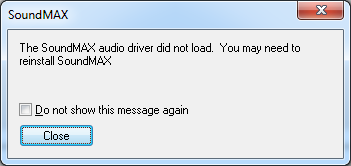
Still the system kept complaining with this message from:

[SoundMAX]
The SoundMAX audio driver did not load. You may need to reinstall SoundMAX.
[ ] Do not show this message again
[Close]

Disabling is not a good solution: it is a per user setting in the Registry, so logging in as a different user will still bring up the same message.

The real solution is to remove the remnants that the uninstall of the SoundMAX driver package left around.

Process Explorer from SysInternals has a nice “Find Window’s Process” feature to find out which process did show the message, and the executable started for that process:  “C:\Program Files (x86)\Analog Devices\Core\smax4pnp.exe

Then I used autoruns from SysInternals to find where smax4pnp.exe was started from: a Registry entry under HKEY_LOCAL_MACHINE\SOFTWARE\Wow6432Node\Microsoft\Windows\CurrentVersion\Run:  SoundMAXPnP containing the above path.

I deleted that registry key from within autoruns, moved the “C:\Program Files (x86)\Analog Devices” directory tree to the recycle bin using Windows explorer, then rebooted: problem solved.

–jeroen

Posted in BIOS, Boot, Power User | Leave a Comment »

IBM turns 100 today: Happy birthday, IBM

Posted by jpluimers on 2011/06/16

Today, a lot of articles and blogs will mention IBM’s 100th birthday.

My first encounter were their Selectric typewriters, followed by their PC and AT computers at high-school and university, both setting standards for personal computing.

I’ve used their AS/400 machines (via iSeries now named System i, and merged into their IBM Power Systems), RS/6000 (now System p) and mainframes (via zSeries now named System z) too.

However, being mainly on the PC side, I got totally addicted to their keyboards and to their  ThinkPad line of machines that – as part of IBM’s PC devision – got sold to Lenovo, and their hard drives (which got sold to HGST and are now part of Western Digital).

IBM still do a lot of research, which sets them apart from many other IT companies.

I love that, as a lot of good things has come from it: just google it or browse their lists with highlights on their research accomplishments.

Happy birthday IBM.

–jeroen

Posted in About, Opinions, Personal | Leave a Comment »

Finding out which client process is using a Windows network share

Posted by jpluimers on 2011/06/16

Sometimes when you want to release a network drive you get an error message that something still uses it:
C:\>net use h: /d
The device is being accessed by an active process.

More help is available by typing NET HELPMSG 2404.

Finding out about that something is the trick.
Luckily, Process Explorer allows you to search for handles pointing to resources that start with \device\lanmanredirector, as ASK-LEO explains.

–jeroen

Posted in Power User, Windows, Windows 7, Windows Vista, Windows XP | Leave a Comment »

#TMobile NL #fail: SSL error because of expired certificate when viewing MMS messages

Posted by jpluimers on 2011/06/15

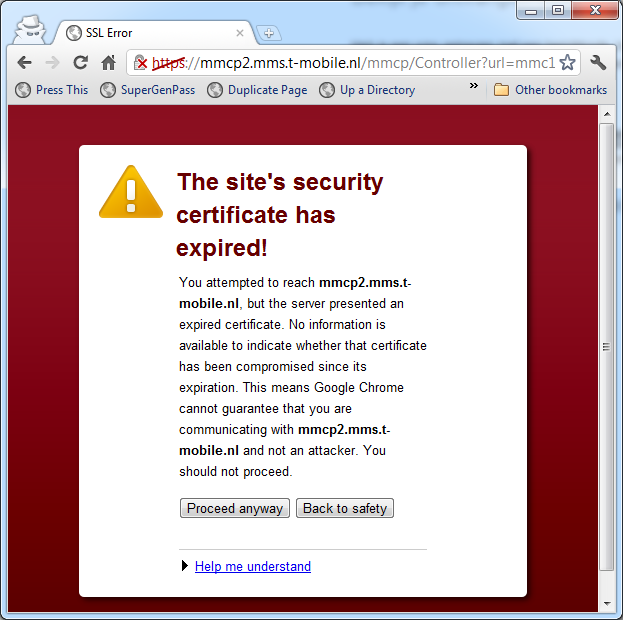
When visting the Dutch TMobile site for viewing MMS messages, you get a big security message indicating their certificate has expired.

In fact, it expired on 20110612.
For me it is unbelievable that nobody at TMobile has been able to get the renewed certificate on-line yet!

In Google Chrome the message reads like this:

The site’s security certificate has expired!
You attempted to reach mmcp2.mms.t-mobile.nl, but the server presented an expired certificate. No information is available to indicate whether that certificate has been compromised since its expiration. This means Google Chrome cannot guarantee that you are communicating with mmcp2.mms.t-mobile.nl and not an attacker. You should not proceed.

Help me understand
When you connect to a secure website, the server hosting that site presents your browser with something called a “certificate” to verify its identity. This certificate contains identity information, such as the address of the website, which is verified by a third party that your computer trusts. By checking that the address in the certificate matches the address of the website, it is possible to verify that you are securely communicating with the website you intended, and not a third party (such as an attacker on your network).

For a certificate which has not expired, the issuer of that certificate is responsible for maintaining something called a “revocation list”. If a certificate is ever compromised, the issuer can revoke it by adding it to the revocation list, and then this certificate will no longer be trusted by your browser. Revocation status is not required to be maintained for expired certificates, so while this certificate used to be valid for the website you’re visiting, at this point it is not possible to determine whether the certificate was compromised and subsequently revoked, or whether it remains secure. As such it is impossible to tell whether you’re communicating with the legitimate web site, or whether the certificate was compromised and is now in the possession of an attacker with whom you are communicating. You should not proceed past this point.

–jeroen

Posted in Power User | Leave a Comment »

Top 10 Mobile Internet Trends

Posted by jpluimers on 2011/06/15

I’ve done quite a bit of mobile research development lately, so it was good to come accross the Top 10 Mobile Internet Trends (Feb 2011) slide deck.

Looking into the future is always surrounded with a lot of uncertainty, but that deck has quite some interesting data.

–jeroen

Posted in Development, Mobile Development | Leave a Comment »

c# – Generics and nullable type – Stack Overflow

Posted by jpluimers on 2011/06/14

A while ago, I needed some generic way of parsing data that could result instancef of both regular ordinal and nullable ordinal types.

Luckily there was a nice question about this on StackOverflow, of which I liked this answer (source code below) much more than the accepted answer: concise, elegant, period.

    public static T? Parse(this string text) where T: struct
    {
        object o = null;
        try
        {
            var ttype = typeof(T);
            if (ttype.IsEnum)
            {
                T n = default(T);
                if (Enum.TryParse(text, true, out n))
                    return n;
            }
            else
                o = Convert.ChangeType(text, ttype);
        }
        catch { }

        if (o == null)
            return new Nullable();

        return new Nullable((T)o);
    }

–jeroen

Posted in .NET, C#, C# 2.0, C# 3.0, C# 4.0, Development, Software Development | 1 Comment »

Resize your VMware ESXi/ESX/vSphere disks (via JJClements.co.uk)

Posted by jpluimers on 2011/06/13

James Clements explains how to resize your VMware ESXi/ESX/vSphere disks.

You can resize the disks live when using ESXi/ESX/vShere 4 and up.

When using Windows Vista or 2008 and up, you don’t need special tools for resizing the partitions on those disks: the built-in disk manager can do it.

When using Windows 2003 Server, Windows XP or less, then you need the EXTPART tool from Dell as explained by GeekSeat:

All you need to do now is provision the extra space to the VM, then run the tool at the command line and follow the wizard:

C:\>extpart.exe
ExtPart - Utility to extend basic disks (Build 1.0.4)
(c) Dell Computer Corporation 2003
.
Volume to extend (drive letter or mount point): c:
Current volume size : 66285 MB (69504860160 bytes)
Current partition size : 76285 MB (79990815744 bytes)
Size to expand the volume (MB): 76285

that’s it – job done . . zero downtime (watch out of course . . this works differently if you have a clustered disk to extend – see: http://geekseat.wordpress.com/2011/01/25/replacing-clustered-storage-for-a-sql-cluster-emc-ce-ms-clustering/ )

Note the “Size to expand” is actually the number of MB you are adding to the volume as Redelijkheid explains.

Sometimes you need to do this in multiple steps as diskmgmt.msc does not always give the free partition space in megabytes.

There is no need to reboot after expanding using ExtPart.

Edit: 20111222; you can download ExtPart through the DELL web-site; there are also direct http downloads of the EXE and README, and direct ftp downloads for the EXE and README.

If you don’t trust ExtPart, there is always the GParted way as explained by BleepingComputer.com.

–jeroen

via: 

Posted in ESXi4, ESXi5, ESXi5.1, Power User, VMware, VMware ESXi | 2 Comments »

Technet / MSDN Subscriber Downloads: downloading the Office Language Pack for your specific languages

Posted by jpluimers on 2011/06/10

In the past the Office 2003 Proofing Tools contained the proofing and grammar tools for many languages.

Not so any more since Office 2007 and up.

So when needing the non-English proofing and grammar tools for a particular VM, I trapped into the same pit I fell in before: downloading the Office Language Pack 2010, I only got the English proofing and grammar tools instead of the tools for many languages.

Downloading them from Technet or MSDN for a particular language is of course easy: for each language you need:

  1. in the “Languages” combobox, select your language
  2. download the Office Language Pack for that language

Duh :)

After that, be sure to switch back the language to your default preferred language ;-)

–jeroen

Posted in Power User | Leave a Comment »