The Wiert Corner – irregular stream of stuff

Jeroen W. Pluimers on .NET, C#, Delphi, databases, and personal interests

  • My badges

  • Twitter Updates

  • My Flickr Stream

  • Pages

  • All categories

  • Enter your email address to subscribe to this blog and receive notifications of new posts by email.

    Join 1,862 other subscribers

Archive for August, 2010

Speaking at Delphi Live 2010 USA and EKON 14 Germany

Posted by jpluimers on 2010/08/18

Next week, I’ll be speaking at Delphi Live 2010 in San Jose, California., USA.
At the end of september, I’ll be speaking at EKON 14, in Darmstadt, Germany. My 14th appearance at EKON!

Delphi Live (sessions in English):

EKON 14 (Sessions auf Deutsch / in German):

Hope tho see some of you people at one of those events.

I will bring some USB audio equipment, so I might do a bit of geek stuff doing ASIO audio on those events too.

–jeroen

Posted in Conferences, Delphi, DelphiLive, Development, EKON, Event, Software Development | 5 Comments »

Allen Bauer sheds more light on the goal of the 64-bit support level for Delphi, and the goal of the x64 Delphi and x64 C++ release time frames

Posted by jpluimers on 2010/08/17

On the Embarcadero forum, Jolyon Smith asked about the underlying meaning of the 64-bit Pulsar statements in the updated Roadmap.
He did not ask for an exact date, but what level of 64-support is the current goal.

Allen Bauer (Chief Scientist at Embarcadero) was kind enough to put up a few answers.

A few quotes are below, please read the full thread titled Embarcadero Discussion Forums: Roadmap: Clarification Required Please … for the exact answers.
It basically boils down to this: Read the rest of this entry »

Posted in Delphi, Development, Software Development | 9 Comments »

x64 support in ESXi4.1 requires VT, I know that! but why warn so late?

Posted by jpluimers on 2010/08/16

I know that ESXi 4.1 requires VT (the Intel support for hardware assisted virtualization) to be enabled to run x64 VMs.
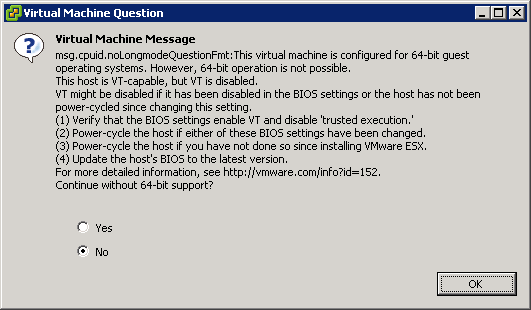
This is the warning that you get when starting an x64 VM, and you don’t have VT enabled:

[Window Title]
Virtual Machine Message
[Main Instruction]
Virtual Machine Message
msg.cpuid.noLongmodeQuestionFmt: This virtual machine is configured for 64-bit guest
operating systems. However, 64-bit operation is not possible.
This host is VT-capable, but VT is disabled.
VT might be disabled if it has been disabled in the BIOS settings or the host has not been
power-cycled since changing this setting.
(1) Verify that the BIOS settings enable VT and disable ‘trusted execution.’
(2) Power-cycle the host if either of these BIOS settings have been changed.
(3) Power-cycle the host if you have not done so since installing VMware ESX.
(4) Update the hosts’s BIOS to the latest version.
For more detailed information, see http://vmware.com/info?id=152
Continue without 64-bit support?
[Yes] [No] [OK]

Read the rest of this entry »

Posted in BIOS, Boot, ESXi4, Hardware, HP XW6600, Power User, Virtualization, VMware, VMware ESXi | 3 Comments »

Veeam FastSCP on ESXi 4.1: “API version on the server does not allow CreateDirectory operation” -> Upgrade to 3.0.3

Posted by jpluimers on 2010/08/13

Last week, I wrote Veeam Backup and Replication on ESXi 4.1: “Input string was not in a correct format.” -> Upgrade to 4.1.2

I was partially wrong in that Veam Backup FastSCP 3.0.2.270 did not work: that the alternative is Veeam Backup and Replication 4.1.2.
Well not completely: Veeam Backup and Replication 4.1.2 works, but a day after they released that 4.1.2 version, they also released Veeam Backup and FastSCP 3.0.3, which works too.
And of course they released it about half a day after I wrote the above post :-) Read the rest of this entry »

Posted in ESXi4, Power User, Veeam, VMware | 2 Comments »

TomTom Lifetime Maps/Traffic Subscription: should I do it?

Posted by jpluimers on 2010/08/12

I’m considering a TomTom Lifetime Maps/Traffic Subscription on a TomTom XXL 540 World Traveler’s Edition Series.

But given section 7 “Subscriptions (for Lifetime Maps/Traffic, see subparagraphs f and g only)” of their General Terms and Conditions (see below) – especially the underlined pieces below – I’m hesitating.

I have the gut feeling the same can happen with that device that happened with my HTC Advantage X7500 PDA:
it runs TomTom 6, since TomTom 7 does not support this PDA (might have to do with the 640×480 resolution of the PDA).
Newer maps don’t run on TomTom 6, so I’m stuck with old (Europe and USA) maps.

This TomTom XXL 540 WTE system is only available in the USA (not over here in Europe), and since I’ll be speaking at DelphiLive in less than 2 weeks from now: well, you’ll get my point :-)

I can’t seem to find out if this model has 4Gb or 2Gb memory; so anyone who knows that, please place a coment.
Also the screen resolution seems to be 480 x 272 (I’m used to 640 x 480), so I will probably need to get used to that if I buy.

So: Any opinions on what you think the map support lifetime of this XXL 540 WTE navi will be? Read the rest of this entry »

Posted in Opinions, Power User | Leave a Comment »

.NET: the TFS / Visual Studio mix: connecting from VS2008 to TFS2010 and CodePlex

Posted by jpluimers on 2010/08/11

Lately, CodePlex is in the progress of [WayBackmigrating from TFS2008 to TFS2010 (they [Archive.ishave done TFS05…TFS01 and TFS07; TFS06 and TFS08…TFS10 still need to be done).

When your projects have been migrated (or you are going to use TFS2010 yourself), and you use VS2008 (or VS2005 – which I have not tested yet), you need to perform some updates and configuration changes to connect to the new TFS2010 servers.

So this post is about connecting from VS2008 to TFS2010 on CodePlex.
The tips will also work when connecting to a regular TFS2010 server: the connection URL is slightly different. Read the rest of this entry »

Posted in .NET, CodePlex, Development, Software Development, Source Code Management, TFS (Team Foundation System) | Leave a Comment »

Quick Access Extension (Visual Studio equivalent of RAD Studio IDE Insight)

Posted by jpluimers on 2010/08/10

It is good to see the cross breeding effect works:

Last week, the Visual Studio 2010 Productivity Power Tools added Quick Access Extension, which is the Visual Studio equivalent of the Delphi RAD Studio IDE Insight.

It is a keyboard shortcut (Delphi: F6 or Ctrl-.; Visual Studio: Ctrl+3) to search and execute things defined by the environment:

  • menu options
  • configuration options
  • templates

Delphi has a few options that Visual Studio hasn’t and vice versa, but it comes really close.

–jeroen

Posted in .NET, Delphi, Development, Keyboards and Keyboard Shortcuts, Power User, Software Development, Visual Studio and tools | 2 Comments »

VMware ESXi 4.x: meaning of “Create User: User name or password has an invalid format” error

Posted by jpluimers on 2010/08/09

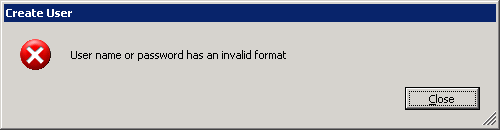
Sometimes when you add a new user to your ESXi 4.x installation, you get this error message (click for the full size picture):Create User: User name or password has an invalid format

Create User:  User name or password has an invalid format

Until now, only a few russian pages described the cause:
Without console login (or SSH  – see my blog tomorrow), you cannot see the obvious reason for this message:

Your password does not adhere to the ESXi 4.x password policy, which is more strict than the ESX/ESXi 3.x policy.

vm-help.com has a nice page describing the ESXi 4.x password policy, and how to alter it.

–jeroen

Posted in ESXi4, Power User, VMware | 2 Comments »

RDP to VMware host running an XP guest: Invisible Mouse Cursor on Text Editors

Posted by jpluimers on 2010/08/06

Scenario is this;

  1. RDP into a host running VMware
  2. Use the VMware client to run XP as guest
  3. Hover the mouse over a text editor
  4. The mouse cursor becomes invisible

I have seen it happen under these circumstances: Read the rest of this entry »

Posted in Power User, VMware, Windows, Windows 7, Windows Vista, Windows XP | 7 Comments »

Veeam Backup and Replication on ESXi 4.1: “Input string was not in a correct format.” -> Upgrade to 4.1.2

Posted by jpluimers on 2010/08/05

I’m in the process of moving the VMs on my ESX 3.5 box to an ESXi 4.1 box (so I can get ESXi 4.1 installed on the ESX 3.5 box).
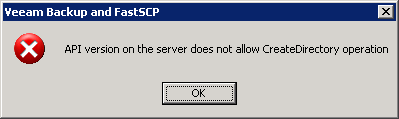
I tried copying over the files using the free Veeam Backup and FastSCP 3.0.2.270, but that obviously does not work well:

—————————
Veeam Backup and FastSCP
—————————
API version on the server does not allow CreateDirectory operation
—————————
OK
—————————

The free FastSCP works on a file by file base, but that won’t cut it.
Hoping the licensed product would work better, I registered for a trial of Veeam Backup and Replication (it is version 4.x in stead of FastSCP which is still 3.x).

The registration process went swift, but I was just a tad bit too early trying to run it against VMware ESXi 4.x: Read the rest of this entry »

Posted in ESXi4, Power User, Veeam, VMware | Leave a Comment »