


Recently, I had to restore StarTeam 2005 on a Windows 2003 Server.
An out-of-the-box install using MSDE 2000 does not want to run as a service.
This post shows you how I solved that problem. Read the rest of this entry »
Posted by jpluimers on 2010/08/24
Recently, I had to restore StarTeam 2005 on a Windows 2003 Server.
An out-of-the-box install using MSDE 2000 does not want to run as a service.
This post shows you how I solved that problem. Read the rest of this entry »

Posted in Database Development, Development, MSDE 2000, Power User, Software Development, Source Code Management, SQL Server, SQL Server 2000, StarTeam, Windows, Windows Server 2003 | Leave a Comment »
Posted by jpluimers on 2010/08/23
I had a really bad experience using Nokia Ovi Suite 2.2.0.241 to update my Nokia 6700 classic phone from v09.70 to v10.50.
This is what I did:
Now the phone is blank: everything was wiped off, the backup restauration failed. Read the rest of this entry »
Posted in Power User | Leave a Comment »
Posted by jpluimers on 2010/08/20
When you write .NET 4 software, you want to deploy it to your clients, so they need to install the .NET Framework 4.
On fully patched Windows Server 2003 x86 installations, the (optional) Windows Update for Microsoft .NET Framework 4 for Windows Server 2003 x86 (KB982671) usually results in this error:
Installation Failure
Error Code: 0x80246002
Try to install the update again, or request help from one of the following resources.
It fails during download, so it does not even reach the install phase.
Don’t loose too much time resolving this: The usual solution for 0x80246002 as described in KB958056 does not work.
The systems affected don’t have anti-virus or similar software installed, so disabling those won’t work: there is nothing to disable.
What does work is the suggestion a bit lower in the 0x80246002 update fails search results Read the rest of this entry »
Posted in .NET, Delphi, Development, Power User, Prism, Software Development | 8 Comments »
Posted by jpluimers on 2010/08/19
In my VM’s, I often run different instances and/or versions of SQL Server.
Finding the right instance of SQL server, and the right version of SQLCMD.EXE / OSQL.EXE can be a pain.
That’s why I have written the two batch-files shown below for that.
They are not perfect, but they do work for me, and show a few interesting batch-file tricks.
As for preferring SQLCMD: [WayBack] sql server – What are the differences between osql, isql, and sqlcmd? – Stack Overflow
This finds the most up-to-date SQLCMD.EXE (or OSQL.EXE for SQL Server 2000) and puts the location of it in the sqlcmd environment variable.
@echo off
rem find the highest version of SQLCMD.EXE or OSQL.EXE and put it in the sqlcmd environment variable
rem this prefers SQLCMD.EXE over OSQL.EXE

set sqlcmd=

for %%d in ("%ProgramFiles%", "%ProgramFiles(x86)%") do for %%v in (80, 90, 100) do for %%f in (OSQL, SQLCMD) do (
call :sqlcmdtest "%%~d\Microsoft SQL Server\%%v\Tools\Binn\%%f.EXE" %1
)

if !!==!%sqlcmd%! for %%f in (OSQL, SQLCMD) do (
call :find-on-path %%f.EXE
)

if !%1!==!! echo SQLCMD: %sqlcmd%
goto :exit

rem be carefull not to specify the .EXE in the %%f FOR loop-expression, otherwise it tries to dine SQLCMD.EXE and OQSL.EXE in the current directory

rem http://msdn.microsoft.com/en-us/library/ms178653.aspx
rem 80 = SQL Server 2000
rem 90 = SQL Server 2005
rem 100 = SQL Server 2008 and 2008 R2

:find-on-path
set sqlcmd=%~f$PATH:1
if not ""=="%sqlcmd%" set sqlcmd="%sqlcmd%"
goto :exit

:sqlcmdtest
if exist %1 if !%2!==!! echo found %1
if exist %1 set sqlcmd=%1

:exit
Tricks used:
This batch file finds the SQL Server instances on the local machines from the naming of the SQL Server services that are running.
Note that it won’t work if you choose custom names for your SQL Server services (but that will probably break a lot of other stuff out there as well).
@echo off
rem find best matching instance of SQL Server on this machine
set sqlinstance=
set sqlservice=
for /f "usebackq tokens=1,2,3 delims=:$" %%i in (`sc query`) do (
rem %%j is " MSSQL" because we dropped space as a delimiter
if "%%i"=="SERVICE_NAME" call :bare-service %%j %%k
)
if !%1!==!! echo SQL Instance=%sqlinstance%
if !%1!==!! echo SQL Service=%sqlservice%
goto :exit

:bare-service
rem %1 equals "MSSQL" because of the command-line parsing trims spaces
rem the order is important: we favour named instances over unnamed:
if "%1"=="MSSQLSERVER" call :process-instance %1 .
if "%1"=="MSSQL" call :process-instance MSSQL$%2 .\%2
goto :exit

:process-instance
if !%1!==!! echo found service "%1" providing instance "%2"
if "%sqlinstance%"=="" set sqlinstance=%2& set sqlservice=%1
for /f "usebackq tokens=1,2,3,4" %%s in (`sc query %1`) do (
if "%%s"=="STATE" if !%1!==!! echo state of %1 is %%v
)
goto :exit

:exit
Tricks used:
sc query sample fragment:
SERVICE_NAME: MSSQL$SQLEXPRESS
DISPLAY_NAME: SQL Server (SQLEXPRESS)
        TYPE               : 10  WIN32_OWN_PROCESS
        STATE              : 4  RUNNING
                                (STOPPABLE,PAUSABLE,ACCEPTS_SHUTDOWN)
        WIN32_EXIT_CODE    : 0	(0x0)
        SERVICE_EXIT_CODE  : 0	(0x0)
        CHECKPOINT         : 0x0
        WAIT_HINT          : 0x0
My final batch-file ties both together:
set sqlrun=
call %~dp0sql-find-sqlcmd.bat %*
call %~dp0sql-find-instance.bat %*
if not !!==!%sqlcmd%! if not !!==!%sqlinstance%! set sqlrun=%sqlcmd% -S %sqlinstance% -E
if !%1!==!! echo SQLRUN=%sqlrun%
The output of that batch-file is like this:
found "C:\Program Files\Microsoft SQL Server\90\Tools\Binn\OSQL.EXE"
found "C:\Program Files\Microsoft SQL Server\90\Tools\Binn\SQLCMD.EXE"
found "C:\Program Files\Microsoft SQL Server\100\Tools\Binn\OSQL.EXE"
found "C:\Program Files\Microsoft SQL Server\100\Tools\Binn\SQLCMD.EXE"
SQLCMD: "C:\Program Files\Microsoft SQL Server\100\Tools\Binn\SQLCMD.EXE"
found ".\SQLEXPRESS"
state of service MSSQL$SQLEXPRESS with SQL Server instance .\SQLEXPRESS is RUNNING
found "MSSQLSERVER" (.)
state of service MSSQLSERVER with SQL Server instance . is RUNNING
SQL Instance=.\SQLEXPRESS
SQLRUN="C:\Program Files\Microsoft SQL Server\100\Tools\Binn\SQLCMD.EXE" -S .\SQLEXPRESS -E
Hope this helps a few people.
–jeroen
Posted in CommandLine, Database Development, Development, Software Development, SQL Server | 8 Comments »
Posted by jpluimers on 2010/08/18
Next week, I’ll be speaking at Delphi Live 2010 in San Jose, California. , USA.
At the end of september, I’ll be speaking at EKON 14, in Darmstadt, Germany. My 14th appearance at EKON!
Delphi Live (sessions in English):
EKON 14 (Sessions auf Deutsch / in German):
Hope tho see some of you people at one of those events.
I will bring some USB audio equipment, so I might do a bit of geek stuff doing ASIO audio on those events too.
–jeroen

Posted in Conferences, Delphi, DelphiLive, Development, EKON, Event, Software Development | 5 Comments »
Posted by jpluimers on 2010/08/17
On the Embarcadero forum, Jolyon Smith asked about the underlying meaning of the 64-bit Pulsar statements in the updated Roadmap.
He did not ask for an exact date, but what level of 64-support is the current goal.
Allen Bauer (Chief Scientist at Embarcadero) was kind enough to put up a few answers.
A few quotes are below, please read the full thread titled Embarcadero Discussion Forums: Roadmap: Clarification Required Please … for the exact answers.
It basically boils down to this: Read the rest of this entry »

Posted in Delphi, Development, Software Development | 9 Comments »
Posted by jpluimers on 2010/08/16
I know that ESXi 4.1 requires VT (the Intel support for hardware assisted virtualization) to be enabled to run x64 VMs.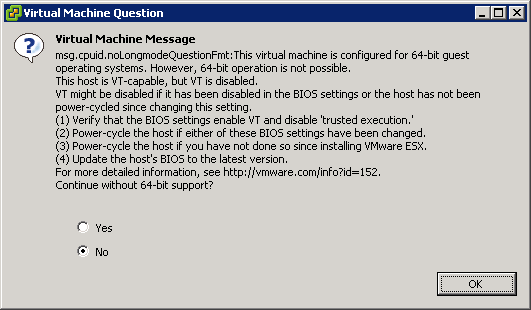
This is the warning that you get when starting an x64 VM, and you don’t have VT enabled:
[Window Title]
Virtual Machine Message
[Main Instruction]
Virtual Machine Message
msg.cpuid.noLongmodeQuestionFmt: This virtual machine is configured for 64-bit guest
operating systems. However, 64-bit operation is not possible.
This host is VT-capable, but VT is disabled.
VT might be disabled if it has been disabled in the BIOS settings or the host has not been
power-cycled since changing this setting.
(1) Verify that the BIOS settings enable VT and disable ‘trusted execution.’
(2) Power-cycle the host if either of these BIOS settings have been changed.
(3) Power-cycle the host if you have not done so since installing VMware ESX.
(4) Update the hosts’s BIOS to the latest version.
For more detailed information, see http://vmware.com/info?id=152
Continue without 64-bit support?
[Yes] [No] [OK]

Posted in BIOS, Boot, ESXi4, Hardware, HP XW6600, Power User, Virtualization, VMware, VMware ESXi | 3 Comments »
Posted by jpluimers on 2010/08/13
Last week, I wrote Veeam Backup and Replication on ESXi 4.1: “Input string was not in a correct format.” -> Upgrade to 4.1.2
I was partially wrong in that Veam Backup FastSCP 3.0.2.270 did not work: that the alternative is Veeam Backup and Replication 4.1.2.
Well not completely: Veeam Backup and Replication 4.1.2 works, but a day after they released that 4.1.2 version, they also released Veeam Backup and FastSCP 3.0.3, which works too.
And of course they released it about half a day after I wrote the above post :-) Read the rest of this entry »

Posted in ESXi4, Power User, Veeam, VMware | 2 Comments »
Posted by jpluimers on 2010/08/12
I’m considering a TomTom Lifetime Maps/Traffic Subscription on a TomTom XXL 540 World Traveler’s Edition Series.
But given section 7 “Subscriptions (for Lifetime Maps/Traffic, see subparagraphs f and g only)” of their General Terms and Conditions (see below) – especially the underlined pieces below – I’m hesitating.
I have the gut feeling the same can happen with that device that happened with my HTC Advantage X7500 PDA:
it runs TomTom 6, since TomTom 7 does not support this PDA (might have to do with the 640×480 resolution of the PDA).
Newer maps don’t run on TomTom 6, so I’m stuck with old (Europe and USA) maps.
This TomTom XXL 540 WTE system is only available in the USA (not over here in Europe), and since I’ll be speaking at DelphiLive in less than 2 weeks from now: well, you’ll get my point :-)
I can’t seem to find out if this model has 4Gb or 2Gb memory; so anyone who knows that, please place a coment.
Also the screen resolution seems to be 480 x 272 (I’m used to 640 x 480), so I will probably need to get used to that if I buy.
So: Any opinions on what you think the map support lifetime of this XXL 540 WTE navi will be? Read the rest of this entry »
Posted in Opinions, Power User | Leave a Comment »
Posted by jpluimers on 2010/08/11
Lately, CodePlex is in the progress of [WayBack] migrating from TFS2008 to TFS2010 (they [Archive.is] have done TFS05…TFS01 and TFS07; TFS06 and TFS08…TFS10 still need to be done).
When your projects have been migrated (or you are going to use TFS2010 yourself), and you use VS2008 (or VS2005 – which I have not tested yet), you need to perform some updates and configuration changes to connect to the new TFS2010 servers.
So this post is about connecting from VS2008 to TFS2010 on CodePlex.
The tips will also work when connecting to a regular TFS2010 server: the connection URL is slightly different. Read the rest of this entry »

Posted in .NET, CodePlex, Development, Software Development, Source Code Management, TFS (Team Foundation System) | Leave a Comment »
 The Wiert Corner - irregular stream of stuff