Archive for January, 2013
Posted by jpluimers on 2013/01/23
A while ago I found myself in .NET Assembly hell.
I inherited a bunch of interdependent .NET projects with no clear build instructions that were halfway ported between .NET 1.x and 4.x had various binaries here and there, a mix of of imported Office COM libraries and PIAs, links to various source code and binary versions 3rd party libraries like Microsoft Enterprise Library (which is very unforgiving when you get configuration wrong, and – because it uses dynamic loading and the version used was from before MEF – is painfully hard to track down wrong types and assemblies).
Basically the right assemblies got into the wrong places, the wrong assemblies in the right places, and a version mix up all over the place.
All in all it was a mess, and I was in .NET assembly hell.
It was a tedious and painful process to solve, so below are a few tips, links to posts and tools that helped me getting this solved. Read the rest of this entry »
Posted in .NET, .NET 1.x, .NET 4.0, Development, Software Development | Leave a Comment »
Posted by jpluimers on 2013/01/22
I normally don’t do much VBScript stuff, but sometimes I have to, and these tips helped me big time:
–jeroen
This was the script in question (mimicked a bit after Prnmngr.vbs): Read the rest of this entry »
Posted in Development, Scripting, Software Development, VBScript, Visual Studio 11, Visual Studio 2005, Visual Studio 2008, Visual Studio 2010, Visual Studio and tools | Leave a Comment »
Posted by jpluimers on 2013/01/21
I’m going to try PowerLine.
My story is similar to Les at How Big Is Your Network?.
15 years and still growing
In 1995 I wired the house with thin net coax (10base2 w/ BNC connectors), because it did not require any expensive hubs of the day. Those old wires are still in place. The cable modem connects to a Netgear wireless router with four wired plugs. Two go to computers, one to xbox 360 and forth to Netgear hub 24 10baseT and 1 10Base2 (BNC) ports. Connected to the 24 port hub via cat 5 are another computer, 1 inkjet printer, 1 laser printer and an SMC power line Ethernet adapter. The powerline adapter connects to another SMC adapter and switch in storage building about 100 yards away from the house. This storage building has my old computers, Apple II, C64, Atari , iMac etc. Via the BNC port another 2 computers are connected in other parts of the house. Each room to which the 10base2 cable runs has a 4 port hub with BNC and RJ45 ports to allow for cat 5 connections. Last there is a laptop and an desktop in the house connected to the wireless router.
—Guest Les
 I built my first network in my first rental home: a 2-room apartment with a living/study/kitchen/balcony of about 38 m^2, a bedroom of about 16 m^2 and a bathroom/shower of about 4 m^2. A crazy place (for one because the landlord choose to install 16 A D-type fuse in the main fuse box delivering power to multiple 25 A fuses in the apartment, so I once had the main fuse explode).
It was the place where I established my first company, had a BBS called The White House (which was in part true, as most of the house was indeed white), frequented the comp.font newsgroup (as I landed a PostScript/TrueType digitizing font job in about 1990) and comp.lang.pascal group, and was public domain author.
Having a single computer multitasking BBS, work and storage using DESQview (video) wasn’t the best. So when I earned enough money using Turbo Pascal 6 and Turbo Pascal for Windows, and with student editions of DOS 5.0, Windows 3.0, and Netware 3.x I built my own network. Read the rest of this entry »
Posted in About, Font, Personal, Power User | 2 Comments »
Posted by jpluimers on 2013/01/20
Any geeks that already have this one?
If so, please let me know what you think of it.
Pebble: E-Paper Watch for iPhone and Android

–jeroen
via: Pebble.
Posted in Android Devices, Apple, iOS, iPhone, Power User | Tagged: android, gadgets, geeks, iphone, technology | Leave a Comment »
Posted by jpluimers on 2013/01/20
On my interest list: game written in Delphi and now being ported to FreePascal under Lazarus for multi-platform reasons: Agenda for 2013 | www.SaschaWillems.de.
–jeroen
Posted in Delphi, Development, FreePascal, Lazarus, Pascal, Software Development | 9 Comments »
Posted by jpluimers on 2013/01/19
I love Google:
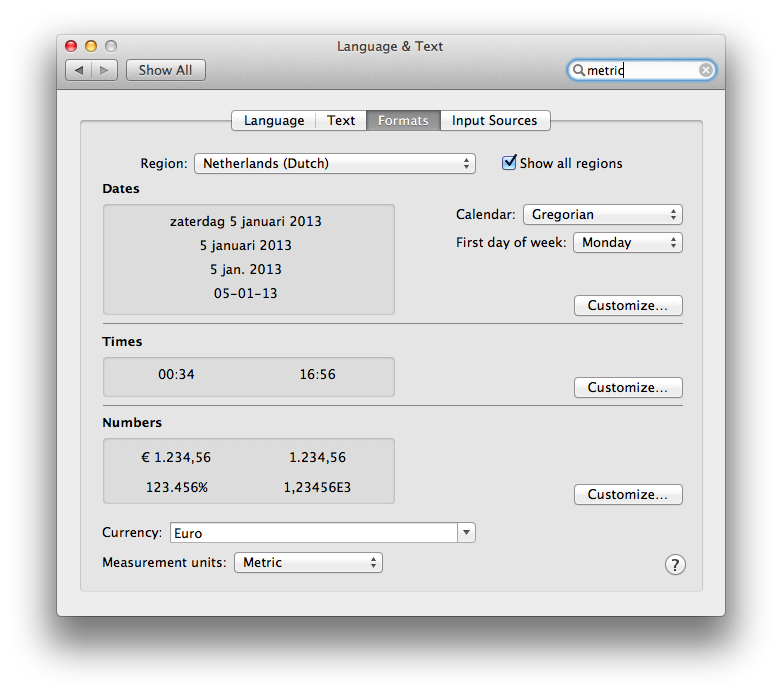
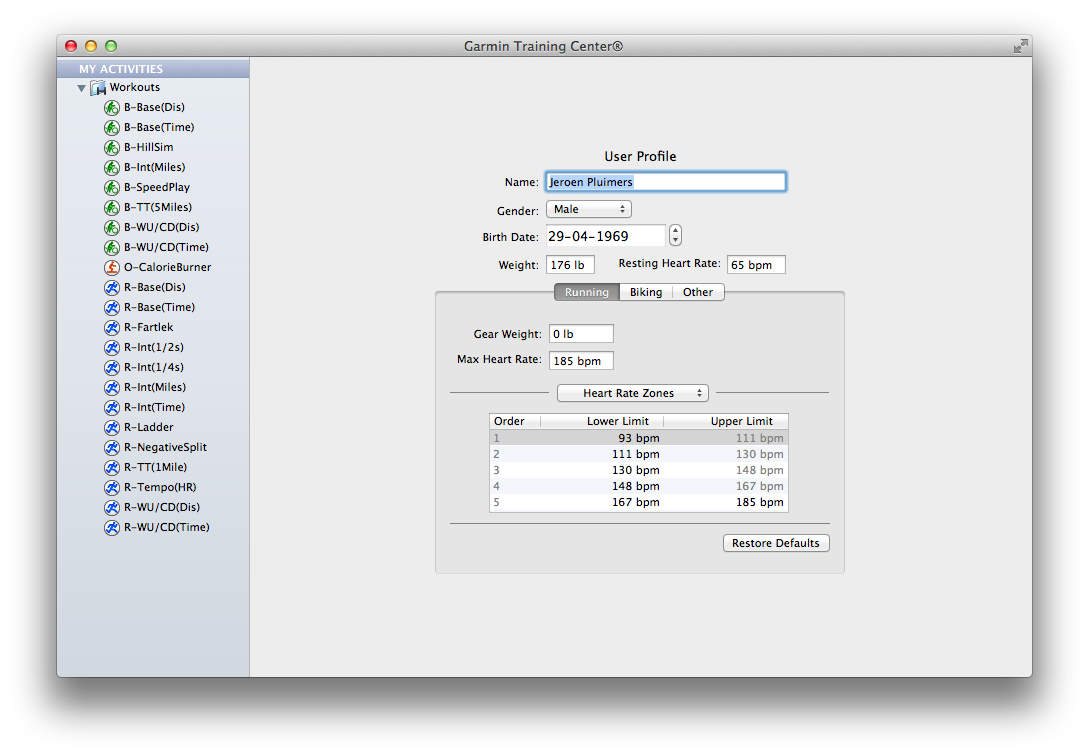
Especially since there is still software like Garmin Training Center for Mac on Mac OS X with – in the System Preferences – the Measurement Units set as Metric, insists on entering weight as lb, and workout distance in miles.
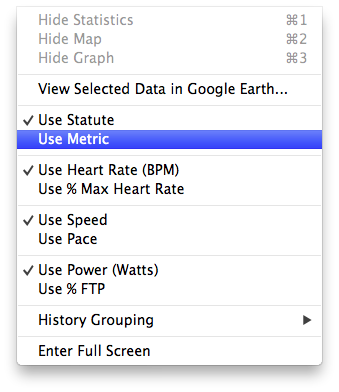
The reason is that Garmin Training Center on Mac OS X has its own “Measurement Units” settings. Where Mac OS lets the system wide setting be either “Metric” or ” US”, Garmin choose between “Metric” and “Statute” (the latter is default, not the OS X setting).
The problem is twofold:
Garmin has head offices and most of their customers outside the USA, so why insist on US units being default, and why not link the setting to the Mac OS X Preference?
UX #fail.
Oh BTW: if you connect your Garmin device, and GTC still indicates “no fitness device was found”, then use a different USB Cable and don’t connect it through a hub: the device is very picky on talking over USB (charging over USB works with virtually any USB cable).

Garmin Training Center on Mac OS X insists in imperial units, even though the system is configured as metric.

Garmin Training Center on Mac OS X has its own “Measurement Units” settings. Where Mac OS lets the system wide setting be either “Metric” or ” US”, Garmin choose between “Metric” and “Statute” (the latter is default, not the OS X setting).

Even after setting the Garmin Training Center to “Metric”, it still lists “Miles” in your workouts.
–jeroen
Posted in Google, GoogleSearch, Opinions, Power User, User Experience (ux) | Tagged: gadgets, garmin, google, imperial units, kg, mac os x, measurement units, metric, os x, software, system preferences, technology, workout | Leave a Comment »
Posted by jpluimers on 2013/01/18
In most database index nodes are doubly linked to allow bi-directional scans. http://is.gd/8CMb7w, however not for InterBase and FireBird, there the reverse link isn’t used because it can be inconsistent due to write order of index pages.
The result is that in Firebird and InterBase, indexes are single-directional (either ascending or descending).
This is for your safety: it guarantees index consistency, even if because of EMP, your machine suddenly reboots after your tank fired a missile.
–jeroen
via Twitter / Avalanche1979: @SQLPerfTips For Firebird the ….
(Wow, did I really wrote 1200 blog posts?)
Posted in Database Development, DB2, Development, Firebird, InterBase, MySQL, OracleDB, PostgreSQL, SQL Server, SQL Server 2000, SQL Server 2005, SQL Server 2008, SQL Server 2008 R2, SQL Server 2012, SQL Server 7, Sybase | Leave a Comment »
Posted by jpluimers on 2013/01/18
Though my [Wayback/Archive.is] Dell Dimension 9200/DXP061 machines already had 4 gigabyte of memory, I just learned they can go to 8 gigabyte of memory.
Multiple source confirm that it is possible to put 8 GB of memory in a Dell Dimension 9200/DXP061 (aka “Dell XPS 410”):
–jeroen
Posted in DELL-9200, Hardware, LifeHacker, Power User | Leave a Comment »
Posted by jpluimers on 2013/01/17
Last year, I missed this tiny sentence:
So in plain English, any VM that was generated on VMware ESX Server 3.5 or later can run atop ESXi 5.1 unchanged.
Which means it is a snap to move your VMs from older ESX / ESXi / vSphere versions as long as they are ESX 3.x or later.
In fact hardware version 7 has the widest compatibility amongst ESX/ESXi/vSphere/Fusion/Workstation/Player versions (see the table at the bottom).
The free version still has a 32 gigabyte physical RAM limit (people are still confused by the vRAM / Physical RAM distinction, especially since vRAM is not limited any more). Read the rest of this entry »
Posted in ESXi4, ESXi5, ESXi5.1, Excel, Fusion, Power User, VMware, VMware ESXi, VMware Workstation, Word | Tagged: computer, hardware version, hardware versions, machine hardware, physical ram, software, technology, version compatibility, virtual hardware, virtual machine, virtual machines, vm, vms | Leave a Comment »
Posted by jpluimers on 2013/01/17
Every once in a while, Office Communicator indicates a contact is not off-line and allows me to send messages to him/her, but then gives an error 504.
The reason is that the off-line status replicates slowly, so you were not aware your contact went off-line while typing the message.
The Error ID 504 is just an unfrienly way of saying “your contact went off-line, but you didn’t know that when sending the message, and I don’t have a friendly way of telling you this”.
–jeroen
via: Communicator 2007 R2 Help on Error ID 504.
Posted in Communicator, Office, Power User, Windows, Windows 7, Windows XP | Leave a Comment »




 The Wiert Corner - irregular stream of stuff