


Demo party time. Amazing. As it runs on an early 4.77 Mhz IBM 8088 PC with CGA video.
–jeroen
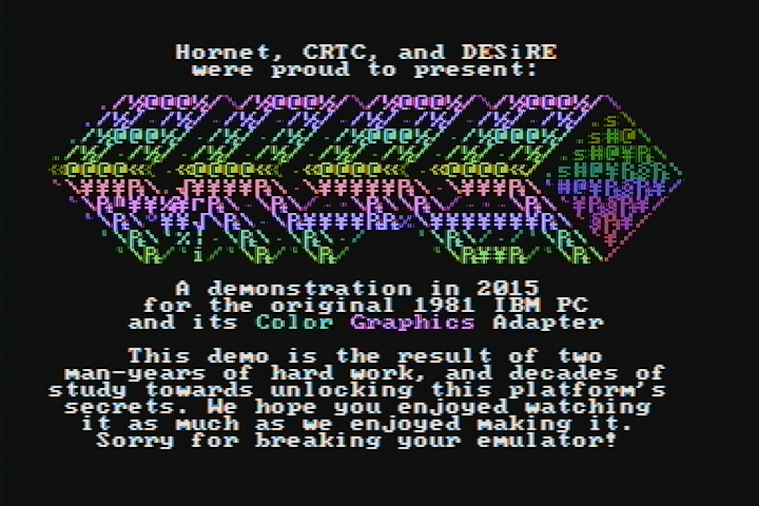
Posted by jpluimers on 2015/04/09
Demo party time. Amazing. As it runs on an early 4.77 Mhz IBM 8088 PC with CGA video.
–jeroen

Posted in History | Leave a Comment »
Posted by jpluimers on 2015/04/09
A while ago I wrote about Delphi XE7 is out with version 21.0.17017.3725; Spring4D is almost ready, now I can repeat parts of it for XE8.
The download links for Delphi XE8, C++Builder XE8 and RAD Studio XE8 are there: ftpd and altd. A whopping 7,217,184,768 bytes (compare that to XE7 update 1 at 5,649,917,952 bytes: almost 30% increase) that has been seeded a few days ago with the version time stamped at the end of last month (like xe7), here is the version number: 22.0.19027.8951.
Before installing, note that in addition to the below documentation links:
Be sure to have at least 70 gigabytes of free disk space before you attempt to install.
This in addition to the almost 7 GiB ISO file (:
The download is fast as altd is on akamai: the 7 GiB downloaded in about 16 minutes. Google can do the math.
On the Spring4D side, Stefan and Honza have added XE8 support, so a new release of that can be near.
Posted in Delphi, Delphi XE8, Development, Software Development | 9 Comments »
Posted by jpluimers on 2015/04/09
mos6502 wrote a really nice post on G+ with this quote:
“This is currently the oldest publicly available piece of source written by Bill Gates.”
A must read if you ever used Microsoft BASIC on a 6502 machine.
Lots of link to various sources of the Microsoft BASIC (it was developed on a PDP-10 that could even run the outputed 6502 assembly!)
–jeroen
via: We’ve already had some posts on the BASIC programming language for the 6502,….
Posted in 6502, BASIC, Development, History, Software Development | Leave a Comment »
Posted by jpluimers on 2015/04/08
On the research list because of this v1.5.1.90 feature:
{%forvariableinVariables %}{%ifvariable.Name =='MyAwesomeBuildVariable'and variable.Value !=''%}My Awesome Build Variable: {{ variable.Value }}{% endif %}{% endfor %}
Just to see if it can help solving this issue I am having:
Wish: expansion of both $$ and %% in the same string.
To circumvent this error (where %TargetVersion%=XE2):
Could not expand query ‘$Agent.Delphi.%TargetVersion%.Path$’. Object reference not set to an instance of an object.
–jeroen
via:
Posted in Continua CI, Continuous Integration, Development, Software Development | Leave a Comment »
Posted by jpluimers on 2015/04/07
During any software life cycle, you will want to phase out some code, and most likely want to mark code to be phased out in the future.
So here are two examples on how to do that in C# and in Delphi that just shows the effects of obsoleting/deprecating code.
Posted in .NET, .NET 1.x, .NET 2.0, .NET 3.0, .NET 3.5, .NET 4.0, .NET 4.5, C#, C# 1.0, C# 2.0, C# 3.0, C# 4.0, C# 5.0, C# 6 (Roslyn), Delphi, Delphi 2005, Delphi 2006, Delphi 2007, Delphi 2009, Delphi 2010, Delphi 6, Delphi 7, Delphi 8, Delphi XE, Delphi XE2, Delphi XE3, Delphi XE4, Delphi XE5, Delphi XE6, Development, Software Development | 6 Comments »
Posted by jpluimers on 2015/04/06
My response to the comments in Cut and Paste Files & Folders in Mac OS X got a bit took long. So here is it in an article:
Indeed. CUA. The days (:
I’ll write more about CUA in the future (there is some CUA site:wiert.me stuff from the past) as it defines a lot of modern UI and user experience.
In fact the history of Ctrl-C and Command-C goes back until before System 1 (the OS for the first Macintosh) which indeed had the Open Apple Key shortcuts, but didn’t introduce them.
The Command Key was introduced in the Apple III and became more popular in the Apple //e and //c (I own both) where AppleWorks was already using these shortcuts in 1986.
It is funny to notice that Apple keyboards lost their logo keys but Windows keyboards gained them.
Some Apple keyboard pr0n can be found on Wikipedia.
–jeroen
Posted in 6502, History, IBM SAA CUA, Keyboards and Keyboard Shortcuts | 1 Comment »
Posted by jpluimers on 2015/04/06
Thanks User Chris Page – Stack Overflow for answering on StackOverflow:
Some quotes of his answer:
As of Mac OS X Lion 10.7, Terminal includes exactly this functionality as a Service. As with most Services, these are disabled by default, so you’ll need to enable this to make it appear in the Services menu.
System Preferences > Keyboard > Keyboard Shortcuts > ServicesEnable New Terminal at Folder. There’s also New Terminal Tab at Folder, which will create a tab in the frontmost Terminal window (if any, else it will create a new window). These Services work in all applications, not just Finder, and they operate on folders as well as absolute pathnames selected in text.
…
In addition, Lion Terminal will open a new terminal window if you drag a folder (or pathname) onto the Terminal application icon, and you can also drag to the tab bar of an existing window to create a new tab.
…
Finally, if you drag a folder or pathname onto a tab (in the tab bar) and the foreground process is the shell, it will automatically execute a “cd” command. (Dragging into the terminal view within the tab merely inserts the pathname on its own, as in older versions of Terminal.)
…
You can also do this from the command line or a shell script:
open -a Terminal /path/to/folderThis is the command-line equivalent of dragging a folder/pathname onto the Terminal application icon.
–jeroen
via: osx – Open terminal here in Mac OS finder – Stack Overflow.
Posted in Apple, Mac, Mac OS X / OS X / MacOS, Mac OS X 10.7 Lion, OS X 10.8 Mountain Lion, OS X 10.9 Mavericks, Power User | 2 Comments »
Posted by jpluimers on 2015/04/03
Scary:
Pushing poisoned style sheets into documents to XSS into GMail via copy and paste.
“Affected” office software
Affected browsers
Flash can be used to attach as well.
Details: https://insomnihackdotme.files.wordpress.com/2015/03/copypest.pdf
Thanks Kristian for posting.
–jeroen
via:
Posted in Uncategorized | Leave a Comment »
Posted by jpluimers on 2015/04/03
Interesting:
To remove the language barrier, we have written a detailed step-by-step procedure to get the 36 TB free cloud storage from Qihoo 360 Cloud Drive.
For all those MSDN and TechNet ISOs that aren’t available on-line any more (:
–jeroen
via: How To Get 36 TB Free Cloud Storage From Qihoo 360 Yunpan (Cloud Drive)?.
Posted in Cloud Apps, Internet, Power User | Leave a Comment »
Posted by jpluimers on 2015/04/03
A really long time I wrote about Increasing your Windows XP NTFS disk size under VMware Workstation 7.
I totally forgot that article also included a link to do the same on ESXi the old fashioned style. The tool you needed back then (and still works) there is vmkfstools (the ESXi version, not the vCLI version), and use it like this to extend the VMDK disk to 60 gigabyte:
vmkfstools --extendvirtualdisk 60G /vmfs/volumes/datastore_name/vm_name/disk_name.vmdk
You can replace --extendvirtualdisk with -X.
However, nowadays you can do the same from the vSphere Client as explained by David Davis at How to Extend a vSphere Windows VM Disk Volume.
After that you follow the steps in the original article to increase the partition size inside Windows.
As of Windows Vista, this has become much easier, so there you go.
–jeroen

Posted in ESXi5.1, ESXi5.5, Fusion, Power User, VMware, VMware ESXi | Leave a Comment »
 The Wiert Corner - irregular stream of stuff