Posted by jpluimers on 2015/11/24
A while ago, I had this error on BitBucket:
Running git.exe with arguments "fetch --prune" failed with return code 128 and error output: "fatal: unable to access 'https://%account%@bitbucket.org/%user%/%repository%.git/': Unknown SSL protocol error in connection to bitbucket.org:443
A quick search for “Unknown SSL protocol error in connection to bitbucket.org:443” pointed me to a comment by Ludwik Trammer on an answer by Jordfräs:
I resolved the issue by upgrading from git 1.8 to git 2.0.
Which reminded me this was a Windows system, where there is no package manager that verifies how far your non-system software is behind.
One day, I will write a script that finds out about the git version history and inform me of major/minor versions I’ve skipped.
Some notes for that:
Probably I will need to do something similar for Mercurial/hg in the future as well.
–jeroen
via: git – Unknown SSL protocol error in connection – Stack Overflow
Posted in Development, DVCS - Distributed Version Control, git, Power User, Software Development, Source Code Management, Windows, Windows 7, Windows 8, Windows 8.1, Windows 9, Windows Server 2008, Windows Server 2008 R2, Windows Server 2012, Windows Server 2012 R2 | Leave a Comment »
Posted by jpluimers on 2015/11/24
A while ago, I came across a class having (among other members) two methods named like this:
Within one of the other members of the class, I had to (temporarily) Stop processing, then Start it again.
But I couldn’t, as neither Start, nor Stop would make a record of the state it left the instance in.
Always ensure you know the state of an instance.
So I added the state, and tests to ensure a Stop/Start change was indeed not breaking things.
–jeroen
Posted in .NET, .NET 1.x, .NET 2.0, .NET 3.0, .NET 3.5, .NET 4.0, .NET 4.5, C#, C# 1.0, C# 2.0, C# 3.0, C# 4.0, C# 5.0, C# 6 (Roslyn), Delphi, Delphi 10 Seattle, Delphi 2007, Delphi 2009, Delphi 2010, Delphi XE, Delphi XE2, Delphi XE3, Delphi XE4, Delphi XE5, Delphi XE6, Delphi XE7, Delphi XE8, Development, Software Development | 1 Comment »
Posted by jpluimers on 2015/11/23
I never found the cause for this error:
The number of connections to this computer is limited and all connections are in use right now. Try connecing later or contact your system administrator.
I tried all the links I found via The number of connections to this computer is limited and all connections are in use right now. Try connecing later or contact your system administrator. – Google Search
In the end I did a hard power down of the machine and rebooted. The error never returned.
I tried these links all to no avail:
–jeroen
Posted in Power User, Windows, Windows 8, Windows 8.1 | 2 Comments »
Posted by jpluimers on 2015/11/22
This is why I love GExperts. The experimental build, that is.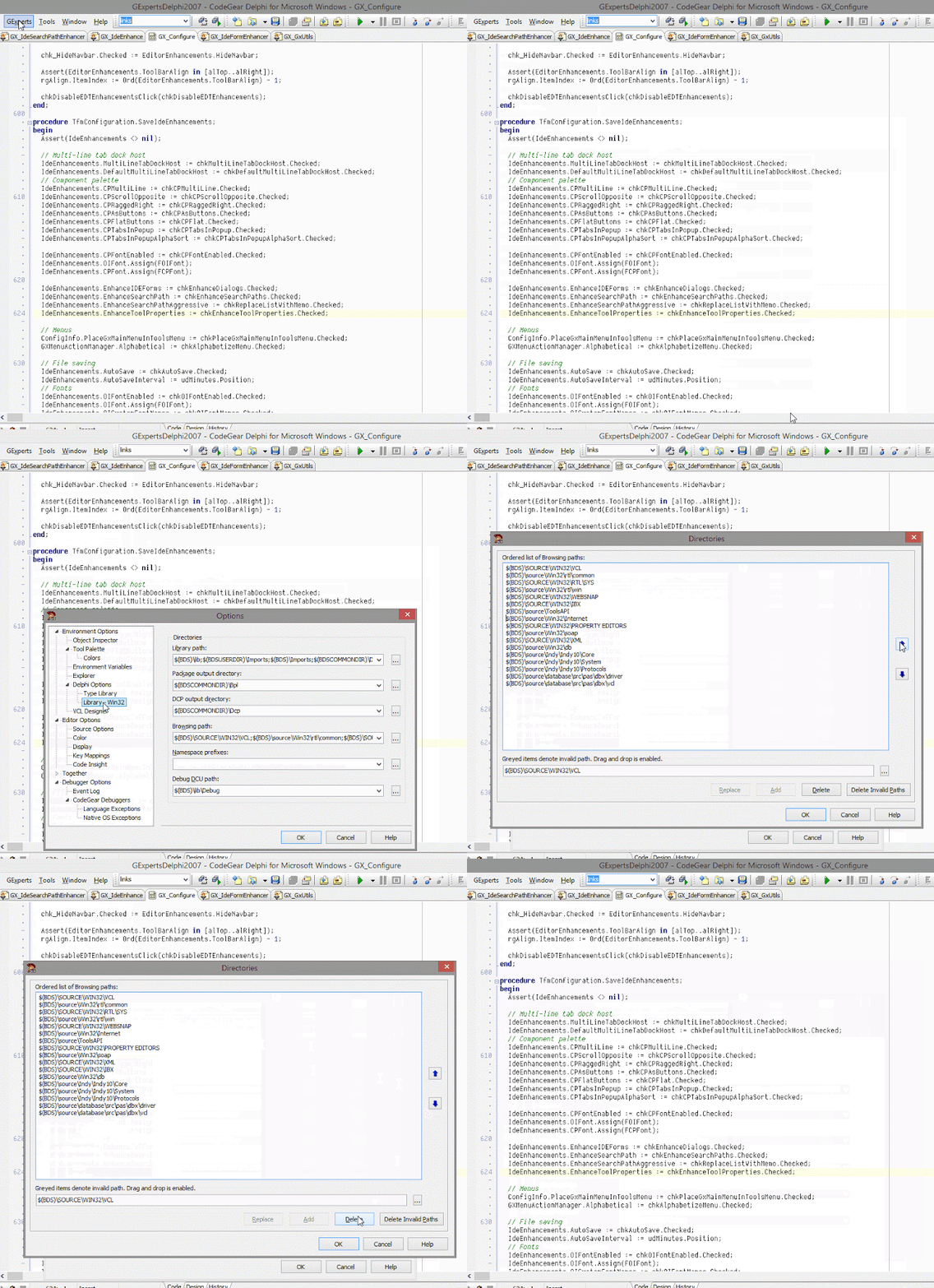 What do you think of this? – Thomas Mueller (dummzeuch) – Google+
Source: What do you think of this?
Posted in Uncategorized | Leave a Comment »
Posted by jpluimers on 2015/11/22
So after you carefully organised everything into circles over the last years,
with the new interface, G+ is moving away from the concept of circles. As Debi indicates, you can still find them if you tweak Settings and find the right places to click.
The classic G+ URL is https://plus.google.com/?gmbpt=true&fd=1
This is how to get to see who you have in each circle:
- On the left menu, hit “People”, then there are tabs to the top for Following and Followers.
- under “Following” you’ll finally get to see who you have in each circle.
This is to get some of your Circles back in the navigation on the left:
- go to Settings, then
-
Advanced Settings: Enable circle stream in navigation
–jeroen
Source: Also, do not pictures of people “in your circles,” or “have you in circles,” …
Posted in Uncategorized | Leave a Comment »
Posted by jpluimers on 2015/11/21
Google Groups allows you to create and participate in online forums and email-based groups with a rich experience for community conversations.
Source: Chrome not asking to save or saving passwords? – Google Product Forums
Posted in Uncategorized | Leave a Comment »
Posted by jpluimers on 2015/11/21
Not without reason there is a FAQ: How do I move my chat history over to my new Android phone?
Since Helium didn’t restore the WhatsApp settings and Android File Transfer refused to paste large files to the new Android phone, this is what I did
- On the target phone:
- Uninstall WhatsApp on the new phone
- Delete the folder in /storage/emulated/0/WhatsApp
- On the source phone:
- Follow the WhatsApp back-up steps in the above FAQ link
- Zip the folder/storage/emulated/0/WhatsApp
- Transfer it to DropBox using GhostCommander and the GC DropBox plugin
- On the target phone:
- Transfer WhatsApp.zip from DropBox
- Unzip it to the folder /storage/emulated/0/WhatsApp
- Install WhatsApp
- Restore the backup
–jeroen
Posted in Android Devices, Power User, WhatsApp for Android | Leave a Comment »





 The Wiert Corner - irregular stream of stuff