Archive for August, 2017
Posted by jpluimers on 2017/08/22
Found out about this a while ago:
MAC-Telnet – Open source MAC Telnet client and server for connecting to Microtik RouterOS routers and Posix machines via MAC address.
Source: haakonnessjoen/MAC-Telnet: Open source MAC Telnet client and server for connecting to Microtik RouterOS routers and Posix machines via MAC address. [Fork]
Background:
Earlier, I wrote about a Wireshark plugin for dissecting Mac-Telnet packets. Now I have created an open source application for connecting to a RouterOS router.
Source: RouterOS Mac-Telnet application for Linux users | Håkon Nessjøen [WayBack]
My previous post was about RouterOS Mac-Telnet application for Linux users where I talked about the MAC-Telnet client I created for Linux users.
Source: MAC-address based Telnet server in Linux | Håkon Nessjøen [WayBack]
–jeroen
Posted in C, Development, Internet, MikroTik, Power User, routers, Software Development | Leave a Comment »
Posted by jpluimers on 2017/08/21
‘Volgens mij gaat het niet om gebrek aan aanbod, maar om gebrek aan kénnis van het aanbod in Nieuw-West,’ schrijft Liesbeth van der Woud in een lezersbrief aan Het Parool.
Ze heeft helemaal gelijk: [WayBack] ‘Nieuw-West heeft veel te bieden voor herhaalbezoekers’ – Opinie – PAROOL
–jeroen
Posted in LifeHacker | 2 Comments »
Posted by jpluimers on 2017/08/21
I didn’t notice this bind change for a while, but some time ago after doing an rcnamed restart it would split out this error message:
the working directory is not writable
It seems harmless as BIND still starts:
Starting name server BIND ..done
Anyway, some links that helped me solve it:
The last entry provides the solution:
rcnamed stop

chown named:named /var/lib/named/ -R

rcnamed start

rcnamed status
The latter didn’t show any error message.
–jeroen
Posted in *nix, bind-named, Linux, openSuSE, Power User, SuSE Linux | Leave a Comment »
Posted by jpluimers on 2017/08/21
If you need to change the SIM code or disable it altogether on your Android device, here’s how to do just that: Android: How To Disable or Change SIM PIN Code and How to remove the PIN code from the SIM card | Table [WayBack]
Posted in Power User | Leave a Comment »
Posted by jpluimers on 2017/08/18
What directories to backup on ESXi apart from the VMs? – Server Fault [WayBack]:
You may want to look at purpose-built VMware backup tools. You will be very disappointed if you treat an ESXi host like a Linux/Unix server.
Use the VMware backup commands [WayBack] from a separate station, and you’ll be left with a nice configuration tarball. I would find another approach for the actual VM backups.
Edit: Host-based example
vim-cmd hostsvc/firmware/sync_config
vim-cmd hostsvc/firmware/backup_config
This stores the config in /scratch/downloads:
# vim-cmd hostsvc/firmware/backup_config
Bundle can be downloaded at : http://ip.of.esxi.host/downloads/52fd67ba-2fdf-9876-6651-46c3da638f1a/configBundle-centaur.ewwhite.net.tgz
Also see: http://www.virtuallyghetto.com/2013/02/how-to-backup-restore-free-esxi-host.html [WayBack]
–jeroen
Posted in ESXi5, ESXi5.1, ESXi5.5, Power User, Virtualization, VMware, VMware ESXi | Leave a Comment »
Posted by jpluimers on 2017/08/18
Twitter stores images on twimg.com in various sizes.
You specify the size by adding a colon plus suffix to the URL. No colon plus suffix means a default size.
Suffixes you can use see to come from the media entity in Entities in Objects | Twitter Developers:
There is one undocumented size: orig
The default size seems to be medium.
Examples (full images below):
Thanks to Thomas Petricek [WayBack] who poked fun last year on Twitter [WayBack] at both LaTeX and O RLY (the image meme [WayBack], not the text meme)
--jeroen
Read the rest of this entry »
Posted in Development, SocialMedia, Software Development, Twitter, Web Development | Tagged: coeffects, LaTeX | Leave a Comment »
Posted by jpluimers on 2017/08/17
Reproduction of A start job is running for dev-disk-by... – Google Photos / Oops. Let’s see if I can reproduce it, as I think this is related: https://…
Reproducible steps below.
Related:
Tried tips from last link: fails as well
These are the modifications of the steps further on based on the last link above.
- After first boot, verify the WiFi drivers are there:
# rpm -qa | grep bcm43xx

bcm43xx-firmware-20170410-2.1.noarch
- After editing
/etc/dracut.conf.d/raspberrypi_modules.conf, perform sudo mkinitrd without any -f
- After reboot, same error
Error result
At boot time:
 A start job is running for dev-disk-by\…
After waiting:
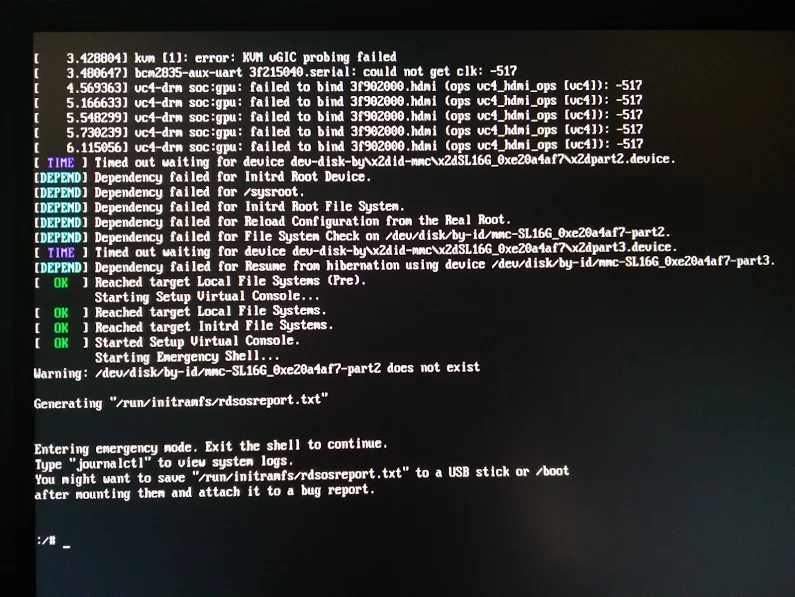
Reproducible steps
- download (or a more recent one) from http://download.opensuse.org/repositories/devel:/ARM:/Factory:/Contrib:/RaspberryPi3/images/ :
- Install them on a MicroSD card
- Put in Raspberry Pi 3 and boot
- Get the IP address of the machine, then SSH into it (
ssh root@ip-address, password linux)
- Follow the steps from [WayBack] openSUSE on Raspberry Pi 3: From Zero to Functional System in a Few Easy Steps – SUSE Blog | SUSE Communities to get WiFi working:
- Edit
/etc/dracut.conf.d/raspberrypi_modules.conf and remove the sdhci-iproc from the first and # on the last line:From :
add_drivers+=" sdhci-iproc bcm2835-sdhost bcm2835_dma mmc_block dwc2 "
# Workaround for Wifi
#omit_drivers+=" sdhci-iproc"
To :
add_drivers+=" bcm2835-sdhost bcm2835_dma mmc_block dwc2 "
# Workaround for Wifi
omit_drivers+=" sdhci-iproc"
- Run these commands:
mkinitrd -f
reboot
- Check in
Yast if wlan0 exists in System -> Network Settings, then assign an SSIS plus credentials to it
- Verify the list contains
BCM43430 WLAN card
- Select it
- Click the
Edit button
- Put the check mark next to
Dynamic Address then select DHCP and the kind of DHCP (in my caseboth version 4 and 6)
- Click the
Next button
- Keep
Operating Mode as Managed
- Click the
Scan Network button
- Select
Network Name (ESSID) from the list
- Select
Authentication Mode from the list
- Put the check mark for
Key Input Type as Passphrase
- Enter the
Encryption Key
- Click the
Next button
- Click the
OK button
- Quit
Yast
- Wait a few moments, then very with
ip a that wlan0 got an IP address
- Update the system:
zypper refresh
zypper dist-upgrade
- Reboot
- Wait for the error to occur on the HDMI screen (USB keyboard does not work there, so I cannot copy logs)
Gist log until 7. is below.
IRC chat transcript opensuse-factory
[10:40am] <wiert> TL;DR: Tumbleweed on Rpi3; enable WiFi according to site and forum instructions; zypper dist-upgrade; boot failure.
[10:41am] <wiert> without enabling WiFi everything is fine.
[10:41am] <wiert> spare RPi3s get in next week, so I’ll configure this one for my brother without WiFi for now.
[10:43am] <fvogt> Hm, that guide can’t actually work that way (unless something changed significantly)
[10:43am] <wiert> it worked in the sense that it got WiFi working. it failed in the sense that you cannot upgrade any more (:
[10:43am] <fvogt> The omit_drivers line removed the driver for the sd card controller, so it’s no surprise that it doesn’t boot anymore. It needs a different device tree
[10:44am] <fvogt> I guess you upgraded the kernel + DT? You must not do that
[10:44am] <wiert> funny as after the mkinitrd, a reboot went fine.
[10:44am] <wiert> it’s only that after a zypper dup it fails.
[10:44am] <mnowak__> DimStar, I wan’t $$ only on Windows, I should not have to re-define $prompt_sign. I guess I need to move the second $prompt_sign to the if-clause below
[10:45am] <fvogt> wiert: Ah, so it ships with a WiFi enabled DT + Kernel with the TW image
[10:45am] <fvogt> If you zypper dup then, it’ll switch to the DT + Kernel from plain TW, breaking everything
[10:46am] <wiert> What’s DT?
[10:46am] <wiert> driver-tree?
[10:46am] <fvogt> Close, device-tree
[10:46am] <wiert> (that gist has all the steps I performed)
[10:46am] <fvogt> It contains the assignment of memory and other HW resources to each other and drivers
[10:47am] <fvogt> That’s most likely the issue
[10:48am] <fvogt> You can recover from that by downloading the right .dtb file and putting it on the sd card manually
[10:48am] <fvogt> Alternatively, the u-boot embedded one should still work, so you can delete the DT on the SD and it should boot again (with some missing peripherals though)
[10:51am] <wiert> I’ve already put a fresh disk image on it and I’m in the midst of configuring it for my brother (he’s mentally retarded and I’m putting it behind his TV so he can view his agenda electronically to see if that gives him more stability in organising his life; I need to be at his place in 2 hours)
[11:27am] <wiert> @fvogt: I will add this part of the IRC chat to that blog post and try to get your suggestions done when the spare RPI3s get in.
–jeroen
Read the rest of this entry »
Posted in *nix, Development, Hardware Development, Linux, openSuSE, Power User, Raspberry Pi, SuSE Linux, Tumbleweed | Leave a Comment »
Posted by jpluimers on 2017/08/16
Too bad: it was fun while it lasted.
Mid april 2017 [WayBack] HDD Guardian – Home closed down, so the latest commit removed all the [WayBack] HDD Guardian – Source Code.
HDD Guardian provides a Windows front-end for smartctl, a utility which monitors your hard drive(s) and SSD(s) for health status, taking advantage of S.M.AR.T.
The WayBack machine and Archive.is have archived some links though:
Anyone interested in getting it before codeplex itself shuts down:
git svn clone https://hddguardian.svn.codeplex.com/svn
Edit 20210909:
Note that a while ago, the salvaged source code got pushed to GitHub: [Wayback/Archive.is] native-api/hddguardian: A GUI app to watch and manage HDDs’ S.M.A.R.T., based on smartmontools. Salvaged from https://hddguardian.codeplex.com
–jeroen
Posted in .NET, Development, Power User, Software Development, VB.NET, Windows | Leave a Comment »


 The Wiert Corner - irregular stream of stuff