The Wiert Corner – irregular stream of stuff

Jeroen W. Pluimers on .NET, C#, Delphi, databases, and personal interests

  • My badges

  • Twitter Updates

  • My Flickr Stream

  • Pages

  • All categories

  • Enter your email address to subscribe to this blog and receive notifications of new posts by email.

    Join 1,861 other subscribers

Archive for 2017

When your Windows 8.1 mouse cursor is invisible in the screen center on VMware Fusion

Posted by jpluimers on 2017/10/02

Remove the

Remove the “VMware Pointing Device” using “devmgmt.msc”

Somehow I have it happen every now and then on Windows (usually 8.1 x64) VMs running inside a VMware (usually Fusion) that the mouse cursor is stuck.

VMware Tools were already at the latest version and a plain reboot didn’t help.

It doesn’t matter if I was running full screen or Windows and altering these mouse settings did not change the behaviour:

  • Enable pointer shadow
  • Display pointer trails (long or short: does not matter)

I did enable Show location of pointer when I press the CTRL key which then indicated the mouse pointer was static at the screen center.

The only thing to get the mouse respond to mouse movement were these steps:

  1. Start Device Manager using devmgmt.msc
  2. Switch to the Devices by Connection view from the View menu
  3. Open these sub-trees:
    1. Your machine in this case my machine W81ENTX64VS2015
    2. ACPI x64-based PC
    3. Microsoft ACPI-Compliant System
    4. PCI Bus
    5. Intel 82371AB/EB PCI to ISA bridge (ISA mode)
  4. Now delete the VMware Pointing Device
  5. Reboot after Device Manager ask you to do so

After that my mouse cursor works fine.

Just in case you bump into a similar thing, but the above steps don’t help, here are some links with different steps that might work in your situation:

Read the rest of this entry »

Posted in Fusion, Power User, Virtualization, VMware, Windows, Windows 8.1 | Leave a Comment »

Raspberry Pi brexit – changing your locale away from GB when you’ve a different keyboard

Posted by jpluimers on 2017/10/02

A while ago I wrote about -bash: warning: setlocale: LC_ALL: cannot change locale (en_US.UTF-8) on fresh Raspbian on Raspberry

I thought my locale issues were solved and they sort of were. Until I had to logon locally and managed to get one or more of these characters in my password:

  • ~ (tilde)
  • @ (at)
  • # (hash)
  • \ (backslash)
  • | (pipe)
  • " (double-quote)

Then logon would fail locally but work via ssh. Go figure!

Lot’s of people outside the UK using their Raspberry Pi with keyboard and monitor will now say: you’ve the default GB keyboard layout and your keyboard is not GB.

Bingo!

This is how US keys look when using a GB keyboard layout:

Read the rest of this entry »

Posted in *nix, Debian, Development, Hardware Development, Linux, Power User, Raspberry Pi, Raspbian | Leave a Comment »

Reminder to self: brew update needs re-accepting the xcode license agreement

Posted by jpluimers on 2017/09/29

Even though I have accepted this before, I needed to accept it again:

$ brew-update-ugprade 
Error: You have not agreed to the Xcode license. Please resolve this by running:
  sudo xcodebuild -license accept
$ sudo xcodebuild -license accept
Password:
$ brew-update-ugprade

–jeroen

Posted in Apple, Development, Home brew / homebrew, Power User, Software Development, xCode/Mac/iPad/iPhone/iOS/cocoa | Leave a Comment »

On my research list: connecting Fritz!Box devices together into a virtual PBX

Posted by jpluimers on 2017/09/29

I’ve some Fritz!Box devices on various locations that each provide VoIP access and either ISDN or PSTN lines.

Wouldn’t it be cool to be able to join them together into a virtual PBX?

I’m not sure how it’s possible and what you need for it, so here are some links that should make my future research on this easier:

–jeroen

Posted in Fritz!, Gigaset, Internet, ISDN, LifeHacker, Power User, PSTN, Telephony, VoIP | Leave a Comment »

Siemens GigaSet DX600A TCP port 650 protocol looks like old-school AT commands…

Posted by jpluimers on 2017/09/29

While playing around with nmap to view some of my IoT^w LoT devices, I found out my Siemens GigaSet DX600A ISDN (yes: ISDN; I’m an old fart) has these two ports open:

PORT    STATE SERVICE VERSION
80/tcp  open  http    Siemens Gigaset A580, DX800A, or S450 VoIP phone http config
| http-methods: 
|_  Supported Methods: GET POST
|_http-server-header: 
| http-title: Site doesn't have a title (text/html).
|_Requested resource was http://dx600a-isdn.pso71.local/login.html
650/tcp open  telnet  Gigaset telnetd
MAC Address: 7C:2F:80:15:D6:10 (Gigaset Communications GmbH)
Device type: general purpose
Running: Linux 2.6.X
OS CPE: cpe:/o:linux:linux_kernel:2.6
OS details: Linux 2.6.13 - 2.6.32

I’m going to play with port 650 later as it looks like it supports an AT command protocol(on Windows the GigaSet QuickSync TAPI driver translates TAPI to AT commands) so it should be possible to do all kinds of cool stuff with it.

These links should help ans it should work with the DX800A as well:

–jeroen

Posted in DECT, Gigaset, ISDN, Power User, PSTN, Telephony | Leave a Comment »

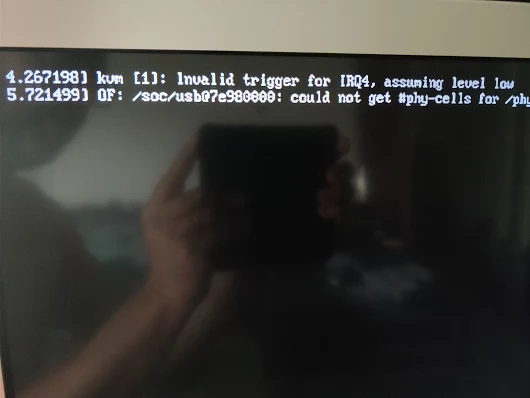
Oops: OF: /soc/usb at 7e980000: could not get #phy-cells for /phy

Posted by jpluimers on 2017/09/28


kvm [1]: Invalid trigger for IRQ4, assuming level low
OF: /soc/usb at 7e980000: could not get #phy-cells for /phy

Via [WayBack] Oops. – Jeroen Wiert Pluimers – Google+

This was after updating my Raspberry Pi 3 with Tumbleweed to 20170920.

Not sure what do do now. Some searches didn’t reveal much:

–jeroen

Posted in *nix, Development, Hardware Development, Linux, openSuSE, Power User, Raspberry Pi, SuSE Linux, Tumbleweed | Leave a Comment »

IANA Service Name and Transport Protocol Port Number Registry

Posted by jpluimers on 2017/09/28

Cool! Search by port number, name, user or description straight from the source: IANA.org Service Name and Transport Protocol Port Number Registry

Posted in Communications Development, Development, Internet protocol suite, Network-and-equipment, Power User, TCP | Leave a Comment »

mention-bot (Mention Bot) – automagically mentions potential review users for a pull request depending on context

Posted by jpluimers on 2017/09/28

mention-bot (Mention Bot) is cool!

It mentions potential review users on a pull-request depending on the context (currently: if the users have lines deleted by the pull request or have enough blame presence around the modified lines in the pull request).

First saw it used here: https://github.com/libssh2/libssh2/pull/144#issuecomment-257244996

It has source code at facebook/mention-bot: Automatically mention potential reviewers on pull requests.

And there is mention-bot/how-to-unsubscribe

–jeroen

Posted in Continuous Integration, Development, DVCS - Distributed Version Control, git, GitHub, Power User, Software Development, Source Code Management | Leave a Comment »

How I use Linux to write software for multiple target platforms using Wine, Delphi 7, Lazarus and Delphi Berlin

Posted by jpluimers on 2017/09/27

How I use Linux to write software for multiple target platforms – Kris Kamil Jacewicz – Google+

WINE has come a long way. Many things do not have a native look and feel, but so do many Delphi FMX or Lazarus LCL applications.

In fact I use quite a few tools (including Mikrotik WinBox) through Wine on Mac OS and it runs a lot more stable than quite a few of the FMX applications I’ve tried and ditched.

So for business applications not requiring a platform specific look and feel this indeed is quite acceptable direction to follow.

More at http://kriscode.blogspot.tw/2016/10/how-i-use-linux-to-write-software-for.html

–jeroen

Posted in Delphi, Development, Software Development | 2 Comments »

How does one configure Notepad++ to use spaces instead of tabs? – Stack Overflow

Posted by jpluimers on 2017/09/27

The StackOverflow screenshot it out-dated so a new one is below.

  1. In the Settings menu, choose Preferences...
  2. In the Preferences dialog, choose Language
  3. Ensure the (default empty) Replace by space checkbox is checked
  4. Optionally change the Tab size from 4 to another suitable value

I prefer these settings: 

via: How does one configure Notepad++ to use spaces instead of tabs? – Stack Overflow [WayBack]

–jeroen

Read the rest of this entry »

Posted in Notepad++, Power User, Text Editors, Windows | 1 Comment »