The Wiert Corner – irregular stream of stuff

Jeroen W. Pluimers on .NET, C#, Delphi, databases, and personal interests

  • My badges

  • Twitter Updates

  • My Flickr Stream

  • Pages

  • All categories

  • Enter your email address to subscribe to this blog and receive notifications of new posts by email.

    Join 1,861 other subscribers

Archive for January, 2019

android – How to release a Firemonkey control properly, in this case a child form with a parent? – Stack Overflow

Posted by jpluimers on 2019/01/02

For my archive as [Archive.is] TFmxObject.Release is deprecated since Delphi 10.2 Tokyo, and – worse – broken on some platforms: [WayBack] android – How to release a Firemonkey control properly, in this case a child form with a parent? – Stack Overflow

TFmxObject.Release uses TThread.ForceQueue internally, and that’s currently broken under Android (see discussion above).

As a workaround, a working cross-platform version for releasing an object from its event handler would be

procedure TForm.CloseBtnClick(Sender: TObject);
begin
  Parent := nil;
  TThread.CreateAnonymousThread(
  procedure
  begin
    TThread.Synchronize(nil,
    procedure
    begin
      Self.DisposeOf;
    end);
  end).Start;
end;

Instead of Synchronize you can also use Queue in above method.

What is important to keep in mind is that you should not keep any other references to the control you are releasing or you may hit the trouble down the road.

Via:

[WayBack] What are the solutions for a wizard like application (a single form with content changed depending on some action) in Firemonkey?

I’ve been using TFormStand to have a single form and load frames dynamically, but have some AV in the stept when changing frames…. –

R Gosp – Google+

–jeroen

Posted in Delphi, Development, Software Development | Leave a Comment »

Reddit: parodies on O RLY Books

Posted by jpluimers on 2019/01/02

Many more “Essential Programming Guides” that are not in the O RLY Parody Book Generator for Slack are at [WayBack]  O RLY Books.

Related: [WayBack] generate (500×700)

–jeroen

Read the rest of this entry »

Posted in Development, Fun, Quotes, Software Development, T-Shirt quotes | Leave a Comment »

Google Search string for either docwiki, Delphi 2007 or Delphi 2009 docs

Posted by jpluimers on 2019/01/02

These search the Delphi 2007 docs:

Similar for Delphi 2009 docs

The second ones search just English, and the first searches all languages.

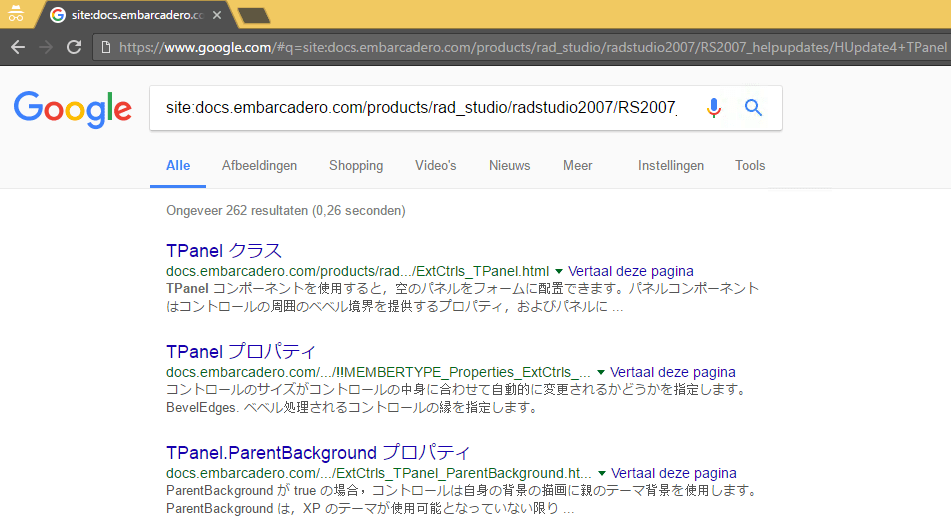
Given the Google search indexing, the first might give a lot of Japanese search results:

https://www.google.com/#q=site:docs.embarcadero.com/products/rad_studio/radstudio2007/RS2007_helpupdates/HUpdate4+TPanel

I made shortcuts for the English one in Chrome:

Search engine definition
Search engine Delphi 2007 docs
Keyword d2007
URL with %s in place of query https://www.google.com/#q=site:docs.embarcadero.com/products/rad_studio/radstudio2007/RS2007_helpupdates/HUpdate4/EN+%s


Search engine definition
Search engine Delphi 20079 docs
Keyword d2009
URL with %s in place of query https://www.google.com/#q=site:docs.embarcadero.com/products/rad_studio/delphiAndcpp2009/HelpUpdate2/EN+%s


I did the same for the docwiki (where you cannot distinguish between languages in a generic way for all Delphi versions, as the language comes after the Delphi version and the kind of documentation (CodeExamples, Libraries, etc.)):

Search engine definition
Search engine Docwiki (all EN/DE/FR/JP)
Keyword docwiki
URL with %s in place of query https://www.google.com/#q=site:docwiki.embarcadero.com+%s

Reasoning:

  • It’s the earliest Delphi version having documentation on-line in HTML format.
  • The foundations of the RTL/VCL structure has not changed since then
  • The links can be archived in the WayBack machine and still look nice after archiving (no CSS fuzz that makes archived pages hard to read)

–jeroen

Posted in Delphi, Delphi 2007, Development, Software Development | 2 Comments »

Technical Leadership in Software Companies

Posted by jpluimers on 2019/01/01

When leading a tech team, the first thing you should do this year is read [WayBack] Technical Leadership in Software Companies.

It helps you learn about what developers want and how they want to be managed.

Quoting the author:

Software developers have to be managed differently than people in other industries because their work is intellectual in nature. I took the audience through ways in which technical leadership can inspire software developers to achieve the extraordinary.

Via:

Read the rest of this entry »

Posted in Agile, Development, Software Development | Leave a Comment »

The biggest lie I tell myself is not about new years resolutions.

Posted by jpluimers on 2019/01/01

The biggest lie I tell myself is “I don’t need to write that down, I’ll remember it”

It’s likely older, but the oldest reference I could find was 2012 [WayBack].

So before I forget:

Happy New Year everyone!

With the above quote, it is no coincidence I started my blog even earlier (in 2009): it’s my off-line memory, way better readable than my hand-writing and indexed by various search engines.

Read the rest of this entry »

Posted in About, Conference Topics, Conferences, Event, LifeHacker, Personal, Power User | Leave a Comment »

Easy Running of Scripts at Boot and Shutdown – SUSE Blog | SUSE Communities

Posted by jpluimers on 2019/01/01

Cool:

/etc/init.d/after.local

–jeroen

Posted in *nix, *nix-tools, bash, Development, Linux, openSuSE, Power User, Scripting, Software Development, SuSE Linux, Tumbleweed | Leave a Comment »

brew update reminder

Posted by jpluimers on 2019/01/01

Reminder to self:

==> Caveats
==> nss
nss is keg-only, which means it was not symlinked into /usr/local,
because Firefox can pick this up instead of the built-in library, resulting in
random crashes without meaningful explanation.

Please see https://bugzilla.mozilla.org/show_bug.cgi?id=1142646 for details.

If you need to have nss first in your PATH run:
echo ‘export PATH=”/usr/local/opt/nss/bin:$PATH”‘ >> ~/.bash_profile

For compilers to find nss you may need to set:
export LDFLAGS=”-L/usr/local/opt/nss/lib”
export CPPFLAGS=”-I/usr/local/opt/nss/include”

For pkg-config to find nss you may need to set:
export PKG_CONFIG_PATH=”/usr/local/opt/nss/lib/pkgconfig”

==> sphinx-doc
sphinx-doc is keg-only, which means it was not symlinked into /usr/local,
because this formula is mainly used internally by other formulae.
Users are advised to use `pip` to install sphinx-doc.

If you need to have sphinx-doc first in your PATH run:
echo ‘export PATH=”/usr/local/opt/sphinx-doc/bin:$PATH”‘ >> ~/.bash_profile

==> sqlite
sqlite is keg-only, which means it was not symlinked into /usr/local,
because macOS provides an older sqlite3.

If you need to have sqlite first in your PATH run:
echo ‘export PATH=”/usr/local/opt/sqlite/bin:$PATH”‘ >> ~/.bash_profile

For compilers to find sqlite you may need to set:
export LDFLAGS=”-L/usr/local/opt/sqlite/lib”
export CPPFLAGS=”-I/usr/local/opt/sqlite/include”

For pkg-config to find sqlite you may need to set:
export PKG_CONFIG_PATH=”/usr/local/opt/sqlite/lib/pkgconfig”

==> openssl
A CA file has been bootstrapped using certificates from the SystemRoots
keychain. To add additional certificates (e.g. the certificates added in
the System keychain), place .pem files in
/usr/local/etc/openssl/certs

and run
/usr/local/opt/openssl/bin/c_rehash

openssl is keg-only, which means it was not symlinked into /usr/local,
because Apple has deprecated use of OpenSSL in favor of its own TLS and crypto libraries.

If you need to have openssl first in your PATH run:
echo ‘export PATH=”/usr/local/opt/openssl/bin:$PATH”‘ >> ~/.bash_profile

For compilers to find openssl you may need to set:
export LDFLAGS=”-L/usr/local/opt/openssl/lib”
export CPPFLAGS=”-I/usr/local/opt/openssl/include”

For pkg-config to find openssl you may need to set:
export PKG_CONFIG_PATH=”/usr/local/opt/openssl/lib/pkgconfig”

==> openssl@1.1
A CA file has been bootstrapped using certificates from the system
keychain. To add additional certificates, place .pem files in
/usr/local/etc/openssl@1.1/certs

and run
/usr/local/opt/openssl@1.1/bin/c_rehash

openssl@1.1 is keg-only, which means it was not symlinked into /usr/local,
because openssl/libressl is provided by macOS so don’t link an incompatible version.

If you need to have openssl@1.1 first in your PATH run:
echo ‘export PATH=”/usr/local/opt/openssl@1.1/bin:$PATH”‘ >> ~/.bash_profile

For compilers to find openssl@1.1 you may need to set:
export LDFLAGS=”-L/usr/local/opt/openssl@1.1/lib”
export CPPFLAGS=”-I/usr/local/opt/openssl@1.1/include”

For pkg-config to find openssl@1.1 you may need to set:
export PKG_CONFIG_PATH=”/usr/local/opt/openssl@1.1/lib/pkgconfig”

==> icu4c
icu4c is keg-only, which means it was not symlinked into /usr/local,
because macOS provides libicucore.dylib (but nothing else).

If you need to have icu4c first in your PATH run:
echo ‘export PATH=”/usr/local/opt/icu4c/bin:$PATH”‘ >> ~/.bash_profile
echo ‘export PATH=”/usr/local/opt/icu4c/sbin:$PATH”‘ >> ~/.bash_profile

For compilers to find icu4c you may need to set:
export LDFLAGS=”-L/usr/local/opt/icu4c/lib”
export CPPFLAGS=”-I/usr/local/opt/icu4c/include”

For pkg-config to find icu4c you may need to set:
export PKG_CONFIG_PATH=”/usr/local/opt/icu4c/lib/pkgconfig”

==> ruby
By default, binaries installed by gem will be placed into:
/usr/local/lib/ruby/gems/2.6.0/bin

You may want to add this to your PATH.

ruby is keg-only, which means it was not symlinked into /usr/local,
because macOS already provides this software and installing another version in
parallel can cause all kinds of trouble.

If you need to have ruby first in your PATH run:
echo ‘export PATH=”/usr/local/opt/ruby/bin:$PATH”‘ >> ~/.bash_profile

For compilers to find ruby you may need to set:
export LDFLAGS=”-L/usr/local/opt/ruby/lib”
export CPPFLAGS=”-I/usr/local/opt/ruby/include”

For pkg-config to find ruby you may need to set:
export PKG_CONFIG_PATH=”/usr/local/opt/ruby/lib/pkgconfig”

==> qt
We agreed to the Qt open source license for you.
If this is unacceptable you should uninstall.

qt is keg-only, which means it was not symlinked into /usr/local,
because Qt 5 has CMake issues when linked.

If you need to have qt first in your PATH run:
echo ‘export PATH=”/usr/local/opt/qt/bin:$PATH”‘ >> ~/.bash_profile

For compilers to find qt you may need to set:
export LDFLAGS=”-L/usr/local/opt/qt/lib”
export CPPFLAGS=”-I/usr/local/opt/qt/include”

For pkg-config to find qt you may need to set:
export PKG_CONFIG_PATH=”/usr/local/opt/qt/lib/pkgconfig”

==> python
Python has been installed as
/usr/local/bin/python3

Unversioned symlinks `python`, `python-config`, `pip` etc. pointing to
`python3`, `python3-config`, `pip3` etc., respectively, have been installed into
/usr/local/opt/python/libexec/bin

If you need Homebrew’s Python 2.7 run
brew install python@2

You can install Python packages with
pip3 install <package>
They will install into the site-package directory
/usr/local/lib/python3.7/site-packages

See: https://docs.brew.sh/Homebrew-and-Python
==> youtube-dl
Bash completion has been installed to:
/usr/local/etc/bash_completion.d

zsh completions have been installed to:
/usr/local/share/zsh/site-functions
==> cabal-install
Bash completion has been installed to:
/usr/local/etc/bash_completion.d
==> node
Bash completion has been installed to:
/usr/local/etc/bash_completion.d
==> hub
Bash completion has been installed to:
/usr/local/etc/bash_completion.d

zsh completions have been installed to:
/usr/local/share/zsh/site-functions
==> gnupg
Once you run this version of gpg you may find it difficult to return to using
a prior 1.4.x or 2.0.x. Most notably the prior versions will not automatically
know about new secret keys created or imported by this version. We recommend
creating a backup of your `~/.gnupg` prior to first use.

For full details on each change and how it could impact you please see
https://www.gnupg.org/faq/whats-new-in-2.1.html
==> mas
Bash completion has been installed to:
/usr/local/etc/bash_completion.d
==> pandoc
Bash completion has been installed to:
/usr/local/etc/bash_completion.d
==> go
A valid GOPATH is required to use the `go get` command.
If $GOPATH is not specified, $HOME/go will be used by default:
https://golang.org/doc/code.html#GOPATH

You may wish to add the GOROOT-based install location to your PATH:
export PATH=$PATH:/usr/local/opt/go/libexec/bin

–jeroen

Posted in Apple, LifeHacker, Mac, Mac OS X / OS X / MacOS, macOS 10.13 High Sierra, Power User | Leave a Comment »

Python 2.7 Countdown: a year from now it is unsupported

Posted by jpluimers on 2019/01/01

Besides wishing you a happy new year, also a reminder: [WayBack] Python 2.7 Countdown Python 2.7 will retire on januari 1, 2020. Learn more and see the countdown here.

This is indeed a breaking change for Python users, similar as from Perl 4 to Perl 5, and PHP 4 to PHP 5.

It shows two things:

  • how extremely hard it is to evolve a language without breaking things
  • how long it takes for the community at large to digest breaking changes

And indeed porting of complex systems is hard [WayBack] WIP: Port calibre to python 3 by flaviut · Pull Request #870 · kovidgoyal/calibre · GitHub but doable [WayBack] Bug #1714107 “Python 2 is retiring” : Bugs : calibre.

Via: [WayBack1/WayBack2] Python 3 improves in some ways over Python 2, but also makes a bunch of changes that are breaking, but cosmetic (i.e. renaming methods and functions, or… – Kristian Köhntopp – Google+ (with some interesting comments, but also a rant-sequence of someone who would better use that energy to improve Python than to bash it).

–jeroen

Posted in Development, Python, Scripting, Software Development | Leave a Comment »