The Wiert Corner – irregular stream of stuff

Jeroen W. Pluimers on .NET, C#, Delphi, databases, and personal interests

  • My badges

  • Twitter Updates

  • My Flickr Stream

  • Pages

  • All categories

  • Enter your email address to subscribe to this blog and receive notifications of new posts by email.

    Join 1,860 other subscribers

Archive for June, 2019

List of applications behind the various control panel links – via “Stop user access to control panel”

Posted by jpluimers on 2019/06/21

An interesting set of apps behind the various control panel links from [WayBack] Stop user access to control panel. Even though from 2013, many still work.

I edited most because:

  • some had the form control /name - Microsoft.AutoPlay but the – should have been between the name and the command.
  • none had the commands in code format so it was hard to see what you have to run

Add Hardware – Wizard hdwwiz.cpl
Administrative Tools – control admintools
Advanced System Properties ?
Advanced tab System – PropertiesAdvanced.exe
Computer Name – tab sysdm.cpl or SystemPropertiesComputerName.exe
Prevention tab – SystemPropertiesDataExecutionPrevention.exe
Hardware tab – SystemPropertiesHardware.exe
System Protection tab – SystemPropertiesProtection.exe
Remote tab – SystemPropertiesRemote.exe
AutoPlay – control /name Microsoft.AutoPlay
Backup and Restore Center – control /name Microsoft.BackupAndRestoreCenter
Backup Status and Configuration – sdclt.exe
BitLocker Drive Encryption – control /name Microsoft.BitLockerDriveEncryption
Bluetooth Devices – bthprops.cpl
Date And Time – timedate.cpl or control date/time
Display Settings – desk.cpl
Default Programs – control /name Microsoft.DefaultPrograms
Device Manager – devmgmt.msc
Disk Manager – diskmgmt.msc
Ease of Access Center – access.cpl or Utilman.exe
Game Controllers –  joy.cpl
Indexing Options – control /name Microsoft.IndexingOptions
Internet Options – inetcpl.cpl
Keyboard Properties – control keyboard
Mouse Properties – main.cpl or control mouse
Network and Sharing Center – control /name Microsoft.NetworkandSharingCenter
Network Connections – ncpa.cpl or control netconnections
Offline Files – control /name Microsoft.OfflineFiles
Parental Controls – control /name Microsoft.ParentalControls
Pen and Input – Devices TabletPC.cpl
People Near Me – collab.cpl or p2phost.exe
Phone and Modem Options – telephon.cpl or control telephony
Power Options – powercfg.cpl
Printers – control printers
Problem Reports and Solutions – wercon.exe
Programs and Features – appwiz.cpl
Regional and Language Options – intl.cpl or control international
Scanners and Cameras – sticpl.cpl
Secure Online Key Backup – control /name Microsoft.SecureKeyBackup
Security Center – wscui.cpl
Sound – mmsys.cpl
Speech Recognition Options – control /name Microsoft.SpeechRecognitionOptions
Sync Center – mobsync.exe
System – control /name Microsoft.System
Tablet PC Settings – control /name Microsoft.TabletPCSettings
Task Scheduler – control schedtasks
Text to Speech – sapi.cpl or control speech
User Accounts – nusrmgr.cpl or Netplwiz.exe or control userpasswords
User Accounts (advanced) – control userpasswords2
Volume Mixer – SndVol.exe
Welcome Center – control.exe /name Microsoft.WelcomeCenter
Windows Defender – MsAsCui.exe
Windows Firewall – Firewall.cpl or FirewallControlPanel.exe
Windows Firewall Settings – FirewallSettings.exe
Windows Sidebar Properties – control.exe /name Microsoft.WindowsSidebarProperties
Windows SideShow – control.exe /name Microsoft.WindowsSideshow
Windows Update – control.exe /name Microsoft.WindowsUpdate

–jeroen

Posted in Power User, Windows | Leave a Comment »

Is it possible to comment out lines of diagram syntax? – PlantUML Q&A

Posted by jpluimers on 2019/06/21

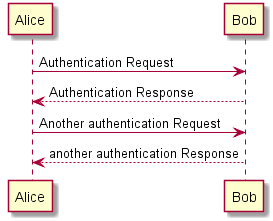
I like PlantUML a lot as it is an easy way to create even simple diagrams using plain text, for instance a simple Sequence Diagram like below.

Sometimes, you want to add comments because the way you build the diagram needs explanation that is not needed in the diagram itself. You can:

[Archive.is] Is it possible to comment out lines of diagram syntax? – PlantUML Q&A:

You can use quote like in the following example

@startuml
' This is a comment on a single line
Bob->Alice : hello
/' You quote by using slash-and-quote
to split your comments on several
lines '/
@enduml

[Archive.isSequence Diagram syntax and features

–jeroen

Posted in Development, Diagram, PlantUML, Power User, Software Development, UML | Leave a Comment »

How to find and play Google.com’s secret adventure game – The Verge

Posted by jpluimers on 2019/06/21

https://www.theverge.com/2018/10/1/17922628/google-text-adventure-easter-egg-console

Posted in Uncategorized | Leave a Comment »

Stugge kabel probleem – Netwerken – GoT

Posted by jpluimers on 2019/06/21

[WayBackStugge kabel probleem – Netwerken – GoT: talkpoeder is het geheim om stugge kabels door een bochtig stelsel PVC pijpen te trekken.

–jeroen

Posted in LifeHacker, Power User | Leave a Comment »

To use the – undocumented – GetItCmd.exe CLI version of the GetIt package manager, run rsvars.bat first – via G+

Posted by jpluimers on 2019/06/20

Interesting observation on [WayBack] How do you use the CLI version of GetIt Package Manager. I always get a “no items were found.” response. As usual, the EMBT wiki is total rubbish and do… – Graeme Geldenhuys – Google+.

What you need for GetItCmd, is to run rsvars.bat for your Delphi version first, which is exactly what [WayBackRun-Dependend-rsvars-From-Path.bat – which I wrote a while ago – does.

I did not even know that there was a CLI equivalent of [WayBack] GetIt – RAD Studio , but it is there, totally undocumented: GetItCmd apart from two filename references on the French and German docwiki:

Apart from that, I could only find these links:

Another odd thing: rsvars.bat is also not documented, and has just one reference in the docwiki: [WayBack] Using CMake with C++ Builder – RAD Studio.

The use of rsvars.bat is simple: it sets the below environment variables (some older versions set less variables, like missing PLATFORM or PlatformSDK) for use with the IDE (bds32.exe), msbuild and GetIt.

BDS
BDSINCLUDE
BDSCOMMONDIR
FrameworkDir
FrameworkVersion
FrameworkSDKDir
PATH
LANGDIR
PLATFORM
PlatformSDK

(some of these are set to empty to they at least exist)

Later on, Marco Cantu reacted

The command line version of GetIt is not stable, so it was never “promoted” to being a feature. It was a tentative feature, we likely removed the English doc, but translations remained — so having that documentation is kind of an error. We ship is as we use it, with a specific command that works and is safe. In other words, use it as your own risk, as it is not an official feature.

So apparently, the only way that GetIt works, is through a specific command in GetItCmd. From an architectural point of view that gives me a  “lets get this tick on the feature matrix done no matter what the architectural consequences are” feeling.

–jeroen

Posted in Delphi, Development, Software Development | Leave a Comment »

How to test if an executable exists in the %PATH% from a windows batch file? – Stack Overflow

Posted by jpluimers on 2019/06/20

I needed a solution inside a batch file for git similar to [WayBack] How to test if an executable exists in the %PATH% from a windows batch file? – Stack Overflow which became this:

where /q git || echo Cound not find git on the PATH %PATH%. && goto :eof

I could have expanded this to find the install location, but for now this is sufficient.

When it is needed, I should read [WayBack] Programmatically (not manually) finding the path where Git is installed on a Windows system – Stack Overflow

–jeroen

Posted in Batch-Files, Development, DVCS - Distributed Version Control, git, Scripting, Software Development, Source Code Management | Leave a Comment »

Splitting user settings from your Delphi projects:  DprojSplitter by Uwe Raabe

Posted by jpluimers on 2019/06/20

Reminder to self to try this out: [WayBackWorking in a team? DprojSplitter might be helpful! | The Art of Delphi Programming.

The most recent version (covering a wider range of Delphi versions) was at [WayBackDprojSplitter for Delphi XE2 to XE6 available | The Art of Delphi Programming.

DprojSplitter handles the current build configuration and current plattform. In addition these settings are handled, too (found in CommonOptionStrs):

sDebugger_RunParams,
sDebugger_RemoteRunParams,
sDebugger_HostApplication,
sDebugger_RemotePath,
sDebugger_RemoteHost,
sDebugger_EnvVars,
sDebugger_SymTabs,
sDebugger_Launcher,
sDebugger_RemoteLauncher,
sDebugger_IncludeSystemVars,
sDebugger_UseLauncher,
sDebugger_UseRemoteLauncher,
sDebugger_CWD,
sDebugger_RemoteCWD,
sDebugger_RemoteDebug,
sDebugger_DebugSourcePath,
sDebugger_LoadAllSymbols,
sDebugger_LoadUnspecifiedSymbols,
sDebugger_SymbolSourcePath

Heck, you can even configure the ones to split: [WayBackConfiguring DprojSplitter to Your Needs | The Art of Delphi Programming

–jeroen

via:

Posted in Delphi, Development, Software Development | Leave a Comment »

Some links about the TCP SACK PANIC attacks on Linux and FreeBSD Kernels

Posted by jpluimers on 2019/06/20

The TCP SACK vulnerabilities as found by Netflix: [WayBack] security-bulletins/2019-001.md at master · Netflix/security-bulletins · GitHub.

Easy, but slow workaround from [WayBack] linux – How to disable TCP SACK for CentOS? – Super User:

Temporary (until boot):

echo "0" > /proc/sys/net/ipv4/tcp_sack

Permanent (even after boot):

echo "net.ipv4.tcp_sack = 0" >> /etc/sysctl.conf
sysctl -p

Coverage:

–jeroen

Posted in *nix, *nix-tools, Communications Development, Development, Internet protocol suite, Power User, Security, TCP | Leave a Comment »

SQL Server 8060 row size query limit

Posted by jpluimers on 2019/06/19

Every now and then you bump into a limit you did not know it existed before:

Cannot create a row of size 8209 which is greater than the allowable maximum row size of 8060.

This is while querying a few tables having a combined column size of more than 8060. Which means it is not just about single tables being too wide.

Related:

–jeroen

Posted in Database Development, Development, SQL, SQL Server | Leave a Comment »

Pattern: Service Mesh

Posted by jpluimers on 2019/06/19

I need to re-read this: [WayBackPattern: Service Mesh

Via [WayBack] What is a Service Mesh? What is the purpose of Istio? – The Isoblog. /[Archive.is] What is a Service Mesh? What is the purpose of Istio in Kubernetes? … – Kristian Köhntopp – Google+:

An article by Phil Calçado explains the Container Pattern “Service Mesh” and why one would want that in a really nice way.

Phil uses early networking as an example, and explains how common functionality needed in all applications was abstracted out of the application code and moved into the network stack, forming the TCP flow control layer we have in todays networking.

A similar thing is happening with other functionality that all services that do a form of remote procedure call have to have, and we are moving this into a different layer. He then gives examples of the ongoing evolution of that layer, from Finagle and Proxygen through Synapse and Nerve, Prana, Eureka and Linkerd. Envoy and the resulting Istio project of CNCF are the current result of that development, but the topic is under research, still.

–jeroen

Posted in Cloud Development, Development, Software Development | Leave a Comment »