The Wiert Corner – irregular stream of stuff

Jeroen W. Pluimers on .NET, C#, Delphi, databases, and personal interests

  • My badges

  • Twitter Updates

  • My Flickr Stream

  • Pages

  • All categories

  • Enter your email address to subscribe to this blog and receive notifications of new posts by email.

    Join 1,861 other subscribers

Archive for 2019

Visual Studio Code direct download links

Posted by jpluimers on 2019/08/14

Visual Studio Code download links:

Via:

–jeroen

Posted in .NET, Development, Software Development, vscode Visual Studio Code | Leave a Comment »

PowerShell: be careful using `-ReadCount` on `Get-Content`

Posted by jpluimers on 2019/08/14

I learned this the hard way: [WayBackDifferent result when using -ReadCount with Get-Content: because -ReadCount delivers data in chunks, the filter after [WayBack] Get-Content (Microsoft.PowerShell.Management) it will only filter on those chunks. If the filter isn’t prepared for that, it might only filter the last chunk.

So do not use for instance [WayBack] Select-String (Microsoft.PowerShell.Utility) on it, but perform your own [WayBack] ForEach-Object (Microsoft.PowerShell.Core) aliased as foreach like in [WayBack] Get all lines containing a string in a huge text file – as fast as possible?:

Get-Content myfile.txt -ReadCount 1000 |
  foreach { $_ -match "my_string" }

A more elaborate example is at [WayBack] How can I make this PowerShell script parse large files faster?.

–jeroen

Posted in CommandLine, Development, PowerShell, PowerShell, Scripting, Software Development | Leave a Comment »

What is ‘if __name__ == “__main__”‘ for?

Posted by jpluimers on 2019/08/14

One of the things when I learned Python was that in some scripts I found a block starting with a statement like this:

if __name__ == '__main__':

It looked like an idiom to me, and indeed it is: [WayBack] What is ‘if name == “main“‘ for?.

It allows a file to be both used as “main” standalone program file and a module. That section of code will not be executed if it is loaded as a module.

Part of the idiom is also to put your code in a separate method so this block is as short as possible.

if __name__ == '__main__':
main()

Via: [WayBack] Why is Python running my module when I import it, and how do I stop it? (thanks user166390 and Jeremy Banks for the answers there)

–jeroen

Posted in Development, Python, Scripting, Software Development | Leave a Comment »

QualityCentral 56524: tanh function from Delphi 7 till Delphi XE was buggy; XE2 fixed it

Posted by jpluimers on 2019/08/13

In case you maintain code in older versions of Delphi, be aware that the function tanh was broken starting in Delphi 7 and only got fixed in Delphi XE2: QualityCentral QualityCentral 56524: tanh function from Delphi 7 till Delphi XE was buggy; XE2 fixed it.

For big inputs, it would just fail, instead of returning 1.

The reason is that in the buggy versions, tanh got replaced from an old working version into a simple sinh/cosh, which mathematically is correct, but if your numeric data type has limited accuracy, you need to account for the boundaries where the result fits, but intermediates do not.

the [WayBack] Math.Tanh Function implements the hyperbolic tangent, for which you can find the definition at Hyperbolic function – Wikipedia: Definitions.

By now it is implemented for all floating point types the same way (only the parameter type changes in each implementation)

function Tanh(const X: Extended): Extended; overload;
const
  MaxTanhDomain = 23;
  C1of3 = 1/3;
  CBorder = 1.8145860519450699870567321328132e-5; // 2 ^(-63 / 4)
  CLn2Div2 = 0.34657359027997265470861606072909; // Ln2 / 2
var
  y, z: Extended;
begin
  FClearExcept;
  case TExtendedRec(X).SpecialType of
    fsPositive,
    fsNegative:
      begin
        z := X;
        if X < 0 then z := -z;
        if (z > MaxTanhDomain) then
          Result := 1.0
        else if (z < CBorder) then
          Result := z  - z * z * z * c1of3
        else if (z < CLn2Div2) then
        begin
          y := ExpMinus1(2*z);
          Result := y / (2 + y);
        end
        else
        begin
          y := Exp(2*z);
          Result := 1 - (2/(y + 1));
        end;
        if X < 0 then Result := -Result;
      end;
    else
      Result := X;
  end;
  FCheckExcept;
end;

–jeroen

Posted in Delphi, Development, Software Development | Leave a Comment »

Powershell: what kind of data type is [string[]] and when would you use it?

Posted by jpluimers on 2019/08/13

[WayBackIn Powershell, what kind of data type is [string[]] and when would you use it? (thanks cignul9 and arco444!): basically it forces an array of string.

It defines an array of strings. Consider the following ways of initialising an array:

[PS] > [string[]]$s1 = "foo","bar","one","two",3,4
[PS] > $s2 = "foo","bar","one","two",3,4

[PS] > $s1.gettype()

IsPublic IsSerial Name                                     BaseType
-------- -------- ----                                     --------
True     True     String[]                                 System.Array

[PS] > $s2.gettype()

IsPublic IsSerial Name                                     BaseType
-------- -------- ----                                     --------
True     True     Object[]                                 System.Array

By default, a powershell array is an array of objects that it will cast to a particular type if necessary. Look at how it’s decided what types the 5th element of each of these are:

[PS] > $s1[4].gettype()

IsPublic IsSerial Name                                     BaseType
-------- -------- ----                                     --------
True     True     String                                   System.Object


[PS] > $s2[4].gettype()

IsPublic IsSerial Name                                     BaseType
-------- -------- ----                                     --------
True     True     Int32                                    System.ValueType


[PS] > $s1[4]
3
[PS] > $s2[4]
3

The use of [string[]] when creating $s1 has meant that a raw 3 passed to the array has been converted to a String type in contrast to an Int32 when stored in an Object array.

–jeroen

Posted in CommandLine, Development, PowerShell, PowerShell, Scripting, Software Development | Leave a Comment »

(53) Introducing the “Lab in a Box” Concept – Patrick Titiano & Kevin Hilman, BayLibre – YouTube

Posted by jpluimers on 2019/08/13

Related: Introducing The “Lab in a Box” Concept (ELC-E-2017-Prague).pdf

Via:

–jeroen

Read the rest of this entry »

Posted in Development, Hardware, Hardware Development, Hardware Interfacing, Power User, Raspberry Pi, Software Development | Leave a Comment »

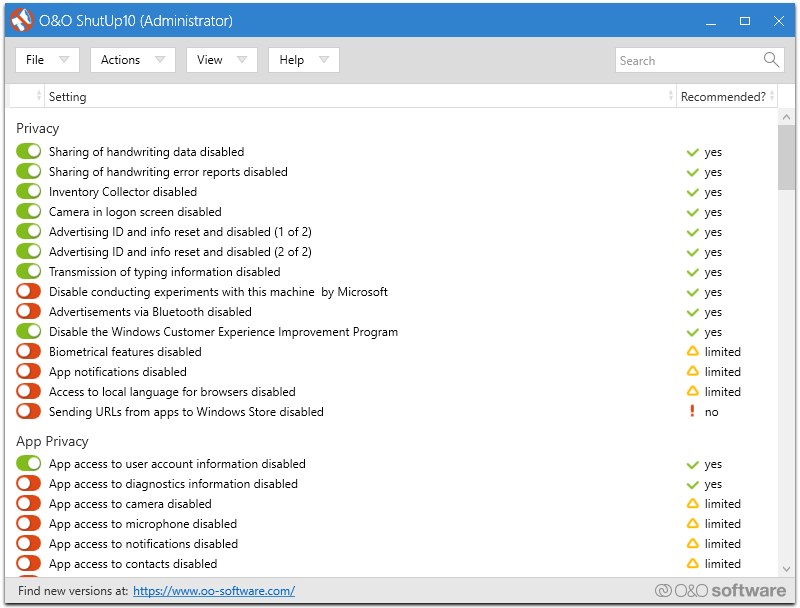
O&O ShutUp10

Posted by jpluimers on 2019/08/12

Interesting: free and portable (no install required: just unzip and go): [WayBack] O&O ShutUp10.

Via [WayBack] Jeroen Wiert Pluimers – Google+ (which I think I got via Twitter)

–jeroen

Posted in Power User, Windows, Windows 10 | Leave a Comment »

Zabbix agent and long running scripts: Timeout parameter in zabbix_agentd.conf

Posted by jpluimers on 2019/08/12

The [WayBack] stock zabbix_agentd.conf is about 10k and the documentation quite a bit larger, so it can take a while to figure out a setting.

I needed one to ensure that scripts could take longer to execute than the default.

Searching for a per-script setting on the server side revealed no solution, so I had to solve it on the agent side. There, a per-script setting is also impossible: there is only the global Timeout (one word, no PascalCase like TimeOut) setting in zabbix_agentd.conf which is the same for Unix and Windows based Zabbix installations:

Unix: [WayBack] Zabbix Documentation 3.0 – 3 Zabbix agent (UNIX)

Parameter Mandatory Range Default Description
Timeout no 130 3 Spend no more than Timeout seconds on processing

Windows: [WayBack] Zabbix Documentation 3.0 – 9.4 Zabbix agent (Windows)

Parameter Mandatory Range Default Description
Timeout no 130 3 Spend no more than Timeout seconds on processing

In my case it was for a PowerShell script that ran twice a day to verify how recent the installations on a particular machine were. The Timeout value needed to be at least 15 for that:

### Option: Timeout
# Spend no more than Timeout seconds on processing.
#
# Mandatory: no
# Range: 1-30
# Default:
# Timeout=3
Timeout=15

–jeroen

Read the rest of this entry »

Posted in *nix, Monitoring, Power User, Zabbix | Leave a Comment »

When an installer errors out with “Please re-run this installer as a normal user instead of”…

Posted by jpluimers on 2019/08/12

Via [WayBack] Anyone with a hint on how to work around this: … “Please re-run this installer as a normal user instead of”… – Jeroen Wiert Pluimers – Google+

This happened for instance when trying to install Source Tree 2.x on Windows (1.9.x works fine):

[Window Title]
SourceTreeSetup-2.3.1.0.exe

[Main Instruction]
Installation has failed

[Content]
Please re-run this installer as a normal user instead of “Run as Administrator”.

[Close]

The problem was by accident the machine got in a state to run commands without UAC approval, so the run dialog would already look have “This task will be created with administrative privileges”:

It was odd, as the machine didn’t have it enabled in the security policy (secpo.msc):

So I did a bit more digging, bumped into [WayBack] Why does my Run dialog say that tasks will created with administrative privileges? – The Old New Thing and had one of those #facepalm moments: Explorer had crashed, and I had started it from Process Explorer, forgetting Process Explorer had an UAC token.

The solution is easy:

  1. Logoff / Logon
  2. Verify the Windows-R shows a “normal” run:

Then you can just run the installer:

–jeroen

Posted in Batch-Files, Console (command prompt window), Development, Power User, Scripting, Software Development, The Old New Thing, Windows, Windows Development | Leave a Comment »

PlasticSCM console

Posted by jpluimers on 2019/08/09

The cm.exe by default is not on the path, even though it is a useful tool.

Some links on it:

Slow

One drawback: the cm.exe is slow in startup, likely because it is a .NET executable needing quite a few assemblies to load:

"C:\Program Files (x86)\Microsoft SDKs\Windows\v10.0A\bin\NETFX 4.7.1 Tools\CorFlags.exe" "C:\Program Files\PlasticSCM5\client\cm.exe"
Microsoft (R) .NET Framework CorFlags Conversion Tool. Version 4.7.2558.0
Copyright (c) Microsoft Corporation. All rights reserved.

Version : v4.0.30319
CLR Header: 2.5
PE : PE32
CorFlags : 0x1
ILONLY : 1
32BITREQ : 0
32BITPREF : 0
Signed : 0

Finding stuff

I get a feeling that there is quite a bit of cm functionality either undocumented, or hardly documented.

For instance, copying a title from the PlasticSCM GUI does not mean it will work as a cm command.

Despite the documentation indicating

When you run queries using comparison operators (>, <, >=, <=) from the command line, remember that the shell considers these operators as IO redirections, so you will need to enclose the queries with quotation marks:
cm find "branches where owner='pablo' and changesets >= '2013/03/01'"

you have to be really careful where to put the starting double quote: it has to be after the find command:

  1. Example 1
    • Title
      User query: find changeset where branch='/main/test/My Branch Name' on repository 'Projects@ssl://plastic.example.org:8088' (22 Items - 0 selected)
    • Failure
      "C:\Program Files\PlasticSCM5\client\cm.exe" "find changeset where branch='/main/test/My Branch Name' on repository 'Projects@ssl://plastic.example.org:8088'"
      Command 'find changeset where branch='/main/test/My Branch Name' on repository 'Projects@ssl://plastic.example.org:8088'' not found. Type cm showcommands to get a command list.
    • Success
      "C:\Program Files\PlasticSCM5\client\cm.exe" find "changeset where branch='/main/test/My Branch Name' on repository 'Projects@ssl://plastic.example.org:8088'"
  2. Example 2
    • Title
      Changesets /main/test/My Branch Name@Projects@ssl://plastic.example.org:8088 (4 Items - 1 selected)
    • Failure
      "C:\Program Files\PlasticSCM5\client\cm.exe" find "Changesets /main/test/My Branch Name@Projects@ssl://plastic.example.org:8088"
      Error: unexpected char: '@'
    • Success
      "C:\Program Files\PlasticSCM5\client\cm.exe" find "Changesets where branch='/main/test/My Branch Name' on repository 'Projects@ssl://plastic.example.org:8088'"

This means that changeset can be Changesets: it is case insensitive and has multiple aliases. It looks similar to commands I used in my days of using Rational ClearCase – Wikipedia

I need to find out how to translate a non-query title into a query one. That will make it a lot easier to go from PlasticSCM GUI to the cm.

No XML documentation

The cm find command has a cool parameter --xml, which dumps the output in an XML tree.

My original goal was to see if I could turn the XML into something like Markdown or RST, using an XSLT transform like these:

For those transforms, you have to know how the input XML is structured. However, this information is undocumented.

When asked, PlasticSCM indicated there is no XSD for it claiming it was “super simple export to XML”:

[WayBack] Plastic SCM on Twitter: “No XSD, I’m afraid. Just super simple export to XML.… “

https://twitter.com/plasticscm/status/1039842761304940544

I hoped the elements were just uppercase versions of the output below, but they are not. Bummer.

–jeroen

Read the rest of this entry »

Posted in Development, PlasticSCM, Power User, Source Code Management | Leave a Comment »