Archive for 2019
Posted by jpluimers on 2019/03/07
SourceTree does not like it when by accident two git stash entries have exactly the same name.
To work around that, you have to rename one.
The easiest way to do this is on the console using the tips from [WayBack] How can I rename a git stash? – Stack Overflow (thanks [WayBack] qzb):
$ git stash list

stash@{0}: WIP on master: Add some very important feature

stash@{1}: WIP on master: Fix some silly bug
First, you must remove stash entry which you want to rename:
$ git stash drop stash@{1}

Dropped stash@{1} (af8fdeee49a03d1b4609f294635e7f0d622e03db)
Now just add it again with new message using sha of commit returned after dropping:
$ git stash store -m "Very descriptive message" af8fdeee49a03d1b4609f294635e7f0d622e03db
And that’s it:
$ git stash list

stash@{0}: Very descriptive message

stash@{1}: WIP on master: Add some very important feature
This solution requires git 1.8.4 or later, and yes, it works with dirty working directory too.
Some other useful git stash commands:
–jeroen
Posted in Development, DVCS - Distributed Version Control, git, Software Development, Source Code Management, SourceTree | Leave a Comment »
Posted by jpluimers on 2019/03/07
If you get a message like this in Atom when using plantuml-preview:

then you need to change the PlantUML Jar setting from your old version (in my case /usr/local/Cellar/plantuml/1.2017.13/libexec/plantuml.jar:

Then you have to save your .plantuml file so the preview re-renders.
This finds the homebrew installed PlantUML versions:
$ find /usr/local/Cellar/plantuml | grep plantuml.jar

/usr/local/Cellar/plantuml/1.2017.13/libexec/plantuml.jar

/usr/local/Cellar/plantuml/1.2017.14/libexec/plantuml.jar
–jeroen
Posted in Development, Diagram, PlantUML, Software Development, UML | Leave a Comment »
Posted by jpluimers on 2019/03/06
Delphi and FPC have different language boundaries, so it is always good to read a thread discussing how to get near-the-edge cases work in both.
This case is about Smart Pointers (here called auto pointers, maybe because auto_ptr is what they used to be called in C++): [WayBack] Hi all, I am trying to make a certain piece of code cross compile between Delphi and FPC. On FPC, it compiles fine but on Delphi I get a [dcc32 Error] P… – Ugochukwu Mmaduekwe – Google+
In the end if comes down to that Delphi does not allow forward-declaration of records (it does for interfaces and classes), but that you do not need a __PAutoPtr_T = ^__TAutoPtr_T, because you can use ^__TAutoPtr_T in parameters.
In Spring4D, they are called Shared/IShared/TShared, see my comment:
Note that since these are reference counted, you might want to call them shared_ptr. If you enforce the single-instance behaviour, observe that in C++ they are now called uniqe_ptr.
In Spring4D this rename has already taken place a while ago: https://bitbucket.org/sglienke/spring4d/commits/e252b81fd3788cf5b82588721f68d00c892deb87
–jeroen
Posted in Conference Topics, Conferences, Delphi, Development, Event, Software Development | 2 Comments »
Posted by jpluimers on 2019/03/06
With the removal of the C# based Windows vSphere Client in ESXi 6.5, the vSphere HTML5 Web Client is the way to go.
It doesn’t cover all functionality yet, and some functionality is in different places in the UI, so below the steps to change the hostname.
Since I prefer a central location of name and address management, I’ve also documented on how to do this with DHCP option 12.
Oh: I’m not alone in finding the changed place
Before I begin, some background reading on DHCP Options as I plan to do more with that in the future:
Read the rest of this entry »
Posted in Development, ESXi6.5, Power User, RouterOS, Scripting, Software Development, Virtualization, VMware, VMware ESXi | Leave a Comment »
Posted by jpluimers on 2019/03/05
Below are the git statements I used to solve this ASCII art problem from me (as I work in Git Flow feature branches):
old situation:
commit-1..4  -  commit-5  -  commit-6  -  commit-7  -  commit-8  -  commit-9
                   ^            ^            ^            ^           ^
                   |            |            |            |           |
                master       develop      feature/A                 feature/old
to:
commit-1..4  -  commit-5  -  commit-6  -  commit-7  -  commit-8  -  commit-9
                   ^            ^            ^            ^           ^
                   |            |            |            |           |
                master       develop      feature/A    feature/old  feature/new
git branch

git rev-parse HEAD

git log --pretty=format:'%H' -n 2

git checkout -b feature/new hash-of-commit-8

git branch --set-upstream-to=feature/old

git cherry-pick ..feature/old

git branch --force feature/old hash-of-commit-8
Step by step, this is what happens:
branch lists the current branchesrev-parse HEAD shows the hash of the current commit (commit-9)log --pretty=format:'%H' -n 1shows the hash of the previous two commits (from top to bottom: commit-9 and commit-8)checkout creates a new branch based on the past commit-8branch --set-upstream ensures the new branch tracks the old branchcherry pick ensures the new branch gets all the commits from the old branchbranch --force ensure the old branch looses the extra commits you wanted to only be in newBranchName
Based on
–jeroen
Posted in Development, DVCS - Distributed Version Control, git, Power User, Software Development, Source Code Management | Leave a Comment »
Posted by jpluimers on 2019/03/05
VMware and USB sticks have two aspects:
- Creating an installable USB stick
- Boot from it and install on another USB stick
Some motherboard and servers offer an internal USB socket to plug in the second stick.
If not, search for “usb 3” motherboard header adapter “usb a”.
Getting the ISO installer on a USB stick to install from
- Download Rufus (I’ve used the portable version from)
- Run Rufus, select ISO image type

- Choose the image (the button on the right of the image type), in my case
VMware-VMvisor-Installer-201701001-4887370.x86_64.iso from https://my.vmware.com/group/vmware/evalcenter?p=free-esxi6 which Rufus recognises as ESXI-6.5.0-20170104001-STANDARD:

- Confirm the menu file replacement (note they forgot to translate the
Ja button to Yes and Nee to No):

---------------------------
Replace menu.c32?
---------------------------
This ISO image seems to use an obsolete version of 'menu.c32'.
Boot menus may not display properly because of this.

A newer version can be downloaded by Rufus to fix this issue:
- Choose 'Yes' to connect to the internet and download the file
- Choose 'No' to leave the existing ISO file unmodified
If you don't know what to do, you should select 'Yes'.

Note: The new file will be downloaded in the current directory and once a 'menu.c32' exists there, it will be reused automatically.
---------------------------
Ja Nee
---------------------------
- If you get this, then just choose
No in the previous dialog:

---------------------------

File download

---------------------------

Unknown internet error 0x00002F0D

---------------------------

OK

---------------------------
- Confirm erasure of the USB device data (here the
Cancel button is still Dutch Annuleren:

---------------------------

Rufus

---------------------------

WARNING: ALL DATA ON DEVICE 'NO_LABEL (F:) [4.1GB]' WILL BE DESTROYED.

To continue with this operation, click OK. To quit click CANCEL.

---------------------------

OK Annuleren

---------------------------
Installing from the USB based installer onto another target USB stick
Yes, you need a second USB to install onto. Which means that it’s best if the two sticks are different models or different brands so it is easier to set them apart.
- Insert both sticks in your machine
- Power on the machine and go into BIOS settings
- Boot from the first
Posted in ESXi6, ESXi6.5, Power User, Virtualization, VMware, VMware ESXi | Leave a Comment »
Posted by jpluimers on 2019/03/04
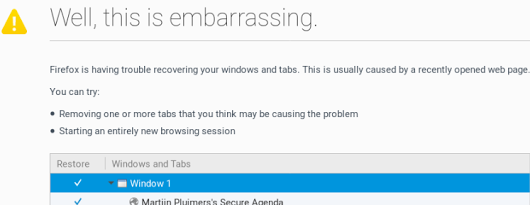 A while ago, I asked about [WayBack] “Is there a way to skip the Firefox “Well, this is embarrassing” during a sudden reboot and just continue with the loading of the default pages? – Jeroen Wiert Pluimers – Google+
Later I found the workaround at both and [WayBack] Well this is embarrassing message | Firefox Support Forum | Mozilla Support with more elaboration at [WayBack] Don’t give Chance for Firefox to Show ‘Well, this is embarrassing” message next time again | Techdows:
- Open Firefox
- Type
about:config in the addressbar
 Confirm the
This might void your warranty!
by clicking
I accept the risk!- Search for
browser.sessionstore.resume_from_crash
- Double click it so the value changes from the
default value true to the user set value false


Now after a sudden reboot of the machine, a start of Firefox just loads the default page.
–jeroen
Posted in Firefox, Power User, Web Browsers | Leave a Comment »


 The Wiert Corner - irregular stream of stuff