The Wiert Corner – irregular stream of stuff

Jeroen W. Pluimers on .NET, C#, Delphi, databases, and personal interests

  • My badges

  • Twitter Updates

  • My Flickr Stream

  • Pages

  • All categories

  • Enter your email address to subscribe to this blog and receive notifications of new posts by email.

    Join 1,854 other subscribers

Archive for 2020

The magic Delphi ReturnAddress intrinsic

Posted by jpluimers on 2020/02/05

I could not find any official place where ReturnAddress is documented even though it is used at quite a few places in the RTL, VCL, FMX and 3rd party libraries like DUnitX, Spring4D, JCL, ReportBuilder, TeeChart.

I tried searching it in the contexts of Delphi 2007, Delphi 2009, but there is only a [Archive.is] different System.ObjAuto.TParameters.ReturnAddress documented in XE2 and higher.

procedure Abort;
begin
  raise EAbort.CreateRes(@SOperationAborted) at ReturnAddress;
end;

There is a (usually broken*) ReturnAddr function used in various places of the RTL/VCL/FMX and (therefore wrongfully copied) in many other peoples code.

  function ReturnAddr: Pointer;
  // From classes.pas
  asm
    MOV     EAX,[EBP+4] // sysutils.pas says [EBP-4], but this works !
  end;
  • See the above link; I think this was fixed in Delphi XE, but the issue is still open.

Related to the above is the documented ExceptAddr.

I’ve used this in my ExceptionHelperUnit to build a GetStackTrace function in the example gist below.

I found these posts documenting the behaviour of the above intrinsic functions and more:

–jeroen

Read the rest of this entry »

Posted in Conference Topics, Conferences, Delphi, Development, Event, Software Development | Leave a Comment »

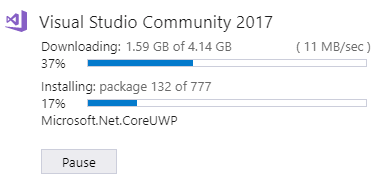
I love installers that can download and install in parallel threads….

Posted by jpluimers on 2020/02/04

[WayBack] I love installers that can download and install in parallel threads. Embarcadero and Zypper can learn from this. – Jeroen Wiert Pluimers – Google+

Most Linux distributions have package managers that can do this (apt and yum can), but OpenSuSE zypper (actually ZYpp) cannot even download packages in parallel:

Embarcadero is in the same state as zypper.

–jeroen

Posted in *nix, Development, openSuSE, Power User, Software Development, SuSE Linux, Tumbleweed | Leave a Comment »

Delphi: Bezier in FMX

Posted by jpluimers on 2020/02/04

In case I ever need to do some Bezier curve coding in Delphi: [WayBack] GitHub – zhaoyipeng/FMXComponents: Firemonkey Opensource Components

Via: [WayBack] Interesting set of components for FireMonkey – Christen Blom-Dahl – Google+

–jeroen

Read the rest of this entry »

Posted in Delphi, Development, FireMonkey, Software Development | Leave a Comment »

TL;DR: Raspberry Pi models 1..3 become hotter and hotter under load; no housing gives best cooling.

Posted by jpluimers on 2020/02/04

[WayBack] TIL Raspi Kühlkörper bringen nix. Lego schon.  – Kristian Köhntopp – Google+

Background information: [Archive.is] Mein Raspberry Pi 3 und sein Problem mit der Systemtemperatur · Un*xe

–jeroen


Posted in *nix, Debian, Development, Hardware, Hardware Development, Linux, Power User, Raspberry Pi, Raspbian | Leave a Comment »

Those nice User Experiences: two shortcuts binding to Alt-O on the Dutch Windo…

Posted by jpluimers on 2020/02/03

[WayBack] Those nice User Experiences: two shortcuts binding to Alt-O on the Dutch Windows 10 translation… – Jeroen Wiert Pluimers – Google+

I know it is hard to do UX, but at least test your translations.

–jeroen

Posted in Usability, User Experience (ux) | Leave a Comment »

Managing sendmail TLS authenticated users

Posted by jpluimers on 2020/02/03

A few notes for managing the users that should be allowed to send mail via sendmail using TLS authentication.

Most of it is derived/summarised for [WayBack] SMTP AUTH in sendmail 8.10-8.13 and [WayBack] Creating Users for a Postfix-Based Mail Relay – Scott’s Weblog – The weblog of an IT pro specializing in cloud computing, virtualization, and networking, all with an open source view

  1. Verify your sendmail allows TLS:
    # sendmail -d0.1 -bv | grep SASL
    NETUNIX NEWDB NIS NISPLUS PIPELINING SASLv2 SCANF SOCKETMAP
  2. The list of TLS authentication users differs from the ones in /etc/passwd
  3. The tools and files manage if  the output is SASLv2 or older. For SASLv2 they are:
    • /etc/sasldb2 has the users/passwords
    • sasldblistusers2 lists the users
    • saslpasswd2 manages users

For instance, this commands creates a new user for use with sendmail:

# saslpasswd2 -c -u example.org firstname.lastname
Password:
Again (for verification):

sasldblistusers2

firstname.lastname@example.org: userPassword

cat /etc/sasldb2

....................firstname.lastname@example.orguserPassword

For future reading:

I thought I needed this so I could add an alias @pluimers.com to my gmail box, as I read only the accepted answer at [WayBack] Add new alias to Gmail without SMTP (forwarding-only address) – Web Applications Stack Exchange pointing to:

I should have read the second answer at [WayBack] Add new alias to Gmail without SMTP (forwarding-only address) – Web Applications Stack Exchange:

As of writing, however, you can simply use the Gmail SMTP server, as long as you use [WayBackGoogle two-step authentication.

So just for completeness, the full steps:

  1. Gmail settings, Accounts and Import tab.
  2. Add another email address you own
  3. Type name and email address to be added.
  4. For SMTP Server, put smtp.gmail.com
  5. For Username, your full Gmail address including @gmail.com
  6. For password, provide an App Password generated in Google Accounts at https://security.google.com/settings/security/apppasswords
  7. Leave Secured connection using TLS selected as is.
  8. Add Account

–jeroen

Posted in *nix, *nix-tools, Power User, sendmail | Leave a Comment »

Fixing “one or more critical volumes is not having enough free space” also known as 0x81000033 during Windows backup

Posted by jpluimers on 2020/02/03

If you get this error:

Backup and Restore failed and you receive the following error message: The backup did not complete successfully. Check your backup: Windows Backup skipped backing up system image because one or more critical volumes is not having enough free space.

then you are dealing with error 0x81000033 which usually means your SYSTEM RESERVED partition is full, but might happen on other volumes you are backing up as well.

Windows tries to trick your mind, as the error actually indicates the disk you make your backup to, but in fact it is about one or more of the disks you are backing up.

Most often, this is the hidden partition SYSTEM RESERVED (sometimes called System Reserved):

The SYSTEM RESERVED partition (~100 megabyte on systems originally installed with Windows < 8 and ~350 megabyte afterwards) contains files relating to boot, recovery and BitLocker drive encryption. You find more information about it here:

The minimum free size for volumes when using Windows backup are these:

  • volumes less than 500 megabytes: 50 megabytes free space
  • between 500 megabytes and 1 gigabytes: 320 megabytes of free space
  • more than 1 gigabytes: at least 1 gigabyte of free space

That was indeed the case on my disk:

Freeing space on the System Reserved volume

A quick search for 0x81000033 reveals space issues usually are about the USN Journal which you can configuring using fsutil.

Even though the documentation doesn’t tell, fsutil accepts not just a drive letter as VolumePath, but also a VolumeName. [WayBack] 1_multipart_xF8FF_3_WolfC07.pdf (Chapter 7 of “Troubleshooting Microsoft Technologies: The Ultimate Administrator’s Repair Manual“) gets that right:

volumepath … specify the path to a logical volume (drive letter, mount path, volume name).

So you do not need a drive letter to disable the USN journal, the volumename suffices.

This volume name is the unique NTFS identification for a volume: [WayBack] NTFS Curiosities (part 2): Volumes, volume names and mount points – Antimail

You can find the volume name inside PowerShell by using Get-Volume | Format-List, then on an administrative command prompt running this:

fsutil usn deletejournal /D \\?\Volume{b41b0670-0000-0000-00e8-0e8004000000}\

In my case this wasn’t enough, so I had to assign a drive letter to see that there was a snapshots directory in the root:

Deleting that directory solved the problem.

Related articles:

–jeroen

Read the rest of this entry »

Posted in Power User, Windows, Windows 10, Windows 7, Windows 8, Windows 8.1 | Leave a Comment »

Error “30029-1001” – Google Search; when installing Office 365 language packs

Posted by jpluimers on 2020/01/31

On my list of things to figure out: Error “30029-1001” – Google Search.

This happens when installing language packs for Office 365.

Related:

–jeroen

Posted in Office, Power User | Leave a Comment »

Happlink / PlugUp died, but you can still use their U2F USB key

Posted by jpluimers on 2020/01/31

Nothing lasts, so the company behind the U2F key on the right is long gone, but their site is archived in Archive.is and the WayBack machine. Since the U2F protocol is open, you can still set up the device and use it. Here is how for your Google account (for instance with GMail), it works in a similar way for other providers:

Archived links:

Some of their videos are also still online (embedded links at the bottom of the post):

U2F (or Universal 2nd Factor – Wikipedia) has an open protocol by FIDO Alliance – Wikipedia. More on that in these links below.

One final odd note:

The FIDO alliance still listed Happlink on their web-site when I wrote this blog post.

It used to be at this address: Happlink, 4 rue Jehan Le Povrmoyne, 76240 Le Mesnil-Esnard, France

Read the rest of this entry »

Posted in Power User, Security, U2F FIDO Security Keys | Leave a Comment »

When storing huge files under NTFS compression, ensure you have twice the disk space

Posted by jpluimers on 2020/01/31

When copying over a 400 gigabyte file over the network to an NTFS compressed folder on a drive with having 600 gigabytes free space, the volume became full after copying ~350 gigabytes.

What I learned is that compressing huge files for later read-only access is fine, but you need about twice the disk space while the copy operation is in progress.

For non-compressed files you can go without this extra reservation.

Background information:

Note there are also issues with NTFS compression and de-duplication. I’m not sure about sparse files. Be careful when you try to compress the system drive where your Windows OS lives on:

–jeroen

Posted in NTFS, Power User, Windows | Leave a Comment »