The Wiert Corner – irregular stream of stuff

Jeroen W. Pluimers on .NET, C#, Delphi, databases, and personal interests

  • My badges

  • Twitter Updates

  • My Flickr Stream

  • Pages

  • All categories

  • Enter your email address to subscribe to this blog and receive notifications of new posts by email.

    Join 1,854 other subscribers

Archive for 2020

Hamburger menu character on unicode: use U+2261 instead of U+2630

Posted by jpluimers on 2020/01/27

Not all fonts have Unicode character ☰ [WayBack] Unicode Character ‘TRIGRAM FOR HEAVEN’ (U+2630) as it is in a less common block.

More fonts have Unicode character ≡ [WayBack] Unicode Character ‘IDENTICAL TO’ (U+2261)

The latter is slightly shorter and slightly narrower than the former, but works in way more places.

Via [WayBack] html – Unicode ☰ hamburger not displaying in Android & Chrome – Stack Overflow

I’ve worked around this problem by using the UNICODE character UNICODE U+2261 (8801), ≡ IDENTICAL TO as illustrated below rather than the UNICODE U+2630 (9776) ☰ TRIGRAM FOR HEAVEN which

–jeroen

Posted in Development, Encoding, LifeHacker, Power User, Software Development, Unicode | Leave a Comment »

GitHub – Nike-Inc/gimme-aws-creds: A CLI that utilizes Okta IdP via SAML to acquire temporary AWS credentials

Posted by jpluimers on 2020/01/27

Since I will likely need something like this one day: [WayBackGitHub – Nike-Inc/gimme-aws-creds: A CLI that utilizes Okta IdP via SAML to acquire temporary AWS credentials

I think I got this via Kristian Köhntopp a while ago.

–jeroen

Posted in Amazon.com/.de/.fr/.uk/..., Cloud, Cloud Development, Infrastructure, Power User, Software Development | Leave a Comment »

Mapping US-English Keyboard keys to Turkish

Posted by jpluimers on 2020/01/27

I wrote about Delphi, IBX and the Turkish I problem about a year and a half ago. Back then, I could use a US-English system to reproduce the problem. This time, I had a problem on a Turkish system running an embedded version of Windows with hardly any UI tools available (especially no Windows Explorer).

Luckily, I had the command prompt, but it looked like this:

X:\>mode con codepage

Status for device CON:
----------------------
    Code page:      857

X:\>mode con codepage select 437
Invalid parameter - select

X:\>mode con codepage select=437
Invalid parameter - select

Status for device CON:
----------------------
    Lines:          300
    Columns:        120
    Keyboard rate:  31
    Keyboard delay: 1
    Code page:      437

X:\>

I tried the [WayBack] modecommand to change from [WayBack] code page 857(Turkish) to [WayBack] code page 437(IBM PC or OEM-US) which is the default on US-English systems, but that did not change the keyboard locale, not even for the command prompt.

Read the rest of this entry »

Posted in Development, internatiolanization (i18n) and localization (l10), Power User, Software Development | Leave a Comment »

Windows – chance display/screen/monitor resolution from the console

Posted by jpluimers on 2020/01/24

Links:

TODO: find out the differences in both qres tools.

–jeroen

Posted in Power User, Windows | Leave a Comment »

Richard P Feynman – FUN TO IMAGINE (full)

Posted by jpluimers on 2020/01/24

On my watch list: Richard P Feynman – FUN TO IMAGINE (full) – YouTube

The first 5 minutes are already so great and full of imagination, that I need to find time to watch it once more after already watching it 2 times in full with some time in-between to reflect.

Via: [WayBack] Richard P Feynman – FUN TO IMAGINE (full) – DoorToDoorGeek “Stephen McLaughlin” – Google+

–jeroen

Read the rest of this entry »

Posted in LifeHacker, Power User, science | Leave a Comment »

Viewing certbot installed certificates and their expiry dates

Posted by jpluimers on 2020/01/24

A simple tip on the certbot command-line from [WayBackUser Guide — Certbot 0.19.0.dev0 documentation – Managing certificates (Automatically enable HTTPS on your website with EFF’s Certbot, deploying Let’s Encrypt certificates.):

To view a list of the certificates Certbot knows about, run the certificates subcommand:

certbot certificates

This returns information in the following format:

Found the following certs:
  Certificate Name: example.com
    Domains: example.com, www.example.com
    Expiry Date: 2017-02-19 19:53:00+00:00 (VALID: 30 days)
    Certificate Path: /etc/letsencrypt/live/example.com/fullchain.pem
    Private Key Path: /etc/letsencrypt/live/example.com/privkey.pem

Via: [WayBack] It there a command to show how many days certificate you have? – Server – Let’s Encrypt Community Support

–jeroen

Posted in Encryption, Let's Encrypt (letsencrypt/certbot), Power User, Security | Leave a Comment »

If your tool depends on others, at least search for them…

Posted by jpluimers on 2020/01/23

If you auto-configure, then at least try searching the tools you need:

[WayBack] Yeah right Delphi 10.2 Tokyo (for which the shortcut – unlike the Berlin one – does not contain the word Tokyo), they are right on the Windows PATH wher… – Jeroen Wiert Pluimers – Google+

–jeroen

Posted in Delphi, Development, Software Development | Leave a Comment »

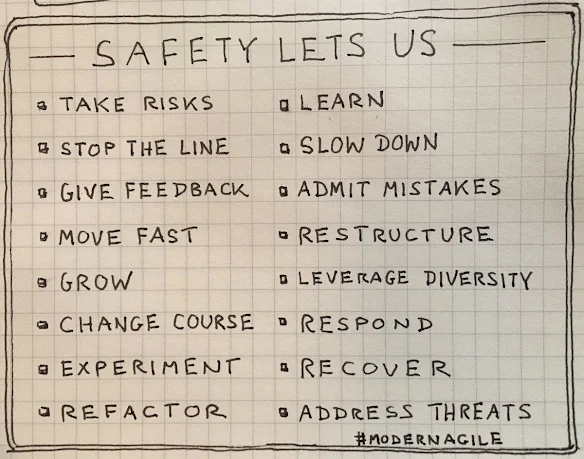
Of Course Psychological Safety…But How? – John Cutler – Medium

Posted by jpluimers on 2020/01/23

On my reading list: [WayBackOf Course Psychological Safety…But How? – John Cutler – Medium

Medium indicates it is an 8 minute tread, but since I’m more on the non-people side of the spectrum, digesting it will take quite some time needing multiple reeds.

Via: [WayBack] Of Course Psychological Safety…But How? – John Cutler – Medium – Marjan Venema – Google+

Marjan is a great coach on the personal and agility side of things.

–jeroen

Posted in Agile, Development, LifeHacker, Power User | Leave a Comment »

Delphi developer switching to C# – Stack Overflow

Posted by jpluimers on 2020/01/23

Another blast from the past. I’ve been using many development environment all my live, so I have been using .NET very early on allowing me to make a good comparison: [WayBackDelphi developer switching to C# – Stack Overflow.

I have a broad toolbox because we’ve never lived in a “silver bullet” era: any problem needs a combination of tools to solve them. Having a broad toolset allows you to pick and choose more easily. Mastering the different tools however requires a lot of effort and time. You really need to love this profession to put that energy in it.

I heavily use both for software development.

Development speed of server apps (web apps, web services, windows services) is much higher in .NET.

Development speed of business apps (pure Windows UI) is much higher in Delphi.

Development of sexy apps is a pain in both environments.

A few things you should know:

  • Learning the .NET framework will take a lot of time: it is huge, but contains a lot of gizmos (some gems are really well hidden).
  • Don’t lose yourself in following all new trends at once: generics, lambda, LINQ, each are nice, but grasping them all at once is only for a few of us
  • For web apps, skip WebForms, but learn ASP.NET MVVC (yes, the Ruby guys were right after all); learn HTML 5 and JavaScript too.
  • For sexy Windows apps, learn WPF, but be prepared for a steep learning curve (designer, and framework are radically different)
  • Don’t get a too sexy UI: it costs you a disproportional amount of time while your users are waiting for functionality
  • Like the market has been bashing Delphi since version 1, the market is bashing SilverLight too
  • Skip WinForms; if you need something like WinForms, then Delphi is way more productive (even more so if you have an existing Delphi VCL codebase).
  • WPF is just as thread-friendly as the VCL or WinForms (read: neither of the 3 is thread friendly)
  • Don’t perform rewrites of your Delphi stuff in .NET (or for that matter any other 1:1 rewrite from platform A into platform B): it is a waste of your time.
  • Threading and synchronization are a pain in all development environments. The pain is not so much in the general stuff (the Concurrent Collections in the .NET 4 framework helps, as do the Delphi OmniThreadLibrary), but in getting the final details and exception cases right is the real pain.
  • Garbage collection does not mean that you won’t leak memory: it means that you won’t leak when your app terminates, but while it runs the leaks are way harder to detect (boy, I wish I had the FastMM memory monitor for .NET)

–jeroen

Posted in .NET, C#, Delphi, Development, Software Development | 3 Comments »

Delphi / Visual Studio build events: xcopy exit code 9009; ensure your PATH indeed includes the Windows directories

Posted by jpluimers on 2020/01/22

If you ever get an exit code 9009 from xcopy like the one below, then try using the full path to xcopy. It should be there, it should not matter, but it does if someone changed your path.

[Exec Error] The command " xcopy ....\Shared\DLL\FastMM\FastMM_FullDebugMode.dll .\Win32\Debug\ /y&& xcopy ....\Shared\DLL\OpenSSL\libeay32.dll .\Win32\Debug\ /y&& xcopy ....\Shared\DLL\OpenSSL\ssleay32.dll .\Win32\Debug\ /y&& xcopy ....\Shared\DLL\gRPC\nghttp2.dll .\Win32\Debug\ /y&& xcopy ....\Shared\DLL\gRPC\sgcWebSockets.dll .\Win32\Debug\ /y" exited with code 9009.

Preliminary solution: replace xcopy    with C:\Windows\System32\xcopy.exe .

Final solution: look with Process Explorer and Process Monitor what the exact environment PATH is. It should include C:\WINDOWS\system32;C:\WINDOWS;C:\WINDOWS\System32\Wbem;

If it does not, then find out what is changing your path.

Related:

–jeroen

Posted in .NET, Delphi, Development, Software Development | Leave a Comment »