The Wiert Corner – irregular stream of stuff

Jeroen W. Pluimers on .NET, C#, Delphi, databases, and personal interests

  • My badges

  • Twitter Updates

  • My Flickr Stream

  • Pages

  • All categories

  • Enter your email address to subscribe to this blog and receive notifications of new posts by email.

    Join 1,860 other subscribers

Archive for February, 2021

Automatically closing ABBY Finereader 5.0 windows after scanning is completed

Posted by jpluimers on 2021/02/23

Both my Fujitsu ScanSnap ix500 and ix100 scanners can be used from Windows to automatically scan to PDF.

PDF conversion is done through the included ABBYY FineReader 5.0 software.

However, on each scan, it keeps a dialog open with the scan results, even if scanning went fine.

When scanning lots of documents, lots of dialogs are open, causing two problems:

  • a lot of memory and window handle resource usage
    • this can be ~100 megabytes per instance
  • a lot of disk usage:
    • it keeps both the non-OCR and OCR PDF files active (only when closing, the non-OCR PDF file is deleted)

I wanted to close that dialog automatically, but none of the configuration settings allow it.

So I wrote a quick and dirty solution, that could have been in any tool supporting the Windows API and call backs. The solution below should easily translate to tools other than Delphi.

These are the only Windows API functions used:

these types:

and these constants:

The basic structure is an EumWindows call passing a callback that gets called for all top level Windows, then in the callback, for matching captions: call EnumChildWindows with another callback. In that callback, for matching captions and child captions, perform a click or close.

Related posts:

Log of Windows related to both programs:

ParentHWnd=$00000000;HWnd=$00030602;IsVisible=-1;IsOwned=0;IsAppWindow=-1;WindowTextLength=33;WindowText="ABBYY FineReader for ScanSnap 5.0"
> Recursive child windows for ABBYY
  ParentHWnd=$00030602;HWnd=$000205E2;IsVisible=-1;IsOwned=0;IsAppWindow=0;WindowTextLength=0;WindowText=""
  ParentHWnd=$00030602;HWnd=$000205E0;IsVisible=-1;IsOwned=0;IsAppWindow=0;WindowTextLength=0;WindowText=""
  ParentHWnd=$00030602;HWnd=$000205EC;IsVisible=-1;IsOwned=0;IsAppWindow=0;WindowTextLength=0;WindowText=""
  ParentHWnd=$00030602;HWnd=$000205EA;IsVisible=-1;IsOwned=0;IsAppWindow=0;WindowTextLength=74;WindowText="Register your copy of ABBYY FineReader and receive the following benefits:"
  ParentHWnd=$00030602;HWnd=$000205E8;IsVisible=-1;IsOwned=0;IsAppWindow=0;WindowTextLength=25;WindowText="- Free technical support;"
  ParentHWnd=$00030602;HWnd=$000205E6;IsVisible=-1;IsOwned=0;IsAppWindow=0;WindowTextLength=51;WindowText="- Information about new versions of ABBYY products."
  ParentHWnd=$00030602;HWnd=$000205E4;IsVisible=-1;IsOwned=0;IsAppWindow=0;WindowTextLength=12;WindowText="Registration"
  ParentHWnd=$00030602;HWnd=$000205FC;IsVisible=-1;IsOwned=0;IsAppWindow=0;WindowTextLength=0;WindowText=""
  ParentHWnd=$00030602;HWnd=$000205FA;IsVisible=-1;IsOwned=0;IsAppWindow=0;WindowTextLength=6;WindowText="&Close"
  > Child is Close button: clicking.
  < ParentHWnd=$00000000;HWnd=$00030602;IsVisible=-1;IsOwned=0;IsAppWindow=-1;WindowTextLength=33;WindowText="ABBYY FineReader for ScanSnap 5.0"
  ParentHWnd=$00030602;HWnd=$000205F6;IsVisible=-1;IsOwned=0;IsAppWindow=0;WindowTextLength=34;WindowText="Processing finished (warnings: 1)."
  ParentHWnd=$00030602;HWnd=$000205F4;IsVisible=-1;IsOwned=0;IsAppWindow=0;WindowTextLength=31;WindowText="Converting to searchable PDF..."
  ParentHWnd=$00030602;HWnd=$000205F0;IsVisible=-1;IsOwned=0;IsAppWindow=0;WindowTextLength=0;WindowText=""
  ParentHWnd=$00030602;HWnd=$000205EE;IsVisible=-1;IsOwned=0;IsAppWindow=0;WindowTextLength=0;WindowText=""
  ParentHWnd=$00030602;HWnd=$000205D2;IsVisible=-1;IsOwned=0;IsAppWindow=0;WindowTextLength=63;WindowText="Page 1. Make sure the correct recognition language is selected."

ParentHWnd=$00000000;HWnd=$00010248;IsVisible=-1;IsOwned=-1;IsAppWindow=0;WindowTextLength=14;WindowText="Creative Cloud"
> Recursive child windows for Creative Cloud
  ParentHWnd=$00010248;HWnd=$0001024A;IsVisible=-1;IsOwned=0;IsAppWindow=0;WindowTextLength=28;WindowText="Main Container Client Dialog"
  ParentHWnd=$00010248;HWnd=$0002034A;IsVisible=-1;IsOwned=0;IsAppWindow=0;WindowTextLength=3;WindowText="IMS"
  ParentHWnd=$00010248;HWnd=$0001035A;IsVisible=-1;IsOwned=0;IsAppWindow=0;WindowTextLength=0;WindowText=""
  ParentHWnd=$00010248;HWnd=$00020350;IsVisible=-1;IsOwned=0;IsAppWindow=0;WindowTextLength=18;WindowText="Sign in - Adobe ID"
  > Child is Signin button: closing parent.
  < ParentHWnd=$0003011A;HWnd=$00010248;IsVisible=-1;IsOwned=-1;IsAppWindow=0;WindowTextLength=14;WindowText="Creative Cloud"
    < ParentHWnd=$00000000;HWnd=$0003011A;IsVisible=0;IsOwned=0;IsAppWindow=0;WindowTextLength=4;WindowText="Core"

It appears that ABBYY has a different set of booleans than Creative Cloud.

This is kind of odd, as delphi – How to get captions of actual windows currently running? – Stack Overflow points to Window Features – Windows applications | Microsoft Docs: Owned Windows stating:

The Shell creates a button on the taskbar whenever an application creates a window that isn’t owned. To ensure that the window button is placed on the taskbar, create an unowned window with the WS_EX_APPWINDOW extended style. To prevent the window button from being placed on the taskbar, create the unowned window with the WS_EX_TOOLWINDOW extended style. As an alternative, you can create a hidden window and make this hidden window the owner of your visible window.

Apparently, ABBYY fully plays by the rules, but Creatheive Cloud cheats a bit: none of the Windows are WS_EX_APPWINDOW, but the hidden unowned “Core” owner of the “Creative Cloud” still makes it appear on the taskbar.

–jeroen

Read the rest of this entry »

Posted in Delphi, Development, Fujitsu ScanSnap, Hardware, ix100, ix500, Power User, Scanners, Software Development, Windows Development | Leave a Comment »

Unittesting FizzBuzz

Posted by jpluimers on 2021/02/23

Keep a version history of how you approach the below TDD driven approach, then discuss it with one of your co-workers.

Note there is no “right” approach, though probably you will experience that some environments and approaches may lead to code that is better, for instance because it is:

  • easier to explain
  • shorter
  • more performant

The above 3 might points bite each other (;

Based on FizzBuzz: One Simple Interview Question – YouTube.

Write initial tests

Write unit tests for this unit under test in pseudo code:

type OutputMethod: method(string Value)
class FizzBuzzGame:
    method Construct(OutputMethod Value)
    method Process(int Value)

Unit test that captures Output with a certain set of Values, then tests for the four possible combinations:

  • number
  • Fizz
  • Buzz
  • FizzBuzz

and also ensures that the passed OutputMethod is being called once for each call to Process.

Extend the tests

Now extend the tests to cover the below multiples and all the permutations caused by the longer list. Think carefully about the permutations.

  • 3 -> Fizz
  • 5 -> Buzz
  • 7 -> Fuzz
  • 11 -> Bizz
  • 13 -> Biff

Write the unit under test

The least tricky bit should be this step.

Be sure to test the solution with your co-workers as well.

Non positive numbers.

Did you think about negative numbers?

Did you think about the number zero?

What would you do about them in the tests and unit under test?

–jeroen

Read the rest of this entry »

Posted in Conference Topics, Conferences, Development, Event, Software Development | Leave a Comment »

Delphi intrinsic functions that evaluate to consts

Posted by jpluimers on 2021/02/23

A long time ago, I wondered Are these really Windows compiler unsupported Delphi Intrinsic Routines about [WayBack/Archive.is] Delphi Intrinsic Routines – RAD Studio.

Today, I limited the documented intrinsic list to the constant intrinsic functions:

const
  _Abs = System.Abs(1);
  _Chr = System.Chr(1);
  _Concat = System.Concat(1);
  _Hi = System.Hi(1);
  _High = System.High(1);
  _Length = System.Length('');
  _Lo = System.Lo(1);
  _Low = System.Low(1);
  _Odd = System.Odd(1);
  _Ord = System.Ord(1);
  _Pi = System.Pi();
  _Pred = System.Pred(1);
  _Ptr = System.Ptr(1);
  _Round = System.Round(1);
  _SizeOf = System.SizeOf(1);
  _Sqr = System.Sqr(1);
  _Succ = System.Succ(1);
  _Swap = System.Swap(1);
  _Trunc = System.Trunc(1);

The limited table is below the fold.

There is also a set of undocumented generic intrinsics that I wrote about in Source: Delphi Compiler Intrinsics can help you collapse generated code for generics a lot.

Of the those undocumented functions, these are constant intrinsic functions:

const // undocumented compiler intrinsics
  _Default = Default(Integer);
  _IsManagedType = IsManagedType(1);
  _GetTypeKind = GetTypeKind(1);
  _IsConstValue = IsConstValue(1);

–jeroen

Read the rest of this entry »

Posted in Conference Topics, Conferences, Delphi, Development, Event, Software Development, Undocumented Delphi | 2 Comments »

Redux: Mac OS X – Spotlight not finding many files: force a rescan solved it

Posted by jpluimers on 2021/02/22

I bumped into a case where none of the steps in Mac OS X – Spotlight not finding many files: force a rescan solved it helped.

The problem was that my SD card at  /Volumes/SanDisk400GB/ was not indexed any more, but the SSD was.

These steps solved it:

$ sudo mdutil -i off /Volumes/SanDisk400GB/
2019-02-25 16:32:47.097 mdutil[14810:3728038] mdutil disabling Spotlight: /Volumes/SanDisk400GB -> kMDConfigSearchLevelFSSearchOnly
    Indexing disabled.
$ sudo mdutil -i on /Volumes/SanDisk400GB/
/Volumes/SanDisk400GB:
    Indexing enabled. 
$ sudo mdutil -E /Volumes/SanDisk400GB/
/Volumes/SanDisk400GB:
    Indexing enabled. 
$ sudo mdutil -E /
/:
    Indexing enabled. 
$ sudo mdutil -p

I am not sure if any of these can be omitted.

An odd thing: sudo mdutil -s does not show any output on progress. It is too late now, but I suspect it requires a volume parameter, just like -i and -E require.

–jeroen

Posted in Apple, Mac OS X / OS X / MacOS, Power User | Leave a Comment »

Why you should critically review how often and why you use various spaces in your home

Posted by jpluimers on 2021/02/22

Below is a great thread on why and how often you use spaces in your home.

It is time to critically review these, especially as the enduring covid crisis in many countries means you will spend a lot more time together for quite some time to come.

Rooms often hardly used, but usually being over-dimensioned or overly invested in:

  • living rooms
  • dining rooms
  • master bed rooms

Rooms under-estimated:

  • kitchens
  • bathrooms
  • family rooms (which seem to be the real living rooms)
  • office / work spaces (too often in small bed rooms)

It helps figuring out the hotspots in your home, and think about why you use them often or seldom, then redo the layout of the house so often used spaces get big enough to efficiently use.

A great video with a study done some 5 years ago is below the fold showing those hotspots for a typical USA home. The same idea applies outside in other countries as well, though they might not have all the rooms a typical USA house has.

Thread: [Archive.is] Kristian Köhntopp on Twitter: “For me, “Working from Home” started at 2020-02-23 due to a fire in the office. A month later, when the building was about to be reopened, Corona struck and forced the entire company into working from home. We will be keeping this up until at least October. This is my desk.… “

–jeroen

Read the rest of this entry »

Posted in LifeHacker, Power User | Leave a Comment »

Downloading Facebook videos as mp4 files in both mobile and HD quality for offline viewing

Posted by jpluimers on 2021/02/22

Videos from the above links below the sig.

–jeroen

Read the rest of this entry »

Posted in Facebook, Power User, SocialMedia | Leave a Comment »

Python: saving a web page to a jpeg image file by using the Google base64url encoded screenshot of it

Posted by jpluimers on 2021/02/19

As a follow-up on Still looking for base64url decoding tools, both on-line and for MacOS homebrew: this is in Python, works on MacOS, Linux and Windows, and can be integrated in a web page.

It is based on the ideas in [WayBack] Python-Twitter-Hacks/websiteScreenshot.py at master · edent/Python-Twitter-Hacks · GitHub, which was more like a code snippet with hard coded literals.

It downloads a jpeg web-site screenshot using the Google PageSpeed API V1, which generates the screenshot as a base64url encoded blob inside a JSON structure.

Python does not have native Python base64url support, but the concept of it is fairly straightforward: [WayBack] RFC 4648 – The Base16, Base32, and Base64 Data Encodings: Base 64 Encoding with URL and Filename Safe Alphabet, which allows data to be passed inside URLs without reverting to [WayBack] Percent-encoding – Wikipedia.

My changes work, but are by no means in canonical form or Idiomatic Python. I have a long way to go to reach that level of Python.

So I forked the repository, and fixed the script basing it on Python 3.

I might make it V2 compatible in the future. More information on V2 in [WayBack] Google APIs Explorer: Services > PageSpeed Insights API v2 > pagespeedonline.pagespeedapi.runpagespeed

Content is in the below gist.

–jeroen

Read the rest of this entry »

Posted in base64, base64url, Development, Encoding, Python, Scripting, Software Development | Leave a Comment »

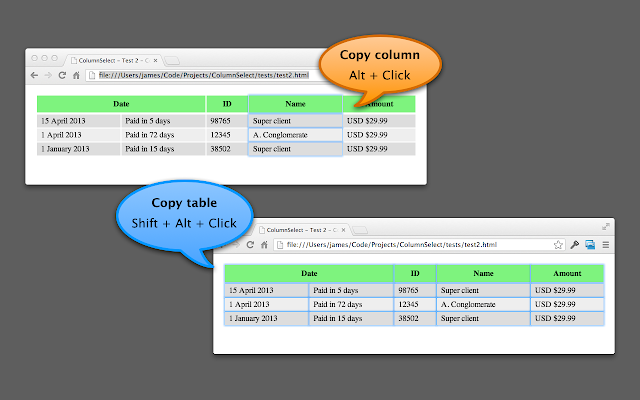
ColumnCopy – Chrome Web Store

Posted by jpluimers on 2021/02/19

[Archive.is] ColumnCopy – Chrome Web Store: Enables copying columns from tables.

It can read anything on any web page, and it uses modifier keys, so I usually have it disabled until I need it.

You can disable/enable it on this page:

chrome://extensions/?id=lapbbfoohlcmlbdaakldmmallcbcbpjb

Via [WayBack] Select column from a table with Google Chrome – Super User

Sorry to dig up an old thread, but this might help someone in the future. I wrote a Chrome extension called ColumnCopy which accomplishes this task.

–jeroen

Posted in Chrome, LifeHacker, Power User, Web Browsers | Leave a Comment »

Quooker links en afmetingen

Posted by jpluimers on 2021/02/19

(Dutch as that’s where I found the information)

NB: Prijzen waren van begin 2019

  • PDF: Installatiehandleiding COMBI+
  • PDF:  Vervanging HiTAC®-waterfilter bij COMBI(+) (E)
  • PDF: Installatiehandleiding CUBE
  • PDF: Afmetingen Flex kraan
  • [Archive.is] Installateurs

    Klik op het plaatje voor een grotere versie.

  • [WayBack] PDF: Afmetingen reservoirs

    LET OP! Houd rekening met 3 cm extra ruimte in uw keukenkastje boven de COMBI(+) en 8 cm extra boven de COMBI(+) E i.v.m. de slang

  • [Archive.is] Wat zijn de afmetingen van de Quooker-reservoirs? Installatie

    PRO3-reservoir (3L kokendwaterreservoir):

    Reservoir hoogte: 40 cm

    Reservoir diameter: 15 cm

    COMBI(+)-reservoir (7L kokendwaterreservoir):

    Reservoir hoogte: 47 cm

    Reservoir diameter: 20 cm

    CUBE (gekoeld waterreservoir):

    Reservoir hoogte: 43 cm incl. CO2 cilinder

    Reservoir breedte: 30 cm incl. CO2 cilinder

    Reservoir diepte: 44 cm

    Een overzicht van alle specificaties van onze kokendwaterreservoirs vind je hier. Een overzicht van alle specificaties van de Quooker CUBE vind je hier.

    Benieuwd naar de afmetingen van de kranen? Deze vind je op de pagina van de kraan naar jouw keuze.

  • [Archive.is] Onze collectie reservoirs
    • Kokendwaterreservoir COMBI+

      • Samenvatting

        Inhoud 7 liter
        Afmetingen (hoogte x breedte x diepte) 47 x 20 x 20 cm
        Hoeveelheid 40° – 60° Onbeperkte
      • Algemeen

        Reservoir Hoogte 47 cm
        Reservoir Diameter 20 cm
        Opwarmtijd 20 minuten
        Benodigde Werkhoogte 50 cm
      • Vermogen

        Vermogen 2200 W
        Spanning 230 V
        Stand-By Verbruik * 10 W
        Jaarlijks Elektriciteitsverbruik 511 kWh/A
      • Waterdruk

        Minimale Waterleidingdruk 200 kPa (2 bar)
        Maximale Waterleidingdruk 600 kPa (6 bar)
        Max. Werkdruk 800 kPa (8 bar)
      • Beveiliging

        Overdrukventiel 800 KPa (8 Bar)
        Maximaal Temperatuur
      • Specificaties

        Hoeveelheid 40°C Onbeperkt
        Hoeveelheid 60°C Onbeperkt
        Temperatuurregeling Thermostatisch
        Filter High Temperature Activated Carbon
      • Energielabel

        Opgegeven Capaciteitsprofiel XXS
        Energie-Effieciëntieklasse Voor Waterverwarming A
        Energie-Effieciëntie Voor Waterverwarming 36%
        Warmwatertemperatuurinstelling Van Waterverwarmingstoestel 40°C – 60°C
        Geluidsniveau – dB
    • Gekoeldwaterreservoir CUBE

      • Specificaties

        Spanning 230 V
        Vermogen 100 W
        Stand-By Verbruik 12 W
        Reservoir Hoogte 43 cm
        Reservoir Breedte 30 cm
        Reservoir Diepte 44 cm
        Minimale Waterleidingdruk 200 kPa (2 bar)
        Maximale Waterleidingdruk 400 kPa (4 bar)
        Type Waterfilter Hollow Fiber filter
  • [Archive.is] Koel bruisend en gefilterd water met de CUBE [Archive.is image]

Posted in DIY, LifeHacker, Power User | Leave a Comment »

PowerShell: avoid Write-Output, use Return only for ending execution, use $Output variable for returning additional output

Posted by jpluimers on 2021/02/18

Recently, I bumped into [WayBack] Write-Output confusion for the upteenth time.

Luckily I had the below links archived, basically invalidating the use of Write-Output, and invalidating the answer at [WayBack] powershell – What’s the difference between “Write-Host”, “Write-Output”, or “[console]::WriteLine”? – Stack Overflow.

Read the rest of this entry »

Posted in CommandLine, Development, PowerShell, PowerShell, Scripting, Software Development | Leave a Comment »