The Wiert Corner – irregular stream of stuff

Jeroen W. Pluimers on .NET, C#, Delphi, databases, and personal interests

  • My badges

  • Twitter Updates

  • My Flickr Stream

  • Pages

  • All categories

  • Enter your email address to subscribe to this blog and receive notifications of new posts by email.

    Join 1,854 other subscribers

Archive for September, 2021

PowerShell OS Support Matrix – mohitgoyal.co

Posted by jpluimers on 2021/09/08

By now, probably newer versions have come out, but this should give a rough indication of the 2019 state of [WayBack] PowerShell OS Support Matrix – mohitgoyal.co:
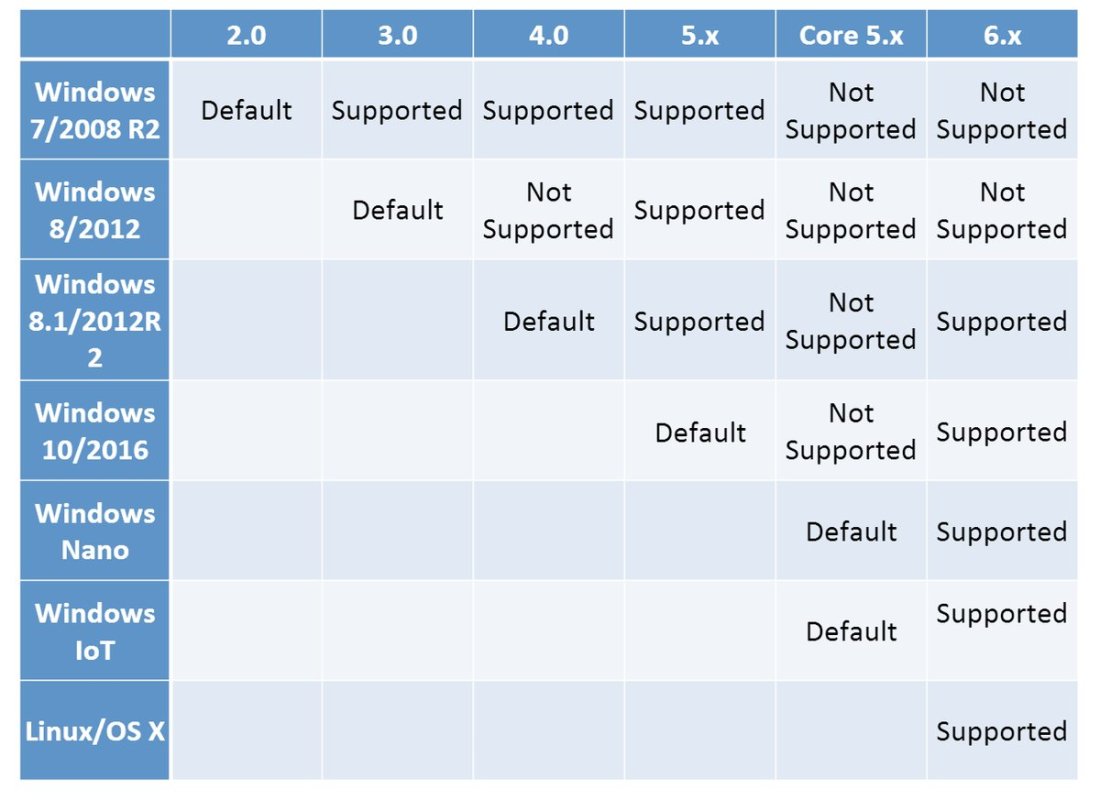
For 5.1 and lower, you can find the prerequisites in [WayBack] Windows PowerShell System Requirements – PowerShell | Microsoft Docs.

–jeroen

Posted in .NET, CommandLine, Development, PowerShell, PowerShell, Scripting, Software Development | Leave a Comment »

Most network protocols are TCP based, so be aware ping uses ICMP and traceroute UDP

Posted by jpluimers on 2021/09/08

Interesting thread: [WayBackSwiftOnSecurity sur Twitter : “I had this issue in my prev company network. QoS will drop ICMP and you’ll chase your tail. If you want to find out if a network service works, test the service. If you want to know if TCP works, use TCP.… “

So:

  • tcpping and tcptraceroute for the win!
  • remember that some protocols, rely on ICMP or UDP, so ensure these work on your network tool (do not QoC them away!)

[WayBack] Zimmie on Twitter: “It is perhaps worth noting: traceroute does not generally use ICMP. Instead, it uses this horrific UDP port range with a different port for every probe at every hop. 30 hops? That’s 90 different UDP ports you just tried. Makes its value questionable at the best of times.…”

Related:

–jeroen

Posted in *nix, *nix-tools, Communications Development, Development, Power User, TCP, UDP | Leave a Comment »

“A parameter cannot be found that matches parameter name ‘PassThru'” – likely your powershell version is too old

Posted by jpluimers on 2021/09/07

If you get [WayBack] “A parameter cannot be found that matches parameter name ‘PassThru'” as PowerShell error, then likely the PowerShell version is too old to support -PassThru, which likely means you have are running pre-Windows 10 version.

PowerShell 3 (introduced in 2012) added the -PassThru parameter that allowed to chain multiple commands from one list pipe.

Another reason for the error might be that the command you use does not support the -PassThru parameter.

To check which commandlets support -PassThru, use the below command (the output is from a Windows 8.1 machine running PowerShell 4.0).

Read the rest of this entry »

Posted in .NET, CommandLine, Development, PowerShell, PowerShell, Software Development | Leave a Comment »

checkdigits onTwitter : “CTRL+S is the new carriage return. Type line of code, CTRL+S to save, start new line of code. #NotParanoid 😬…”

Posted by jpluimers on 2021/09/07

After bumping into yet another occasion where a tool did not properly save after saving: [WayBack] checkdigits on Twitter : “CTRL+S is the new carriage return. Type line of code, CTRL+S to save, start new line of code. #NotParanoid 😬…”

in a response to [WayBack] Dare Obasanjo on Twitter: “No one I know who works on software for a living trusts it to do anything important. That people assume software can be trusted for important things like voting or driving cars when I can’t even trust my follower count is correct is the biggest trick we’ve played as an industry.… “

Read the rest of this entry »

Posted in Development, Software Development | Leave a Comment »

Tricks used by software developers to https://127.0.0.1

Posted by jpluimers on 2021/09/07

Long interesting thread at [WayBack] Thread by @sleevi_: “@SwiftOnSecurity So, some history: It used to be folks would get certs for “localhost”, just like they would from “webmail”, despite no CA e […]”

In  2019, applications were still using tricks (including shipping private keys!) to “securely” access https://127.0.0.1 on some port.

This should have stopped in 2015, but hadn’t. I wonder how bad it still is today.

Related:

Read the rest of this entry »

Posted in Communications Development, Development, DNS, HTTP, Internet, Power User, Software Development, TCP, TLS | Leave a Comment »

Indeterminate Form Infinity Times Zero – YouTube

Posted by jpluimers on 2021/09/06

Infinity is not a number and you cannot do arithmetic with it. This means that in mathematics, in contrast to what some people believe, infinity times zero might not equal to zero.

As infinity as mind boggling to most, two interesting videos below.

The first about infinity times zero, the second about some interesting paradoxes around infinity.

But first a few other links:

Read the rest of this entry »

Posted in Mathematics, Power User, science | Leave a Comment »

Actuele spoorkaart Nederland

Posted by jpluimers on 2021/09/06

[WayBack] Actuele spoorkaart Nederland:

Visualisatie van de treinenloop in Nederland op basis van actuele reisinformatie.

Dit is waar http://kubus.mailspool.nl/spoorkaart/ heen verhuisde: https://spoorkaart.mwnn.nl/

Deze zijn dus hopeloos verouderd:

Via [WayBack] Robert van den Brink on Twitter: “Haha dacht dat jij nogal zelfredzaam was, maar zie bijv. [spoorkaart] voor de series die wel rijden. Op Hvs-Ut rijdt bijv. een (extra) IC 28600 heen en weer.… “

–jeroen

Read the rest of this entry »

Posted in LifeHacker, Power User | Leave a Comment »

D10U003 Dell OptiPlex 3060 Micro documentation links

Posted by jpluimers on 2021/09/06

For my link archive [WayBack] Support for OptiPlex 3060 | Documentation | Dell US linking to these D10U003 Micro specific documents:

Via Google: [WayBack] optiplex-3060-desktop_specifications3_en-us.pdf

jeroen

Posted in Hardware, Power User | Leave a Comment »

Worlds Smartest Chessboard | Square Off

Posted by jpluimers on 2021/09/03

Cool “gadget”: [WayBack] Worlds Smartest Chessboard | Square Off:

Experience the future of chess with a telerobotic chessboard that would make a worthy gift for anyone!

If you get one, the largest version:

Nice video demonstrating it is below.

–jeroen

Read the rest of this entry »

Posted in Fun, Hardware, Power User | Leave a Comment »

Multiple commands in one sudo: use “sudo sh -c ‘apt update && apt upgrade -y'”

Posted by jpluimers on 2021/09/03

So I won’t forget: [WayBack] @nixcraft on Twitter: Instead of typing the following on your Ubuntu/Debian/Mint Linux desktop: sudo apt update sudo apt upgrade -y Do to save typing and time at the CLI (add to your shell startup): alias update=”sudo sh -c ‘apt update && apt upgrade -y'” See for more info:

[WayBack] How to run multiple commands in sudo under Linux or Unix – nixCraft:

sudo syntax to run multiple commands

The syntax is:
sudo sh -c 'command1 && command2'
sudo -- sh -c 'command1 && command2'
sudo -u userNameHere -- sh -c 'command1; command2'
sudo -- sh -c 'command1; command2'
sudo -- bash -c 'command1; command2'
sudo -i -- 'command1; command2; command3'
sudo -i -- sh -c 'command1 && command2 && command3'

UNDERSTANDING SUDO COMMAND OPTIONS

  1. -- : A — signals the end of options and disables further option processing for sudo command.
  2. sh -c : Run sh shell with given commands
  3. 'apt-get update && sudo apt-get -y upgrade' First update repo and apply upgrades if update was successful.

A note about using sudo command in a shell script

Here is a sample shell script that shows how to use or run multiple commands with sudo:

#!/bin/bash
echo "Running commands as a root user..."
sudo -- -sh -c <<EOF
apt-get update
apt-get -y upgrade
apt-get -y install nginx 
apt-get -y remove nano
apt-get clean
echo "All done."
EOF

A note about using sudo with bash shell aliases

The syntax is as follows for shell aliases:

alias foo="sudo -- sh -c 'cmd1 && cmd2'"
alias bar='sudo -- sh -c "cmd1 && cmd2"'

–jeroen

Posted in *nix, *nix-tools, bash, Power User | Leave a Comment »