


Reminder to self that this is an excellent part of a dashboard for someone with Alzheimer’s disease: [WayBack] Hoe laat het is: hoe laat is het? Zo laat is het.
–jeroen
Posted by jpluimers on 2021/09/10
Reminder to self that this is an excellent part of a dashboard for someone with Alzheimer’s disease: [WayBack] Hoe laat het is: hoe laat is het? Zo laat is het.
–jeroen

Posted in Alzheimer's disease, LifeHacker, Power User | Leave a Comment »
Posted by jpluimers on 2021/09/09
For my link archive (most via [Wayback] sata very slow after ESXi 6.7 update – Google Search):
dd: [Wayback] datastore – How can I speed up file tranfers on local storage in vSphere 5? – Server Faultlspci | grep -E -i "SAS|SATA|SCSI|RAID|SSD" for this): [Wayback] Freenas on ESXI – AHCI Passthrough – Intel C220 Lynx Point Controller | TrueNAS Communityesxcli storage core adapter list to ist controllers together with drivers, then lspci -n (I tend to use lspci -v | less for this) to find which one to set to passthrough: [Wayback] Kaperschip: AHCI controller passthrough with a Supermicro Xeon-D motherboardvmw_ahci being slow,whereas the Patsburg driver isn’t (this is supposed to be fixed in ESXi 6.7): [Wayback/Archive.is] Incredibly slow disk performance – ESXi 6.5 : vmware
ESXi 6.5 includes a new native driver (vmw_ahci) for SATA AHCI controllers, but that introduces performance problems with a lot of controllers and/or disks.
Try to disable the native driver and revert to the older sata-ahci driver by running
esxcli system moduleset--enabled=false--module=vmw_ahciin an ESXi shell. Reboot the host to make the change effective.
Two takeaways already:
–jeroen
Posted in ESXi6, ESXi6.5, ESXi6.7, ESXi7, Power User, Virtualization, VMware, VMware ESXi | Leave a Comment »
Posted by jpluimers on 2021/09/09
When you do a choco upgrade all --yes on a system that – during upgrade – becomes low on disk space, you can end up with a lot of empty .nupkg files.
For those package, Chocolatey will not recognise they are installed any more.
The fix is this:
--force parameter before the --yes parameter like in
choco install --force --yes chocolatey
choco upgrade --all --yesI wrote a few PowerShell scripts assisting me in cleaning up the mess.
choco-list-installed.bat:: https://superuser.com/questions/890251/how-to-list-chocolatey-packages-already-installed-and-newer-version-available-fr choco list --localonly %*
choco-show-installed-package-names.bat:: `--limit-output` does not show Chocolatey version header and count footer. :: `--id-oonly` omits the version number, so you only get the package name choco list --local-only --limit-output --id-only
choco-show-installed-package-names-and-versions.bat:: `--limit-output` does not show Chocolatey version header and count footer. choco list --local-only --limit-output %*
choco-reinstall-empty-nupkg-by-names.ps1There is an environment variable set on installation,
ChocolateyInstall, which is set toC:\Chocolateyby default in versions of Chocolatey less than 0.9.8.27. After that, this defaults toC:\ProgramData\Chocolatey.NOTE: By default, the
C:\ProgramDatafolder on Windows is hidden. You will either need to enable hidden files and folders throughFolder Options | Viewor you can navigate directly to the path shown above by copy/pasting directly into the Windows Explorer address bar.In version 0.9.9 of Chocolatey, it actively moves from the old folder location to the new one.
A convenient way to obtain the string value rather than the dictionary entry (which is technically what
Get-ChildItemis accessing) is to just use the variable syntax:$Env:USERPROFILErather thanGet-ChildItem Env:USERPROFILE.$localpath = "$env:USERPROFILE\some\path"…
Also, the
Join-Pathcmdlet is a good way to combine two parts of a path.$localpath = Join-Path $env:USERPROFILE 'some\path'
<#
https://learningpcs.blogspot.com/2009/12/powershell-finding-0-byte-files.html

Zero length .nupkg files sorted by oldest first.

These are packages that choco will not show and likekly need a forced reinstall.

Choco does remember the version that was installed (so not all the choco config is hosed).

- https://stackoverflow.com/questions/28235388/where-is-the-chocolatey-installation-path/28239451#28239451
- https://stackoverflow.com/questions/41047123/powershell-concatenate-an-environment-variable-with-path/41047343#41047343

/#>
$LibPath = Join-Path $env:ChocolateyInstall 'lib'
$NuPkgExtension = 'nupkg'
$NupkgFilter = "*.$NuPkgExtension"

## Remove the empty .nupkg files for each argument
$args | ForEach-Object {
    $PackageName = $_
    Write-Output "Deleting any empty $PackageName.$NuPkgExtension under $LibPath :"

    Get-ChildItem -Path $LibPath -Recurse -Filter $NupkgFilter | Where-Object {
        ($_.Length -eq 0) -and ($_.BaseName -eq $PackageName)
    } | Sort-Object LastWriteTime | ForEach-Object {
        $PackageFullName = $_.FullName
        Write-Output "Deleting $PackageFullName"
        Remove-Item $PackageFullName
    }
}

## Force install the chocolatey package for each argument
$args | ForEach-Object {
    $PackageName = $_
    Write-Output "Installing $PackageName with Chocolatey:"
    choco install --force --yes $PackageName
}
Some more links that helped me solve this:
Some links on errors I encountered while recovering from this:
--ignorechecksum to choco --install (see [WayBack] CommandsInstall · chocolatey/choco Wiki · GitHub)--force parameterSysinternals Suite is going to be installed in ‘C:\ProgramData\chocolatey\lib\sysinternals\tools’
File appears to be downloaded already. Verifying with package checksum to determine if it needs to be redownloaded.
Error – hashes do not match. Actual value was ‘A510C31C2CC591A16F342E7CBA5DC8409EAF08C9B56729CF132C95C69E196787’.
Downloading sysinternals
from ‘https://download.sysinternals.com/files/SysinternalsSuite.zip’
Progress: 100% – Completed download of C:\Users\devCrPhoneDebug\AppData\Local\Temp\2\chocolatey\sysinternals\2018.12.27\SysinternalsSuite.zip (23.51 MB).
Download of SysinternalsSuite.zip (23.51 MB) completed.
Error – hashes do not match. Actual value was ‘A510C31C2CC591A16F342E7CBA5DC8409EAF08C9B56729CF132C95C69E196787’.
ERROR: Checksum for ‘C:\Users\devCrPhoneDebug\AppData\Local\Temp\2\chocolatey\sysinternals\2018.12.27\SysinternalsSuite.zip’ did not meet ‘b14466c6bf3be216ea71610a3f455030e791cd5ad1b42a283886194205d176b0’ for checksum type ‘sha256’. Consider passing the actual checksums through with –checksum –checksum64 once you validate the checksums are appropriate. A less secure option is to pass –ignore-checksums if necessary.
The install of sysinternals was NOT successful.
Error while running ‘C:\ProgramData\chocolatey\lib\sysinternals\tools\chocolateyInstall.ps1’.
See log for details.Chocolatey installed 0/1 packages. 1 packages failed.
See the log for details (C:\ProgramData\chocolatey\logs\chocolatey.log).
.nupkg files first, which will give you an idea on the potential missing dependencies. Retry by forcing reinstall each dependency..nupkg files. Example: [WayBack] Unable to resolve dependency · Issue #206 · chocolatey/choco · GitHub
choco-reinstall-empty-nupkg-by-names.ps1command, then retry.–jeroen
Posted in Chocolatey, COBOL, Development, Power User, PowerShell, PowerShell, Scripting, Software Development, Windows, Windows 10 | Leave a Comment »
Posted by jpluimers on 2021/09/09
I knew I could run shell:startup and similar shortcuts from the Explorer address bar or the Windows-R “run” prompt.
First I learned that via [WayBack] tablet – How to set Google Chrome to automatically open up and in full screen – Super User.
Then via [WayBack] “shell:startup” – Google Search, I found [WayBack] Location of the Startup folder in Windows 10.
It took a while before I realised you can also run them from the command-prompt, batch-files or PowerShell scripts prepending them with start:
start shell:startup
That one will open a new explorer window in the user startup folder from either the command-prompt, a batch file or PowerShell script..
The shell: shortcuts can contain spaces. So for instance there is shell:common startup that opens the common startup folder.
Starting it from the command prompt, batch file or PowerShell script is different: because of the spaces you will get the error on the right unless you add double quotes:
start "shell:common statartup"
All shell: commands that you can run in the same way: double quotes work for both the ones requiring spaces and the simple ones nor requiring spaces.
Virtually each new Windows version (even most Windows 10 major builds) gets new shell: commands.
A good source with an up-to-date and historically accurate of shell: commands list is at [WayBack] Shell Commands to Access the Special Folders in Windows 10/8/7/Vista/XP » Winhelponline,
You can get the current list by recursively enumerating the HKEY_LOCAL_MACHINE\SOFTWARE\Microsoft\Windows\CurrentVersion\Explorer\FolderDescriptions registry key, which consists of a list of Explorer folder GUIDs having Name, ParentFolder and RelativePath value names.
–jeroen
Posted in Batch-Files, Console (command prompt window), Development, Power User, Scripting, Software Development, Windows | Leave a Comment »
Posted by jpluimers on 2021/09/08
Not sure why, bit if you want to force install a package, answering yes to all prompts, the chocolaty parameter order needs to be --yes --force instead of --force --yes.
This works:
choco install --yes --force git.install --params "/GitAndUnixToolsOnPath /NoGitLfs /SChannel /NoAutoCrlf /WindowsTerminal"
This fails:
choco install --force --yes git.install --params "/GitAndUnixToolsOnPath /NoGitLfs /SChannel /NoAutoCrlf /WindowsTerminal"
–jeroen
Posted in Chocolatey, Development, DevOps, Power User, Scripting, Software Development, Windows | Leave a Comment »
Posted by jpluimers on 2021/09/08
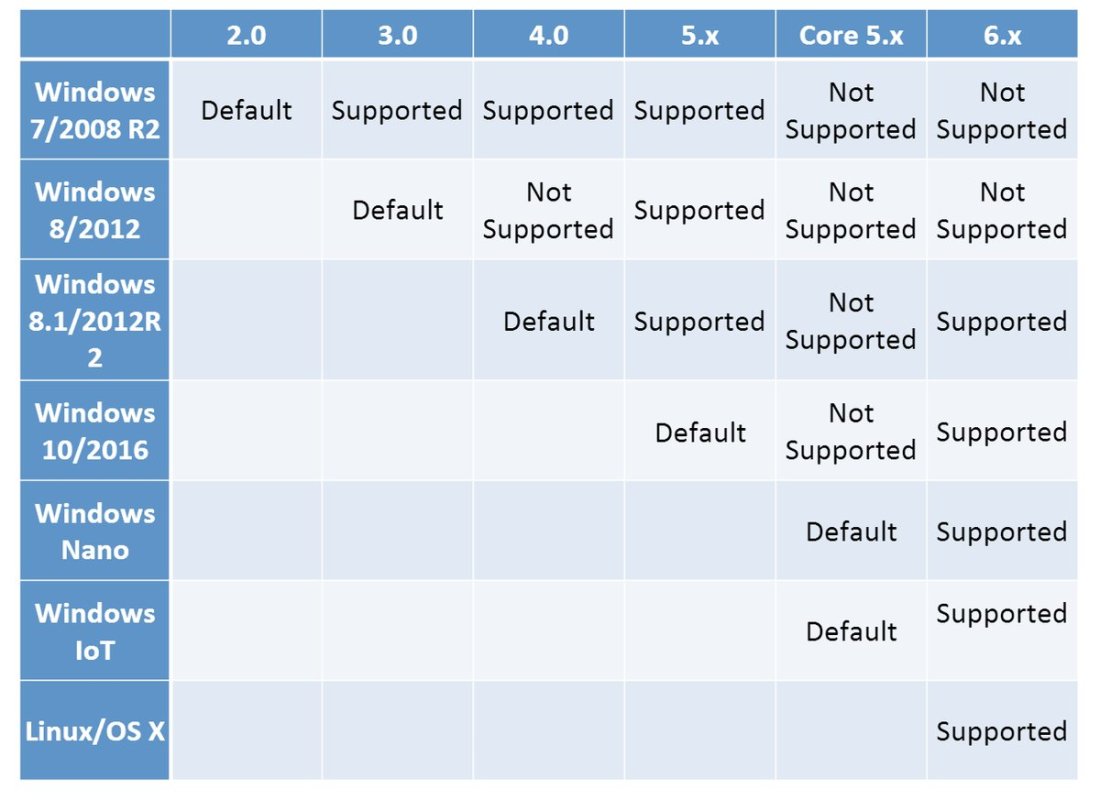
By now, probably newer versions have come out, but this should give a rough indication of the 2019 state of [WayBack] PowerShell OS Support Matrix – mohitgoyal.co:
For 5.1 and lower, you can find the prerequisites in [WayBack] Windows PowerShell System Requirements – PowerShell | Microsoft Docs.
–jeroen

Posted in .NET, CommandLine, Development, PowerShell, PowerShell, Scripting, Software Development | Leave a Comment »
Posted by jpluimers on 2021/09/08
Interesting thread: [WayBack] SwiftOnSecurity sur Twitter : “I had this issue in my prev company network. QoS will drop ICMP and you’ll chase your tail. If you want to find out if a network service works, test the service. If you want to know if TCP works, use TCP.… “
So:
tcpping and tcptraceroute for the win![WayBack] Zimmie on Twitter: “It is perhaps worth noting: traceroute does not generally use ICMP. Instead, it uses this horrific UDP port range with a different port for every probe at every hop. 30 hops? That’s 90 different UDP ports you just tried. Makes its value questionable at the best of times.…”
Related:
–jeroen
Posted in *nix, *nix-tools, Communications Development, Development, Power User, TCP, UDP | Leave a Comment »
Posted by jpluimers on 2021/09/07
If you get [WayBack] “A parameter cannot be found that matches parameter name ‘PassThru'” as PowerShell error, then likely the PowerShell version is too old to support -PassThru, which likely means you have are running pre-Windows 10 version.
PowerShell 3 (introduced in 2012) added the -PassThru parameter that allowed to chain multiple commands from one list pipe.
Another reason for the error might be that the command you use does not support the -PassThru parameter.
To check which commandlets support -PassThru, use the below command (the output is from a Windows 8.1 machine running PowerShell 4.0).
Posted in .NET, CommandLine, Development, PowerShell, PowerShell, Software Development | Leave a Comment »
Posted by jpluimers on 2021/09/07
After bumping into yet another occasion where a tool did not properly save after saving: [WayBack] checkdigits on Twitter : “CTRL+S is the new carriage return. Type line of code, CTRL+S to save, start new line of code. #NotParanoid 😬…”
in a response to [WayBack] Dare Obasanjo on Twitter: “No one I know who works on software for a living trusts it to do anything important. That people assume software can be trusted for important things like voting or driving cars when I can’t even trust my follower count is correct is the biggest trick we’ve played as an industry.… “

Posted in Development, Software Development | Leave a Comment »
Posted by jpluimers on 2021/09/07
Long interesting thread at [WayBack] Thread by @sleevi_: “@SwiftOnSecurity So, some history: It used to be folks would get certs for “localhost”, just like they would from “webmail”, despite no CA e […]”
In 2019, applications were still using tricks (including shipping private keys!) to “securely” access https://127.0.0.1 on some port.
This should have stopped in 2015, but hadn’t. I wonder how bad it still is today.
Related:
- SubjectC=AU, O=Atlassian Pty Ltd, L=Sydney, ST=New South Wales, CN=atlassian-domain-for-localhost-connections-only.com
- Serial NumberA:3E:93:53:0E:74:53:AE:CB:40:BA:20:10:12:F8:FB
- IssuerC=US, O=DigiCert Inc, OU=www.digicert.com, CN=DigiCert SHA2 High Assurance Server CAValidity11 May 2017 — 15 May 2020
Result for atlassian-domain-for-localhost-connections-only.com/A with DNSSEC validation:
{
  "Status": 0,
  "TC": false,
  "RD": true,
  "RA": true,
  "AD": false,
  "CD": false,
  "Question": [
    {
      "name": "atlassian-domain-for-localhost-connections-only.com.",
      "type": 1
    }
  ],
  "Answer": [
    {
      "name": "atlassian-domain-for-localhost-connections-only.com.",
      "type": 1,
      "TTL": 1620,
      "data": "127.0.0.1"
    }
  ]
}
Assessment failed: IP address is from private address space (RFC 1918)
Posted in Communications Development, Development, DNS, HTTP, Internet, Power User, Software Development, TCP, TLS | Leave a Comment »

 The Wiert Corner - irregular stream of stuff