The Wiert Corner – irregular stream of stuff

Jeroen W. Pluimers on .NET, C#, Delphi, databases, and personal interests

  • My badges

  • Twitter Updates

  • My Flickr Stream

  • Pages

  • All categories

  • Enter your email address to subscribe to this blog and receive notifications of new posts by email.

    Join 1,854 other subscribers

Archive for 2021

Delphi use of FS segment: structured exception handling

Posted by jpluimers on 2021/03/16

A while ago, I had to trace through a lot of code in the CPU pane to track down some memory allocation related issues.

I wondered what the use of the FS segment was about, so via [Archive.is] delphi what is fs segment used for – Google Search, I found that it is related to Win32 Structured Exception handling and therefore not limited to Delphi, through these links:

A few disassembly parts to show how the Delphi Win32 compiler uses this for try finally blocks and try except blocks is below. Note that often, there are implicit try finally blocks when having managed method parameters or local variables.

–jeroen

Read the rest of this entry »

Posted in Delphi, Development, Software Development, Undocumented Delphi, Windows Development | Leave a Comment »

Windows 10 Home: allow a certain user to have a non-expiring password

Posted by jpluimers on 2021/03/15

Sometimes it makes sense to have a user never expire the password.

On a non-home editions of Windows, this is easy: just run lusrmgr.msc, then in the UI change the property for the user.

On home editions of Windows, you cannot do this in a GUI: those bits are either disabled or completely unavailable.

I did this on a demo VM system on an elevated command-prompt:

C:\>wmic UserAccount where Name='developer' set PasswordExpires=False
Updating property(s) of '\\DEMO-VM\ROOT\CIMV2:Win32_UserAccount.Domain="DEMO-VM",Name="developer"'
Property(s) update successful.

To show the current state (before I changed it):

C:\>wmic UserAccount where Name='developer'
AccountType  Caption           Description  Disabled  Domain      FullName  InstallDate  LocalAccount  Lockout  Name       PasswordChangeable  PasswordExpires  PasswordRequired  SID                                            SIDType  Status 
512          DEMO-VM\developer              FALSE     DEMO-VM                            TRUE          FALSE    developer  TRUE                TRUE             TRUE              S-1-5-21-2478057260-1439466941-978077079-1002  1        OK     

Via: [WayBack] Cocosenor: 4 ways to disable or enable Windows 10 password expiration notification

–jeroen

Posted in Power User, Windows, Windows 10 | Leave a Comment »

MacOS “mds_stores” high CPU usage

Posted by jpluimers on 2021/03/15

I notices a high CPU usage, so searched for [Wayback] “mds_stores” – Google Search.

There I quickly found out this is the Spotlight indexer using a lot of CPU.

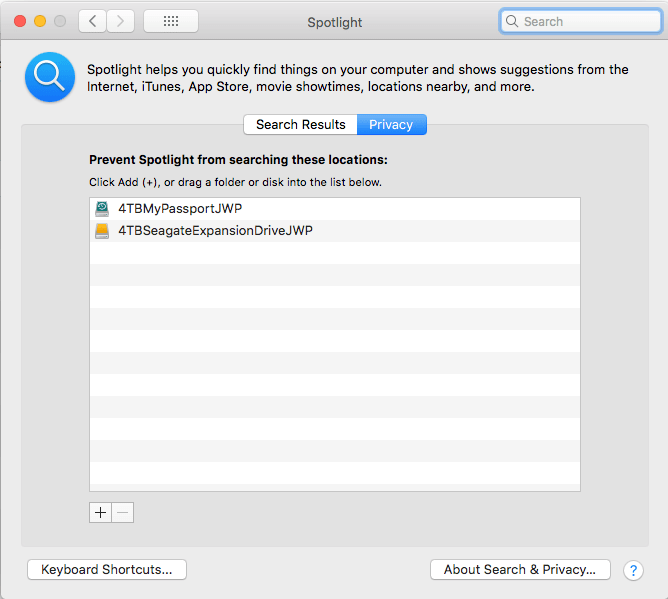
From that, it was easy to track down: I had added a second 4TB backup disk, but forgot to add it to the Spotlight indexing exclusion list, where you get by following these steps:

  1. Open “Preferences”
  2. Search for “Spotlight”
  3. Click on the “Privacy” button
  4. Click on the “+” button to add a new folder
  5. Browse to the top of the list inside your computer to find the volumes to exclude

Now it is on it:

Related: [WayBack] [FIXED] mds_stores Process Consuming High CPU Usage – MacMetric

–jeroen

Posted in Apple, Mac OS X / OS X / MacOS, Power User, SpotLight | Leave a Comment »

Windows Users like “Window Manager\DWM-3” are virtual users

Posted by jpluimers on 2021/03/15

Having seen logon failures from user Window Manager\DWM-3 while on a public WiFi network, I did a quick search on [WayBack] “Window Manager\DWM-3” – Google Search.

It appeared somebody trying a dictionary attack on the RDP port of my Windows VM which was on the host Bridged Network (see [Archive.is] Help – VMware Fusion 6 Documentation Center).

This is a virtual user that is part of a series of users that the Desktop Window Manager started using from Windows 8 and up.

The first user always exist, DWM-2 and up are created for new dwm.exe processes (by winlogon.exe) when users start logging on through RDP connections to a Windows machine:

  1. Window Manager\DWM-1
  2. Window Manager\DWM-2
  3. Window Manager\DWM-3
  4. Window Manager\DWM-4

In addition to logging on as a new user, as of Windows 8, these also are created when shutting down and starting up (which Windows fools you by actually doing a kind of hibernate): [Wayback] windows 8 – What is winlogon.exe -SpecialSession? – Super User

Related:

–jeroen

Posted in Power User, Windows, Windows 10, Windows 8, Windows 8.1 | Leave a Comment »

Supermicro | Products | Motherboards | Xeon® Boards | X9SRi-3F

Posted by jpluimers on 2021/03/12

I still like this board: Supermicro | Products | Motherboards | Xeon® Boards | X9SRi-3F.

It has been in a storage solution for a while, uses OK power, has not many SATA ports, but enough slots for expansion cards, and comes with two network connections and 8 slots which I fitted with a total of 256 gibibyte of memory.

Some links, as SuperMicro tends to hide them behind POST requests:

Note that IPMI over je Java Web Start.app runs into certificate signing issues, so better use Supermicro IPMIViewer for this:

IPMIView links via:

The errors when running the KVM Console from your web browser are waved away by SuperMicro, but more and more people bump into them:

–jeroen

Posted in Development, Hardware, Mainboards, Power User, Software Development, SuperMicro, Virtualization, VMware, VMware ESXi, X9SRi-3F | Leave a Comment »

Enable Block at First Sight to detect malware in seconds | Microsoft Docs

Posted by jpluimers on 2021/03/12

On my reading list, because I saw it suddenly enabled on a domain based Windows network:

[WayBackEnable Block at First Sight to detect malware in seconds | Microsoft Docs

Enable the Block at First sight feature to detect and block malware within seconds, and validate that it is configured correctly.

It seems to have been introduced early 2018: Windows Defender – Wikipedia: Advanced Features

Windows 10’s Anniversary Update introduced Limited Periodic Scanning, which optionally allows Windows Defender to scan a system periodically if another antivirus app is installed.[5] It also introduced Block at First Sight, which uses machine learning to predict whether a file is malicious.[21]

There is a BAFS – Windows Defender Testground for which you need a Microsoft account.

–jeroen

Posted in Power User, Security, Windows, Windows 10 | Leave a Comment »

Domeinnaam prijzen – Internetproviders en Hosting – GoT

Posted by jpluimers on 2021/03/12

For my link archive: domain name registration prices in The Netherlands: [WayBack] Domeinnaam prijzen – Internetproviders en Hosting – GoT

–jeroen

Posted in DNS, Hosting, Internet, Power User | Leave a Comment »

Waarom stemmen we in Nederland niet online? | NU – Het laatste nieuws het eerst op NU.nl

Posted by jpluimers on 2021/03/11

Mooi stuk [Wayback] Waarom stemmen we in Nederland niet online? | NU – Het laatste nieuws het eerst op NU.nl

Is het veilig om tijdens de coronacrisis in het stemhokje te staan, vragen veel mensen zich op dit moment af. Waarom stemmen we nu eigenlijk niet online?

Samenvatting:

  • Vrij stemmen is buiten het stemhokje niet goed te controleren
  • Stemgeheim is biuten het stemhokje niet goed te controleren

Eigenlijk gelden beide ook voor briefstemmen.

Wat voor mij ook belangrijk is, is dat het uitleggen van normaal stemmen (inclusief controles en hertellingen) heel eenvoudig is uit te leggen, maar dat dit bij elektronisch stemmen veel moeilijker is.

Vanwege het belang van inzichtelijkheid zie ik online stemmen voorlopig daarom niet komen.

–jeroen


Posted in LifeHacker, Power User | Leave a Comment »

Mikrotik: script to set clock to Amsterdam, enable ntp, then show latest ntp correction

Posted by jpluimers on 2021/03/11

For my script list:

/system ntp client set enabled=yes server-dns-names=0.pool.ntp.org,1.pool.ntp.org,2.pool.ntp.org,3.pool.ntp.org
/delay 10
/system ntp client print

If the delay was long enough, you will see output like this:

             enabled: yes
         primary-ntp: 0.0.0.0
       secondary-ntp: 0.0.0.0
    server-dns-names: 0.pool.ntp.org,1.pool.ntp.org,2.pool.ntp.org,3.pool.ntp.org
                mode: unicast
       poll-interval: 15m
       active-server: 149.210.230.59
    last-update-from: 149.210.230.59
  last-update-before: 29s290ms
     last-adjustment: 702us

If the delay was too short, the lines after mode will not be present.

–jeroen

Posted in Development, RouterOS, Scripting, Software Development | Leave a Comment »

GitHub – pastpages/savepagenow: A simple Python wrapper for archive.org’s “Save Page Now” capturing service

Posted by jpluimers on 2021/03/11

This makes it way easier to save WayBack content:

[WayBack] GitHub – pastpages/savepagenow: A simple Python wrapper for archive.org’s “Save Page Now” capturing service

A poor-mans alternative is the below bash script from [WayBack] Saving of public Google+ content at the Internet Archive’s Wayback Machine by the Archive Team has begun : plexodus:

For Linux, MacOS / OSX, BSD, and other Unix-like operating systems (including Android with Termux, or Windows, with a Unix/Linux environment), the following script (I’ve saved this as archive-url) will archive the requested URL:

#!/bin/bash
# archive-url
# Archive selected URL at the Internet Archive

curl -s -I -H "Accept: application/json" "https://web.archive.org/save/${1}" |
grep '^x-cache-key:' | sed "s,https,&://,; s,\(${1}\).*$,\1,"

Save that to your execution path (I’ve chosen ~/bin, you might use /usr/local/bin or another location on your $PATH, and invoke as, say (again referring to the G+MM homepage):

$ archive-url https://plus.google.com/communities/112164273001338979772

If you have a list of URLs in a file (or pipelined from command output), you can request all of them to be archived in a simple bash loop. I’m using xargs here to run ten simultaneous requests from the file gplus-urllist:

cat gplus_urllist | while read url do xargs -I{} -P 10 archive-url {}; done

I’ve run this on over 10,000 URLs over a modest residential broadband connection in a hair over two hours.

Note that such requests trigger an archive by the Internet Archive from one of its archiving nodes, you’re not sending the page to the Archive yourself. In particular, archival from regions defaulting to another language may result in the Google+ site content (but not post or comments) being in a different language. I’ve frequently seen my pages turning up in Japanese, for instance.

–jeroen

Posted in bash, Development, Python, Scripting, Software Development | Leave a Comment »