The Wiert Corner – irregular stream of stuff

Jeroen W. Pluimers on .NET, C#, Delphi, databases, and personal interests

  • My badges

  • Twitter Updates

  • My Flickr Stream

  • Pages

  • All categories

  • Enter your email address to subscribe to this blog and receive notifications of new posts by email.

    Join 1,861 other subscribers

Archive for the ‘Hardware Development’ Category

Some ideas to show a Google Calendar on a TV using a Raspberry Pi and HDMI output

Posted by jpluimers on 2019/01/10

Using OpenSuSE Tumbleweed E20 on Raspberry Pi 3: accessing the enlightenment desktop over VNC after automatic logon I wanted to buy an on-line read-only diary to help my mentally retarded brother see what his next few days are going to be like.

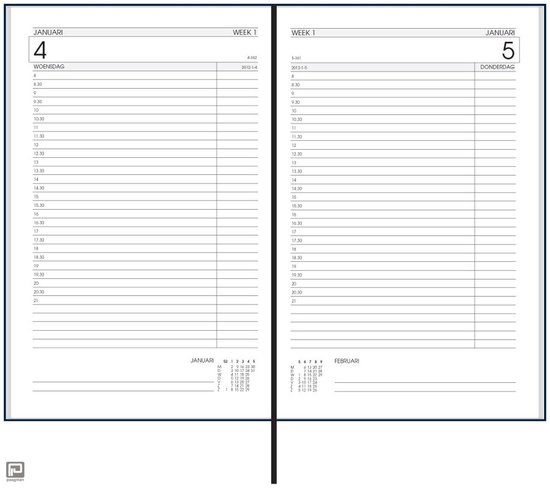
He increasingly has difficulty handling a paper agenda and has an agenda with 30 minute blocks like [Archive.isbol.com | Bureau Agenda 2017 – 1 dag per Pagina | 0041560163422 | Boeken (and the [Archive.is] picture on the right), but actually he needs 15 minute blocks during some portions of the day.

We call that kind “bureau agenda” which I think translates well into “desk diary”.

They were quite different from the agendas I used to have at school (:

[WayBack[Zonder titel] Rijam agenda 1983/84 verzamelen? Stripcatalogus op Catawiki

For most school mates, they were more like this:

Had je een O’Neill of ging je voor De Familie Doorzon? De oude agenda’s uit je middelbare schooltijd zijn de verpersoonlijking van je eigen puber-ik. Afgelopen weekend startte in het Nationaal Onderwijsmuseum in Dordrecht de toffe tentoonstelling Grow Up over die vuistdikke, volgeplakte agenda’s.

[WayBackSchoolagenda vol sentiment | Go with the Vlo

Anyway, some ideas I initially had are below.

This is what I actually did:

Two things for the future:

Initial thoughts

Raspberry based:

Chromecast based:

–jeroen

Read the rest of this entry »

Posted in Development, Google, GoogleCalendar, Hardware Development, JavaScript/ECMAScript, JSFiddle, LifeHacker, Power User, Raspberry Pi, Scripting, Software Development | 2 Comments »

OpenSuSE Tumbleweed on RaspberryPi 3: adding ” modprobe.blacklist=vc4″ to the kernel commandline was a lot tougher than I hoped for.

Posted by jpluimers on 2019/01/08

I run most of my Raspberry Pi systems headless, so I was a bit surprised that OpenSuSE tumbleweed on a Raspberry Pi 3B didn’t show anything on my HDMI monitor after I installed KDE after it switches away from text-mode boot output.

[WayBackHCL:Raspberry Pi3 – openSUSE suggests to

I see HDMI output in U-Boot, but not in Linux

The upstream Linux graphics driver for the Raspberry Pi has problems with a few monitors. The same applies to the 7″ LCD displays. In those cases, please fall back to the efi frame buffer console by passing the following into the kernel command line:

 modprobe.blacklist=vc4

However, it does not explain how to modify that “the kernel command line”.

Searching for obvious ways via “Raspberry Tumbleweed Kernel Command Line” got me to for instance

which all suggest editing /boot/cmdline.txt, however that file does not exist:

# ls -al /boot
total 34624
drwxr-xr-x  6 root root     4096 Jul 23 21:05 .
drwxr-xr-x 24 root root     4096 Jul 16 02:02 ..
-rw-r--r--  1 root root       65 Jul 16 12:42 .Image-4.4.76-7-default.hmac
-rw-r--r--  1 root root        0 Jul 16 16:56 0x75b762d5
lrwxrwxrwx  1 root root       22 Jul 16 16:34 Image -> Image-4.4.76-7-default
-rw-r--r--  1 root root 14878208 Jul 16 12:20 Image-4.4.76-7-default
-rw-r--r--  1 root root  3217519 Jul 16 12:20 System.map-4.4.76-7-default
lrwxrwxrwx  1 root root        1 Jul 16 02:00 boot -> .
-rw-r--r--  1 root root     1725 May 24 20:11 boot.readme
-rw-r--r--  1 root root     2405 Jul 16 16:56 boot.scr
-rw-r--r--  1 root root     2333 Jul 16 16:56 boot.script
-rw-r--r--  1 root root   152522 Jul 16 08:39 config-4.4.76-7-default
lrwxrwxrwx  1 root root       12 Jul 23 16:13 dtb -> dtb-4.11.6-1
drwxr-xr-x  3 root root     4096 Jul 23 16:13 dtb-4.11.6-1
drwxr-xr-x  5 root root    16384 Jan  1  1970 efi
drwxr-xr-x  7 root root     4096 Jul 24 18:27 grub2
lrwxrwxrwx  1 root root       23 Jul 16 16:34 initrd -> initrd-4.4.76-7-default
-rw-------  1 root root  8080932 Jul 23 21:05 initrd-4.4.76-7-default
-rw-r--r--  1 root root   288571 Jul 16 12:42 symvers-4.4.76-7-default.gz
-rw-r--r--  1 root root      377 Jul 16 12:42 sysctl.conf-4.4.76-7-default
-rw-r--r--  1 root root  1484762 Jul 16 16:56 unicode.pf2
drwxr-xr-x  2 root root     4096 Jul 24 09:05 vc
-rw-r--r--  1 root root  7282031 Jul 15 07:00 vmlinux-4.4.76-7-default.gz

There are other config.txt files:

# find / | grep config.txt
/boot/efi/config.txt
/boot/vc/config.txt

However, these seems to be unclear which of the two is actually used and what options can be set at all: [WayBackRaspberry Pi • View topic – aarch64 on Pi3.

So the quest continues, as a lot of settings can be applied in these files:

Setting “modprobe.blacklist=vc4”

I’ve temporarily given up on the /boot/config.txt editing, but continued searching for “modprobe.blacklist=vc4”, which lead to a few interesting results:

All of those suggest adding modprobe.blacklist=vc4 to the grub configuration. The second post actually has the most elaborate steps for this, which I’ve paraphrased into:

  1. As root, edit /etc/default/grub (make a backup first)
  2. Search for the variable GRUB_CMDLINE_LINUX
  3. Add the modprobe.blacklist=vc4to the end of the variable initialisation (ensure there is a space before it and you keep the terminating double-quote)
  4. Re-generate the grub configuration file used at boot time (make a backup first): grub2-mkconfig > /boot/grub2/grub.cfg

This solved my problem: no text output on HDMI.

Note that in order to get graphical output, you need to install any of the non-JeOS images. Installing just kde+kdm and dependencies isn’t enough to get the X server going.

–jeroen

Posted in Development, Hardware Development, Raspberry Pi | Leave a Comment »

Testing SMTP from the console on Linux, BSD and Mac OS: swaks and smtp-cli Perl script clients

Posted by jpluimers on 2019/01/03

Testing SMTP using telnet is tedious as you have to remember the commands and responses in the SMTP protocol. It gets even harder when doing SMTP AUTH, as then you have to base encode a bunch of strings [WayBackHow to Test SMTP AUTH using Telnet [Wiki] | NDCHost

Luckily there is a Perl script swaks: [WayBackSwaks – Swiss Army Knife for SMTP which does ESMTP and LMTP as well as TLS.

The funny thing is that the repository at jetmore/swaks: Swaks – Swiss Army Knife for SMTP only has the readme, but the not the script which you can get from [WayBack] swaks.pl.

Despite that, most Linux distributions have an installation package.

[WayBackswaks for OpenSuse is in the [WayBacknetwork repository, so for Tumbleweed (actually: Factory) on Raspberry Pi you need to perform this:

zypper addrepo http://download.opensuse.org/repositories/network/openSUSE_Factory_ARM/network.repo
zypper refresh
zypper install swaks

On Mac OS X it is even easier: if you have the homebrew package manager installed, you just install the [WayBackswaks formula using the [WayBack] swaks.rb script:

brew install swaks

Note there is also the smtp-cli Perl script which I mentioned before at Fake/Mock SMTP servers and services for use during development, which also does TLS, but few environments have ready built packages for them. If you still want to try it out:

For SMTP AUTH:

swaks -tls --to jeroen.wiert.me@pluimers.com --from jeroen.wiert.me@pluimers.com --server smtp.xs4all.nl --auth-user username

Which prompts for the password, then outputs like this:

=== Trying smtp.xs4all.nl:25...
=== Connected to smtp.xs4all.nl.
<- 220 smtp-cloud3.xs4all.net ESMTP ESMTP server ready -> EHLO rmbpro1tbjwp
<-  250-smtp-cloud3.xs4all.net hello [188.206.68.219], pleased to meet you
<-  250-HELP
<-  250-AUTH LOGIN PLAIN
<-  250-SIZE 157286400
<-  250-8BITMIME
<-  250-STARTTLS
<- 250 OK -> STARTTLS
<- 220 Ready to start TLS === TLS started with cipher TLSv1:DHE-RSA-AES256-SHA:256 === TLS no local certificate set === TLS peer DN="/OU=Domain Control Validated/OU=PositiveSSL Wildcard/CN=*.xs4all.nl" ~> EHLO rmbpro1tbjwp
<~  250-smtp-cloud3.xs4all.net hello [188.206.68.219], pleased to meet you
<~  250-HELP
<~  250-AUTH LOGIN PLAIN
<~  250-SIZE 157286400
<~  250-8BITMIME
<~ 250 OK ~> AUTH LOGIN
<~ 334 ############ ~> anA=
<~ 334 ############ ~> ############################
<~ 235 ... authentication succeeded ~> MAIL FROM:<jeroen.wiert.me@pluimers.com>
<~  250 <jeroen.wiert.me@pluimers.com> sender ok
 ~> RCPT TO:<jeroen.wiert.me@pluimers.com>
<~  250 <jeroen.wiert.me@pluimers.com> recipient ok
 ~> DATA
<~ 354 enter mail, end with "." on a line by itself ~> Date: Wed, 19 Jul 2017 09:09:57 +0200
 ~> To: jeroen.wiert.me@pluimers.com
 ~> From: jeroen.wiert.me@pluimers.com
 ~> Subject: test Wed, 19 Jul 2017 09:09:57 +0200
 ~> Message-Id: <20170719090957.052207@rmbpro1tbjwp>
 ~> X-Mailer: swaks v20170101.0 jetmore.org/john/code/swaks/
 ~> 
 ~> This is a test mailing
 ~> 
 ~> .
<~ 250 smtp-cloud3.xs4all.net accepted mail mXA71v00C4jr6ac01XA9Bo for delivery ~> QUIT
<~  221 smtp-cloud3.xs4all.net ESMTP closing connection
=== Connection closed with remote host.

–jeroen

Posted in *nix, *nix-tools, Communications Development, Development, Hardware Development, Internet protocol suite, Linux, openSuSE, Power User, Raspberry Pi, SMTP, SuSE Linux, Tumbleweed | Leave a Comment »

Need to play with this: Raspberry Pi web simulator from Microsoft Corporation

Posted by jpluimers on 2018/12/26

It’s been a while since [WayBack] +Microsoft Corporation has recently released a preview version of an open source +Raspberry Pi web simulator where you can connect sensors and component… – Jean-Luc Aufranc – Google+

Back then it was convoluted to get going. Hopefully by now that has changed.

So time to take another look during the holiday season:


It reminded me a lot of [WayBackBring ideas to life with free online Arduino simulator and PCB apps | Autodesk Circuits (a.k.a. circuits.io):

Read the rest of this entry »

Posted in *nix, Development, Hardware, Hardware Development, Hardware Interfacing, Linux, Power User, Raspberry Pi, Software Development | Leave a Comment »

Fritz!Box LUA links on my research list

Posted by jpluimers on 2018/11/27

I’m not sure around which firmware versions Fritz!Box started to implement LUA links, but they are now on my research list.

Below a reference and where I found them.

A few notes first:

  • There are many duplicates, which in due time I need to de-duplicate.
  • The .lua links seem to override the old cgi-bin links (that are partially reverse engineered at [WayBackCategory:Befehle in /usr/www/cgi-bin – Fritz!Box).
  • Usually, .lua links require a SID. In the web-ui, a Fritz!Box very much tries to hide that SID from URLs in the browser address bar (especially for firmware versions 06.50 and up) so the easiest to get them is this:
    1. Login to your Fritz!Box
    2. Manually copy any of the URLs in the left side
    3. Take the SID from there.
  • More recent firmware versions hide the .lua links too, but you can see them when monitoring your network traffic in the developer mode of your web browser

Logging in programmatically needs a challenge response mechanism. It used to be at [Wayback] http://www.avm.de/de/Extern/Technical_Note_Session_ID.pdf but now has moved to [Wayback/Archive.ishttps://avm.de/fileadmin/user_upload/Global/Service/Schnittstellen/AVM_Technical_Note_-_Session_ID.pdf

Here is the list:

Read the rest of this entry »

Posted in Development, Fritz!, Fritz!Box, Hardware Development, Hardware Interfacing, Internet, Power User | Leave a Comment »

SSH: Connection Reset by Peer – Server Fault

Posted by jpluimers on 2018/11/22

One occasion I had SSH throw a Connection Reset by Peer on my when was the SD-card of a Raspberry Pi started failing and the ext4 filesystem got mounted in read-only mode.

Then sshd was still listening on port 22, but since it could not write to disk any more, it threw a Connection Reset by Peer to the client.

It was on OpenSuSE Tumbleweed, but would failed just as well using Raspbian.

Lessons learned:

  • IoT hardware will fail.
  • ext4 breaks when the hardware breaks.

–jeroen

Reference:

Posted in *nix, *nix-tools, Debian, Development, Hardware Development, IoT Internet of Things, Linux, Network-and-equipment, openSuSE, Power User, Raspberry Pi, Raspbian, SuSE Linux, Tumbleweed | Leave a Comment »

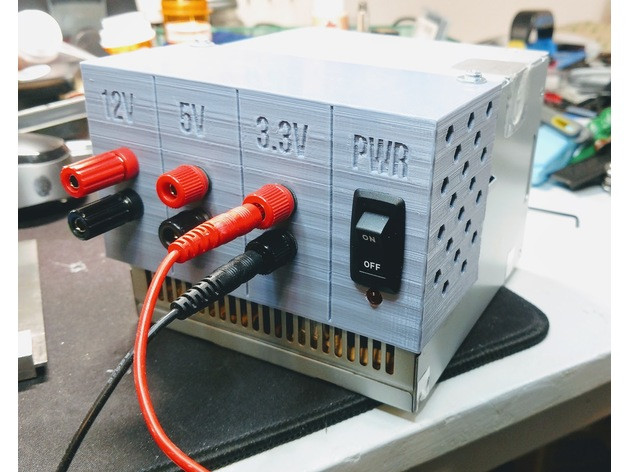
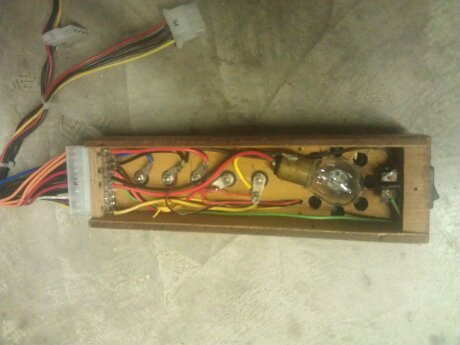
Convert/adapt an old ATX Power Supply into a Bench Power Supply with (or without) 3D Printed Parts

Posted by jpluimers on 2018/11/16

An interesting idea, although I would slightly modify it so I can -12V and -5V as well and maybe other voltage combinations too:

They are based on these underlying links:

Note that some of the newer power supplies with 24-pin molex connectors do not give you -5V any more.

A few notes:

  • depending on the age, ATX supplies can get you these voltages: -12V, -5V, 0V, +3.3V, +5V, +12V
    • -12V and -5V have very limited currents
    • newer power supplies often do not have -5V (especially the ones having 24-pin connectors)
    • newer power supplies have limited +5V power, but higher +12V power
    • older power supplies have limited +12V power, but higher +5V power
  • always take pictures of all connectors and the wire colours connected to them before starting (especially before cutting any wires)
    • this allows you to find back:
      • non-standard wire colours
      • configurations not covered here
  • to get stable 12V, you need a 5V load of about 5W:
    • between RED (+5V) andBLACK (GND),
    • for instance with pin 3 and pin 4,
    • or over one of the molex/floppy connectors: pins RED-BLACK
    • as load,
      • use at least a 10V/10W resistor or 12v/10W halogen lamp
      • ensure they are cooled well
  • to get stable 12V, you need a 12V load of about 10W
    • between YELLOW (+12V) andBLACK (GND),
    • for instance with pin 10 and pin 17,
    • or over one of the molex/floppy connectors: pins YELLOW-BLACK
    • as load,
      • use at least a 20V/20W resistor or 12v/20W halogen lamp
      • ensure they are cooled well
  • if your power supply has a BROWN (+3.3VS),
    • then ensure it is connected to ORANGE (+3.3V)
      • as brown is the SENSING wire to check 3.3V is OK.
  • to turn the power supply on,
    • short GREEN (PWR_ON, pin 14) and BLACK (GND, pin 15)
  • to know when the power is on:
    • connect a LED via a resistor between GREY (PWR_OK, pin 8) and BLACK (GND, pin 7)
  • to know when there is mains power:
    • connect a LED via a resistor between PURPLE (+5VSB, pin 9: stand by) and BLACK (GND, pin 7 or pin17)
  • Wikipedia: ATX Power supply describes
    • PWR_OK (often called Power Good)
    • +5VSB (stand by)
  • read the specs of your power supply to understand how much current it can deliver on which lines
  • some more current information

Example for loads: https://www.youtube.com/watch?v=gKgziA46wFY; more on why you need them and how to choose:

With a few more modifications you can [WayBack] Convert a Computer Power Supply to a Variable Bench Top Lab Power Supply.

I will probably go for this solution as it is easier to swap power supplies.

–jeroen

Via: [WayBack] Nice recycling of an old ATX power supply with a 3D printed part and a few accessories and cables… – Jean-Luc Aufranc – Google+


Read the rest of this entry »

Posted in Development, Hardware Development | 3 Comments »

Relay Switch Circuit and Relay Switching Circuit

Posted by jpluimers on 2018/11/08

Via yesterdays post on a bench power supply fabricated from an ATX power supply, I found this very interesting set of relay switching circuits:

Electronics Tutorial about the Relay Switch Circuit and relay switching circuits used to control a variety of loads in circuit switching applications

[WayBackRelay Switch Circuit and Relay Switching Circuit

The images below are from that site. Note the BC337 and BC109 have different voltage/power specs. See [WayBackBC337/BC109 datasheet & application note – Datasheet Archive.

–jeroen

Read the rest of this entry »

Posted in Development, Hardware Development | Leave a Comment »

DIY Filament Sensor for your 3D Printer

Posted by jpluimers on 2018/10/23

Via:

–jeroen

Read the rest of this entry »

Posted in 3D printing, Development, Hardware Development, LifeHacker | Leave a Comment »

Hopefully this is now available: in March you could pre-order the PoE hat for the Raspberry Pi 3 B+ at ~ EUR 15.

Posted by jpluimers on 2018/10/22

Wow, EUR 15 is almost half the price of an Raspberry Pi 3 B+:

[WayBack] RPI3-MODBP-POE RASPBERRY-PI, Add-On Board, Power over Ethernet (PoE) HAT for Raspberry Pi 3 Model B+ | Farnell UK

Via:

–jeroen

Posted in Development, Hardware Development, Power User, Raspberry Pi | Leave a Comment »