The Wiert Corner – irregular stream of stuff

Jeroen W. Pluimers on .NET, C#, Delphi, databases, and personal interests

  • My badges

  • Twitter Updates

  • My Flickr Stream

  • Pages

  • All categories

  • Enter your email address to subscribe to this blog and receive notifications of new posts by email.

    Join 1,839 other subscribers

Archive for the ‘Hardware Development’ Category

Tumbleweed on Raspberry Pi 3 – Bug 1084419 – Glibc update to 2.27 causes segfault during name resolution

Posted by jpluimers on 2018/03/15

Need to watch these:

A few notes:

  • It is inside the glibc name resolution
  • IPv6 is OK, IPv4 fails.
  • ping/nslookup (which do not depend on glibc) are OK
  • there is an intermediate fix requiring direct osc downloads

A simple test case

Failing situation

$ curl --silent --show-error http://example.org > /dev/null
Segmentation fault (core dumped)

Succeeding situation

$ curl --silent --show-error http://example.org > /dev/null

Non related, but in hindsight my own stupid fault during a similar update: a post mortem

Most important bits of my external infrastructure - page 1

Most important bits of my external infrastructure – page 1

I thought I had forgot about the SuSEfirewall2 changes (On my research list: migrate from OpenSuSE SuSEfirewall2 to firewalld) so assumed that was the reason I broke one of my secondaries (which runs on a Raspberry Pi 2):

Mistakes like these are the reason to have secondaries in the first place https://infrastatus.wiert.me and do port-mortems.

Which is kind of odd, as the SuSEfirewall2 didn’t throw any warnings like at this similar one:

This one still works because it is on the firewall in front of the Raspberry Pi 2:

(Screenshots of the above URLs are below).

In fact it was another mistake: I had forgotten to make the DHCP lease static, which resulted in a wrong IP address to be assigned upon reboot, instantly making the firewall rules invalid:

I could have fixed this remotely when I had thought about this.

–jeroen

Read the rest of this entry »

Posted in *nix, Development, Hardware Development, Linux, openSuSE, Power User, Raspberry Pi, SuSE Linux, Tumbleweed | 3 Comments »

Koushik Dutta (Koush) – Google+Hackintosh Guide: GA-X99P-SLI | Intel 6950X | GTX 980ti

Posted by jpluimers on 2018/03/05

If I ever want to create a GPU grade or server grade Mac system: [WayBackHackintosh Guide: GA-X99P-SLI | Intel 6950X | GTX 980ti New Hackintosh is complete. If you want to recreate my setup, here’s the guide I wrote up.… – Koushik Dutta (Koush) – Google+

It’s nicely wrapped up: koush/EFI-X99: Hackintosh Guide: Gigabyte X99P-SLI, Intel 6950X, GeForce GTX 980ti

(Apple still sells Mac OS X Server, but no server grade hardware any more)

Note there are others having an X99 hackintosh.

More details:

–jeroen

Posted in Apple, Development, Hardware Development, Mac, Mac OS X / OS X / MacOS, macOS 10.12 Sierra, Power User | 1 Comment »

Some links on getting a Remeha Avanta 35c connected to LoT

Posted by jpluimers on 2018/03/01

I like LAN of Things over Internet of Things, so I want to connect my Remeha Avanta 35c heater to something that has ethernet.

For Windows, there is Remeha ReCom software:

It connects via an (expensive) “USB” cable which basically is a USB to serial TTL converter:

Note that Avanta/Calenta/Tzerra heaters are all very similar, especially on the communication side.

For their differences, see [WayBackVeelgestelde vragen – Remeha

–jeroen

Posted in Development, Hardware Development | Leave a Comment »

Always watch your uA sources: The mystery of the Zombie RAM | josh.com

Posted by jpluimers on 2018/02/13

Interesting read [WayBack]: The mystery of the Zombie RAM | josh.com that starts with

It all started one bright morning when I wondered: Can the RAM memory on an AVR chip continue to store data after power is removed? If it can hold the data even just for a brief moment, then…

TL;DR: Always watch your uA sources. Or like Lübbe Onken puts it on G+:

In my first company, we had built a piece of hardware, which turned itself on mysteriously sometimes. We found out that this was caused by a status led that created enough current in bright sunlight.

–jeroen

via:


Posted in Arduino, Development, Hardware Development | Leave a Comment »

Using a Mac for prepping the SD-card for an ODROID-C1+

Posted by jpluimers on 2018/02/12

Some notes based on The woods and trees of OpenSuSE on single-board computers – image abbreviations – and getting it installed using OS X « The Wiert Corner – irregular stream of stuff.

I needed to get Ubuntu on an ODROID-C1+ (as it looks like nobody is maintaining a current OpenSuSE for it).

Installing the ODROID-C1+ image using OS X

Download image

Download either of these (note that “minimal” is different from “mate minimal”; see https://www.youtube.com/watch?v=jOYWx_YToh8) from de.eu.odroid.in/ubuntu_16.04lts:

Put image on SD card

I installed on a 8 gigabyte SD card that revealed itself as /dev/disk1 using this diskutil command (via osx – List all devices connected, lsblk for Mac OS X – Ask Different [WayBack])

diskutil list

So this wrote the image to SD card in a sudo su - prompt:

targetDevice="disk1"
unxz --keep ubuntu-16.04-minimal-odroid-c1-20160817.img.xz; \
diskutil umount "/dev/${targetDevice}s1"; \
dd bs=1m of="/dev/r${targetDevice}" if=ubuntu-16.04-minimal-odroid-c1-20160817.img; \
sync; \
diskutil list; \
diskutil eject "/dev/${targetDevice}"

Boot and first time steps on Odroid

Use the default user and password that [WayBackODROID Forum • View topic – Ubuntu Minimal User / Password mentions:

odroid login: root
Password: odroid

From there, create a new user and add it to the sudo group (I used visudo to check the correct group for sudoers) :

adduser jeroenp
addgroup jeroenp sudo

And then hook it up to the network and get the IP address:

ifconfig

Now you can ssh into the odroid with user jeroenp and the password assigned to it. You can also perform a sudo su - to get to root level.

ssh and configure a few things

First of all, install etckeeper as it’s a life saver:

apt-get install etckeeper

This will install some other packages, but that’s OK; it will end suggesting you to enter email address, name and perform an initial commit:

Initialized empty Git repository in /etc/.git/

*** Please tell me who you are.

Run

  git config --global user.email "you@example.com"
  git config --global user.name "Your Name"

to set your account's default identity.
Omit --global to set the identity only in this repository.

fatal: unable to auto-detect email address (got 'root@odroid.(none)')
etckeeper commit failed; run it by hand

Do that:

cd /etc
git config --global user.email "example@example.org"
git config --global user.name "Example User"
git commit -m "initial commit"

Now perform these steps:

  1. Change the root password
  2. Disable etckeeper daily autocommits
  3. Change the hostname
  4. Update/Upgrade/Distribution-upgrade
  5. Fix the cursor in console mode

Change root password:

# sudo su -
# passwd
Enter new UNIX password:
Retype new UNIX password:
passwd: password updated successfully

Disable etckeeper daily autocommits involves one line in /etc/etckeeper/etckeeper.conf:

-#AVOID_DAILY_AUTOCOMMITS=1
+AVOID_DAILY_AUTOCOMMITS=1

Change the hostname; assuming your new host name is newHostName.

  1. edit /etc/hosts and replace the old hostname with newHostName
  2. Perform these commands:
    hostnamectl set-hostname newHostName
    exec bash
    hostname -f

Both the command prompt and the hostname output should show newHostName.

Update/Upgrade:

apt-get update
apt-get upgrade

Fix the cursor in console mode:

Somehow the Odroid C1+ does not support a blinking hardware text cursor.


–jeroen

Posted in *nix, *nix-tools, Development, etckeeper, Hardware Development, Linux, Odroid, openSuSE, Power User, Raspberry Pi, SuSE Linux, Tumbleweed, Ubuntu | Leave a Comment »

Some KlikAanKlikUit links – it runs at 433 Mhz is insecure, but for lights should work fine

Posted by jpluimers on 2018/01/09

Since I’ve an old TPC-200 lying around…

–jeroen

Posted in Development, Hardware Development | Leave a Comment »

Some links on multicast networking, Raspberry Pi and DVB USB adapters that help you build a TV server

Posted by jpluimers on 2017/12/26

A cool set of YouTube videos by CWNE88:

The USB device used here is this one:

Tuner is AVerMedia AVerTV Volar Green
There are 2 models, but the good one uses firmware dvb-usb-it9135-02.fw The other one uses dvb-usb-af9035-02.fw but that didn’t seem to work as well and got hot. They look the same on the outside though.
ID 07ca:3835 AVerMedia Technologies, Inc. AVerTV Volar Green HD (A835B)

–jeroen

Posted in Development, Hardware Development, Power User, Raspberry Pi | Leave a Comment »

OpenBSD on PC Engines APU2 | Hacker News

Posted by jpluimers on 2017/11/21

Via [WayBackOpenBSD on PC Engines APU2 | Hacker News and [WayBackIlya S – Google+ commenting at [WayBack] I am thinking about moving to BSD as my main OS – Joe C. Hecht – Google+:

Just in case I want to build my own router on PC Engines APU2 hardware: installation instructions at [Wayback/Archive] elad/openbsd-apu2: OpenBSD on the APU2

–jeroen

Posted in APU, Development, Hardware, Hardware Development, Internet, Network-and-equipment, Power User, routers | Leave a Comment »

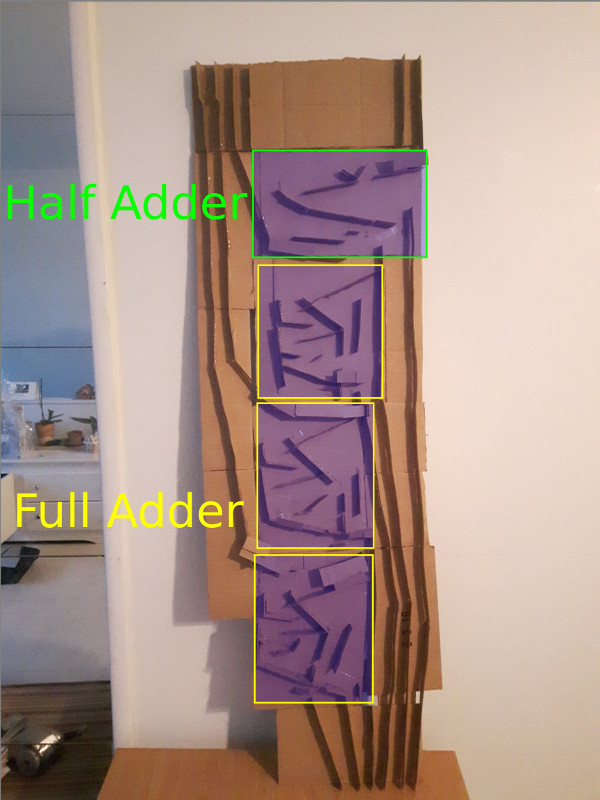
A 4-bit Calculator made in cardboard and marble

Posted by jpluimers on 2017/11/14

Cool device: [WayBackA 4-bit Calculator made in cardboard and marble

I really love this. Not just that it exists, but how it was made and how it’s explained.

Definitely worth reading.

via: [WayBack] Funny modern abacus https://lapinozz.github.io/learning/2016/11/19/calculator-with-caordboard-and-marbles.html – David Berneda – Google+

–jeroen

Posted in Algorithms, Development, Hardware Development, Software Development | Leave a Comment »

MX Backup – Postfix Email Server | samhobbs.co.uk

Posted by jpluimers on 2017/11/09

Interesting as it has steps for both OpenSuSE and Debian each well suited for running on a Raspberry Pi.

[WayBackMX Backup – Postfix Email Server | samhobbs.co.uk

It seems postfix is a lot easier to configure than sendmail so I already like it.

First I need to read a bit more in Postfix greylisting.

I’ll need to catch up on Sam’s other parts with the postfix tag as well:

–jeroen

Posted in *nix, *nix-tools, Debian, Development, Hardware Development, Linux, openSuSE, Power User, Raspberry Pi, Raspbian, sendmail, SuSE Linux, Tumbleweed | Leave a Comment »