The Wiert Corner – irregular stream of stuff

Jeroen W. Pluimers on .NET, C#, Delphi, databases, and personal interests

  • My badges

  • Twitter Updates

  • My Flickr Stream

  • Pages

  • All categories

  • Enter your email address to subscribe to this blog and receive notifications of new posts by email.

    Join 1,862 other subscribers

Archive for the ‘Hardware Interfacing’ Category

USB LED Light Lamp for Computer Keyboard Reading Laptop Notebook PC 2016 | eBay

Posted by jpluimers on 2017/09/18

Putting all those old USB chargers to good use:

USB LED Light Lamp for Computer Keyboard Reading Laptop Notebook PC 2016 | eBay [WayBack]

Via:

AMAZING 77 cent LED light -including shipping Pulls about 3/4 of a watt (0.14 amp @ 5v), and rivals the light output of a $20 3 watt lamp from Amazon.… – Joe C. Hecht – Google+ [WayBack]

–jeroen

Read the rest of this entry »

Posted in Development, Hardware, Hardware Development, Hardware Interfacing, Power User, USB, USB | Leave a Comment »

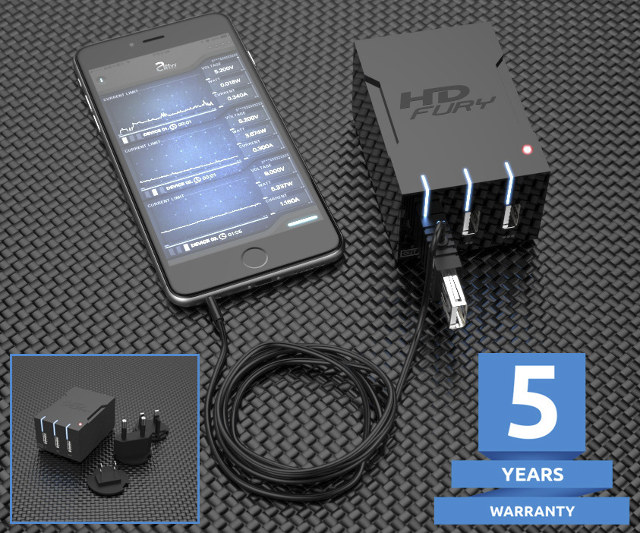
$59 HDFury Universal PSU Doctor Supports Power Monitoring via iOS or Android

Posted by jpluimers on 2017/05/11

Interesting device [WayBack]: $59 HDFury Universal PSU Doctor Supports Power Monitoring via iOS or Android which has a lot more details.

Via: [WayBack] +HDfury has launched a 3-port USB charger/power supply with power monitoring function. – Jean-Luc Aufranc – Google+

–jeroen

Posted in Android Devices, Apple, Development, Hardware Development, Hardware Interfacing, iOS, Power User, USB | Leave a Comment »

Mac OS X – serial communication programs

Posted by jpluimers on 2017/03/30

Some links that helped me getting FTDI USB serial communication to Raspberry Pi systems going:

–jeroen

Posted in Apple, Communications Development, Development, Hardware Development, Hardware Interfacing, iMac, Legacy Ports: COM, Mac, Mac OS X / OS X / MacOS, MacBook, MacBook Retina, MacBook-Air, MacBook-Pro, MacMini, OS X 10.10 Yosemite, OS X 10.9 Mavericks, Power User, Raspberry Pi, USB | Leave a Comment »

KPN LoRa om Van Raam fietsen te traceren Zakelijk KPN Forum

Posted by jpluimers on 2017/03/02

Interesting: [Archive.isKPN LoRa om Van Raam fietsen te traceren Zakelijk KPN Forum via [WayBackNederlands bedrijf komt met narrowband-internet-of-things-ontwikkelbordje – Computer – Nieuws – Tweakers

–jeroen

Posted in Arduino, Development, Hardware Development, Hardware Interfacing | Leave a Comment »

Some ChromeCast URLs

Posted by jpluimers on 2017/02/01

I need to check these against a Chromecast v2 as the below URLs are from a v1 device:

More is possible by using cURL: Chromecast Hacking Has Begun | fiquett.com

sleep 8h; while true; do
curl -H "Content-Type: application/json" http://192.168.71.113:8008/apps/YouTube -X POST -d 'v=somevideo';
done

Related:

–jeroen

via:

Posted in Chromecast, Communications Development, Development, Google, Hardware Interfacing, HTTP, https, Internet protocol suite, REST, Security, TCP | 3 Comments »

Some notes and links on hacking a Philips TVs TCP ports

Posted by jpluimers on 2017/01/25

In my case this is about a Philips 42PFL7676H TV, but this likely applies to many Philips TVs from the 2009-2012 era.

According to nmap, these ports are open:

PORT STATE SERVICE REASON VERSION
1925/tcp open unknown syn-ack
2323/tcp open 3d-nfsd? syn-ack
49153/tcp open upnp syn-ack Philips Intel UPnP SDK 1.4 (Philips Smart TV; UPnP 1.0; DLNADOC 1.50)

TCP port 1925 is actually implementing the jointSPACE REST API over HTTP which has some nice documentation (also locally on your TV).

PCremote implements this and is easy to install: just download (or git clone) the html locally or to a web-server and try it, or even easier: browse to the www.netdata.be/tv site. You can even use it on your Raspberry Pi. There is also support for jointSPACE it in agocontrol.

Two nice threads about it from the Philips support forum:

TCP port 2323 seems to be the voodooport which should enable you to do DirectFB Voodoo.

Jean-Marc Harvengt (software engineer at Philips) showed a nice demo (see video below) on using VooDoo. I wish he had published the source code.

TCP port 49153 also hosts an HTTP server. The base URL I could find information about is 192.168.71.115:49153/nmrDescription.xml It seems that nmrDescription.xml has to do with DLNA and upnp.

Later on I found that my brothers 32PFL7675H TV should also support JointSPACE, but that it had to be activated:

AFTER upgrading to the new firmware, jointSPACE NEEDS TO BE ACTIVATED by entering the following digits sequence while watching TV (WatchTV activity): “5646877223

Source: jointSPACE TVs Developers

Before activation, only port was open 49153. After that, port 2323 was open as well. But the www.netdata.be/tv app doesn’t work on this TV. This does work however: Philips MyRemote – Android Apps on Google Play

–jeroen

Read the rest of this entry »

Posted in Communications Development, Development, Hardware Interfacing, HTTP, Internet protocol suite, REST, TCP | Leave a Comment »

Somfy Smoove Origin RTS Protocol | PushStack

Posted by jpluimers on 2016/05/24

Interesting: Somfy Smoove Origin RTS Protocol | PushStack a base to start Hacking Somfy.

The Somfy protocol is tricky as it uses rolling keys.

More interesting links:

These are in Dutch, but very interesting as they show how to do reverse engineering and getting it to work hardware wise:

Read the rest of this entry »

Posted in Arduino, Development, Hardware Development, Hardware Interfacing, Raspberry Pi | Leave a Comment »

Replace Boxee by Raspberry Pi as most TV support doing video+USB keybard over HDMI

Posted by jpluimers on 2016/02/22

If for instance your Boxee gets old or breaks down, you can use a Raspberry Pi as a replacement with Kodi as media player.

This combination will understand the Video+USB over HDMI which most TV supports officially named HDMI-CEC , but most vendors “invented” their own names (see list below).

The core is the kodi support for CEC.

Basically it comes down to using three cables going to the Pi: Power from TV (or some other source), HDMI to TV, and wired Ethernet. And a distribution for RaspberryPi containing kodi will work, for instance from OpenELEC Mediacenter – Download: Raspberry Pi Builds

Chad MILLER has more details on how to get this to work: My Boxee box is getting old, but I knew of no replacements. The problem is I …

Names known for HDMI-CEC via Wikipedia:

Anynet+ (Samsung), Aquos Link (Sharp), BRAVIA Link and BRAVIA Sync (Sony), HDMI-CEC (Hitachi), E-link (AOC), Kuro Link (Pioneer), INlink (Insignia), CE-Link and Regza Link (Toshiba), RIHD (Remote Interactive over HDMI) (Onkyo), RuncoLink (Runco International), SimpLink (LG), T-Link (ITT), HDAVI Control, EZ-Sync, VIERA Link (Panasonic), EasyLink (Philips), and NetCommand for HDMI (Mitsubishi).

Because of the naming, turning on CEC can be confusing: How to Enable HDMI-CEC on Your TV, and Why You Should

–jeroen

Posted in *nix, *nix-tools, Development, Hardware Development, Hardware Interfacing, HDMI, Linux, Power User, Raspberry Pi | Leave a Comment »

USB Typewriter — Classic Typewriters for the Digital Age (for mechanical typewriters, not electrical ones)

Posted by jpluimers on 2014/03/19

Nicely done: the USB Typewriter — Classic Typewriters for the Digital Age, as they can do almost all keys a PC keyboard can do see the USB Typewriter — FAQ using a mechanical (not electrical!) typewriter.

Basically the opposite of  the IBM Selectric Computer Terminal, the Daisy wheel printing, the IBM 1050 systemand the IBM 2741 Console.

Note the kits (there are both soldering and non-soldering versions) are mostly aimed at models that once were popular in the USA, so for manufacturers like Adler there are no guidelines (but the existing guidelines for soldering and for non-soldering probably work fine).

–jeroen

Posted in Development, Hardware Development, Hardware Interfacing, Keyboards and Keyboard Shortcuts, LifeHacker, Power User, USB | Tagged: | 2 Comments »

How To Backup Bootable USB Drive

Posted by jpluimers on 2012/10/15

I needed to make backups of a couple of maintenance USB drives.

It turned out to be pretty easy: How To Backup Bootable USB Drive describes how to do that based on a small USB Image Tool developed in .NET.

One of the things you can do with this is backup bootable Windows installation media.

Note it is a simple tool, so it backups only same size to same size. For more advanced copy purposes, use something like the professional tools from Acronis.

–jeroen

Posted in .NET, Development, Hardware Interfacing, Power User, Software Development, USB, Windows, Windows 7, Windows 8, Windows Server 2000, Windows Server 2003, Windows Server 2003 R2, Windows Server 2008, Windows Server 2008 R2, Windows Vista, Windows XP | Leave a Comment »