


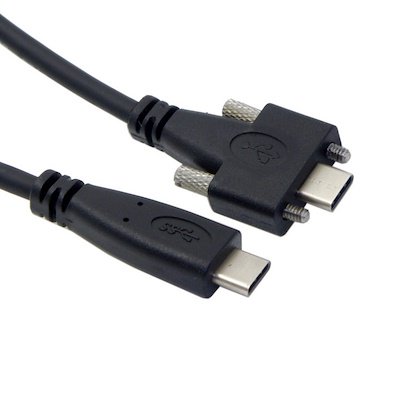
Lot’s of confusing pictures from [WayBack] foone on Twitter: “whenever I get bored and think my life is going too well, I google “industrial USB-C” and now everything is back to shit…”
Archive for the ‘USB’ Category
foone on Twitter: I google “industrial USB-C” and now everything is back to shit…
Posted by jpluimers on 2022/06/06

Posted in Development, Fun, Hardware, Hardware Interfacing, Power User, USB, USB, USB-C | 1 Comment »
DroidCam – Webcam for PC – Apps on Google Play
Posted by jpluimers on 2021/12/21
Since most phones still have better cameras than most laptops, this is on my list of things to try:
Android app: [Wayback/Archive] DroidCam – Webcam for PC – Apps on Google Play (there is also an iOS app, but I don’t use iOS devices)
Client software for Windows and Linux: [Wayback/Archive] Dev47Apps
DroidCam turns your phone/tablet into a webcam for your PC.
Use it with chat programs like Zoom, MS Teams, and Skype.Main Features:
– Chat using “DroidCam Webcam” on your computer, including Sound and Picture.
– Connect over WiFi or USB cable.
– Unlimited free usage at standard definition.
– Keep using your phone with DroidCam in background (Android).
– Simple, safe, efficient, and trusted by millions of people worldwide.DroidCamX Pro Features:
– Switch to HD Mode for 720p/1080p high definition video.
– Camera controls: toggle light, enable continuous auto focus, zoom in/out.
– Rotate, Flip & Mirror the video to better match your setup.
– Adjust brightness, contrast, add video delay and adjust audio volume (Windows).
– USB-Only mode for extra privacy and security.
– Option to auto-mute phone calls.
– No Ads.
I am really curious how they did this on the software side: developing and signing drivers; low-latency communications protocol, etc.
Via: [Wayback/Archive] Apple deelt workaround die scherm verkleint voor MacBook Pro-notch-problemen – Computer – Nieuws – Tweakers
–jeroen
Share this:

Posted in Development, Hardware Interfacing, Power User, USB, WebCam | Leave a Comment »
GitHub – dschmenk/apple2pi: Apple II client/server for Raspberry Pi
Posted by jpluimers on 2020/05/28

It can run [WayBack] RASPPLE II: A2CLOUD, A2SERVER, Apple II Pi for Raspberry Pi
Lot’s of videos below, all by David Schmenk https://www.youtube.com/user/dschmenk/videos
- Apple II Pi – https://www.youtube.com/watch?v=Kx_ggKHWaxA
- Apple II Pi part 2 – https://www.youtube.com/watch?v=BX2VWZQCtkU
- Apple II Pi part 3 – https://www.youtube.com/watch?v=OpevIc3_H1g
- Apple II Pi part 4 – https://www.youtube.com/watch?v=tbqLEU35d0E
- What is the A2Pi (part 1)? – https://www.youtube.com/watch?v=wZSLrq5LQhU
- What is the A2Pi (part 2)? – https://www.youtube.com/watch?v=kg9Zvb3dgpw
- What is the A2Pi (part 3)? – https://www.youtube.com/watch?v=yMc6R5GGprQ
- What is the A2Pi (part 4)? – https://www.youtube.com/watch?v=6yBuIKpztpU
- Apple II Pi Quick Setup – https://www.youtube.com/watch?v=pLxs7ceDT_E
- What is the Apple II Pi 2017 – https://www.youtube.com/watch?v=moww3BpckR4
- AppleDuino: Apple II Meets Arduino – https://www.youtube.com/watch?v=JocgWcenoPg
- Arduino Video Demo – https://www.youtube.com/watch?v=vEfm9Pm9MkI
Via:
- [WayBack] Recognise this Apple II? Or do you recognise the Raspberry Pi within? Or both? This is David Schmenk’s Apple II Pi project – a small and simple board, o… – mos6502 – Google+
- [WayBack] Recognise this Apple II? Or do you recognise the Raspberry Pi within? Or both? This is David Schmenk’s Apple II Pi project – a small and simple board, o… – Alan Cox – Google+
–jeroen
Share this:
Posted in *nix, *nix-tools, //e, 6502, Apple, Apple ][, Development, Hardware Development, Hardware Interfacing, History, Power User, Raspberry Pi, USB | Leave a Comment »
Going to test some USB 3 gigabit ethernet adapters based on Realtek RTL8153 and Asix AX88179 chips
Posted by jpluimers on 2018/07/27
Later on, I might add a USB31000S in the mix, but I will do some initial testing with USB 3 gigabit ethernet adapters based on Realtek RTL8153 and Asix AX88179 chips.
Things I will focus on with my Retina MacBook Pro 2015 model are:
- CPU usage
- Throughput
- Duration between reconnect on USB after suspend, and renewing the DHCP lease
- Promiscuous mode capabilities
Some links for my references:
- [WayBack] The 8 Best USB to Ethernet Adapters of 2018 – FabatHome
- [WayBack] What USB to Ethernet Adapters to Buy And How Fast They Perform Based on Specs and Chipsets Used – GTrusted
- [WayBack] Any USB 3.0 Gigabit ethernet adapters that don’t require drivers? | MacRumors Forums
- [WayBack] Ethernet Adapter Compatablity – Raspberry Pi Forums
- [WayBack] Anatomy of a cheap USB to Ethernet adapter – Project Gus
- [Archive.is] nanog: Re: USB Ethernet Adapters
- [WayBack] nanog: Re: USB Ethernet Adapters
- [WayBack] USB to Ethernet Adapter and Promiscuous Mode – Wireshark Q&A
A first impression from the above links is that for Realtek chipset based devices, drivers are more readily included in operating systems, and these chipsets are better at VLAN handling.
–jeroen
Share this:
Posted in Ethernet, LifeHacker, Network-and-equipment, Power User, USB, USB, USB-C | Leave a Comment »
USB LED Light Lamp for Computer Keyboard Reading Laptop Notebook PC 2016 | eBay
Posted by jpluimers on 2017/09/18
Putting all those old USB chargers to good use:
USB LED Light Lamp for Computer Keyboard Reading Laptop Notebook PC 2016 | eBay [WayBack]
Via:
AMAZING 77 cent LED light -including shipping Pulls about 3/4 of a watt (0.14 amp @ 5v), and rivals the light output of a $20 3 watt lamp from Amazon.… – Joe C. Hecht – Google+ [WayBack]
–jeroen
Share this:

Posted in Development, Hardware, Hardware Development, Hardware Interfacing, Power User, USB, USB | Leave a Comment »
$59 HDFury Universal PSU Doctor Supports Power Monitoring via iOS or Android
Posted by jpluimers on 2017/05/11
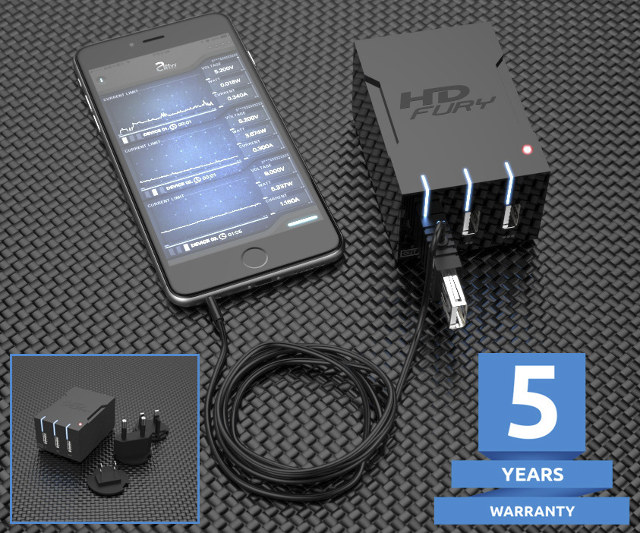 Interesting device [WayBack]: $59 HDFury Universal PSU Doctor Supports Power Monitoring via iOS or Android which has a lot more details.
Via: [WayBack] +HDfury has launched a 3-port USB charger/power supply with power monitoring function. – Jean-Luc Aufranc – Google+
–jeroen
Share this:

Posted in Android Devices, Apple, Development, Hardware Development, Hardware Interfacing, iOS, Power User, USB | Leave a Comment »
Mac OS X – serial communication programs
Posted by jpluimers on 2017/03/30
Some links that helped me getting FTDI USB serial communication to Raspberry Pi systems going:
- Serial adapter drivers, programs, pinout, and tips for console TTY’s on a Mac.Source: Mac’s and serial TTY’s
- List of GUI terminal emulation software for console TTY’s on a Mac with OS X.Source: Mac OS X Serial Applications
- Source: Is there an OS X terminal program that can access serial ports? – Ask Different
- Source: SHA – – – Raspberry Pi – RS232 Serial Interface Options (Revisit)
–jeroen
Share this:
Posted in Apple, Communications Development, Development, Hardware Development, Hardware Interfacing, iMac, Legacy Ports: COM, Mac, Mac OS X / OS X / MacOS, MacBook, MacBook Retina, MacBook-Air, MacBook-Pro, MacMini, OS X 10.10 Yosemite, OS X 10.9 Mavericks, Power User, Raspberry Pi, USB | Leave a Comment »
USB Typewriter — Classic Typewriters for the Digital Age (for mechanical typewriters, not electrical ones)
Posted by jpluimers on 2014/03/19
Nicely done: the USB Typewriter — Classic Typewriters for the Digital Age, as they can do almost all keys a PC keyboard can do see the USB Typewriter — FAQ using a mechanical (not electrical!) typewriter.
Basically the opposite of the IBM Selectric Computer Terminal, the Daisy wheel printing, the IBM 1050 system, and the IBM 2741 Console.
Note the kits (there are both soldering and non-soldering versions) are mostly aimed at models that once were popular in the USA, so for manufacturers like Adler there are no guidelines (but the existing guidelines for soldering and for non-soldering probably work fine).
–jeroen
Share this:
Posted in Development, Hardware Development, Hardware Interfacing, Keyboards and Keyboard Shortcuts, LifeHacker, Power User, USB | Tagged: Classic Typewriters | 2 Comments »
How To Backup Bootable USB Drive
Posted by jpluimers on 2012/10/15
I needed to make backups of a couple of maintenance USB drives.
It turned out to be pretty easy: How To Backup Bootable USB Drive describes how to do that based on a small USB Image Tool developed in .NET.
One of the things you can do with this is backup bootable Windows installation media.
Note it is a simple tool, so it backups only same size to same size. For more advanced copy purposes, use something like the professional tools from Acronis.
–jeroen
Share this:
Posted in .NET, Development, Hardware Interfacing, Power User, Software Development, USB, Windows, Windows 7, Windows 8, Windows Server 2000, Windows Server 2003, Windows Server 2003 R2, Windows Server 2008, Windows Server 2008 R2, Windows Vista, Windows XP | Leave a Comment »
Interesting: Electric Imp with Arduino (via: electric imp – developer kits)
Posted by jpluimers on 2012/05/28
Electric Imp – that wants to power The Internet of Things using imps – is introducing some really interesting hardware, one of the devevelopment kits combining Arduino and Imp on one board:
Duino: Arduino, with Imp
Featuring an ATMEGA328 processor, this board is compatible with the Arduino Uno but instead of having a USB-serial port on it, it has an Imp socket. You can use a modified version of the Arduino IDE to update the ATMEGA code from anywhere in the world when an Imp is plugged in, and use simple serial commands in your Arduino programs to control other Imp devices.
The ATMEGA will operate standalone when no imp card is inserted.
Dimensions: 72mm x 54mm x 14mm
Power supply: USB Mini-B socket (5v) or 2.1mm barrel jack (7-12v)
Price: $20
Some must read links:
- electric imp – what is the imp?.
- Electric Imp Blog | Connect Everything.
- electric imp – developer info.
- electric imp – developer info – hardware.
- This Is How You Will Connect Everything in Your Home to the Internet.
–jeroen
via: electric imp – developer kits.
Share this:

Posted in Arduino, Hardware Development, Hardware Interfacing, USB | 2 Comments »
 The Wiert Corner - irregular stream of stuff