The Wiert Corner – irregular stream of stuff

Jeroen W. Pluimers on .NET, C#, Delphi, databases, and personal interests

  • My badges

  • Twitter Updates

  • My Flickr Stream

  • Pages

  • All categories

  • Enter your email address to subscribe to this blog and receive notifications of new posts by email.

    Join 1,854 other subscribers

Archive for the ‘Development’ Category

When MySQL characterset ‘utf’ does not allow you to enter some Unicode code points

Posted by jpluimers on 2022/01/06

Contrary to what many believe is that MySQL utf8 is not always full blown UTF-8 support, but actually utf8mb3, which has been deprecated for a while now.

Only utf8mb4 will give you full blown UTF-8 support.

This when someone reminded me of this in a Delphi application:

When I insert :joy: emoji into mysql varchar filed I got an error :
#22007 Incorrect string value: '\xF0\x9F\x98\x82' for column 'remarks' at row 1

database charset is utf8

Note that the :joy: emoji is 😂 and has Unicode code point U+1F602 which is outside the basic multilingual plane.

See:

–jeroen

Posted in Conference Topics, Conferences, Database Development, Delphi, Development, Encoding, Event, MySQL, Software Development, UTF-8, UTF8 | Leave a Comment »

LIDL Radio Controlled Wall Clock IAN 100489 English manual

Posted by jpluimers on 2022/01/06

Model 100489-14-01 wall clock

Model 100489-14-01 wall clock

Just in case I need it again.

The signal quality fluctuates during the day (it is a lot better at night when there is less inionisation in the atmosphere), and is worsened by concrete walls (like our home).

Best way to get prolonged reception is at night, on the top floor behind a window or outside.

The clock usually needs between 3 and 10 minutes to pick up the DCF77 signal from the transmitter.

Wall clock manual: [Wayback] 100489_EN.pdf of which this abstract:

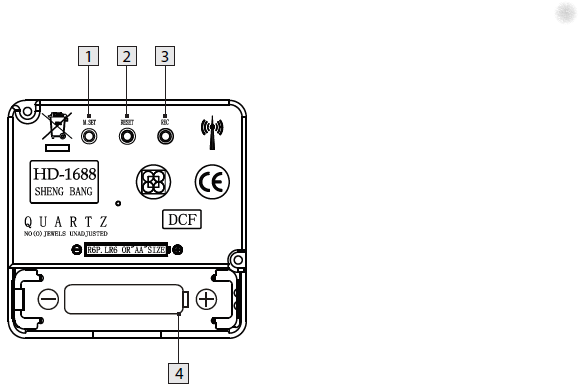
DCF77 HD-1688 clock mechanism

DCF77 HD-1688 clock mechanism

Numbers:

  1. M.SET button
    • Press and keep pressed the M.SET button 1 at least 3 seconds. The wall clock switches into manual mode.
    • Press and keep pressed the M.SET button again until the hands reach the correct position for you to set the time.
    • Briefly pressing the M.SET button moves the hands forward in one minute steps to enable you to set the current time manually.
      Note: After 8 seconds without pressing the M.SET button, the wall clock switches out of manual mode and keeps the time as normal. The manually set value is overwritten as soon as reception of the DCF radio time signal is successful.
  2. RESET button
    • Press the RESET button 2 to reset the radio clock settings. Alternatively, remove the batteries from the device and insert them again.
    • The product now automatically starts to search for the DCF radio time signal.
  3. REC button
    • Press and keep pressed the REC button 3 at least 5 seconds. The wall clock attempts to receive the DCF radio time signal. This process takes a few minutes to complete.
  4. Battery compartment
    • Battery type: 1 x 1.5 V ⎓ AA, LR6


More on the signal, transmitter and encoding: DCF77 – Wikipedia, where the below images are from:

DCF77 reception area from Mainflingen

DCF77 signal strength over a 24-hour period measured in Nerja, on the south coast of Spain 1,801 km (1,119 mi) from the transmitter. Around 1 AM it peaks at ≈ 100 µV/m signal strength. During the day, the signal is weakened by ionization of the ionosphere due to solar activity.

Another DCF77 clock I have: CSL Bearware 302658 DCF clock manual

–jeroen

Posted in Development, Encoding, Hardware Development, LifeHacker, Power User, Software Development | 2 Comments »

Work Chronicles | Comics about Work on Twitter: “Fast-paced Environment… “

Posted by jpluimers on 2022/01/05

Even when young, this transcript should raise all the red flags:

  1. Recruiter: At this job, you will get to work at a fast paced environment.
  2. Recruiter: You will get to thrive under pressure.
  3. Recruiter: And you will be part of a dynamic team.
  4. Applicant: Great, new that you’ve outlined the cons, what are the pros?

[Archive.is] Work Chronicles | Comics about Work on Twitter: “Fast-paced Environment… “ and [Wayback] Fast-paced Environment | Work Chronicles:

–jeroen

Read the rest of this entry »

Posted in About, Development, LifeHacker, Personal, Power User, Software Development | Leave a Comment »

Valetudo | Cloud-free control webinterface for Xiaomi vacuum robots

Posted by jpluimers on 2022/01/04

[Wayback] Valetudo | Cloud-free control webinterface for vacuum robots

Valetudo is a standalone binary which runs on rooted Vacuums of the Xiaomi ecosystem and aims to enable the user to operate the robot vacuum without any Cloud Connection whatsoever.

You can even use it to make a WiFi heat map of the floors in your home: the Valeroni app can do that for you.

The Valeroni app is open source too: [Wayback/Archive.is] ccoors/Valeronoi: A WiFi mapping companion app for Valetudo

Via [Archive.is] Kristian Köhntopp on Twitter: “Paging @sys_adm_ama: … Alternative Firmware für Robot-Staubsauger … Alternative Firmware für Robot-Staubsauger verwenden, um das Wifi im Haus zu mappen (und Staub zu saugen)”

–jeroen

Read the rest of this entry »

Posted in C++, Development, Hardware, LifeHacker, Power User, Software Development, WiFi | Leave a Comment »

Visual Studio Code: some notes on marco tools for vscode

Posted by jpluimers on 2022/01/03

In Visual Studio Code: blazingly fast text expansion with Emmet I wrote:

One of my behaviours I wanted to get rid of is heavily use of keyboard macros, so when doing more web-stuff, I bumped into Emmet (that in the past was called Zen Code).

That didn’t fully cut it, not even in combination with regular expression based search/replace, so I finally to some time to look at some links that might help me out with keyboard macros.

The links for my archive, most via [Wayback/Archive] vscode macro recorder – Google Search:

–jeroen

Posted in Development, Software Development, vscode Visual Studio Code | Leave a Comment »

Winbox configuration files

Posted by jpluimers on 2021/12/31

A few notes:

  • WinBox configuration files are under %APPDATA%\Mikrotik\Winbox
    • The subdirectory sessions contains binary *.viw files that seem to represent “view” configurations (the positions, dimensions and other properties of the open Windows in a Winbox session) where the * of the name seems to be an IPv4 address of a machine.
    • Directories named like 6.40.3-2932358209 and 6.43.13-695307561 contain configuration files that seem to determine what WinBox features a certain RouterOS version should reveal; files in those directories seem to always be these:
      • advtool.crc / advtool.jg
      • dhcp.crc / dhcp.jg
      • hotspot.crc / hotspot.jg
      • icons.crc / icons.png
      • mpls.crc / mpls.jg
      • ppp.crc / ppp.jg
      • roteros.crc / roteros.jg
      • roting4.crc / roting4.jg
      • secure.crc / secure.jg
      • wlan6.crc / wlan6.jg
    • There are binary files Addresses.cdb and settings.cfg.viw
    • A text file named sessionpath contains the expanded path %APPDATA%\Mikrotik\Winbox\sessions

The *.crc files contain a CRC code, presumably on the contents of the correspoding *.jg file. The *.jg files seem to contain some kind of JSON.

Some links I found:

–jeroen

Posted in Development, Internet, MikroTik, Power User, RouterOS, routers, Scripting, Software Development | Leave a Comment »

Productivity tips by Florian Haas and David Moreau-Simard: the mottos you work by

Posted by jpluimers on 2021/12/30

My own motto: learn new things every day.

Florian:

[Archive.is] Florian Haas 🇪🇺 on Twitter: “Docs or it didn’t happen.… “

David:

[Archive.is] ☁David Moreau-Simard on Twitter: “Hey software and system folks, I’m curious: what are some of the mottos you work by ? I’ll start:

Via Florian’s pinned Twitter post I found while writing media.ccc.de – No, we won’t have a video call for that! (Communications in distributed teams by Florian Haas).

–jeroen

Posted in Development, DevOps, Software Development | 1 Comment »

windows 7 – How can I eject a CD via the cmd? – Super User

Posted by jpluimers on 2021/12/30

Quite a while ago I found [Wayback] windows 7 – How can I eject a CD via the cmd? – Super User, but forgot to document that in the batch-files I created from it.

It shows both this one-liner:

powershell "(new-object -COM Shell.Application).NameSpace(17).ParseName('D:').InvokeVerb('Eject')"

The hardcoded const 17 is for the ssfDRIVES element in the ShellSpecialFolderConstants, which is documented at [Wayback] ShellSpecialFolderConstants (shldisp.h) – Win32 apps | Microsoft Docs.

There is no PowerShell equivalent of that element, hence the hardcoded value 17.

The script invokes the verb Eject, which works on any kind of removable media (not just optical drives). If you want to limit it to only certain drive types, then you would need to compare the Type of the ParseName() result. However, that result has a Type property returns a string for which the possible values are not documented.

Here are some links I tried to find out what is returned:

In addition to the Shell.Application, there also is Scripting.FileSystemObject, which allows enumerating the drives and filter on DriveType. This is the relevant documentation:

The second example in the above mentioned answer shows how to use this to filter for optical drives.

It also shows a cool technique to have a hybrid batch-file/JScript script:

@if (@CodeSection == @Batch) @then

@echo off
setlocal

cscript /nologo /e:JScript "%~f0"

goto :EOF

@end // end batch / begin JScript hybrid chimera

// DriveType=4 means CD drive for a WScript FSO object.
// See http://msdn.microsoft.com/en-us/library/ys4ctaz0%28v=vs.84%29.aspx

// NameSpace(17) = ssfDRIVES, or My Computer.
// See http://msdn.microsoft.com/en-us/library/windows/desktop/bb774096%28v=vs.85%29.aspx

var oSH = new ActiveXObject('Shell.Application'),
    FSO = new ActiveXObject('Scripting.FileSystemObject'),
    CDdriveType = 4,
    ssfDRIVES = 17,
    drives = new Enumerator(FSO.Drives);

while (!drives.atEnd()) {
    var x = drives.item();
    if (x.DriveType == CDdriveType) {
        oSH.NameSpace(ssfDRIVES).ParseName(x.DriveLetter + ':').InvokeVerb('Eject');
        while (x.IsReady)
            WSH.Sleep(50);
    }
    drives.moveNext();
}

–jeroen

Posted in Batch-Files, Development, JScript, PowerShell, Scripting, Software Development | Leave a Comment »

media.ccc.de – No, we won’t have a video call for that! (Communications in distributed teams by Florian Haas)

Posted by jpluimers on 2021/12/29

Not just for during the Covid times: the helpful examples and thorough explanation by Florian makes this a must-watch video for anyone wanting to participate in distributed teams.

[Wayback] media.ccc.de – No, we won’t have a video call for that!

The above link has downloads for both Video (mp4 and WebM formats) and audio (mp3 and opus formats). I found the video easier to digest.

If you want to watch it on-line, there is the YouTube video (below the signature) which has closed captions as well.

Kristian Köhntopp made a [Wayback/Archive.is] short intro and abstract on Twitter:

https://xahteiwi.eu/resources/presentations/no-we-wont-have-a-video-call-for-that/

Exactly one year ago, the office building I was working from every work day caught fire, and was closed for a month for renovation.

On the day of the planned reopening, my employer declared Covid emergency and asked everybody to work from home.

So that is how we work since then, and we will continue to do so until at least October.

Not too much has changed, though. When the new https://oosterdokseiland.nl/en/ opens, there will be probably a lot of pain between the people who go to the office to work and those who don’t.

The talk above by @xahteiwi explains in a nice way how to work properly remote first:

  • Writing over speaking.
  • Asynchronous over synchronous.
  • Structured communication over free form.

Some things require a free form video chat, but even then, set an agenda and write minutes.

Florian also explains when to use what, and what situations would require a synchronous wide-band channel, but most of them are exceptional, and most of the time you could execute better using structured, written, async mode comms.

Having said that, if you want his talk as a briefing, here is a Youtube: https://www.youtube.com/watch?v=NVnci3tyDa4

First watch the video, then read the full speaker notes at [Wayback] No, We Won’t Have a Video Call for That! – xahteiwi.eu “My talk from FrOSCon 2020, Cloud Edition.”

More on-line:

–jeroen

Read the rest of this entry »

Posted in Agile, Conference Topics, Conferences, Development, Event, LifeHacker, Power User, Software Development | 1 Comment »

Chrome: allow some URLs to “never sleep” (or hibernate/discard)

Posted by jpluimers on 2021/12/29

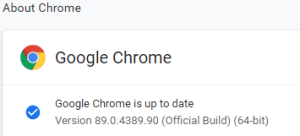
This option in Chrome has moved around a bit, so here is how it was in Version 89.0.4389.90 (Official Build) (64-bit) when I documented it.



  1. Browse to chrome://discards/
  2. Don’t be intimidated by the many rows and columns; only the rightmost 8 (at the time of writing) are interesting:

  3. Search for the URL (in my chase https://web.whatsapp.com/ , so I searched for whatsapp which you see as orange in the screenshots below) for which you want to ensure it will never sleep/hibernate (Chrome calls this “discardable”)

  4. Click Toggle under the checkmark ✔ so it changes into a cross ✘️ (so the URL will never be discarded, hence always stays awake)

Do this only for tabs that are not CPU/memory/traffic intensive

I got there via these posts:

When searching for discards, I found this post: [Wayback] How to Prevent Chrome from Reloading Tabs When You Switch to Them

Chrome has built-in memory management that causes inactive tabs to “sleep” as RAM is filled. When you click the tab again, it has to reload the page. It’s annoying.

–jeroen

Posted in Chrome, Development, Google, Power User, SocialMedia, Software Development, Web Development, WhatsApp | Leave a Comment »