


Lots of ideas, also for the W530 model: [Wayback] The Definitive T430 Modding Guide | by George Kushnir (https://n4ru.it) | Medium.
–jeroen
Posted by jpluimers on 2022/01/13
Lots of ideas, also for the W530 model: [Wayback] The Definitive T430 Modding Guide | by George Kushnir (https://n4ru.it) | Medium.
–jeroen

Posted in Development, Hardware Development, Power User, ThinkPad | Leave a Comment »
Posted by jpluimers on 2022/01/12
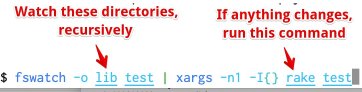
Based on the below tweet and replies, these tools are not on my research list:
fswatch: file change monitor
entr: file change monitor that allows to run action
ack: a context aware find/grep replacement
ag: a faster ack
[Archive.is] Aaron Patterson on Twitter: “Here is my “autotest for lazy people”. It watches for changes in the lib or test directory, and runs rake test on change. There are definitely better, purpose built tools for this. But I am lazy…”
–jeroen

Posted in *nix, *nix-tools, Development, fgrep, find, grep, Power User, Scripting, Software Development | Leave a Comment »
Posted by jpluimers on 2022/01/12
I thought I had written about this a long time ago, as Math.SetRoundMode (and now System.Math.SetRoundMode) has been introduced since at least Delphi 2007. There are also related GetRoundMode and TFPURoundingMode.
Delphi 2009 also introduced TFPUPrecisionMode, GetPrecisionMode and SetPrecisionMode.
Delphi 2010 also introduced TFPUException, TFPUExceptionMask, TFPUPrecisionMode, TFPURoundingMode, ClearExceptions, GetExceptionMask, and SetExceptionMask.
Delphi XE2 introduced namespaces, so prepended the unit Math with the namespace System. to become unit System.Math. It also introduced $EXCESSPRECISION (for x64), GetMXCSR, SetMXCSR, ResetMXCSR, ClearFPUExceptions, TSSEException, TSSEExceptionMask, GetSSEExceptionMask, SetSSEExceptionMask, ClearSSEExceptions, TSSERoundingMode, GetSSERoundMode, SetSSERoundMode.
The documentation basically only had formatting changes. This is the most important part of SetRoundMode:
function SetRoundMode(const RoundMode: TFPURoundingMode): TFPURoundingMode;…
Call
SetRoundingModeto specify how the FPU handles rounding issues. The rounding mode can be any of the following values:
rmNearestrmDownrmUprmTruncate
This is the most important bit of SetPrecisionMode:
function SetPrecisionMode(const Precision: TFPUPrecisionMode): TFPUPrecisionMode;…
Call
SetPrecisionModeto specify the level of precision that the FPU (floating-point unit) uses for floating-point calculations. The precision control mode can be any of the following values:
pmSinglepmReservedpmDoublepmExtended
SetPrecisionModereturns the previous precision control mode.
Both are functions, so so they return the previous value which you can use to set it back later: this is important as it is a process wide. SetPrecisionMode documents this, but SetRoundMode does not!
Since SetRoundMode and SetPrecisionMode set the 8087 CW (and on XE2 and up SetMXCSR), it means all usual Set8087CW caveats apply: changing the global 8087 CW setting impacts all running code, which means that threads, DLLs (especially ones written in other languages), etc might malfunction. You can find some of the caveat effects on my bog by searching for [Wayback] Set8087CW site:wiert.me – Google Search.
If you want to avoid global side effects, you might try the solution in [Wayback] c# – What is the equivalent of Math.Round() with MidpointRounding.AwayFromZero in Delphi? – Stack Overflow by [Wayback] Andreas Rejbrand.
[Wayback/Archive.is] SSE Instruction Set (not sure why Embarcadero used this as reference material from their docwiki, but hey, Intel documentation is likely outdated):
SSE — MXCSR
The
MXCSRregister is a 32-bit register containing flags for control and status information regarding SSE instructions. As of SSE3, only bits 0-15 have been defined.
Pnemonic Bit Location Description FZ bit 15 Flush To Zero R+ bit 14 Round Positive R- bit 13 Round Negative RZ bits 13 and 14 Round To Zero RN bits 13 and 14 are 0 Round To Nearest PM bit 12 Precision Mask UM bit 11 Underflow Mask OM bit 10 Overflow Mask ZM bit 9 Divide By Zero Mask DM bit 8 Denormal Mask IM bit 7 Invalid Operation Mask DAZ bit 6 Denormals Are Zero PE bit 5 Precision Flag UE bit 4 Underflow Flag OE bit 3 Overflow Flag ZE bit 2 Divide By Zero Flag DE bit 1 Denormal Flag IE bit 0 Invalid Operation Flag
FZmode causes all underflowing operations to simply go to zero. This saves some processing time, but loses precision.The
R+,R-,RN, andRZrounding modes determine how the lowest bit is generated. Normally,RNis used.
PM,UM,MM,ZM,DM, andIMare masks that tell the processor to ignore the exceptions that happen, if they do. This keeps the program from having to deal with problems, but might cause invalid results.
DAZtells the CPU to force all Denormals to zero. A Denormal is a number that is so small that FPU can’t renormalize it due to limited exponent ranges. They’re just like normal numbers, but they take considerably longer to process. Note that not all processors supportDAZ.
PE,UE,ME,ZE,DE, andIEare the exception flags that are set if they happen, and aren’t unmasked. Programs can check these to see if something interesting happened. These bits are “sticky”, which means that once they’re set, they stay set forever until the program clears them. This means that the indicated exception could have happened several operations ago, but nobody bothered to clear it.
DAZwasn’t available in the first version of SSE. Since setting a reserved bit inMXCSRcauses a general protection fault, we need to be able to check the availability of this feature without causing problems. To do this, one needs to set up a 512-byte area of memory to save the SSE state to, usingfxsave, and then one needs to inspect bytes 28 through 31 for theMXCSR_MASKvalue. If bit 6 is set,DAZis supported, otherwise, it isn’t.
Architectures Software Developer’s Manual: Intel® 64 and IA-32 includes supporting processors programming environment and architecture.
[Wayback] Intel® 64 and IA-32 Architectures Developer’s Manual: Vol. 1
[Wayback]
Some of the documentation links (that regrettably do not explain what happens behind the scenes with the 8087 CW) are these:
System namespace got prepended, x64 support added and a rudimentary page [Wayback] Floating-Point Rounding Issues – RAD Studio XE2 added
$EXCESSPRECISIONTSSEPrecisionModeSetSSEPrecisionModeGetSSEPrecisionMode
–jeroen
Posted in Delphi, Development, Software Development | Leave a Comment »
Posted by jpluimers on 2022/01/11
This gets the tweets I retweeted and have images in them:
from:@jpluimers filter:images filter:nativeretweets
Based on:
from:@someone filter:nativeretweets [KEYWORD(s)]This shows all retweets of
@someone(including the optional KEYWORD(s)). If you retweeted the same tweet you can use@yourtwitternameinstead of@someone.
To search for mentions of #space from verified accounts, excluding Retweets, type the following in the search box:
#space filter:verified -filter:nativeretweets
I believe per TweetDeck documentation (https://support.twitter.com/articles/20170322) this is the difference:
filter:nativeretweetsshows retweets from users who have hit the retweet button.filter:retweetsshows old style retweets (“RT”) + quoted tweets.Those are filtering FOR those types of results, but as you’ve done, the – is necessary to filter them out
-filter:nativeretweetsor-filter:retweets
/* Twitter API 1.1 tweets / favorites (likes) / following / followers backup in web browser
 * Get your access keys to use Twitter API 1.1: https://dev.twitter.com/docs/auth/tokens-devtwittercom
 * You can change Twitter API URL and Twitter screen_name, then execute script from a trusted web page without CSP protection like about:blank in a web browser console (F12 or Ctrl+Shift+K shortcut)
 * A textarea will appear so you can copy/paste to save data as a CSV file or search tweets / users in your web browser (Ctrl+F shortcut)
 * You can then view your backup in a spreadsheet editor like LibreOffice Calc
 * You can also compare the backup with another one to see who unfollowed you, who changed their Twitter username by looking at the user ID or which tweet you retweeted / favorited was deleted (e.g. with the Linux diff command)
 *
 * Note about the tweets backup:
 * Usually you will search tweets that you retweeted using Twitter web version (https://twitter.com/search) with a search like "from:your_username filter:nativeretweets keyword"
 * But it is limited to the retweets of the last 7 days, like for the free version of the search API (https://developer.twitter.com/en/docs/tweets/search/overview/standard)
 * An alternative is to search tweets in your user timeline with this script but it is limited to your last 3200 tweets (including retweets and replies)
 * This script can be combined with the Twitter feature to backup data, which is not limited to your last 3200 tweets but you can only request a backup every 30 days
 * To find tweets that you retweeted or favorited / liked from a specific person, you can open the CSV file with LibreOffice Calc, click on the column you want to search and press Ctrl+H to search a username
*/
–jeroen
Posted in Development, JavaScript/ECMAScript, Power User, Scripting, SocialMedia, Software Development, Twitter | Leave a Comment »
Posted by jpluimers on 2022/01/06
Contrary to what many believe is that MySQL utf8 is not always full blown UTF-8 support, but actually utf8mb3, which has been deprecated for a while now.
Only utf8mb4 will give you full blown UTF-8 support.
This when someone reminded me of this in a Delphi application:
When I insert :joy: emoji into mysql varchar filed I got an error :
#22007 Incorrect string value: '\xF0\x9F\x98\x82' for column 'remarks' at row 1database charset is
utf8
Note that the :joy: emoji is 😂 and has Unicode code point U+1F602 which is outside the basic multilingual plane.
See:
- Kristian Köhntopp
»Where does PostgreSQL’s collation logic come from?
PostgreSQL relies on external libraries to order strings.
– libc, meaning the operating system locale facility (POSIX or Windows)
– icu, meaning the ICU project (if PostgreSQL was built with ICU support)«- MySQL does things differently:
MySQL binary data files are independent of the host operating system in byte order, number representation (as long as the host fulfils MySQLs basic requirements), collation and even time zone handling.- So MySQL implements collations internally, also to guarantee stability across OS updates.
If it didn’t, a libc update changing collations would mean you have to recreate a lot of indexes. Also, you would not be able to safely move data files from host to host.- MySQL also, for quite some time now, no longer updates its own charsets and collations internally, for the same reason.
So utf8 in MySQL is utf8mb3, the three byte variant of Unicode UTF-8 implementation that covers only the BMP (unicode up to U+FFFF).- When moving to fuller (multiplane) UTF-8 support, a new name was needed, and utf8mb4 was chosen.
So when you actually want modern utf8 in MySQL, you have to use utf8mb4, and now you know why.- utf8 is deprecated and will be upgraded to utf8mb4 in some future MySQL release. This will be a breaking upgrade, and I wonder if it will require dropping and recreating all indexes affected by the change.
That will be painful.- https://dev.mysql.com/doc/refman/8.0/en/charset-unicode-utf8mb3.html …
utf8mb3 page in the MySQL 8.0 manual, with deprecation notice.
What will change is the meaning of the alias utf8 (currently an alias for utf8mb3).
utf8mb3 Character Set (3-Byte UTF-8 Unicode Encoding)
utf8is an alias forutf8mb3; the character limit is implicit, rather than explicit in the name.NoteThe
utf8mb3character set is deprecated and you should expect it to be removed in a future MySQL release. Please useutf8mb4instead. Althoughutf8is currently an alias forutf8mb3, at some pointutf8is expected to become a reference toutf8mb4. To avoid ambiguity about the meaning ofutf8, consider specifyingutf8mb4explicitly for character set references instead ofutf8.
utf8mb4contrasts with theutf8mb3character set, which supports only BMP characters and uses a maximum of three bytes per character:
- For a BMP character,
utf8mb4andutf8mb3have identical storage characteristics: same code values, same encoding, same length.- For a supplementary character,
utf8mb4requires four bytes to store it, whereasutf8mb3cannot store the character at all. When convertingutf8mb3columns toutf8mb4, you need not worry about converting supplementary characters because there are none.
–jeroen
Posted in Conference Topics, Conferences, Database Development, Delphi, Development, Encoding, Event, MySQL, Software Development, UTF-8, UTF8 | Leave a Comment »
Posted by jpluimers on 2022/01/06

Model 100489-14-01 wall clock
Just in case I need it again.
The signal quality fluctuates during the day (it is a lot better at night when there is less inionisation in the atmosphere), and is worsened by concrete walls (like our home).
Best way to get prolonged reception is at night, on the top floor behind a window or outside.
The clock usually needs between 3 and 10 minutes to pick up the DCF77 signal from the transmitter.
Wall clock manual: [Wayback] 100489_EN.pdf of which this abstract:
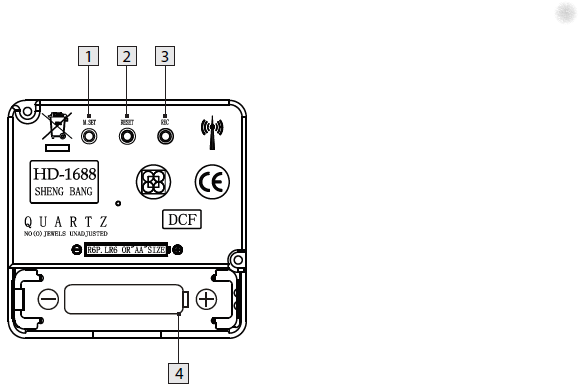
DCF77 HD-1688 clock mechanism
Numbers:
- M.SET button
- Press and keep pressed the M.SET button 1 at least 3 seconds. The wall clock switches into manual mode.
- Press and keep pressed the M.SET button again until the hands reach the correct position for you to set the time.
- Briefly pressing the M.SET button moves the hands forward in one minute steps to enable you to set the current time manually.
Note: After 8 seconds without pressing the M.SET button, the wall clock switches out of manual mode and keeps the time as normal. The manually set value is overwritten as soon as reception of the DCF radio time signal is successful.- RESET button
- Press the RESET button 2 to reset the radio clock settings. Alternatively, remove the batteries from the device and insert them again.
- The product now automatically starts to search for the DCF radio time signal.
- REC button
- Press and keep pressed the REC button 3 at least 5 seconds. The wall clock attempts to receive the DCF radio time signal. This process takes a few minutes to complete.
- Battery compartment
- Battery type: 1 x 1.5 V ⎓ AA, LR6
More on the signal, transmitter and encoding: DCF77 – Wikipedia, where the below images are from:
DCF77 reception area from Mainflingen
DCF77 signal strength over a 24-hour period measured in Nerja, on the south coast of Spain 1,801 km (1,119 mi) from the transmitter. Around 1 AM it peaks at ≈ 100 µV/m signal strength. During the day, the signal is weakened by ionization of the ionosphere due to solar activity.
Another DCF77 clock I have: CSL Bearware 302658 DCF clock manual
–jeroen

Posted in Development, Encoding, Hardware Development, LifeHacker, Power User, Software Development | 2 Comments »
Posted by jpluimers on 2022/01/05
Even when young, this transcript should raise all the red flags:
- Recruiter: At this job, you will get to work at a fast paced environment.
- Recruiter: You will get to thrive under pressure.
- Recruiter: And you will be part of a dynamic team.
- Applicant: Great, new that you’ve outlined the cons, what are the pros?
[Archive.is] Work Chronicles | Comics about Work on Twitter: “Fast-paced Environment… “ and [Wayback] Fast-paced Environment | Work Chronicles:
–jeroen

Posted in About, Development, LifeHacker, Personal, Power User, Software Development | Leave a Comment »
Posted by jpluimers on 2022/01/04
[Wayback] Valetudo | Cloud-free control webinterface for vacuum robots
Valetudo is a standalone binary which runs on rooted Vacuums of the Xiaomi ecosystem and aims to enable the user to operate the robot vacuum without any Cloud Connection whatsoever.
You can even use it to make a WiFi heat map of the floors in your home: the Valeroni app can do that for you.
The Valeroni app is open source too: [Wayback/Archive.is] ccoors/Valeronoi: A WiFi mapping companion app for Valetudo
Via [Archive.is] Kristian Köhntopp on Twitter: “Paging @sys_adm_ama: … Alternative Firmware für Robot-Staubsauger … Alternative Firmware für Robot-Staubsauger verwenden, um das Wifi im Haus zu mappen (und Staub zu saugen)”
–jeroen

Posted in C++, Development, Hardware, LifeHacker, Power User, Software Development, WiFi | Leave a Comment »
Posted by jpluimers on 2022/01/03
In Visual Studio Code: blazingly fast text expansion with Emmet I wrote:
One of my behaviours I wanted to get rid of is heavily use of keyboard macros, so when doing more web-stuff, I bumped into Emmet (that in the past was called Zen Code).
That didn’t fully cut it, not even in combination with regular expression based search/replace, so I finally to some time to look at some links that might help me out with keyboard macros.
The links for my archive, most via [Wayback/Archive] vscode macro recorder – Google Search:
Great for live coding presentations, impressing your friends, or just trying to look busy at work.HackerTyper allows you to record yourself programming, and to replay the same keystrokes by wildly mashing any key. Supports typing, editing, selections (including multicursor) and autocompletions. Basically, it looks like you have programming superpowers.Features
- Record and replay macros.
- Insert stop points, so you don’t accidentally overrun your talking point while live coding.
Hacker Typer allows you to record your keystrokes in VSCode, and to play them back either automatically or by typing random keys. Supports typing, editing, selections (including multicursor) and autocompletions.This version is a fork of Jani Eväkallio’s original extension.Features
- Record and play macros.
- Insert stop points, so you don’t accidentally overrun your talking points while “live coding.”
- Play macros back either automatically or by typing randomly.
It lets you write a quick sequence of commands/scripts to automate VS Code tasks. Example sub-actions are; running command line commands, opening a debugging session, pushing git changes, renaming many files, creating smart snippets, formatting the current file and more.What are some use-case examples?
- A run command that opens up a terminal, starts an SSH connection, and then runs commands on the SSH server
- A new-project command that goes to where ever you typically save projects, uses the GUI to ask for the name of the project, creates the folder, creates a .gitignore with your preferences, runs an init command, and then opens the folder in your current VS Code window.
- A command that opens a project folder, pulls the latest changes, opens several files in that folder, and then displays the recent changes in those files.
- A folder-specific start command, that pulls the latest changes, installs dependiences, formats files, and then opens the debugger with a specific file.
Brings simple, powerful custom macros support to VS Code. Made with <3 by geddskiSee also Level up your Coding with MacrosCreate Custom Macros
Create your own custom macros by adding them to yoursettings.json(Code|File > Preferences > User Settings)For example:"macros": { "commentDown": [ "editor.action.copyLinesDownAction", "cursorUp", "editor.action.addCommentLine", "cursorDown" ] }This macro creates a copy of the current line, comments out the original line, and moves the cursor down to the copy.…
This extension can create command sequence as one command and bind a key, or call it manually.Features
- create command sequence as one command and bind a key.
- call command sequence manually.
- set interval between each command execution.
–jeroen
Posted in Development, Software Development, vscode Visual Studio Code | Leave a Comment »
Posted by jpluimers on 2021/12/31
A few notes:
%APPDATA%\Mikrotik\Winbox
sessions contains binary *.viw files that seem to represent “view” configurations (the positions, dimensions and other properties of the open Windows in a Winbox session) where the * of the name seems to be an IPv4 address of a machine.6.40.3-2932358209 and 6.43.13-695307561 contain configuration files that seem to determine what WinBox features a certain RouterOS version should reveal; files in those directories seem to always be these:
advtool.crc / advtool.jgdhcp.crc / dhcp.jghotspot.crc / hotspot.jgicons.crc / icons.pngmpls.crc / mpls.jgppp.crc / ppp.jgroteros.crc / roteros.jgroting4.crc / roting4.jgsecure.crc / secure.jgwlan6.crc / wlan6.jgAddresses.cdb and settings.cfg.viwsessionpath contains the expanded path %APPDATA%\Mikrotik\Winbox\sessionsThe *.crc files contain a CRC code, presumably on the contents of the correspoding *.jg file. The *.jg files seem to contain some kind of JSON.
Some links I found:
Posted in Development, Hardware, Internet, MikroTik, Network-and-equipment, Power User, RouterOS, routers, Scripting, Software Development, WinBox | Leave a Comment »


 The Wiert Corner - irregular stream of stuff