The Wiert Corner – irregular stream of stuff

Jeroen W. Pluimers on .NET, C#, Delphi, databases, and personal interests

  • My badges

  • Twitter Updates

  • My Flickr Stream

  • Pages

  • All categories

  • Enter your email address to subscribe to this blog and receive notifications of new posts by email.

    Join 1,854 other subscribers

Archive for the ‘Development’ Category

Opening shell folders from the command-prompt

Posted by jpluimers on 2021/09/09

I knew I could run shell:startup and similar shortcuts from the Explorer address bar or the Windows-R “run” prompt.

First I learned that viaย [WayBack] tablet – How to set Google Chrome to automatically open up and in full screen – Super User.

Then via [WayBack] “shell:startup” – Google Search, Iย found [WayBack] Location of the Startup folder in Windows 10.

It took a while before I realised you can also run them from the command-prompt, batch-files or PowerShell scripts prepending them with start:

start shell:startup

That one will open a new explorer window in the user startup folder from either the command-prompt, a batch file or PowerShell script..

The shell: shortcuts can contain spaces. So for instance there is shell:common startup that opens the common startup folder.

Starting it from the command prompt, batch file or PowerShell script is different: because of the spaces you will get the error on the right unless you add double quotes:

start "shell:common statartup"

All shell: commands that you can run in the same way: double quotes work for both the ones requiring spaces and the simple ones nor requiring spaces.

Virtually each new Windows version (even most Windows 10 major builds) gets new shell: commands.

A good source with an up-to-date and historically accurate of shell: commands list is at [WayBack] Shell Commands to Access the Special Folders in Windows 10/8/7/Vista/XP ยป Winhelponline,

You can get the current list by recursively enumerating theย HKEY_LOCAL_MACHINE\SOFTWARE\Microsoft\Windows\CurrentVersion\Explorer\FolderDescriptions registry key, which consists of a list of Explorer folder GUIDs having Name, ParentFolder and RelativePath value names.

–jeroen

Read the rest of this entry »

Posted in Batch-Files, Console (command prompt window), Development, Power User, Scripting, Software Development, Windows | Leave a Comment »

Chocolatey parameter order: `–yes` becomes before `–force`

Posted by jpluimers on 2021/09/08

Not sure why, bit if you want to force install a package, answering yes to all prompts, the chocolaty parameter order needs to be --yes --force instead of --force --yes.

This works:

choco install --yes --force git.install --params "/GitAndUnixToolsOnPath /NoGitLfs /SChannel /NoAutoCrlf /WindowsTerminal"

This fails:

choco install --force --yes git.install --params "/GitAndUnixToolsOnPath /NoGitLfs /SChannel /NoAutoCrlf /WindowsTerminal"

–jeroen

Posted in Chocolatey, Development, DevOps, Power User, Scripting, Software Development, Windows | Leave a Comment »

PowerShell OS Support Matrix โ€“ mohitgoyal.co

Posted by jpluimers on 2021/09/08

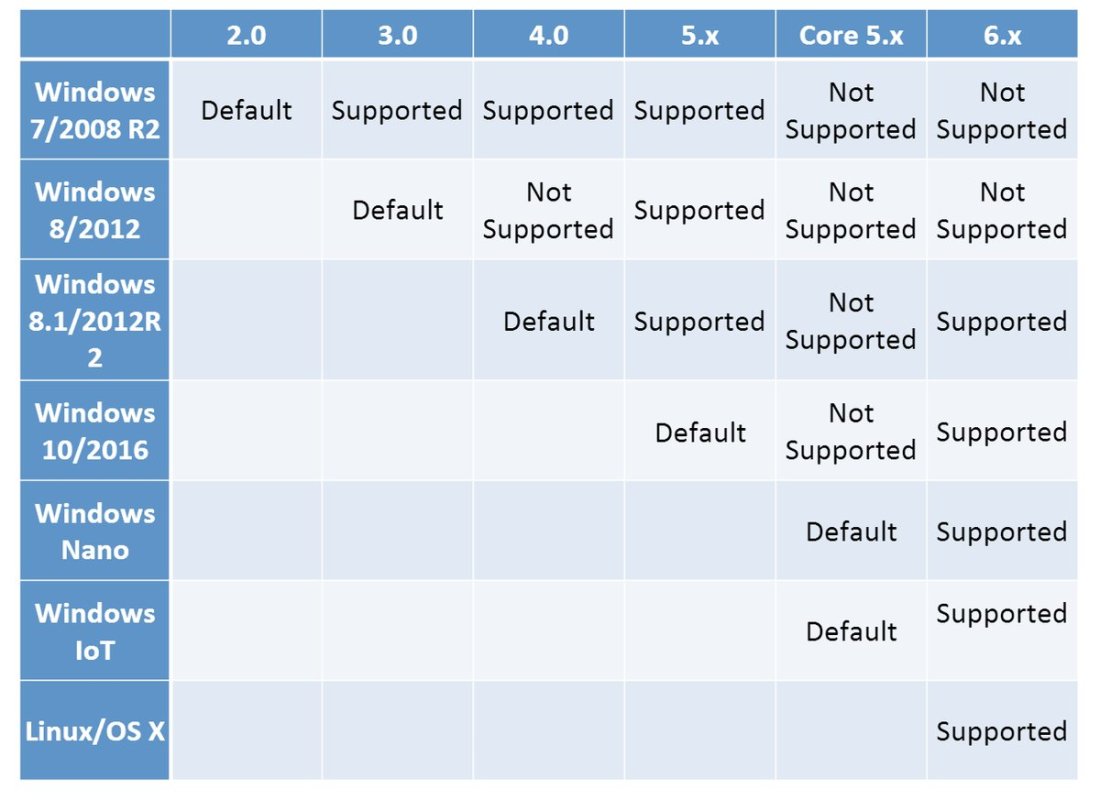
By now, probably newer versions have come out, but this should give a rough indication of the 2019 state of [WayBack] PowerShell OS Support Matrix โ€“ mohitgoyal.co:

For 5.1 and lower, you can find the prerequisites in [WayBack] Windows PowerShell System Requirements – PowerShell | Microsoft Docs.

–jeroen

Posted in .NET, CommandLine, Development, PowerShell, PowerShell, Scripting, Software Development | Leave a Comment »

Most network protocols are TCP based, so be aware ping uses ICMP and traceroute UDP

Posted by jpluimers on 2021/09/08

Interesting thread: [WayBack]ย SwiftOnSecurity sur Twitter : “I had this issue in my prev company network. QoS will drop ICMP and youโ€™ll chase your tail. If you want to find out if a network service works, test the service. If you want to know if TCP works, use TCP.โ€ฆ “

So:

  • tcpping and tcptraceroute for the win!
  • remember that some protocols, rely on ICMP or UDP, so ensure these work on your network tool (do not QoC them away!)

[WayBack] Zimmie on Twitter: “It is perhaps worth noting: traceroute does not generally use ICMP. Instead, it uses this horrific UDP port range with a different port for every probe at every hop. 30 hops? Thatโ€™s 90 different UDP ports you just tried. Makes its value questionable at the best of times.โ€ฆ”

Related:

–jeroen

Posted in *nix, *nix-tools, Communications Development, Development, Power User, TCP, UDP | Leave a Comment »

“A parameter cannot be found that matches parameter name ‘PassThru'” – likely your powershell version is too old

Posted by jpluimers on 2021/09/07

If you get [WayBack] “A parameter cannot be found that matches parameter name ‘PassThru'” as PowerShell error, then likely the PowerShell version is too old to support -PassThru, which likely means you have are running pre-Windows 10 version.

PowerShell 3 (introduced in 2012) added the -PassThru parameter that allowed to chain multiple commands from one list pipe.

Another reason for the error might be that the command you use does not support the -PassThru parameter.

To check which commandlets support -PassThru, use the below command (the output is from a Windows 8.1 machine running PowerShell 4.0).

Read the rest of this entry »

Posted in .NET, CommandLine, Development, PowerShell, PowerShell, Software Development | Leave a Comment »

checkdigits onTwitter : “CTRL+S is the new carriage return. Type line of code, CTRL+S to save, start new line of code. #NotParanoid ๐Ÿ˜ฌโ€ฆ”

Posted by jpluimers on 2021/09/07

After bumping into yet another occasion where a tool did not properly save after saving:ย [WayBack] checkdigits on Twitter : “CTRL+S is the new carriage return. Type line of code, CTRL+S to save, start new line of code. #NotParanoid ๐Ÿ˜ฌโ€ฆ”

in a response toย [WayBack] Dare Obasanjo on Twitter: “No one I know who works on software for a living trusts it to do anything important. That people assume software can be trusted for important things like voting or driving cars when I canโ€™t even trust my follower count is correct is the biggest trick weโ€™ve played as an industry.โ€ฆ “

Read the rest of this entry »

Posted in Development, Software Development | Leave a Comment »

Tricks used by software developers to https://127.0.0.1

Posted by jpluimers on 2021/09/07

Long interesting thread at [WayBack] Thread by @sleevi_: “@SwiftOnSecurity So, some history: It used to be folks would get certs for โ€œlocalhostโ€, just like they would from โ€œwebmailโ€, despite no CA e [โ€ฆ]”

Inย  2019, applications were still using tricks (including shipping private keys!) to “securely” access https://127.0.0.1 on some port.

This should have stopped in 2015, but hadn’t. I wonder how bad it still is today.

Related:

Read the rest of this entry »

Posted in Communications Development, Development, DNS, HTTP, Internet, Power User, Software Development, TCP, TLS | Leave a Comment »

For my link archive: DNS over https

Posted by jpluimers on 2021/09/02

DNS over HTTPS

For my link archive:

JSON DNS output

Some DNS over HTTSP providers support dns-json, which Cloudflare delivers non-pretty printed.

Read the rest of this entry »

Posted in Cloud, Cloudflare, Communications Development, Development, DNS, Encryption, HTTP, https, HTTPS/TLS security, Infrastructure, Internet, Internet protocol suite, Power User, Security, Software Development, TCP, TLS | Leave a Comment »

comex: “Hiding video streams inside PNGs uploaded to Google Drive … How does it get the browser to skip the PNG header”

Posted by jpluimers on 2021/09/02

Wondering what people now are using to store video uploads on cheap and fast network sites: [WayBack] comex on Twitter: “Hiding video streams inside PNGs uploaded to Google Drive: https://t.co/rmK8jicJYl (But what does the m3u8 look like? How does it get the browser to skip the PNG header?)” explained the 2019 situation:

–jeroen

Read the rest of this entry »

Posted in Development, Media, Media Streaming, Power User, Software Development, Video | Leave a Comment »

Coming Back to Old Problems: How I Finally Wrote a Sudoku Solving Algorithm – DEV Community ๐Ÿ‘ฉโ€๐Ÿ’ป๐Ÿ‘จโ€๐Ÿ’ป

Posted by jpluimers on 2021/09/02

It is always fun to see how Sudoku solving algorithms are created and implemented. This is no exception: [WayBack] Coming Back to Old Problems: How I Finally Wrote a Sudoku Solving Algorithm – DEV Community ๐Ÿ‘ฉโ€๐Ÿ’ป๐Ÿ‘จโ€๐Ÿ’ป

(backtracking image from Wikimedia commons)

For a visual Sudoku solver, I usually take [WayBack] Sudoku Solver by Andrew Stuart. Shows the logic behind solving Sudoku square by square which is part of [WayBack] SudokuWiki.org – Getting Started having many visual explanations on how to solve these puzzles, for instance:

It’s a kind of sudo ku, but visually and never failed me solve one.

–jeroen

Posted in Algorithms, Development, Python, Scripting, Software Development | Leave a Comment »