The Wiert Corner – irregular stream of stuff

Jeroen W. Pluimers on .NET, C#, Delphi, databases, and personal interests

  • My badges

  • Twitter Updates

  • My Flickr Stream

  • Pages

  • All categories

  • Enter your email address to subscribe to this blog and receive notifications of new posts by email.

    Join 1,839 other subscribers

Archive for the ‘Development’ Category

.NET/C#: Generating a WordPress posting categories page – part 1

Posted by jpluimers on 2012/07/31

From the category cloud it is hard to see that the categories are organized as a hierarchy. The combobox on the right shows that, but does not have room to properly show the hierarchy. Since WordPress.com does not allow you to deploy your own code, I worked around it in this way using a small .NET C# console program:

  1. Extract the HTML for the All Categories combobox on the right of the page.
  2. Convert that HTML to XHTML (and therefore XML)
  3. Generate XSD from that XML
  4. Generate C# class wrappers from the XSD

Future posts will show more logic on how to handle the imported information, and generate nice category overviews. Preliminary source code is at the BeSharp.net source repository.

Extract the HTML

The HTML is not fully accurate (see my post on HTML and XML escapes from last week), but it is fairly easy to extract. Most web browsers allow you to view the source of your web page. Do that, then search for “All Categories”. Now you see HTML like this:

</pre>
<h2 class="widgettitle">All categories</h2>
<pre><select class="postform" name="cat"><option value="-1">Select Category</option></select><select class="postform" name="cat"><option class="level-0" value="256">About  (66)</option></select><select class="postform" name="cat"><option class="level-1" value="64">   Personal  (60)</option></select><select class="postform" name="cat"><option class="level-2" value="20254983">      Adest Musica  (7)</option></select><select class="postform" name="cat"><option class="level-2" value="32122">      Certifications  (2)</option></select><select class="postform" name="cat">...</select><select class="postform" name="cat"><option class="level-0" value="756">Comics  (3)</option></select><select class="postform" name="cat"><option class="level-0" value="780">Development  (473)</option></select><select class="postform" name="cat"><option class="level-1" value="872460">   Database Development  (55)</option></select><select class="postform" name="cat">...</select><select class="postform" name="cat"><option class="level-0" value="9280">User Experience  (3)</option></select>

I don’t need the H2 heading line, but the rest I do need to generate XML from. I saved the HTML into a text file for processing by the console app.

Convert the HTML to XML

The HTML contains loads of &nbsp;, but XML does not allow for that entity. So the & ampersand needs to be escaped into &amp;This also solves other uses of & in the HTML. The rest of the HTML is XHTML compliant, so does not require change, which results into this C# conversion method:

        private static string toXml(string inputHtml)
        {
            string result = inputHtml.Replace("&", "&");
            return result;
        }

Generate an XSD for the XML, then amend the XSD

Given my comparison of tools for generating XSD from XML, so I used the XmlForAsp XML Schema generator, with the “Separate Complex Types” option. (Note: I will link to the XSD before/after, as WordPress – yet again – screws the XSD sourcecode in the post; this should do for now). That gives me XSD like this (XML is also at pastebin):

<?xml version="1.0" encoding="utf-8"?>
<xsd:schema attributeFormDefault="unqualified" elementFormDefault="qualified" version="1.0" xmlns:xsd="http://www.w3.org/2001/XMLSchema">
 <xsd:element name="select" type="selectType" />
 <xsd:complexType name="selectType">
  <xsd:sequence>
   <xsd:element maxOccurs="unbounded" name="option" type="optionType" />
  </xsd:sequence>
  <xsd:attribute name="name" type="xsd:string" />
  <xsd:attribute name="id" type="xsd:string" />
  <xsd:attribute name="class" type="xsd:string" />
 </xsd:complexType>
 <xsd:complexType name="optionType">
  <xsd:attribute name="value" type="xsd:int" />
 </xsd:complexType>
</xsd:schema>

Which is not complete, but gives a good start. The actual XSD it needs to be like this with a more elaborate optionType complex type that also defines it’s own content as deriving from xsd:string, and adds the class attribute (XML is also at pastebin):

<?xml version="1.0" encoding="utf-8"?>
<xsd:schema attributeFormDefault="unqualified" elementFormDefault="qualified" version="1.0" xmlns:xsd="http://www.w3.org/2001/XMLSchema">
 <xsd:element name="select" type="selectType" />
 <xsd:complexType name="selectType">
  <xsd:sequence>
   <xsd:element maxOccurs="unbounded" name="option" type="optionType" />
  </xsd:sequence>
  <xsd:attribute name="name" type="xsd:string" />
  <xsd:attribute name="id" type="xsd:string" />
  <xsd:attribute name="class" type="xsd:string" />
 </xsd:complexType>
 <xsd:complexType name="optionType">
  <xsd:simpleContent>
  <xsd:extension base="xsd:string">
   <xsd:attribute name="class" type="xsd:string" />
   <xsd:attribute name="value" type="xsd:int" />
  </xsd:extension>
 </xsd:simpleContent>
 </xsd:complexType>
</xsd:schema>

Generate C# classes from the XSD

You can generate C# wrapper classes using the XSD.exe tool that ships with Visual Studio, but XSD.exe is hard to use, is hard to integrate into Visual Studio (despite Microsoft Connect request for it), the XSD.exe generated code still needs work for deserializing, and XSD.exe has very limited generation options (heck, after it changed from .NET 1.x to 2.0, it hasn’t been updated for about a decade). XSD2Code has some great reviews, to I used that in stead. And indeed, very well integrates into Visual Studio 2010, and generates very nice C#, especially when you use the options (see also the screenshot on the right):

  • Under Serialization, set Enabled to True
  • Under Serialization, set GenerateXmlAttributes to True

That way, loading the HTML, converting it to XML, then deserializing it into object instances is as simple as this:

                string inputFileName = args[0];
                string inputHtml = getHtml(inputFileName);
                string xml = toXml(inputHtml);
                selectType select = selectType.Deserialize(xml);

More on actually working with the loaded instances in the next episode, including the great benefit of XSD2Code: it generates C# code as partial classes.

–jeroen

Posted in .NET, C#, C# 4.0, C# 5.0, Development, SocialMedia, Software Development, Usability, User Experience (ux), Web Development, WordPress, WordPress, XML, XML escapes, XML/XSD, XSD | 2 Comments »

Delphi 2007: reproduction and workaround for “[DCC Error] ….pas(26): F2084 Internal Error: AV21BCE0AC-R00000000-0”

Posted by jpluimers on 2012/07/31

Just in case you come across this error ([WayBackQC 108189):

[DCC Error] CompilerAVUnit.pas(26): F2084 Internal Error: AV21BCE0AC-R00000000-0

I had this error in a really complicated unit that I tried to backport from Delphi XE2 to Delphi 2007 (as there was some non-unicode compliant app that needed this).

I could not find it searching for F2084 Internal Error, so I sat down and trimmed it down to the CompilerAVUnit below.

The workaround is simple: remove the static; from method Outer and it compiles fine.

I will post more details on the static keyword in Delphi in a future blog post. For now I’ll keep it at this: Read the rest of this entry »

Posted in Delphi, Delphi 2007, Development, F2084, QC, Software Development | 8 Comments »

XML and HTML escapes

Posted by jpluimers on 2012/07/26

While reviewing some client’s code, I noticed they were generating and parsing XML and HTML by hand (do not ever do that yourself!).

Before refactoring this into something that uses libraries that properly understand XML and HTML, I needed to assess some of the risks.

A major risk is to get the escaping (and unescaping) of XML and HTML right.

Time to finally organize some of my links on escaping HTML and XML that I had in my favourites list.

The starting point is the List of XML and HTML character entity references on Wikipedia. It is readable, complete and lists both kinds of escapes.

XML escapes

The official W3C text that describes XML escaping is hard to read.

There are only 5 predefined XML entities for characters that can (some must) be escaped. This table is derived from the Wikipedia article.

Name Character Unicode code point
(decimal)
Standard When to escape (from the XML 1.0 standard) Description
quot U+0022 (34) XML 1.0 To allow attribute values to contain both single and double quotes double quotation mark
amp & U+0026 (38) XML 1.0 Outside  comment, a processing instruction, or a CDATA section ampersand
apos U+0027 (39) XML 1.0 To allow attribute values to contain both single and double quotes apostrophe (= apostrophe-quote)
lt < U+003C (60) XML 1.0 Outside  comment, a processing instruction, or a CDATA section less-than sign
gt > U+003E (62) XML 1.0 in content, when that string is not marking the end of a CDATA section greater-than sign

HTML escapes

Read the rest of this entry »

Posted in " quot, & amp, > gt, < lt, ' apos, ASCII, Development, Encoding, HTML, Power User, SocialMedia, Software Development, Unicode, Web Development, WordPress, XML, XML escapes, XML/XSD | 1 Comment »

.NET/Visual Studio: disable “Step over properties and operators” – one of the settings I always change for a new Visual Studio Installation

Posted by jpluimers on 2012/07/25

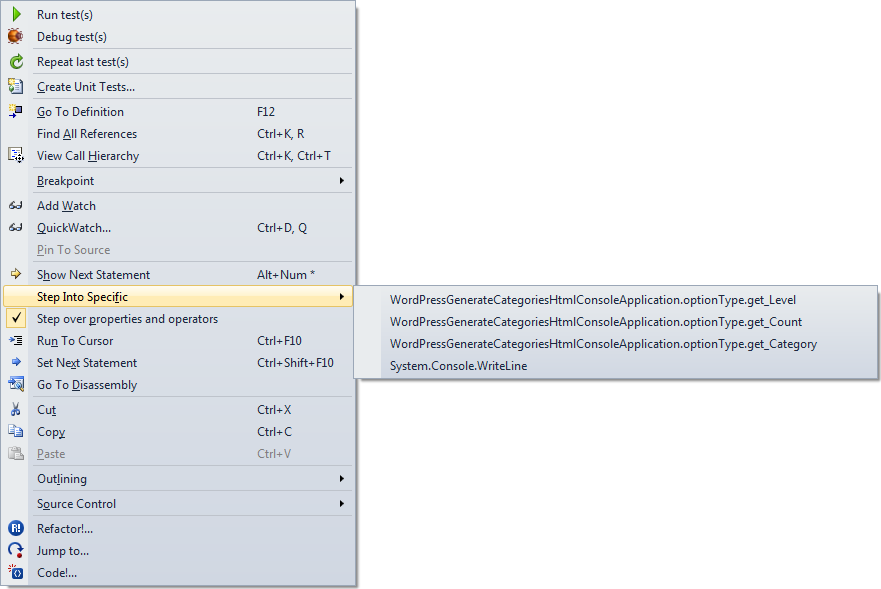
Boy I wish Visual Studio had a “Step into first property or operator” command. You can only do this through the context menu, and that is awfully cumbersome to use.

Just look at the context menu at the end of the post to see why.

Luckily, the option below it is “Step over properties and operators”, which you can easily disable. I usually have it disabled, so for me it is the way to temporarily enable it when I want to skip properties and operators.

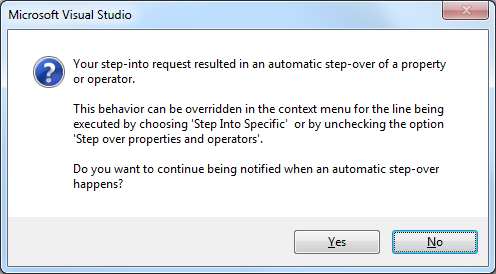
If you don’t then you get this message when tracing into properties (or operators):

[Microsoft Visual Studio]
Your step-into request resulted in an automatic step-over of a property or operator.
This behavior can be overridden in the context menu for the line being executed by choosing 'Step Into Specific' or by unchecking the option 'Step over properties and operators'.
Do you want to continue being notified when an automatic step-over happens?
[Yes] [No]

–jeroen

Posted in .NET, Development, Software Development, Visual Studio 11, Visual Studio 2005, Visual Studio 2008, Visual Studio 2010, Visual Studio and tools | Leave a Comment »

Installing Eclipse, Android SDK and ADT on Mac OS X

Posted by jpluimers on 2012/07/24

Just in case I need to get my Android contacts issue solved by brushing off some Java knowledge and going for Java using Eclipse on my MacBook Air:

All of the above was to try out this: Android-er: Create SD Card in Android Emulator and copy files into, in Eclipse, Emulator and DDMS..

Which in turn I needed for this: Current status on the “Android help needed: App that cleans up the Contacts mess that the LinkedIn app left behind” « The Wiert Corner – irregular stream of Wiert stuff « The Wiert Corner – irregular stream of Wiert stuff.

–jeroen

Posted in Android, Development, Java, Mobile Development, Software Development | 1 Comment »

Alternatives to Reflector that I tried: ILSpy (from SharpDevelop), DotPeek (from JetBrains) and JustDecompile (from Telerik) – none of them cut it

Posted by jpluimers on 2012/07/24

A long time ago, I wrote about the Reflector debacle and the URLs how it used to update. Since then Reflector 6.8.2.5 came out. No newer free versions will be released, and RedGate randomized parts of the URLs to make it harder to upgrade if you do not have version 6.5.0.135 around (if you really want you can go around that too).

So I’ve been using some alternatives for a while: ILSpy by SharpDevelop (open source), dotPeek by JetBrains and JustDecompile by Telerik (both closed source).

There are more (monoflector, Kaliro App Explorer, Dotnet IL Editor, Dis#, StackOverflow threads and various sites describing more) but I discuss the ones I used. Read the rest of this entry »

Posted in .NET, Development, Reflection, Software Development | 10 Comments »

C# code fragment of the week

Posted by jpluimers on 2012/07/24

Please don’t do your code like this:

        internal bool blnMDACResult = true;

        internal bool CheckMDACisOK(string eenMDAC, string strAdoDllPath)
        {
            FileVersionInfo AdoVersionInfo;

            try
            {
                AdoVersionInfo = FileVersionInfo.GetVersionInfo(strAdoDllPath);
                AdoDllVersion = new Version(AdoVersionInfo.ProductMajorPart, AdoVersionInfo.ProductMinorPart, AdoVersionInfo.ProductBuildPart, AdoVersionInfo.ProductPrivatePart);

                switch (eenMDAC)
                {
                    case "2.6":
                    case "2,6":
                        // MDAC 2.6 - 2.60.6526.0
                        Version MinimumVersion = new Version(2, 60, 6526, 0);
                        blnMDACResult = AdoDllVersion.CompareTo(MinimumVersion) >= 0;
                        break;

                    case "2.7":
                    case "2,7":
                        // MDAC 2.7 - 2.70.7713.0
                        Version MinimumVersion = new Version(2, 70, 7713, 0);
                        blnMDACResult = AdoDllVersion.CompareTo(MinimumVersion) >= 0;
                        break;

                    case "2.8":
                    case "2,8":
                        // MDAC 2.8 - 2.80.1022.0
                        Version MinimumVersion = new Version(2, 80, 1022, 0);
                        blnMDACResult = AdoDllVersion.CompareTo(MinimumVersion) >= 0;
                        break;

                    default:
                        // 2.9 and up
                        string numberDecimalSeparator = Thread.CurrentThread.CurrentCulture.NumberFormat.NumberDecimalSeparator;
                        double dMinVersion = ConvertAppl.ToDouble(eenMDAC.Replace(".", numberDecimalSeparator));
                        double dVersion = ConvertAppl.ToDouble(AdoDllVersion.Major + ".".Replace(".", numberDecimalSeparator) + AdoDllVersion.Minor);
                        if (dVersion > dMinVersion)
                            blnMDACResult = true;
                        else
                            blnMDACResult = false;
                        break;
                }
            }
            catch
            {
                // Something went wrong, let's assume the version is ok. (trial on error)
                blnMDACResult = true;
                return blnMDACResult;
            }

            return blnMDACResult;

        }

–jeroen

Posted in .NET, C#, C# 1.0, C# 2.0, C# 3.0, C# 4.0, C# 5.0, Development, Software Development | Leave a Comment »

Android help needed: App that cleans up the Contacts mess that the LinkedIn app left behind

Posted by jpluimers on 2012/07/23

It seems LinkedIn doesn’t react to my tweet for help, so maybe you can provide me (paid) with a custom build of Contact Remover Plus.

This is my problem: https://twitter.com/jpluimers/status/225625536976793600

The LinkedIn Android app has created dozens of LinkedIn links and photo links to many of my contacts.
This renders many functions on my phone unusable:

  • loading the native People app takes minutes
  • Contacs cannot be synced my Google account any more
  • making  a backup fails
  • I cannot edit contacts in the Android People app any more
  • calling a phone number usually takes more than 30 seconds, often more than a minute
  • etc.

I tried to count this for one particular contact with the “Contact Remover” App: His contact has so many pages of photos and LinkedIn links that I cannot count them any more. They are at least dozens, probably more than 100 of each.

I’m using an HTC Sensation phone with a regular Android 4 firmware.

With Android development, I haven’t don’t anything yet with the Contacts API yet, and don’t have the time to do so in short term.

I’m willing to pay for an App that:

  • removes all LinkedIn links for all contacts
  • removes all LinkedIn photos for all contacts

Anyone?

–jeroen

Posted in About, Android Devices, Development, LinkedIn, Personal, Power User, SocialMedia, Software Development | 6 Comments »

Great post on the differences between TFS, SVN, CVS and other source code management systems, ideas on Trunk/Tag/Branch

Posted by jpluimers on 2012/07/19

When switching between different source code management systems for doing version control at clients, it is always a bit of “getting used” to the mantra of both their system, and how it has been implemented.

Few people can really explain this well.

Richard Berg did in his great StackOverflow answer sharing his ideas on how to handle Trunk/Branch/Tag (for people starting with SVN, read this answer by David Schmitt before you mix them up).

I still see truckloads of people, and even teams try to do without version control. Please do use source control. If you don’t know where to get started, read some text on Source Control for beginners, or for instance the free on-line Red Bean books on SVN, Mercurial or CVS.

Also read some other great answers by Richard Berg (many on TFS, but also this very balanced view on usage of nullable in languages and proper use of Invoke-Expression in PowerShell: recommended reading).

–jeroen

Posted in Mercurial/Hg, Source Code Management, Subversion/SVN, TFS (Team Foundation System) | Leave a Comment »

Paros Proxy | TestingSecurity.com

Posted by jpluimers on 2012/07/18

On the research list as it seems a lot wider than HTTP Fiddler:

Paros Proxy

Paros is a valuable testing tool for your security and vulnerability testing. Paros can be used to spider/crawl your entire site, and then execute canned vulnerability scanner tests. But Paros goes beyond that, it comes with a built in utility that can proxy traffic. This Paros Proxy utility can be used to tamper or manipulate any http or https traffic on the fly. This makes some of the more interesting security types of testing. It will help you isolate potential area’s of security concern and then manual attempt to perform the type of testing you desire.

Paros Proxy

Paros also comes with a built in Session ID analyzer. It will display a graph of all the types of Session ID’s it has been presented with using a multiple threaded session initiator. You then can determine if the graph appears random enough for the Session ID. It is a pretty unique and interesting tool to use. Although typically most developers will rely upon another technology tomcat, apache, or some other application to generate Session ID’s. This is not always the case and as such a Session ID analysis should be performed. Sometimes the Session ID will not be randomized enough and the hash used to create the Session ID is easily predictable.

Paros also comes with a built in Fuzzer. You will need to generate your own Fuzzer library to use the Fuzzer, but it will perform all the fuzzing for you.

–jeroen

via: Paros Proxy | TestingSecurity.com.

Posted in Development, HTML, Java, Scripting, SOAP/WebServices, Software Development, Web Development | 2 Comments »