


From a long time ago:
- [Archive.is] Bill the Lizard on Twitter: “Why does HTML think “chucknorris” is a color?
stackoverflow.com/q/8318911/1288“ - [Wayback/Archive.is] browser – Why does HTML think “chucknorris” is a color? – Stack Overflow
–jeroen
Posted by jpluimers on 2024/12/09
From a long time ago:
stackoverflow.com/q/8318911/1288 “–jeroen

Posted in Color (software development), Development, Software Development, Web Development | Leave a Comment »
Posted by jpluimers on 2023/12/27
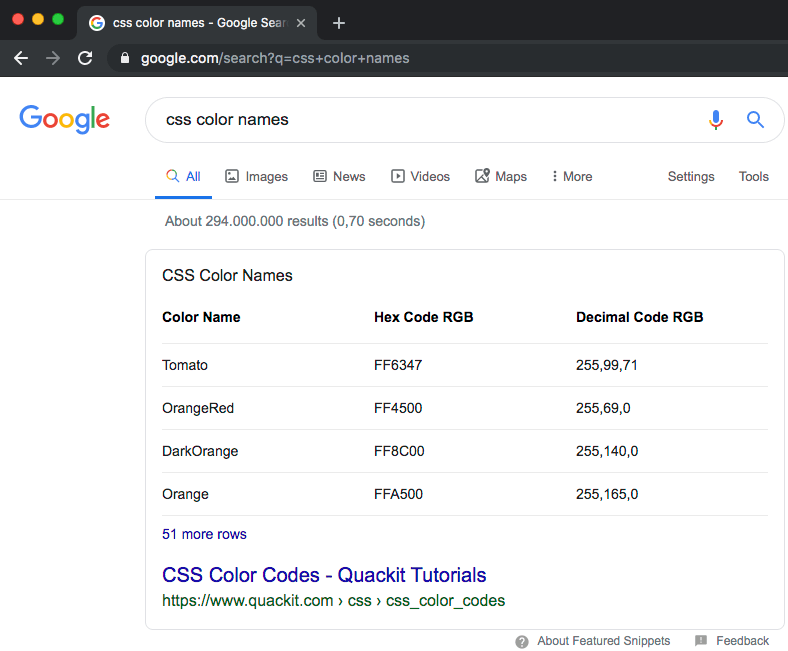
I like the featured snipped [WayBack] css color names – Google Search
It points to [WayBack] Quackit: CSS Color Codes which has the below nice table (a few duplicates could be stripped, but the ordering and layout is great!)
Since then, I also found these very interesting pages on web colors that are also useful in any software development environment:

Posted in Color (software development), CSS, Development, HTML, Software Development, Web Development | Leave a Comment »
Posted by jpluimers on 2022/05/13
A twitter post blasted me away by showing the results of Tesseract (software) – Wikipedia doing perfect OCR on an image from a twitter post:

Posted in C++, Color (software development), Development, OCR, Power User, Software Development, Tesseract | Leave a Comment »
Posted by jpluimers on 2021/12/13
The below answer works on my Linux and OS X systems (each having multiple network adapters configured):
[WayBack] bash – How to get the primary IP address of the local machine on Linux and OS X? – Stack Overflow
ip route get 1 | awk '{print $NF;exit}'
For Linux, I have this bash function:
# note the ";exit" lists the first default route interface, as there can be multiple
function nmap-fingerprint_network_of_default_interface() {
        default_if=$(ip route list | awk '/^default/ {print $5;exit}')
        default_if_cidr=$(ip -o -f inet addr show $default_if | awk '{print $4}')
        nmap -sP $default_if_cidr
}
And for OS X this one:
# requires ipcalc
function nmap-fingerprint_network_of_default_interface() {
        default_if=$(route -q -n get default | awk '/interface:/ {print $2;exit}')
        default_if_address=$(ifconfig $default_if | awk '/inet / {print $2;exit}')
        default_if_netmask_hex=$(ifconfig $default_if | awk '/inet / {print $4;exit}')
        default_if_network_bit_count=$(ipcalc --nocolor --class $default_if_address $default_if_netmask_hex)
        default_if_cidr=$(echo "$default_if_address/$default_if_network_bit_count")
        nmap -sP $default_if_cidr
}
These are the variables used:
default_if: network interface of the default routedefault_if_cidr: IPv4 CIDR of the network interface of the default route (see Classless Inter-Domain Routing: CIDR notation – Wikipedia)default_if_address: IPv4 address of network interface of the default routedefault_if_netmask_hex: hexadecimal IPv4 network mask of network interface of the default routedefault_if_network_bit_count: number of set bits in the IPv4 network mask of the network interface of the default routeLinks used to get the above functions:
-q does not provide output, but I found out that in practice -q -n and -n are equivalent in output.A modern IPv4/IPv6 ipcalc tool, assisting in network calculations in command line and as a tool for scripts.
Nmap supports CIDR-style addressing. You can append
/to an IP address or hostname and Nmap will scan every IP address for which the first<numbits><numbits>are the same as for the reference IP or hostname given.For example,
192.168.10.0/24would scan the 256 hosts between 192.168.10.0 (binary:11000000 10101000 00001010 00000000) and 192.168.10.255 (binary:11000000 10101000 00001010 11111111), inclusive.192.168.10.40/24would scan exactly the same targets.
I might have gotten away with a pure bash solution (see [WayBack] Bash script for calculating network and broadcast addresses from ip and netmask or CIDR Notation · GitHub or my post Getting your local IPv4 addresses, netmasks and CIDRs), but the above works and is way shorter, and easier to maintain.
In stead of ipcalc, subnetcalc can do the same calculations and also supports IPv6, so that is something for a future try:
–jeroen
Posted in *nix, *nix-tools, Apple, bash, Color (software development), Development, Mac, Mac OS X / OS X / MacOS, Power User, Scripting, Software Development | Leave a Comment »
Posted by jpluimers on 2021/12/02
Github officially does not support coloured text, but with a small trick, you can get a few colours by including a diff file in the markdown.
I did it when I had to put on hold open source projects due to rectum cancer recovery, for instance [Wayback] this fritzcap diff added the [Wayback] text:
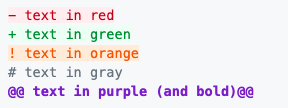
which [Wayback] rendered becomes a kind of red bulleted list:
I learned this trick via [Wayback] How to add color to Github’s README.md file – Stack Overflow (thanks to [Wayback] revisions by [Wayback] craigmichaelmartin, [Wayback] Noam Manos and [Wayback] GalaxyCat105):
You can use the
difflanguage tag to generate some colored text:```diff - text in red + text in green ! text in orange # text in gray @@ text in purple (and bold)@@ ```However, it adds it as a new line starting with either
- + ! #or starts and ends with@@
This issue was raised in [Wayback] github markup #369, but they haven’t made any change in decision since then (2014).
By now there is a new issue, again with little progress: [Wayback] Color text in markdown · Issue #1440 · github/markup
–jeroen

Posted in Color (software development), Development, Lightweight markup language, MarkDown, Software Development | Leave a Comment »
Posted by jpluimers on 2021/08/12
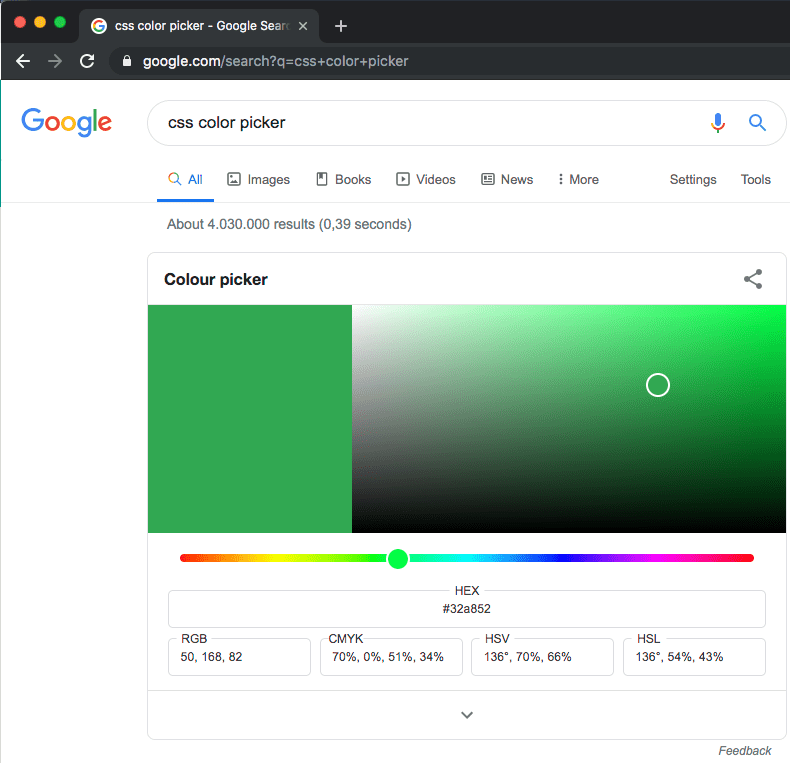
Probably old, but there is an embedded [WayBack] css color picker – Google Search that on each refresh switches colours:
–jeroen

Posted in Color (software development), CSS, Development, Google, GoogleSearch, HTML, Power User, Software Development, Web Development | Leave a Comment »
Posted by jpluimers on 2021/06/08
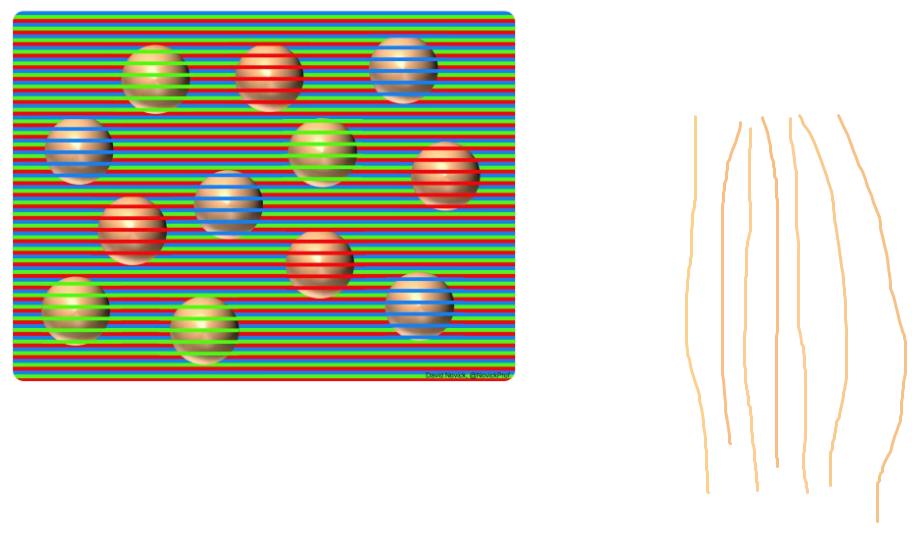
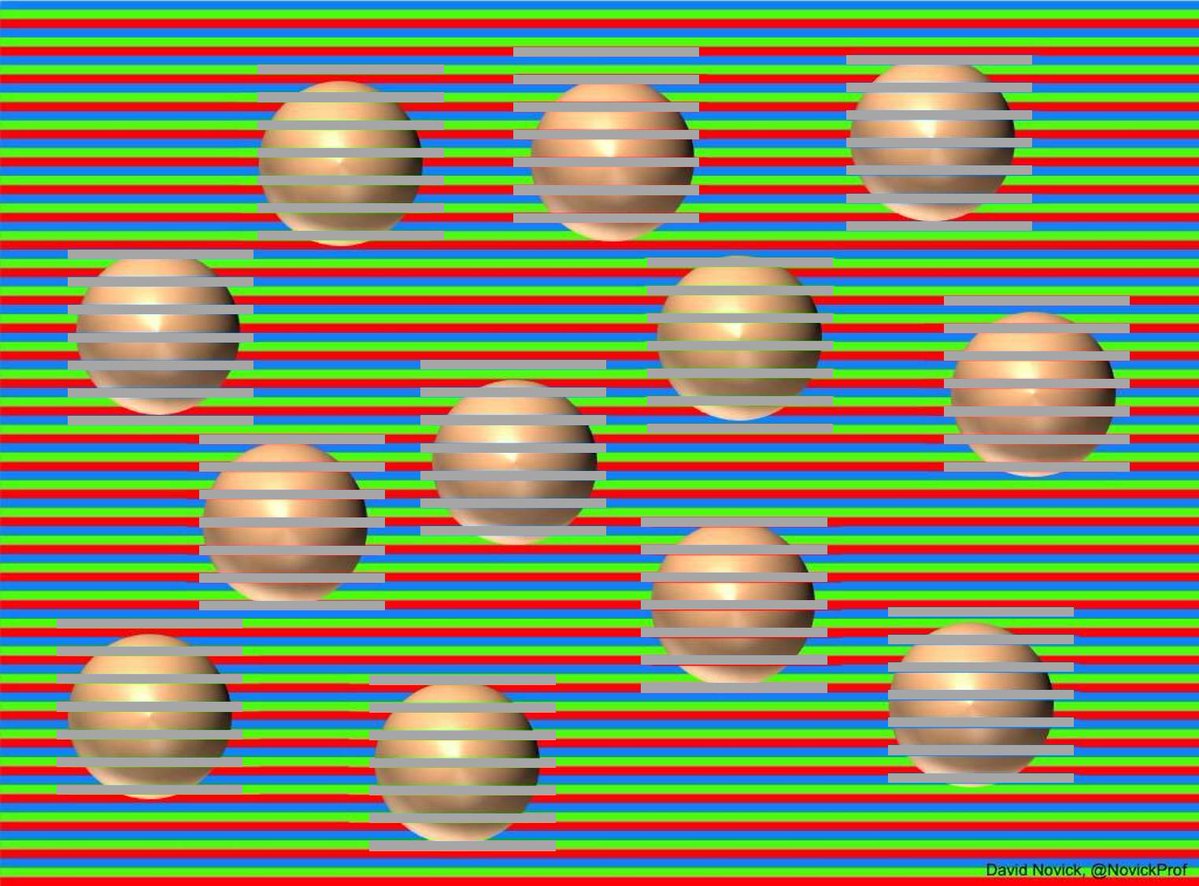
With User Experience, perception plays a big role. It helps to understand how colors work: a difficult topic with amazing results like: “All the balls are the same color — and that color is brown!”
All pictures below are from the [WayBack] Chaz Firestone on Twitter: “All the balls are the same color — and that color is brown!… “ thread.
Original by [WayBack] David Novick (@NovickProf) | Twitter: Professor of Engineering Education and Leadership, the University of Texas at El Paso. Tweets cover innovation & entrepreneurship, improv, and color illusions. El Paso, TX.
[Archive.is] David Novick on Twitter: “A three-color confetti illusion with spheres, which appear to be yellowish, reddish, and purpleish but in fact have exactly the same light-brown base color (RGB 255,188,144). Shrinking the image increases the effect. Original png file is at .… “
A PNG of the original is at engineering.utep.edu/novick/colors and his dropbox, and is even more stunning than the Twitter dithered versions below.
Colors from the color picker tool by [WayBack] #therightwaye (@therightwaye) | Twitter:
Grey backgrounds by [WayBack] Joffan (@Joffan7) | Twitter:
The cool thing is that this is being used in product packaging to make the fruits and vegetables look more orange.
Carrots by [WayBack] Hanon Ondricek on Twitter: “Oh right! And baby carrot bags have orange stripes… #itrustnothingnow… “:
Oranges and grapefruits by [WayBack] Alexei Kojenov (@kojenov) | Twitter:
–jeroen

Posted in Color (software development), Development, Software Development, User Experience (ux) | Leave a Comment »
Posted by jpluimers on 2020/08/06
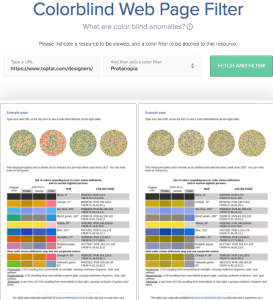
Colorblind Web Page Filter
A great tool I found out about a while ago [Archive.is] Toptal Color Blind Filter.
It shows the original web page and the rendering for various types of color blindness:
protan -> Protanopia: red/green color blindness; anomalous red conesdeutan -> Deutanopia: red/green color blindness; anomalous green conestritan -> Tritanopia: blue/yellow color blindness; anomalous blue conesgrey -> Greyscale/achromatopsia: quick check for all forms of colorblindnessBecause of a comment at [WayBack] Forums… https://embarcaderomonitoring.wiert.me/ – JWP – Google+, I used Toptal to notify Uptime robot that their status pages are hard for color blind people: [WayBack] Jeroen Pluimers on Twitter: “Some color blind people indicated to me that @uptimerobot status pages are hard for them to read. Examples are for @EmbarcaderoTech as they have subdomains being offline often: …”, so lets look at how people with various types of color blindness see embarcaderomonitoring.wiert.me :

Posted in *nix, Color (science), Color (software development), Development, Monitoring, Power User, science, Software Development, Uptimerobot, Usability, User Experience (ux), Web Development | Leave a Comment »
Posted by jpluimers on 2020/04/14
Really cool not too long read: [WayBack] I am in love with colors and design – UX Planet:
How to improve human experience through color
[WayBack] “I’m in love with color” – No Google designer currently working at the company ever. Interesting read, btw. Some great examples, too. – Roderick Gadellaa – Google+
–jeroen
Posted in Color (software development), Development, Software Development, Usability, User Experience (ux) | Leave a Comment »
Posted by jpluimers on 2020/01/16
[WayBack] visual studio code – Does the “editorWhitespace.foreground” workbench.colorCustomizations setting in VSCode actually work? – Stack Overflow
Yes, it does. But after reading [WayBack] vscode-docs/theme-color-reference.md at master · Microsoft/vscode-docs · GitHub: Editor Colors or [WayBack] Visual Studio Code Theme Color Reference you might want to put it in the config straight like this:
see the editor white spaces, enable Toggle Render Whitespace.
editorWhitespace.foreground: Color of whitespace characters in the editor.
However, you need to embed it like this:
"workbench.colorCustomizations": {
    "editorWhitespace.foreground": "#333",
    "editorIndentGuide.background": "#333"
  }
The embedding makes it work.
References:
–jeroen
Posted in .NET, Color (software development), Development, Software Development, Visual Studio and tools, vscode Visual Studio Code | Leave a Comment »





 The Wiert Corner - irregular stream of stuff