Archive for the ‘Lightweight markup language’ Category
Posted by jpluimers on 2023/03/08
This revealed so much pain: [Wayback] gist include image in markdown in current directory – Google Search
I wished that – like in the past – it would work just like in a normal github hosted git repository: [Wayback/Archive] How do I display local image in markdown? – Stack Overflow.
The core problem is that though a gist underneath is a git repository, it is rendered in a way that is different than a github repository is rendered, and that way of rendering has changed over the years effectively making it difficult to embed a picture. When you do embed an image requires the uuid/guid of the raw image URL to be included in the markdown, unlike with a regular repository hosted on github.
That is so much pain that I decided to not host documentation in gists any more.
A bit of the pain:
This is an example gist where I tried to host an image: [Wayback/Archive] Windows 7 with PowerShell v2 fails to upgrade to PowerShell v3 through chocolatey: You must provide a value expression on the right-hand side of the '-' operator.
That gist was prelude to my post Chocolatey on Windows 7: “You must provide a value expression on the right-hand side of the ‘-‘ operator.”.
–jeroen
Posted in Development, DVCS - Distributed Version Control, gist, git, GitHub, Lightweight markup language, MarkDown, Software Development, Source Code Management | Leave a Comment »
Posted by jpluimers on 2023/01/23
TL;DR:
- Create a GitHub repository with the same name as your profile name
- Add a
README.md with Markdown describing your profile
- In the
README.md, add begin/end HTML comment markers <!-- and --> for various types of dynamic content
- In the Actions of this repository, add Workflows for each of the set comment markers that use them to refresh that part of the content using GitHub Actions learning some continuous integration/continuousc deployment (CI/CD) on the fly.
You can spice this up with all kinds of badges to make it look pretty.
HTML Comments in Markdown?
Yes, it is indeed odd to have HTML comments in Markdown where you could just as easy use Markdown comments, but hey: I didn’t define the way this works.
A Markdown comment looks like this:
(empty line)
[comment]: # (This actually is the most platform independent comment)
For explanation on why/how this works, see the below two great StackOverflow answers in this order:
- [Wayback/Archive] syntax – Comments in Markdown: concise example – Stack Overflow by [Wayback/Archive] Magnus.
- [Wayback/Archive] syntax – Comments in Markdown: explainer – Stack Overflow by [Wayback/Archive] User Nick Volynkin – Stack Overflow
Howto
The below two videos (also embedded below the signature) show how to do this. Thanks [Archive] Jesse Hall 🦸♂️ #vsCodeHero (@codeSTACKr) | Twitter for creating them!
- [Wayback/Archive] Next Level GitHub Profile README (NEW) | How To Create An Amazing Profile ReadMe With GitHub Actions – YouTube
- [Wayback/Archive] UPDATE: Next Level GitHub Profile README (NEW) | GitHub Actions | Vercel | Spotify – YouTube
The description of the videos contain all sorts of links to sites and underlying repositories for:
- icons
- shields
- badges
- youtube/blog/RSS and other feed actions
- profile examples
You can see the effects at [Wayback/Archive] codeSTACKr/codeSTACKr in the [Wayback/Archive] raw README.md sources.
Enough to get you some experimentation (:
Watch your commits
One of the drawbacks of mixing manual and automated changes to a repository, is that the automated changes can cause a lot of commits.
This is OK as long as the automated changes add value to the changed content.
In this regard, having stable RSS feeds is important, and YouTube is kind of bad at this when you look at [Wayback/Archive] History for README.md – codeSTACKr/codeSTACKr: videos changing order or popping in/out of the last 5 is kind of annoying.
–jeroen
Read the rest of this entry »
Posted in Development, DVCS - Distributed Version Control, git, GitHub, GitHub Actions, Lightweight markup language, MarkDown, Power User, Source Code Management | Leave a Comment »
Posted by jpluimers on 2022/11/12

This is fine #Twitter (illustration inspired by KC Green; creation video below)
(Edit 20221114: script for high-res images; more tweets from Jan) (Edit 20221116: hat-tip to Sam) (Edit 20221120: archiving t.co links by Michele Weigle) (Edit 20221122: added article by Johan van der Knijff) (20221128 Tapue export tool by Mike Hucka)
Time to be prepared:
The below will help you exporting your Twitter content (Tweets, DMs, media), perform some conversions on them and optionally delete (parts of) your content.
Important: keep your Twitter account afterwards (to prevent someone from creating a new account with the same handle).
Read the rest of this entry »
Posted in *nix, *nix-tools, Awk, Development, Lightweight markup language, MarkDown, Mastodon, Power User, SocialMedia, Software Development, Twitter | Leave a Comment »
Posted by jpluimers on 2022/10/04
On my list of Visual Studio Code extensions to try (after I change the shortcuts, as direct Alt shortcuts are not a good idea, luckily those are configurable)
[Wayback/Archive.is] HTML / XML / RSS link checker – Visual Studio Marketplace (partly paraphrased):
VSCode extension that checks for broken links in an HTML, XML, RSS, PHP, or Markdown file.
…
Checks currently open file:
- for broken links in anchor-href, link-href, img-src, and script-src tags in currently-open HTML or PHP file
- both clearnet and onion (Tor) links
- for badly-formatted mailto links, and duplicate local anchors (anchor-name, anchor-id)
- for working HTTPS equivalents of HTTP links
Optionally checks for invalid characters and common mistakes (missing tag content, empty attribute value, more).
Also checks for errors in a small subset of semantic HTML tags (in HTML and PHP files): checks that each page has header, main, footer; checks that each heading is inside a section, article, or aside; checks that each section/article/aside has exactly one heading in it; checks that heading values are nested properly.
…
To see/change settings for this extension, open Settings (Ctrl+,) / Extensions / “HTML / XML / RSS link checker”.
To change the key-combinations for this extension, open File / Preferences / Keyboard Shortcuts and search for Alt+H or Alt+T or Alt+M or Alt+L.
–jeroen
Posted in .NET, Development, HTML, Lightweight markup language, MarkDown, Power User, RSS, Software Development, vscode Visual Studio Code, Web Development, XML, XML/XSD | Leave a Comment »
Posted by jpluimers on 2022/03/08
The [Wayback/Archive] Embarcadero/IDERA Documentation Wiki has been mostly down since March 3rd, 2022 (not the main page, but almost all other pages are).
I modified [Wayback/Archive] Docwiki https – EmbarcaderoMonitoring to show the actual status of a deeper page as the (mostly static) top page is up, so monitoring that is useless as the deeper pages are down.
The deeper pages are dynamic and require a functioning MySQL database connection. That connection is mostly down (the error message is not clear, so this could be a network or a database server problem, or maybe even a loadbalancer gradually entering bit heaven).
Since it had been down for like 6 days in February*, I’d expect Idera to keep an eye on it and prepare for more downtime. Apparently that’s either not a 24×7 thing for them or they missed the “pre” in preparation as it is dead-silent on .
It also runs on an unsupported version of Mediawiki 1.31** which by itself does not explain the outage, but does indicate that their idea of handling their internal lifetime management is different than what they advocate to clients in their software subscription model, see [Wayback/Archive] Delphi – Embarcadero store, [Wayback/Archive] Update Subscription – Embarcadero and [Wayback/Archive] Special Offers on RAD Studio, Delphi & C++Builder – Embarcadero:
Read the rest of this entry »
Posted in *nix, Bookmarklet, Delphi, Development, JavaScript/ECMAScript, Lightweight markup language, MediaWiki, Monitoring, Power User, Scripting, SocialMedia, Software Development, Twitter, Uptimerobot, Web Browsers | Leave a Comment »
Posted by jpluimers on 2021/12/02
Github officially does not support coloured text, but with a small trick, you can get a few colours by including a diff file in the markdown.
I did it when I had to put on hold open source projects due to rectum cancer recovery, for instance [Wayback] this fritzcap diff added the [Wayback] text:

which [Wayback] rendered becomes a kind of red bulleted list:

I learned this trick via [Wayback] How to add color to Github’s README.md file – Stack Overflow (thanks to [Wayback] revisions by [Wayback] craigmichaelmartin, [Wayback] Noam Manos and [Wayback] GalaxyCat105):
You can use the diff language tag to generate some colored text:
```diff
- text in red
+ text in green
! text in orange
# text in gray
@@ text in purple (and bold)@@
```
However, it adds it as a new line starting with either - + ! # or starts and ends with @@
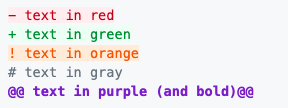
This issue was raised in [Wayback] github markup #369, but they haven’t made any change in decision since then (2014).
By now there is a new issue, again with little progress: [Wayback] Color text in markdown · Issue #1440 · github/markup
–jeroen
Posted in Color (software development), Development, Lightweight markup language, MarkDown, Software Development | Leave a Comment »
Posted by jpluimers on 2021/06/14
Details at [WayBack] Keyboard Shortcuts, Markdown, and Autocomplete – Atlassian Documentation; summary:
To view all Confluence keyboard shortcuts, do any of the following:
- Choose the help icon
 from the universal sidebar, then choose Keyboard Shortcuts.
- When viewing a page, press shift+?
- While editing a page, choose the question mark icon from the editor toolbar.
a list of some of the most common shortcuts:
…
Markdown
Use markdown shortcuts to format text from the comfort of your keyboard.
…
Use autocomplete for links
- Either:
- Type [ and then the first few characters of the page title, user’s name, image name or file name.
- Type the first few characters of the page title, user’s name, image name, or file name (or select relevant text) and then press ctrl+shift+k.
- Click the relevant link from the list of suggestions.
If the item you need is not in the list, either choose Search for ‘xxx’ to continue looking for the page within Confluence, or Insert Web Link to link to an external page.
…
When a Windows shortcut has Ctrl in it, the MacOS shortcut uses Command.
–jeroen
Posted in Development, Keyboards and Keyboard Shortcuts, Lightweight markup language, MarkDown, Power User, Software Development | Leave a Comment »
Posted by jpluimers on 2021/02/25
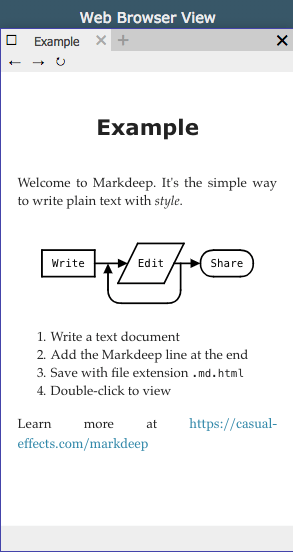 For my link archive: Markdeep
Via:
Related:
–jeroen
Posted in Development, Lightweight markup language, MarkDown, Software Development | Leave a Comment »
Posted by jpluimers on 2020/06/12
It looks like few of the markdown parsers can generate a table without a header: [WayBack] Create table without header in markdown – Stack Overflow.
This comes close in some generators as they generate a half-height empty header for it:
| | | |
|-|-|-|
| Normal Key| Value1 |
|__BoldKey__| Value2 |
But [WayBack] reStructuredText Markup Specification: Grid Tables do support it even if a pipe cell delimiter is inside a cell content:
+--------------+----------+-----------+-----------+
| row 1, col 1 | column 2 | column 3  | column 4  |
+--------------+----------+-----------+-----------+
| row 2        | Use the command ``ls | more``.   |
|              |                                  |
+--------------+----------+-----------+-----------+
| row 3        |          |           |           |
+--------------+----------+-----------+-----------+
–jeroen
Posted in Development, Lightweight markup language, MarkDown, reStructuredText, Software Development | Leave a Comment »
Posted by jpluimers on 2020/04/23
I love Visual Studio Code, but my initial tries to get [WayBack] GitHub – vscode-restructuredtext/vscode-restructuredtext: reStructuredText Language Support in Visual Studio Code to work partially failed: editing works, but I got a non-descriptive error during preview.
All prerequisites are installed, so I needed to pause that for a while.
I still want it, as out of the box, [WayBack] Markdown editing with Visual Studio Code: Markdown Preview works fine, but for complicated documents I tend to use reStructuredText.
Initial steps were simple, as per [WayBack] reStructuredText – Visual Studio Marketplace and editing is awesome (thanks to [WayBack] GitHub – lextm/restructuredtext-antlr: ANTLR Grammar for reStructuredText).
–jeroen
Read the rest of this entry »
Posted in .NET, Development, Lightweight markup language, reStructuredText, Software Development, Visual Studio and tools, vscode Visual Studio Code | Leave a Comment »


 The Wiert Corner - irregular stream of stuff