Archive for the ‘EF Entity Framework’ Category
Posted by jpluimers on 2018/11/27
Since I am going to be involved with building some REST API servers and clients in .NET, here are some links to get me up to speed.
Posted in .NET, .NET ORM, ASP.NET, C#, Development, EF Entity Framework, NHibernate, Software Development | Leave a Comment »
Posted by jpluimers on 2012/08/15
A few weeks ago, Bill Karwin did a must watch webinar on the prevention SQL Injection titled “SQL Injection Myths and Fallacies“.
Bill Karwin (twitter, new blog, old blog, Amazon) is famous for much work in the SQL database community, including InterBase/Firebird, mySQL, Oracle and many more.
He also:
Anyway, his webinar is awesome. Be sure to get the slides, watch the replay, and read the questions follow up.
Watching it you’ll get a better understanding of defending against SQL injection.
A few very valuable points he made: Read the rest of this entry »
Posted in .NET, .NET 3.5, .NET 4.5, .NET ORM, ASP.NET, Batch-Files, C#, C# 1.0, C# 2.0, C# 3.0, C# 4.0, C# 5.0, C++, Cloud Development, COBOL, CommandLine, Database Development, Delphi, Delphi for PHP, Delphi x64, Delphi XE2, Development, EF Entity Framework, F#, Firebird, FireMonkey, History, InterBase, iSeries, Java, JavaScript/ECMAScript, Jet OLE DB, LINQ, LLBLGen, MEF, Microsoft Surface, Mobile Development, PHP, PowerShell, Prism, Scripting, SharePoint, SilverLight, Software Development, SQL, SQL Server, SQL Server 2000, SQL Server 2005, SQL Server 2008, SQL Server 2008 R2, SQL Server 2012, SQL Server 7, VB.NET, VBS, Visual Studio 11, Visual Studio 2002, Visual Studio 2003, Visual Studio 2005, Visual Studio 2008, Visual Studio 2010, Visual Studio and tools, Web Development, Windows Azure, WinForms, WPF, XAML, xCode/Mac/iPad/iPhone/iOS/cocoa | 1 Comment »
Posted by jpluimers on 2012/05/23
Yes. Dorothy. There are people using the ADO .NET Entity Framework with SQL Server 2000 in parallel of moving towards a more modern Microsoft SQL Server version.
Entity Framework is lovely for developing data-centric applications.
By default, Visual Studio 2010 will target SQL Server 2008 as a database. That is fine, but it is kind of invisible it does: there is no property or dialog where you can change this.
What you have to change in order to have the Entity Framework send SQL Server 2000 compatible queries is to:
- Right click your .edmx file
- Choose “Open with”
- Choose the “XML (text) editor”
- Find the ProviderManifestToken attribute
- Change the value (usually from “2008”) into “2000”
- Save the .edmx file
- Build and run your application
A few caveats:
Read the rest of this entry »
Posted in .NET, .NET ORM, C#, C# 2.0, C# 3.0, C# 4.0, Development, EF Entity Framework, Software Development, SQL Server, SQL Server 2000, SQL Server 2005, SQL Server 2008, SQL Server 2008 R2, SQL Server 2012 | Leave a Comment »
Posted by jpluimers on 2011/09/13
Almost a year ago there was a post on the MSDN forums titled EF4 – update model from database ignores some changes.
These are the changes it ignores that I found so far:
- Column renames
- Column data type changes
- Changed foreign key relations
Have you found others?
Which EF versions are worse/better in this respect?
Note that the EF support in Visual Studio 2010 does not warn you if the the model is incompatible with your database.
You will get errors like this at run-time:
Read the rest of this entry »
Posted in .NET, .NET ORM, Database Development, Development, EF Entity Framework, Software Development | 2 Comments »
Posted by jpluimers on 2011/09/06
The drawback of using ORM layers is that often the error messages are very cryptic, and it takes some getting used to in order to find the (often deceptively) simple solution.
This case was an Entity Framework wrapper around a SQL Server database where the primary and foreign keys were all GUIDs, and some of the foreign keys were optional.
So the generated model has a mixed use of Guid? and Guid data types.
Below is the full stack trace, but here is the exception class and message:
System.NotSupportedException: Unable to create a constant value of type ‘System.Object’. Only primitive types (‘such as Int32, String, and Guid’) are supported in this context.
The exception is caused by a piece of code like this:
        public static long CountChildren(ParentEntity parentEntity)
        {
            using (EntitiesObjectContext objectContext = new EntitiesObjectContext())
            {
                Guid? parentId = parentEntity.ID;

                if (null == parentId)
                    throw new ArgumentNullException("parentEntity.Id");

                IQueryable<ChildEntity> ChildEntitys =
                    from content in objectContext.ChildEntity
                    where content.ParentID.Equals(parentId)
                    select content;

                long result = ChildEntitys.Count(); // BOOM!

                return result;
            }
        }
The stack trace at the end of this post contains a truckload of ExpressionConverter lines. Since the LINQ expression contained only one WHERE clause, the mentioning of the list of primitive types in the message (Int32, String, and Guid) made me change the code into the one below.
Read the rest of this entry »
Posted in .NET, .NET ORM, C#, Development, EF Entity Framework, Software Development | 5 Comments »
Posted by jpluimers on 2011/05/25
I love the Entity Framework, but as with every layer of abstraction, sometimes you need to get underneath in order to solve problems.
For EF questions, I usually browse the presentations, blog, articles or Entity Framework book from Julie Lerman.
I met her first at an SDC conference years ago: she has a great way of explaining new concepts in an easy to grasp way, not being afraid to do a deep dive into technology when needed.
Her article MSDN Magazine: Data Points – Profiling Database Activity in the Entity Framework is a great way to start digging for the actual SQL being executed by EF on your behalf.
It has a balanced list of ways to get that SQL, and describes the pros and cons for each means.
The comments point you to some more ways.
Recommended reading!
–jeroen
Posted in .NET, Development, EF Entity Framework, Software Development | Leave a Comment »
Posted by jpluimers on 2011/05/05
The Entity Framework needs you to have a connection string in your App.Config.
It is good practice having your Entity Framework model in a separate assembly.
When using it in your main app, be aware that the connection string that belongs to your model needs to be in the App.config of your main app.
If not, you get an exception like this:
System.ArgumentException was unhandled

Message=The specified named connection is either not found in the configuration, not intended to be used with the EntityClient provider, or not valid.

Source=System.Data.Entity

StackTrace:

at System.Data.EntityClient.EntityConnection.ChangeConnectionString(String newConnectionString)

at System.Data.EntityClient.EntityConnection..ctor(String connectionString)

at System.Data.Objects.ObjectContext.CreateEntityConnection(String connectionString)

at System.Data.Objects.ObjectContext..ctor(String connectionString, String defaultContainerName)
The clue is the contents of the defaultContainerName parameter: you will see that in the App.config of your Entity Framework assembly.
Copy that over to the App.config of your main assembly, then make sure it points to your right database (if you use OTAP), then go :-)
Your App.config then looks like this:
<?xml version="1.0" encoding="utf-8"?>
<configuration>
<connectionStrings>
<add name="MyEntities" connectionString="metadata=res://*/My_EntityModel.csdl|res://*/My_EntityModel.ssdl|res://*/My_EntityModel.msl;provider=System.Data.SqlClient;provider connection string="data source=my-sql-server;initial catalog=my-database;persist security info=True;user id=my-user;password=my-password;multipleactiveresultsets=True;App=EntityFramework"" providerName="System.Data.EntityClient" />
</connectionStrings>
</configuration>
–jeroen
Posted in .NET, C#, Database Development, Development, EF Entity Framework, Software Development, SQL Server | Leave a Comment »
Posted by jpluimers on 2011/04/13
When using Entity Framework 4, your transofmrations (model to classes, DB to model, etc) are performed by T4 Text Templates.
Those templates are executed all over the place (when saving your project, building your project, changing your model, etc).
Since anyone can insert a T4 Text Template into Visual Studio, and those are scripts, it is a potential vulnerability.
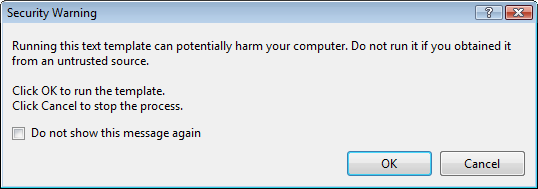
The default Visual Studio behaviour is to show you a dialog like this:

[Security Warning]

Running this text template can potentially harm your computer. Do not run it if you
obtain if rtom an untrusted source.

Click OK. to run the template.
Click Cancel top stop the process.

[X] Do not show this message again

[OK]  [Cancel]
Some blogs mention Just click OK and feel free to check “do not show this message again.”
I’m not sure I want that: it would indicate I always trust T4 Text Templates, even the ones added in the future (T4 Text Templates are executable content, malicious software could find it’s way into your development environment; anyone remember the virus that hooked itself into the run-time library sources of a development system so it would spread through anything compiled on that system?).
But I also don’t want to click OK on that dialog.
It would be so nice if the dialog:
- Showed which template is about to be executed
- Allowed me to skip only for that particular template
Anyone better thoughts on this?
–jeroen
via Customizing EDM Code Gen in EF4 : Don’t Be Iffy.
Posted in .NET, C#, Delphi, Development, EF Entity Framework, Prism, Software Development | 4 Comments »
Posted by jpluimers on 2011/04/05
Entity Framework 4 is nice, but has very confusing error messages.
Maybe it is just me, but getting a feel for what each error message means, and how to cure the underlying mistake(s) is time consuming.
For instance, it took me quite a while to find out why this error occurred during a project build:
Error 3004: Problem in mapping fragments starting at line 569: No mapping specified for properties MyEntity.MyValue in Set MyEntities. An Entity with Key (PK) will not round-trip when: Entity is type [MyEntities.MyEntity]
The solution was simple, I had forgotten to manually perform the “Generate Database from Model…” step before building my solution and was glad I found it in this Stack Overflow answer:
Have since discovered that after I add/change/delete properties on my entities I must “Generate Database from Model” before I compile otherwise I get 3004 mapping errors.
Note that this generation is always a manual step; I haven’t found a way to automate that (if you have found a way: please add a comment below).
–jeroen
via: .net – Entity Framework 4 mapping fragment error when adding new entity scalar – Stack Overflow.
Posted in .NET, Development, EF Entity Framework, Software Development | 5 Comments »



 The Wiert Corner - irregular stream of stuff