The Wiert Corner – irregular stream of stuff

Jeroen W. Pluimers on .NET, C#, Delphi, databases, and personal interests

  • My badges

  • Twitter Updates

  • My Flickr Stream

  • Pages

  • All categories

  • Enter your email address to subscribe to this blog and receive notifications of new posts by email.

    Join 1,839 other subscribers

Archive for the ‘.NET’ Category

Anyone having a solution for “Microsoft Visual Studio” throwing “The operation could not be completed” when including a file in a PowerShell project?

Posted by jpluimers on 2017/06/22

The operation could not be completed.

The operation could not be completed.

Include In Project

Include In Project

I’ve got a bunch of PowerShell projects in a solution. In some of them, I can include new files, in others I get the below error.

The diff of a good/bad project is below as well.

Two questions:

  1. Does anybody know how to work around this?
  2. Does anybody know how to find the actual error for this?

---------------------------
Microsoft Visual Studio
---------------------------
The operation could not be completed
---------------------------
OK
---------------------------

Good file: WindowsLogsCbsInquiry.pssproj

Bad file: WindowsTempInquiry.pssproj

–jeroen

Read the rest of this entry »

Posted in CommandLine, Development, PowerShell, Software Development, Visual Studio 2015, Visual Studio and tools | Leave a Comment »

Keep consistent formatting – via: The Oracle at Delphi: Code is the language, formatting is the dialect.

Posted by jpluimers on 2017/06/13

When this developer finally went to commit his/her changes, they had also reformatted most of the codebase into his/her preferred coding style/format. This was even for files for which no other changes had been made!Imagine the next developer coming along and pulling down the latest changes from the source control system and trying to merge them into their own local changes.

Because of all these code-format-only changes, it became nearly impossible to merge any changes without going through every conflicted file and painstakingly reconcile the changes.

I’ve seen this happen on a few projects where there have been sequential single developers some of which reformatted the whole code base within a few days of taking over.

It made it impossible to perform a “blame” or proper history tracking of feature changes.

That increased the cost of maintenance a lot.

I’ve been on several teams that enforced a pre-checkin standardised formatting of the code. Only rarely that causes problems, usually it’s a blessing to as it makes for a consistent formatting of the code-base where it is much easier to cut the crap and focus on what the real problem is.

–jeroen

Source: The Oracle at Delphi: Code is the language, formatting is the dialect.

Posted in .NET, C#, Delphi, Development, Software Development | 2 Comments »

KirillOsenkov/MSBuildStructuredLog: A logger for MSBuild that records a structured representation of executed targets, tasks, property and item values

Posted by jpluimers on 2017/05/31

Cool: KirillOsenkov/MSBuildStructuredLog: A logger for MSBuild that records a structured representation of executed targets, tasks, property and item values

Basically it parses the XML output into something manageable.

Via Matthijs ter Woord.

–jeroen

Posted in .NET, Continuous Integration, Development, msbuild, Software Development | Leave a Comment »

MiloszKrajewski/LibZ: the alternative to ILMerge (Resolve instead of merge assemblies)

Posted by jpluimers on 2017/05/30

ILMerge has all sorts of drawbacks with things like XAML, WPF, NHibernate, dynamically loaded assemblies and reflection.

Jeffrey Richter: Excerpt #2 from CLR via C#, Third Edition | Microsoft Press blog has an interesting approach based on adding a callback to the AppDomain’s ResolveAssembly event with some steps so you can embed assemblies as resources which you then – unlike ILmerge- dynamically resolve.

Those steps require a bit of manual labour which is taken away by MiloszKrajewski/LibZ: LibZ, the alternative to ILMerge.

The repository on github even compresses your assembly resources.

–jeroen

Posted in .NET, .NET 3.0, .NET 3.5, .NET 4.0, .NET 4.5, C#, C# 3.0, C# 4.0, C# 5.0, C# 6 (Roslyn), Development, Software Development | Leave a Comment »

Anders Hejlsberg on Modern Compiler Construction | Seth Juarez | Channel 9

Posted by jpluimers on 2017/05/18

One of those “must watch” videos if you are remotely or more interested in how compilers influence our day to day coding activities.

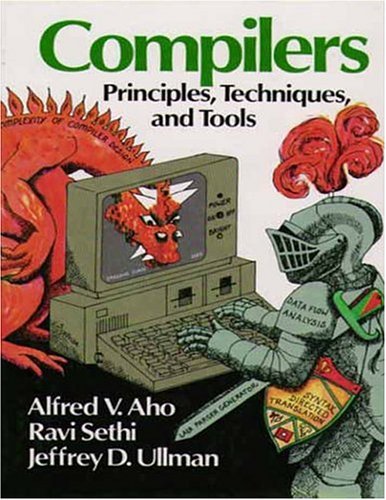
The Red Dragon Book, first edition: Compilers. Principles, Techniques and Tools.

The Red Dragon Book, first edition: Compilers. Principles, Techniques and Tools.

It starts out with referring to the Dragon Book (well, actually the first edition of the Red Dragon Book, as there are three) describing the compilers as having front-ends consisting of a Lexer, Parser and Type Checker and back-ends consisting of Code Generator and Emitter. A full compilation is going through all five stages and there is an increasing cost using these traditional stages when going from syntax highlighting via collapsible regions to red squiggles and code completion will need to go further along those stages taking an increasing time – like seconds or even longer – whereas the user experience requires responses in ~ 100 milliseconds where his code might not even compile in the first place.

Then Anders goes on describing Roslyn, TypeScript and Compiler API JSON interfaces to them so you can run them as a service and keep compiler state, rebuilding just enough of the state on source code changes. He goes on talking about how Visual Studio, Visual Studio Code, Command-Line Compiler, Sublime Text and other tools (can) use these APIs to interact with the compiler so it keeps state of slowly evolving code of which the tools than can emit what they need.

Anders explains this much better and much more visually than I do: so it’s a highly recommended video.

Read the rest of this entry »

Posted in .NET, C#, Delphi, Development, Software Development | 2 Comments »

[CMake] choose 32bit or 64bit in visual studio

Posted by jpluimers on 2017/05/03

This might be obvious for CMake regulars, but given the help, I would never have guessed this.

Generate x64:

cmake .. -G"Visual Studio 14 Win64"

Generate x86 is just leaving out the platform away:

cmake .. -G"Visual Studio 14"

In this case they are for Visual Studio 2015 (internally named 14).

The help:

The following generators are available on this platform:
  Visual Studio 14 2015 [arch] = Generates Visual Studio 2015 project files.
                                 Optional [arch] can be "Win64" or "ARM".
  Visual Studio 12 2013 [arch] = Generates Visual Studio 2013 project files.
                                 Optional [arch] can be "Win64" or "ARM".
  Visual Studio 11 2012 [arch] = Generates Visual Studio 2012 project files.
                                 Optional [arch] can be "Win64" or "ARM".
  Visual Studio 10 2010 [arch] = Generates Visual Studio 2010 project files.
                                 Optional [arch] can be "Win64" or "IA64".
  Visual Studio 9 2008 [arch]  = Generates Visual Studio 2008 project files.
                                 Optional [arch] can be "Win64" or "IA64".
  Visual Studio 8 2005 [arch]  = Generates Visual Studio 2005 project files.
                                 Optional [arch] can be "Win64".
  Visual Studio 7 .NET 2003    = Deprecated.  Generates Visual Studio .NET
                                 2003 project files.

–jeroen

Adopted from: [CMake] choose 32bit or 64bit in visual studio

Posted in .NET, Development, Software Development, Visual Studio 11, Visual Studio 2002, Visual Studio 2003, Visual Studio 2005, Visual Studio 2008, Visual Studio 2010, Visual Studio 2012, Visual Studio 2013, Visual Studio 2014, Visual Studio 2015, Visual Studio and tools | Leave a Comment »

instead of x86, msbuild is creating an x64 solution configuration via sln.metaproj – Stack Overflow

Posted by jpluimers on 2017/05/02

Sometimes msbuild will throw an error like this  for an x86 project:

"C:\Users\Developer\Versioned\libssh2\build\libssh2.sln" (default target) (1) ->
(ValidateSolutionConfiguration target) ->
C:\Users\Developer\Versioned\libssh2\build\libssh2.sln.metaproj : error MSB4126: The specified solution configuration "Debug|X64" is invalid. Please specify a valid solution configuration using the Configuration and Platform properties
form="Any CPU") or leave those properties blank to use the default solution configuration. [C:\Users\Developer\Versioned\libssh2\build\libssh2.sln]

Cause:

vsvars64.bat will set the environment variable Platform=x64 but vsvars32.bat will not empty this environment variable.

Easiest is to run set Platform= then run vsvars32.bat.

Adopted from MSBuild creating an x64 solution configuration via sln.metaproj – Stack Overflow [WayBack]:

If you are running this in the Visual Studio x64 command window it will set an environment variable Platform=x64 that will be used by msbuild. You can verify this by running echo in the command prompt you are using.

echo %platform%

So you will need to override the default when using x64 cmd, or run from the x86 cmd.

malexander

–jeroen

Posted in .NET, C++, Development, Software Development, Visual Studio 2015, Visual Studio and tools, Visual Studio C++ | Leave a Comment »

How to secure memory? – Medo’s Home Page

Posted by jpluimers on 2017/03/15

Sometime you might want to protect your data in memory – the greatest example is when dealing with anything related to passwords. It is simply not smart to keep that data around in a plain-text. In .NET there are multiple methods you can use for this purpose, starting with SecureString, ProtectedMemory, and my favorite ProtectedData.…

Source: How to secure memory? – Medo’s Home Page

via: Found this via +Ilya S a post from +Josip Medved – Stuff like this should be way built into an OS, and RTL’s should have a secureMalloc()… – Joe C. Hecht – Google+

–jeroen


Posted in .NET, .NET 4.0, .NET 4.5, C#, C# 4.0, C# 5.0, C# 6 (Roslyn), Development, Software Development | Leave a Comment »

Some links on deciding if and storing your timestamps as UTC and time zone handling

Posted by jpluimers on 2017/03/08

Some links:

And a great library: nodatime/nodatime: A better date and time API for .NET

--jeroen

Posted in .NET, Development, Jon Skeet, Software Development | Leave a Comment »

Windows 10 – language neutral batch file to start Windows Update

Posted by jpluimers on 2017/02/22

A while ago, I bitched that Microsoft moved away the Windows Update out of the Control panel into a language depended place (in Windows 10 1511 update broke the Hyper-V networking – Fix network connection issues).

Since then I had to maintain too many locales running Windows 10. So here is the batch file:

for /f "delims=" %%A in ('PowerShell -Command "(Get-Culture).Name"') do explorer "%LocalAppData%\Packages\windows.immersivecontrolpanel_cw5n1h2txyewy\LocalState\Indexed\Settings\%%A\AAA_SystemSettings_MusUpdate_UpdateActionButton.settingcontent-ms"

It uses these tricks:

  1. Set output of a command as a variable (in this case a for loop variable)
  2. Execute PowerShell script in a .bat file
  3. PowerShell Get-Culture (which gets a .NET CultureInfo instance)
  4. CultureInfo.Name property (which has the nl-NL, en-US, etc codes in it)

It replaced this simple batch-file which has worked for like 10 years:

%windir%\System32\rundll32.exe url.dll,FileProtocolHandler wuapp.exe

–jeroen

via: Windows Update Shortcut – Create in Windows 10 – Windows 10 Forums

Posted in .NET, .NET 1.x, .NET 2.0, .NET 3.0, .NET 3.5, .NET 4.0, .NET 4.5, Batch-Files, CommandLine, Development, Power User, PowerShell, Scripting, Software Development, Windows, Windows 10 | Leave a Comment »