Few people know the name Peter Sollich, as he always chose not to be a public figure (for instance, he is absent on the Outstanding Technical Achievement video).
Peter has been very important for both the Delphi and the .NET worlds: he was the original author of the 32-bit product that became the Delphi x86 compiler.
A few interesting links came up when using his name in some Google searches.
I just watched this interview with Anders Hejlsberg for the first time. This is truly an amazing interview. It’s rather long, about 1 hour, but it is so worth it. I’m not giving anything away… you’ll have to just watch and enjoy.
I am giving a few things away: trip down memory lane, putting big parts of software development history into perspective,
Since Anders has been so versatile, influential and still humble, this is a must watch for anyone in the software field. To quote Research Channel:
This episode features industry luminary, Anders Hejlsberg. Before coming to Microsoft in 1996 he was well noted for his work as the principal engineer of Turbo Pascal and the chief architect of the Delphi product line. At Microsoft, he was the architect for the Visual J++ development system and the Windows Foundation Classes (WFC). Promoted to Distinguished Engineer in 2000, Anders is the chief designer of the C# programming language and a key participant in the development of Microsoft’s .NET Framework. In this show, Anders is joined by a surprise guest. This episode of ‘Behind the Code’ is hosted by Barbara Fox – former senior security architect of cryptography and digital rights management for Microsoft.
(PS: how a video published in the C# 3 era can be so current <g>).
And if you feel for more, here, here, here, here and here are some more, are a few lists of videos where Anders speaks.
From a historic perspective, I like these most:
Depending in your interface, the NMQ_MQ_LIB can be an environment variable, application setting, or hardcoded DLL name
MQSeries 5.x and WebShpere MQ 6.x require you to specify the bitness in the MQIC DLL name (they don’t accept mqic.dll, but require mqic32.dll) when you access it from the C or Delphi interface.
MQM DLL does not require bitness: it is mqm.dll in all versions.
From client applications, use mqic.dll or mqic32.dll.
This MSI is designed to contain all of the PIA’s which shipped with Microsoft Office System 2003. The product PIA’s will only install if the parent product is installed on the machine.
Leave the PIA redistributable on the machine once it’s installed. Because this product is redistributable, many add-ins could ship it. The MSI will only install once and then subsequent installs would just see that it’s already on the machine. Removing it via Setup logic will remove it for everyone. The current recommendation is to leave uninstallation of the PIA Redistributable to the end user through Add/Remove Programs.
Currently I’m involved in a suite of .NET 4 applications that interface with Office. Office 2003 is the minimum required version, but:
most users and developers have Office 2007 or better installed,
not all people have all parts of Office installed,
the build server does not have Office installed at all.
In none of those scenarios, the PIAs are installed.
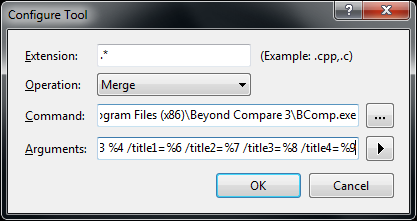
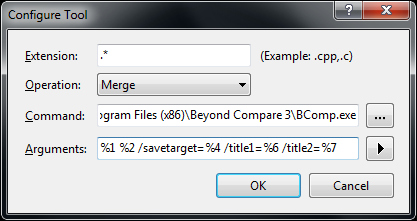
Note that BComp.exe (for GUI use) and BComp.com (for console use) are bootstrappers for BCompare.exe. Both will wait when ran from a GUI or console for the comparison to finish. Starting BCompare.exe will not wait. See BComp.exe vs BComp.com – Scooter Forums for more information on this.
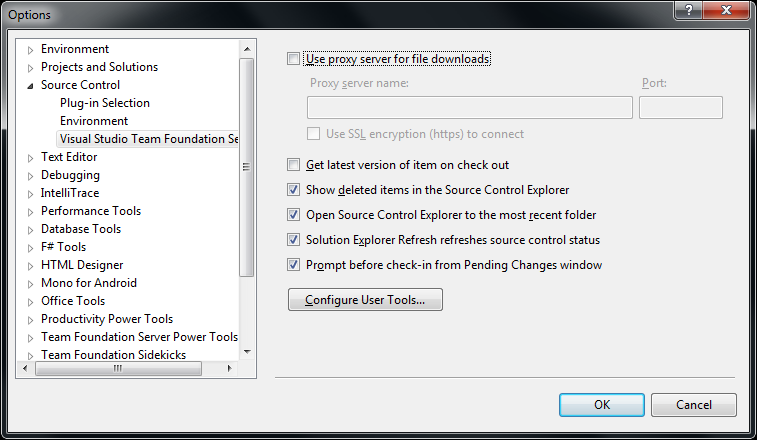
Everywhere you see path to BComp.exe below, enter the path that the above batch file tells you.
The first two pictures on the right show common steps for all three integrations. The images below are the specific ones for each integration. You can click on each image to view a larger version.
The steps work with the full version of Visual Studio and the Team Explorer edition of Visual Studio.
All of the supported aspects are linked to articles from excellent authors. There is far more on the internet about Delphi and Generics, but those are a good start.
My machine is on en-IE, as it is English, and USA as location.
The main advantage for me is to use the that it is a good mix between English and Dutch settings:
English language (so you get proper error messages that you can find back using Google)
USA as location (to force more search engines to use .com domains)
EUR money settings (most software in Western Europe expects EUR, but displays USD when using en-US)
decimal dot (far easier import/export with non-Dutch stuff)
DD/MM/YYYY date format (I tried ISO 8601 YYYYMMDD, but that breaks too much software)
24 hour clock format (just as it should be)
comma list separator (too much software is not configurable to use a certain separator for CSV, especially Excel depends on the system settings for list separator and decimal)





 The Wiert Corner - irregular stream of stuff