Archive for the ‘.NET’ Category
Posted by jpluimers on 2023/08/24
For my link archive: [Wayback/Archive] Bruce Tate on Twitter: “What’s the most unique feature of your favorite programming language?” / Twitter
From the languages that I have been using most:
It was a kind of follow-up on his earlier tweet that also sparked nice responses at [Archive] Bruce Tate on Twitter: “What is a #programming technique or construct that other people like but you think is overused?” / Twitter.
In my respons I phrased my decades long pet peeve [Archive] Jeroen Wiert Pluimers on Twitter: “@redrapids OOP: inheritance over composition. This leads to deep hierarchies that eventually nobody understands.” / Twitter.
Whereas with OOP (object-oriented programming) one should use composition over inheritance, often the reverse is true.
Actually my take can be generalised into two directions as these hierarchies:
- often crowd a single namespace, so: crowding namespaces is bad.
One does see this outside the Object Oriented realm a well.
- often have many levels of indirection, so: overdoing indirection is bad
One does see this outside the Object Oriented realm a well, just not as pronounced.
–jeroen
Posted in .NET, C#, Conference Topics, Conferences, Delphi, Development, Event, JavaScript/ECMAScript, Pascal, Scripting, Software Development | Leave a Comment »
Posted by jpluimers on 2023/08/08
Via Jan Gentleman, I learned
- about the Ctrl+⇧ Shift+⊞ Win+B shortcut on Windows 10 and 11 that restarts starts video driver
- that documentation is in [Wayback/Archive] Troubleshoot black screen or blank screen errors as
Action 1: Try a Windows Key sequence to wake the screen.
If you’re using a device with a keyboard connected to it, select Windows logo key + Ctrl + Shift + B. If you’re in tablet mode, press the volume-up and volume-down buttons simultaneously three times within two seconds. If Windows is responsive, a short beep will sound and the screen will blink or dim while Windows attempts to refresh the screen.
Via:
Later I found out it also is in Table of keyboard shortcuts – Wikipedia: General shortcuts
| Restart Video Driver |
Windows 10: Ctrl+⇧ Shift+⊞ Win+B[2][3] |
Also I learned how people order the modifier keys is varying.
–jeroen
Posted in .NET, Development, Power User, Software Development, Visual Studio and tools, Windows, Windows 10, Windows 11 | Leave a Comment »
Posted by jpluimers on 2023/02/15
Forgot to schedule this in 2014, so here it finally is, as the content is still relevant:
A long time ago (almost 10 years) I did some stuff with State Machines in .NET.
Since then the world has changed, and a lot more libraries have become available.
As I mainly use .NET and Delphi and there is a reasonable chance I need to do some more state machine work, here are some links about State Machines in both environments.
Read the rest of this entry »
Posted in .NET, C#, Conference Topics, Conferences, Delphi, Development, Diagram, Event, Java, Java Platform, Software Development, UML | Leave a Comment »
Posted by jpluimers on 2023/01/19
After publishing Free Linux cloud shell for Gmail users – shell in the browser that works in all locations I’ve been so far, the Google Cloud Shell got extended quite a bit.
There is now [Wayback/Archive] Safe Mode (which skips initialisation scripts):
If there’s a problem in your .bashrc or .tmux.conf files, Cloud Shell immediately close after connection. To resolve this, open Cloud Shell in safe mode by appending cloudshellsafemode=true to the URL. This restarts your Cloud Shell instance and logs you in as root, allowing you to fix any issues in the files.
To permanently delete all files in your home directory and restore your Cloud Shell home directory to a clean state, you can reset your Cloud Shell VM.
And there is support for way more [Wayback/Archive] tools and languages:
Read the rest of this entry »
Posted in .NET, C#, Cloud, Development, Go (golang), Google, GoogleCloudShell, Infrastructure, Java, Java Platform, JavaScript/ECMAScript, Node.js, Perl, PHP, Power User, Python, Ruby, Scripting, Software Development | Leave a Comment »
Posted by jpluimers on 2023/01/10
A while ago I wrote about Setting up a GitHub project so it is served over https as a github.io and a custom subdomain.
Doing the full “host on your custom domain” route was a big tougher than I hoped for, so I totally forgot how easy it is to convert an existing HTML or markdown documentation repository to use GitHub pages without a custom domain.
I needed it for the Delphi version of the DeadLockEmpire (see links below, originally it was an interactive tutorial game focusing on the C# language and .NET runtime), as I am trying to get as much as my stuff published and hosted in a manner that will outlive me (I still have a pretty high chance of the rectum cancer metastases returning).
Enabling GitHub Pages on your repository is almost as easy as hosting a page through raw.githack.com (where I already hosted raw.githack.com/jpluimers/deadlockempire.github.io/feature/Delphi-language-and-Delphi-RTL/index.html as raw.githack.com/jpluimers/deadlockempire.github.io/feature/Delphi-language-and-Delphi-RTL/index.html and rawcdn.githack.com/jpluimers/deadlockempire.github.io/feature/Delphi-language-and-Delphi-RTL/index.html).
This is how easy it was to get it hosted as [Wayback/Archive] jpluimers.github.io/deadlockempire.github.io:
- In my [Wayback/Archive] jpluimers/deadlockempire.github.io: The Deadlock Empire: Slay dragons, learn concurrency! repository, go to the Settings tab, then click on Pages:
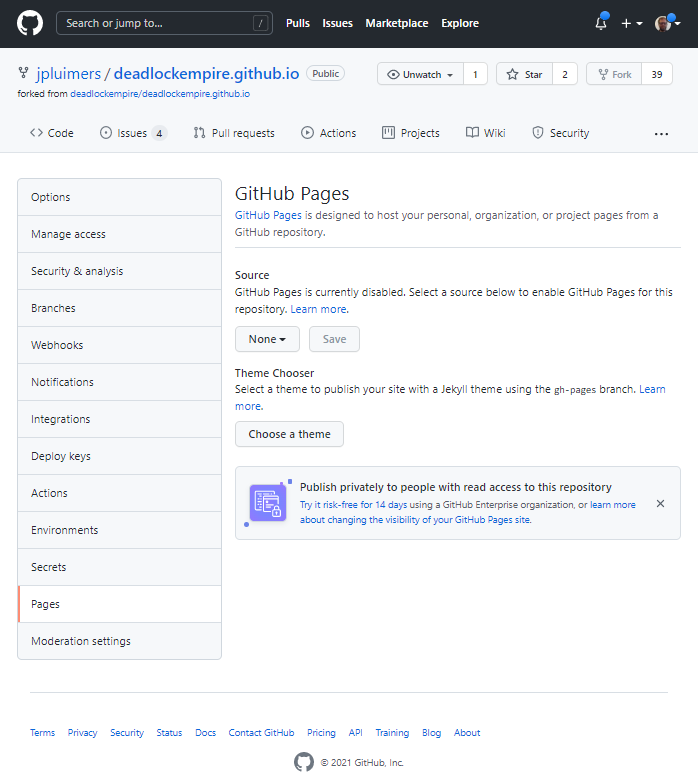
DeadLockEmpire Settings tab, Pages configuration None.
Here you see “None” as value for the branch to be published as GitHub Pages.
- Here I have chosen the Branch “feature/Delphi-language-and-Delphi-RTL” to be published, and am about to press “Save” (full screenshot below):

DeadLockEmpire Pages selecting the correct branch
- After pressing “Save“, the site gets published (it takes about a minute for that to complete) at [Wayback/Archive] jpluimers.github.io/deadlockempire.github.io:

DeadLockEmpire Pages the correct branch has been saved which will automagically publish it.
That was it. No more steps.
Each new commit in the selected branch will auto-publish as well.
Related DeadLockEmpire posts
- 2016 – If you thought you could do multi-threading, then play “The Deadlock Empire” games.
- 2017 – ThreadBarrier/ThreadBarrier.pas at master · lordcrc/ThreadBarrier
- 2020 – Davidlohr Bueso on Twitter: A programmer had a problem. He thought to himself, “I know, I’ll solve it with threads!”. has Now problems. two he
- [WayBack] One second code: Do YOU know how much your computer can do in a second? is a quiz version of the [WayBack] Numbers Every Programmer Should Know By Year. [WayBack] About this game revealed…Source: One second code: Do YOU know how much your computer can do in a second? « The Wiert Corner – irregular stream of stuff
Read the rest of this entry »
Posted in .NET, About, C#, Conference Topics, Conferences, Delphi, Development, Event, Personal, Software Development, Web Development | 1 Comment »
Posted by jpluimers on 2022/12/27
[Archive.is] Kevlin Henney on Twitter: “#FizzBuzzFriday… “.
Related: [Wayback] Your C# is already functional, but only if you let it | In Absentia:
A few days ago I tweeted a C# code snippet, showing a FizzBuzz implementation using some of the new features in C# 8.0. The tweet “went viral”, as the kids say, with several people admiring the terse
–jeroen
Read the rest of this entry »
Posted in .NET, C#, Development, Functional Programming, Python, Software Development | Leave a Comment »
Posted by jpluimers on 2022/12/06
For my link archive for hosting private projects built using technology based on [Wayback/Archive] ASP.NET documentation | Microsoft Docs:
If you also are using other technologies than ASP.NET, Heroku might be an option:
–jeroen
Read the rest of this entry »
Posted in .NET, ASP.NET, ASP.NET core, C#, Development, Hosting, Power User, Software Development, Web Development | Leave a Comment »
Posted by jpluimers on 2022/11/17
Some notes for my link archive.
A long time ago, I asked [Wayback/Archive] c# – Console application using Clipboard.GetFileDropList: how to check if that came from a cut or copy operation? – Stack Overflow.
Back then, the use case had disappeared, so I didn’t follow up. But a new use case might appear soon, so here it goes:
–jeroen
Posted in .NET, C#, Development, Software Development, VB.NET | Leave a Comment »
Posted by jpluimers on 2022/10/04
On my list of Visual Studio Code extensions to try (after I change the shortcuts, as direct Alt shortcuts are not a good idea, luckily those are configurable)
[Wayback/Archive.is] HTML / XML / RSS link checker – Visual Studio Marketplace (partly paraphrased):
VSCode extension that checks for broken links in an HTML, XML, RSS, PHP, or Markdown file.
…
Checks currently open file:
- for broken links in anchor-href, link-href, img-src, and script-src tags in currently-open HTML or PHP file
- both clearnet and onion (Tor) links
- for badly-formatted mailto links, and duplicate local anchors (anchor-name, anchor-id)
- for working HTTPS equivalents of HTTP links
Optionally checks for invalid characters and common mistakes (missing tag content, empty attribute value, more).
Also checks for errors in a small subset of semantic HTML tags (in HTML and PHP files): checks that each page has header, main, footer; checks that each heading is inside a section, article, or aside; checks that each section/article/aside has exactly one heading in it; checks that heading values are nested properly.
…
To see/change settings for this extension, open Settings (Ctrl+,) / Extensions / “HTML / XML / RSS link checker”.
To change the key-combinations for this extension, open File / Preferences / Keyboard Shortcuts and search for Alt+H or Alt+T or Alt+M or Alt+L.
–jeroen
Posted in .NET, Development, HTML, Lightweight markup language, MarkDown, Power User, RSS, Software Development, vscode Visual Studio Code, Web Development, XML, XML/XSD | Leave a Comment »


 The Wiert Corner - irregular stream of stuff