Archive for the ‘.NET’ Category
Posted by jpluimers on 2023/01/19
After publishing Free Linux cloud shell for Gmail users – shell in the browser that works in all locations I’ve been so far, the Google Cloud Shell got extended quite a bit.
There is now [Wayback/Archive] Safe Mode (which skips initialisation scripts):
If there’s a problem in your .bashrc or .tmux.conf files, Cloud Shell immediately close after connection. To resolve this, open Cloud Shell in safe mode by appending cloudshellsafemode=true to the URL. This restarts your Cloud Shell instance and logs you in as root, allowing you to fix any issues in the files.
To permanently delete all files in your home directory and restore your Cloud Shell home directory to a clean state, you can reset your Cloud Shell VM.
And there is support for way more [Wayback/Archive] tools and languages:
Read the rest of this entry »
Posted in .NET, C#, Cloud, Development, Go (golang), Google, GoogleCloudShell, Infrastructure, Java, Java Platform, JavaScript/ECMAScript, Node.js, Perl, PHP, Power User, Python, Ruby, Scripting, Software Development | Leave a Comment »
Posted by jpluimers on 2023/01/10
A while ago I wrote about Setting up a GitHub project so it is served over https as a github.io and a custom subdomain.
Doing the full “host on your custom domain” route was a big tougher than I hoped for, so I totally forgot how easy it is to convert an existing HTML or markdown documentation repository to use GitHub pages without a custom domain.
I needed it for the Delphi version of the DeadLockEmpire (see links below, originally it was an interactive tutorial game focusing on the C# language and .NET runtime), as I am trying to get as much as my stuff published and hosted in a manner that will outlive me (I still have a pretty high chance of the rectum cancer metastases returning).
Enabling GitHub Pages on your repository is almost as easy as hosting a page through raw.githack.com (where I already hosted raw.githack.com/jpluimers/deadlockempire.github.io/feature/Delphi-language-and-Delphi-RTL/index.html as raw.githack.com/jpluimers/deadlockempire.github.io/feature/Delphi-language-and-Delphi-RTL/index.html and rawcdn.githack.com/jpluimers/deadlockempire.github.io/feature/Delphi-language-and-Delphi-RTL/index.html).
This is how easy it was to get it hosted as [Wayback/Archive] jpluimers.github.io/deadlockempire.github.io:
- In my [Wayback/Archive] jpluimers/deadlockempire.github.io: The Deadlock Empire: Slay dragons, learn concurrency! repository, go to the Settings tab, then click on Pages:
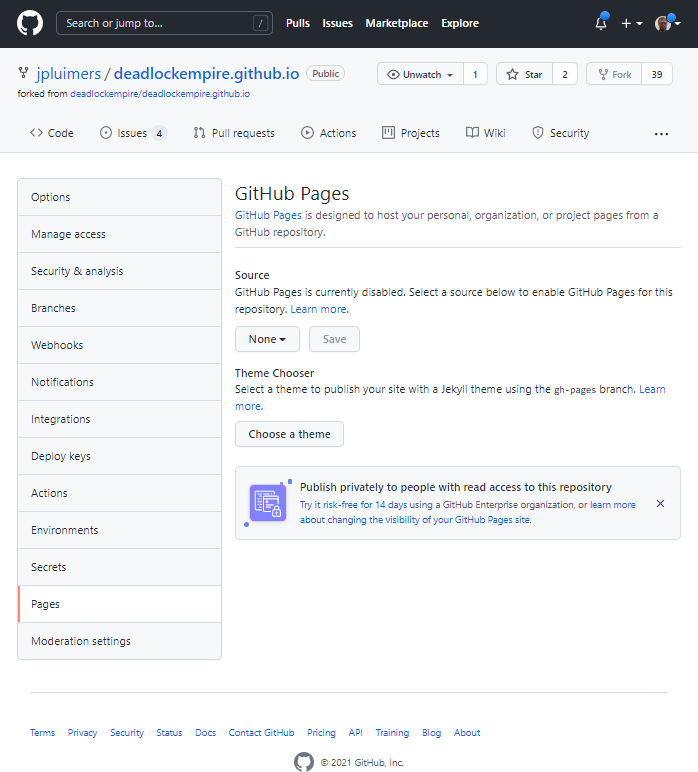
DeadLockEmpire Settings tab, Pages configuration None.
Here you see “None” as value for the branch to be published as GitHub Pages.
- Here I have chosen the Branch “feature/Delphi-language-and-Delphi-RTL” to be published, and am about to press “Save” (full screenshot below):

DeadLockEmpire Pages selecting the correct branch
- After pressing “Save“, the site gets published (it takes about a minute for that to complete) at [Wayback/Archive] jpluimers.github.io/deadlockempire.github.io:

DeadLockEmpire Pages the correct branch has been saved which will automagically publish it.
That was it. No more steps.
Each new commit in the selected branch will auto-publish as well.
Related DeadLockEmpire posts
- 2016 – If you thought you could do multi-threading, then play “The Deadlock Empire” games.
- 2017 – ThreadBarrier/ThreadBarrier.pas at master · lordcrc/ThreadBarrier
- 2020 – Davidlohr Bueso on Twitter: A programmer had a problem. He thought to himself, “I know, I’ll solve it with threads!”. has Now problems. two he
- [WayBack] One second code: Do YOU know how much your computer can do in a second? is a quiz version of the [WayBack] Numbers Every Programmer Should Know By Year. [WayBack] About this game revealed…Source: One second code: Do YOU know how much your computer can do in a second? « The Wiert Corner – irregular stream of stuff
Read the rest of this entry »
Posted in .NET, About, C#, Conference Topics, Conferences, Delphi, Development, Event, Personal, Software Development, Web Development | 1 Comment »
Posted by jpluimers on 2022/12/27
[Archive.is] Kevlin Henney on Twitter: “#FizzBuzzFriday… “.
Related: [Wayback] Your C# is already functional, but only if you let it | In Absentia:
A few days ago I tweeted a C# code snippet, showing a FizzBuzz implementation using some of the new features in C# 8.0. The tweet “went viral”, as the kids say, with several people admiring the terse
–jeroen
Read the rest of this entry »
Posted in .NET, C#, Development, Functional Programming, Python, Software Development | Leave a Comment »
Posted by jpluimers on 2022/12/06
For my link archive for hosting private projects built using technology based on [Wayback/Archive] ASP.NET documentation | Microsoft Docs:
If you also are using other technologies than ASP.NET, Heroku might be an option:
–jeroen
Read the rest of this entry »
Posted in .NET, ASP.NET, ASP.NET core, C#, Development, Hosting, Power User, Software Development, Web Development | Leave a Comment »
Posted by jpluimers on 2022/11/17
Some notes for my link archive.
A long time ago, I asked [Wayback/Archive] c# – Console application using Clipboard.GetFileDropList: how to check if that came from a cut or copy operation? – Stack Overflow.
Back then, the use case had disappeared, so I didn’t follow up. But a new use case might appear soon, so here it goes:
–jeroen
Posted in .NET, C#, Development, Software Development, VB.NET | Leave a Comment »
Posted by jpluimers on 2022/10/04
On my list of Visual Studio Code extensions to try (after I change the shortcuts, as direct Alt shortcuts are not a good idea, luckily those are configurable)
[Wayback/Archive.is] HTML / XML / RSS link checker – Visual Studio Marketplace (partly paraphrased):
VSCode extension that checks for broken links in an HTML, XML, RSS, PHP, or Markdown file.
…
Checks currently open file:
- for broken links in anchor-href, link-href, img-src, and script-src tags in currently-open HTML or PHP file
- both clearnet and onion (Tor) links
- for badly-formatted mailto links, and duplicate local anchors (anchor-name, anchor-id)
- for working HTTPS equivalents of HTTP links
Optionally checks for invalid characters and common mistakes (missing tag content, empty attribute value, more).
Also checks for errors in a small subset of semantic HTML tags (in HTML and PHP files): checks that each page has header, main, footer; checks that each heading is inside a section, article, or aside; checks that each section/article/aside has exactly one heading in it; checks that heading values are nested properly.
…
To see/change settings for this extension, open Settings (Ctrl+,) / Extensions / “HTML / XML / RSS link checker”.
To change the key-combinations for this extension, open File / Preferences / Keyboard Shortcuts and search for Alt+H or Alt+T or Alt+M or Alt+L.
–jeroen
Posted in .NET, Development, HTML, Lightweight markup language, MarkDown, Power User, RSS, Software Development, vscode Visual Studio Code, Web Development, XML, XML/XSD | Leave a Comment »
Posted by jpluimers on 2022/09/21
I totally missed that in 2019, the F2 key was enabled to rename HTML tags, but it does: [Wayback/Archive.is] Select matching element/rename HTML tag in Visual Studio Code – Stack Overflow:
HTML rename tags
You can now use F2 to rename the opening/closing tag pairs in HTML.
F2 when the cursor is over one of the tags and you will get a little input box with the cursor to input the new tag name and the start/end tags will be replaced with whatever you type upon .
[Wayback/Archive.is] Another answer indicates that even more recently, Linked Editing can do the same without even pressing F2. Too bad it is not enabled by default:
No need for extension, this is now cooked into VSCode.
"editor.linkedEditing": true
–jeroen
Posted in .NET, Development, HTML, Software Development, Visual Studio and tools, vscode Visual Studio Code, Web Development | Leave a Comment »
Posted by jpluimers on 2022/09/15
I come from a background of Delphi, Visual Studio and Notepad++ editors that historically have expanded their functionality over decades of releases.
When switching much of my development to Visual Studio Code, which out of the box aims at basic support (which has grown remarkably over the years so it’s way beyond basic now), I decided to review my editing behaviours see if plugins (in vscode speak “extensions marketplace“) would assist me with that.
One of my behaviours I wanted to get rid of is heavily use of keyboard macros, so when doing more web-stuff, I bumped into Emmet (that in the past was called Zen Code).
I bumped into Emmet because I wanted to refactor quite a few bits of html, and embed many sections of text in tags. Normally I would have written a macro for that, but now I did a quick [Wayback/Archive.is] vscode html embed text in element – Google Search and bumped into [Wayback/Archive.is] html – How to do tag wrapping in VS code? – Stack Overflow (thanks [Wayback/Archive.is] Alex!)
Since Visual Studio Code has built-in support for Emmet, here are some links so I can quickly find them back:
Hopefully I will now also less rely on user-defined snippets, though they are still available: [Wayback/Archive.is] Snippets in Visual Studio Code
Using Emmet eventually might help me in my blog-writing too, which still is heavily WordPress.com, known for its limited editor, based.
Apparently, my Google Search fu still is good enough to find these kinds of gems (:
–jeroen
Posted in .NET, CSS, Development, HTML, HTML5, Software Development, Visual Studio and tools, vscode Visual Studio Code, Web Development | Leave a Comment »
Posted by jpluimers on 2022/08/12
From [Wayback Archive.is blog — Why has the URL “archive-li” changed to…:
Why has the URL “archive-li” changed to “archive-ph”, and will this affect saved bookmarks at any time in the future?
 Anonymous
This is temporary and only for some countries. All 7 domains work, so you do not need to change the bookmarks.
In The Netherlands all Archive Today domains redirect to archive.ph using a HTTP 302 redirect.
This caused trouble at my home location, but not at my brother, so I searched for local issues.
In the end, it was because I have dual WAN as network load balancing at home.
TL;DR
Modifying the routing table so traffic for 54.37.18.234 goes to WAN1 was my solution.
Finding the destination address
Read the rest of this entry »
Posted in .NET, Development, Hardware, Network-and-equipment, Power User, PowerShell, routers, Scripting, Software Development | Leave a Comment »
Posted by jpluimers on 2022/07/06
Early june, I blogged about Wake-on-LAN from a Windows machine.
My plan was to adopt [Wayback/Archive.is] Wake.ps1 into Wake-on-LAN.ps1 (as naming is important).
One of the goals was to support multiple hardware MAC address formats, especially as Wake.ps1 had the below comment, but did support the AA-BB-CC-DD-EE-FF, though not the AA:BB:CC:DD:EE:FF hardware MAC address format:
<#
...
.NOTES
Make sure the MAC addresses supplied don't contain "-" or ".".
#>
A colon separated hardware MAC address would result in this error inside the call to the [Wayback/Archive.is] PhysicalAddress.Parse Method (System.Net.NetworkInformation) | Microsoft Docs:
Send-Packet : Exception calling "Parse" with "1" argument(s): "An invalid physical address was specified."
So I did some digging, starting inside the above mentioned blog post, and adding more:
- Wake.ps1 uses the [Wayback/Archive.is]
Parse method in the [Wayback/Archive.is] PhysicalAddress.cs source code in C# .NET, which contains code like this:
            //has dashes?
            if (address.IndexOf('-') >= 0 ){
                hasDashes = true;
                buffer = new byte[(address.Length+1)/3];
            }
- The Perl script at [Wayback/Archive.is] wakeonlan/wakeonlan at master · jpoliv/wakeonlan that started my first blog post in this series which mentions:
xx:xx:xx:xx:xx:xx (canonical)xx-xx-xx-xx-xx-xx (Windows)xxxxxx-xxxxxx (Hewlett-Packard switches)xxxxxxxxxxxx (Intel Landesk)
I should rename the first one IEEE 802, as per this:
- The MAC address: Notational conventions – Wikipedia
The standard (IEEE 802) format for printing EUI-48 addresses in human-friendly form is six groups of two hexadecimal digits, separated by hyphens (-) in transmission order (e.g. 01-23-45-67-89-AB). This form is also commonly used for EUI-64 (e.g. 01-23-45-67-89-AB-CD-EF).[2] Other conventions include six groups of two hexadecimal digits separated by colons (:) (e.g. 01:23:45:67:89:AB), and three groups of four hexadecimal digits separated by dots (.) (e.g. 0123.4567.89AB); again in transmission order.[30]
The latter is used by Cisco (see for instance [Wayback/Archive.is] Cisco DCNM Security Configuration Guide, Release 4.0 – Configuring MAC ACLs [Support] – Cisco and [Wayback/Archive.is] Cisco IOS LAN Switching Command Reference – mac address-group through revision [Support] – Cisco), so another format to add:
- [Wayback/Archive.is] PhysicalAddress.Parse Method (System.Net.NetworkInformation) | Microsoft Docs remarks:
The address parameter must contain a string that can only consist of numbers and letters as hexadecimal digits. Some examples of string formats that are acceptable are as follows:
00112233445500-11-22-33-44-550011.2233.445500:11:22:33:44:55F0-E1-D2-C3-B4-A5f0-e1-d2-c3-b4-a5
Use the GetAddressBytes method to retrieve the address from an existing PhysicalAddress instance.
- After a bit more digging via [Wayback/Archive.is] “three groups of four hexadecimal digits separated by dots” – Google Search , I found that even more hardware MAC address formats are in use as per [Wayback/Archive.is] What are the various standard and industry practice ways to express a 48-bit MAC address? – Network Engineering Stack Exchange.
I really do not have all the sources for the various representations for 48-bit MAC addresses, but I have seen them variously used:
AA-BB-CC-DD-EE-FF
AA.BB.CC.DD.EE.FF
AA:BB:CC:DD:EE:FF
AAA-BBB-CCC-DDD
AAA.BBB.CCC.DDD
AAA:BBB:CCC:DDD
AAAA-BBBB-CCCC
AAAA.BBBB.CCCC
AAAA:BBBB:CCCC
AAAAAA-BBBBBB
AAAAAA.BBBBBB
AAAAAA:BBBBBB
From the last list, which is far more complete than the others, I recognise quite a few from tools I used in the past, but too forgot the actual sources, so I took the full list from there and tried to name them in parenthesis after the links I found above and what I remembered:
AABBCCDDEEFF (Bare / Landesk)AA-BB-CC-DD-EE-FF (IEEE 802 / Windows)AA.BB.CC.DD.EE.FF (???)AA:BB:CC:DD:EE:FF (Linux / BSD / MacOS)AAA-BBB-CCC-DDD (???)AAA.BBB.CCC.DDD (Cisco?)AAA:BBB:CCC:DDD (???)AAAA-BBBB-CCCC (???)AAAA.BBBB.CCCC (Cisco / Brocade)AAAA:BBBB:CCCC (???)AAAAAA-BBBBBB (Hewlett-Packard networking)AAAAAA.BBBBBB (???)AAAAAA:BBBBBB (???)
Some additional links in addition to the ones above:
–jeroen
Posted in .NET, CommandLine, Development, Encoding, HEX encoding, Network-and-equipment, Power User, PowerShell, PowerShell, Scripting, Software Development | Leave a Comment »


 The Wiert Corner - irregular stream of stuff