The Wiert Corner – irregular stream of stuff

Jeroen W. Pluimers on .NET, C#, Delphi, databases, and personal interests

  • My badges

  • Twitter Updates

  • My Flickr Stream

  • Pages

  • All categories

  • Enter your email address to subscribe to this blog and receive notifications of new posts by email.

    Join 1,854 other subscribers

Archive for the ‘Software Development’ Category

Yet again, GitHub violates the Web Content Accessibility Guidelines by stealing a key: not it is the dot (.)

Posted by jpluimers on 2021/08/17

More sites seem to have a tendency of stealing keyboard shortcuts and violating the WCGA (Web Content Accessibility Guidelines), especially the (lowest!) conformance level A in [Wayback] WCAG version 2.1, section Success Criterion 2.1.4 Character Key Shortcuts

If a keyboard shortcut is implemented in content using only letter (including upper- and lower-case letters), punctuation, number, or symbol characters, then at least one of the following is true:

1. Turn off
mechanism is available to turn the shortcut off;
2. Remap
A mechanism is available to remap the shortcut to use one or more non-printable keyboard characters (e.g. Ctrl, Alt, etc);
3. Active only on focus
The keyboard shortcut for a user interface component is only active when that component has focus.

Mind you, I’m a keyboard person, there is even a: Keyboards and Keyboard Shortcuts category, but they always need to be configurable, anything else is a sin.

And GitHub did it again: [Archive.is] GitHub on Twitter: “🤫 New shortcut: Press . on any GitHub repo.… “.

So I’m totally with these:

Now they have started to steal the dot (.) keyboard to (in-place, with a fully new URL and no indication how to easily go back) start Visual Studio Code in the current repository.

Going back, though not documented, actually takes between one and three “back” movements in your web-browser history: utterly ridiculous for a key one can accidentally hit.

This behaviour violates all three above sub-criterions:

  1. it cannot be turned off
  2. there is no way to remap it
  3. it is almost always activated (unless there a text input – like “search” or “goto file” – has focus)

This is a very bad way to cope with accessibility, especially as conformance level A is yet again violated.

[Wayback] WCAG 2.1: section 5.2.1 Conformance Level:

One of the following levels of conformance is met in full.

  • For Level A conformance (the minimum level of conformance), the Web page satisfies all the Level A Success Criteria, or a conforming alternate version is provided.
  • For Level AA conformance, the Web page satisfies all the Level A and Level AA Success Criteria, or a Level AA conforming alternate version is provided.
  • For Level AAA conformance, the Web page satisfies all the Level A, Level AA and Level AAA Success Criteria, or a Level AAA conforming alternate version is provided.

To me another cardinal sin is that they stole Ctrl-F / Command-F (depending if you use non-MacOS or MacOS) from the web browser. So now it does not find it in the full page, but only in the currently selected file. (You guessed it, I’m with [Archive.is] KewlCat on Twitter: “I hate it when they intercept “/” and even [Ctrl]-F… “ too)

More of those conformance violation sins are at [Wayback] Keyboard shortcuts – GitHub Docs.

It isn’t hard to prevent this kind of thinking: it’s a mind set as described by [Archive.is] Patrick Joannisse on Twitter: “I don’t know if you are expecting a real answer but here goes: it starts with the mindset. In my training they had us wear goggles to block our vision and made us use a screen reader for a while. We met people with disabilities and they would show us how they work.… “

If you still like it and want to know how it works

–jeroen

Read the rest of this entry »

Posted in accessibility (a11y), Development, GitHub, Keyboards and Keyboard Shortcuts, Power User, Software Development, Source Code Management | Leave a Comment »

UUOC apparently is/was a thing: useless use of cat

Posted by jpluimers on 2021/08/16

A while ago I bumped into UUOC: [WayBack] cat (Unix): Useless use of cat – Wikipedia.

For me the post important reason to choose between cat and a redirect is realising from the above article:

  • input redirection forms allow command to perform random access on the file, whereas the cat examples do not.
  • cat written with UUOC might still be preferred for readability reasons, as reading a piped stream left-to-right might be easier to conceptualize

I ended up at UUOC through [WayBack] bash – Calling multiple commands through xargs – Stack Overflow.

Invoking multiple commands with the same xargs parameter.

The above question also led me to two better solutions for my original xargs problem.

I liked both below solutions.

The first (by [WayBack] ckhan) uses sh as subshell and substitutes the parameter with a readable name.

The second (by [WayBack] shivams) uses a function which gets way more readable code when the command-line gets longer.

[WayBack] shell – xargs : using same argument in multiple commands – Unix & Linux Stack Exchange:

  1. you’ll want to explicitly execute a subshell:
    echo 95 | xargs -n1 -I_percent -- sh -c '[ _percent -ge 95 ] && echo "No Space on disk _percent% full -- remove old backups please"'

    Note also I’m using _percent instead of {} to avoid extra quoting headaches with the shell. It’s not a shell variable; still just an xargs replacement string.

  2. An alternative way, which is more readable, is to define a separate function which contains all your other commands and then call that function with xargs in a sub-shell.Hence, for example:
    myfunc(){
      [ "$1" -ge 95 ] && echo "No Space on disk $1% full -- remove old backups please"
      echo "Another command echoing $1"
    }
    
    export -f myfunc
    
    echo 95 | xargs -n1 -I_percent -- sh -c 'myfunc "_percent"'

–jeroen

Posted in bash, Development, Scripting, Software Development | Leave a Comment »

Attacking Technical Debt – ardalis

Posted by jpluimers on 2021/08/12

Interesting approach in [WayBack] Attacking Technical Debt – ardalis.

The tech stuff is C# and .NET based, but the general approach can be applied in a universal way.

via: [WayBack] Jim Holmes on Twitter “Great post by @ardalis on attacking Technical Debt. … You should also read my series on creating a Technical Debt Payment Plan, starting here: …”

So also read

–jeroen

Posted in .NET, C#, Development, Software Development, Technical Debt | Leave a Comment »

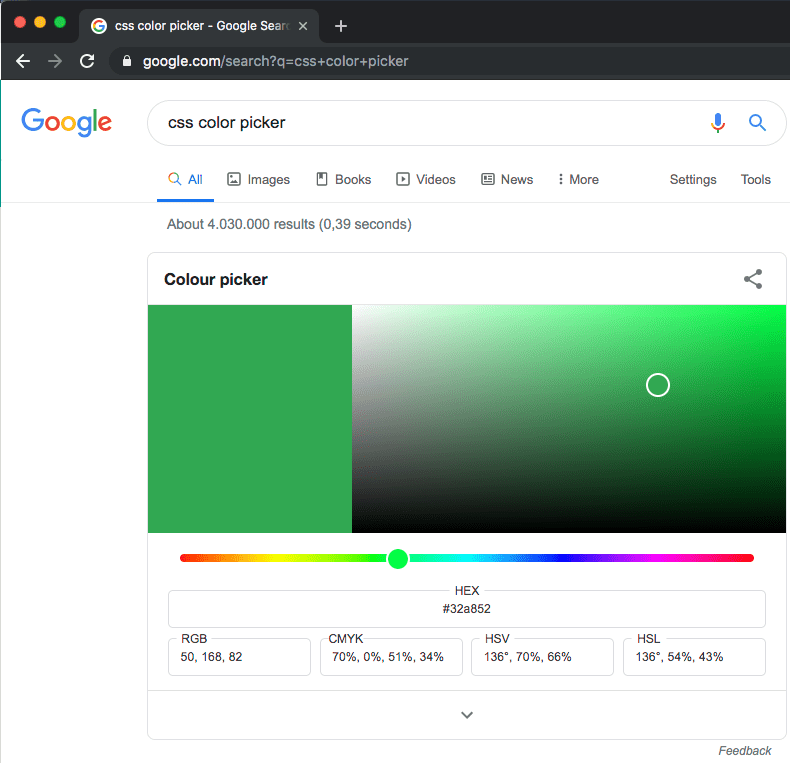
css color picker – Google Search

Posted by jpluimers on 2021/08/12

Probably old, but there is an embedded [WayBack] css color picker – Google Search that on each refresh switches colours:

–jeroen

Posted in Color (software development), CSS, Development, Google, GoogleSearch, HTML, Power User, Software Development, Web Development | Leave a Comment »

Some links on the Delphi VolatileAttribute

Posted by jpluimers on 2021/08/12

Some links, because I had a hard time finding good documentation on VolatileAttribute (which is the name of the type; you use it as [Volatile] on variables, parameters and fields.

TL;DR

Volatile

The volatile attribute is used to mark fields that are subject to change by different threads, so that code generation does not optimize copying the value in a register or another temporary memory location.

You can use the volatile attribute to mark the following declarations:

You cannot use the volatile attribute to mark the following declarations:

type
    TMyClass = class
    private
        [volatile] FMyVariable: TMyType;
    end;

Searches

Read the rest of this entry »

Posted in Delphi, Development, Software Development | Leave a Comment »

Simple iframe clock via Free Clocks for Your Website

Posted by jpluimers on 2021/08/11

Using [WayBack] Free Clocks for Your Website, I created this clock for a 1920×1080 web dashboard which is a web page hosted on [WayBack] raw.githack.com with an iframe hosted at www.timeanddate.com

I know that is a risk, but that is OK for now: that site has existed for a very long time and probably will last a while.

There is a truckload of options you can use, despite the clock being simple. Luckily the [WayBack] FAQ: Free Clocks for Your Website explains these options.

This is the gist of the above “this clock” page:


<!DOCTYPE html>
<html>
<head>
<meta charset="UTF-8">
<meta http-equiv="content-type" content="text/html; charset=UTF-8">
<meta name="robots" content="noindex, nofollow">
<meta name="googlebot" content="noindex, nofollow">
<style type="text/css">
body {
margin: 0; /* override browser setting for body `margin: 8px;` */
overflow: hidden; /* remove scroll bars; does not work for iframes */
}
.box {
float: left;
width: 100vw; /* Firefox/Chrome outside Mac OS X: force viewport-width */
overflow: hidden; /* remove scroll bars; does not work for iframes */
background-color: azure;
}
iframe {
border-width: 0; /* override browser setting for iframe `border-width: 2px; */
height: 100vh;
width: 50vw;
}
.clock_iframe {
float: right;
height: 30vh;
width: 16vw;
}
</style>
<title>Clock in frame</title>
</head>
<body>
<div class="box">
<iframe class="clock_iframe" src="https://freesecure.timeanddate.com/clock/i6xvy9ve/n16/szw300/szh300/hoc000/cf100/hgr0/fiv0/fas34/fdi74/mqv0/mhc000/mhs3/mhl20/mhw1/mhd84/mmv0/hhs1/hms1/hsc000/hss1&quot; frameborder="0" width="300" height="300">
<!– https://www.timeanddate.com/clocks/free.html –>
</iframe>
</div
</body>
</html>

–jeroen

Posted in CSS, Development, HTML, Power User, Software Development, Web Development | Leave a Comment »

On Windows, having an empty password can improve security

Posted by jpluimers on 2021/08/11

From an interesting twitter thread started by SwitftOnSecurity:

Interesting thought that I need to let sink in for a while before trying it.

Great posts by Aaron

Finding out about and fixing Limited User Account bugs:

More to think about:

  • [WayBack] Table of Contents (Aaron Margosis’ Non-Admin WebLog) – Aaron Margosis’ Non-Admin, App-Compat and Sysinternals WebLog
  • [WayBack] Not running as admin… – Aaron Margosis’ Non-Admin, App-Compat and Sysinternals WebLog

    To be more secure, users should log on with a Limited (or “Least-privileged”) User account (LUA), and use elevated privileges only for specific tasks that require them.  Linux/Unix users have understood this for a long time

  • [WayBack] Why you shouldn’t run as admin… – Aaron Margosis’ Non-Admin, App-Compat and Sysinternals WebLog
    • The #1 reason for running as non-admin is to limit your exposure.
    • My #2 reason for running as non-admin applies to developers.  Developing software as User instead of Admin helps ensure that your software will run correctly on end-users’ systems.
    • My #3 reason applies just to Microsoft personnel, particularly those of us in customer-facing roles.  Hey, y’all!  We need to lead by example.
  • [WayBack] The easiest way to run as non-admin – Aaron Margosis’ Non-Admin, App-Compat and Sysinternals WebLog

    Here’s how I set up home computers for friends and relatives:

    • Create a Computer Administrator account called “Admin”.  No password.  (Read on before you flame.)
    • Create a Limited User account for each person who will be using the computer.  No passwords.
    • Enable the Guest account if it is anticipated that visitors may need to go online.

    I instruct all concerned that the Admin account is to be used only for installing software, and to use their individual accounts for all day-to-day use, including web, email, IM, etc.  This has worked quite well for everyone I’ve done this for, and don’t get calls anymore about home pages being hijacked, etc.  Users generally don’t even have to log out.  My 7-year old walks away, the screen saver kicks in, my 3-year old moves the mouse and clicks on his picture (or the frog or whatever it is now) and has his own settings.

    [added 2004.06.22]:  I also like to make the admin desktop noticeably different from normal user desktops, to help prevent accidental use.  For example, use the Windows Classic theme instead of the XP default, set a red background, or a wallpaper that says “For admin use only.  Are you sure you need to be here?”

    OK, I know you’re bursting already:  “No password?!?!  Are you insane?!?!”  Cool down, now.  Starting with Windows XP, a blank password is actually more secure for certain scenarios than a weak password.  By default, an account with a blank password can be used only for logging on at the console.  It cannot be used for network access, and it cannot be used with RunAs.  The user experience of just clicking on your name to log on can’t be beat for simplicity.  If you can trust everyone who has physical access to the computer not to log on as someone else or abuse the admin account, this is a great way to go.  If not, you can always enable passwords.

  • [WayBack] “RunAs” basic (and intermediate) topics – Aaron Margosis’ Non-Admin, App-Compat and Sysinternals WebLog

    The Secondary Logon service was first introduced in Windows 2000, and is in Windows XP and Server 2003.  When you start a new process through RunAs, you provide credentials for the account you want the process to run under – for example, the local Administrator account.  Assuming the credentials are valid, the Secondary Logon service then causes several things to happen:

    • creates a new logon session for the specified account, with a new token;
    • ensures that the new process’ token is granted appropriate access to the current window station and desktop (the specifics change somewhat for XP SP2, but aren’t important here);
    • creates a new job in which the new process and any child processes it starts will run, to ensure that the processes are terminated when the shell’s logon session ends (correcting a problem with the NT4 Resource Kit’s SU utility).
  • [WayBack] RunAs with Explorer – Aaron Margosis’ Non-Admin, App-Compat and Sysinternals WebLog
  • [WayBack] MakeMeAdmin — temporary admin for your Limited User account – Aaron Margosis’ Non-Admin, App-Compat and Sysinternals WebLog

    MakeMeAdmin.cmd invokes RunAs twice, prompting you first for your local admin password, then for your current account password.  The bit that runs as local administrator does the following:

    1. Adds your current account to the local Administrators group (using NET LOCALGROUP, avoiding the problem of needing network credentials to resolve names);
    2. Invokes RunAs to start a new instance of cmd.exe using your current account, which is at this instant a member of Administrators;
    3. Removes your current account from the local Administrators group.

    The result of the second step is a Command Prompt running in a new logon session, with a brand new token representing your current account, but as a member of Administrators.  The third step has no effect on the new cmd.exe’s token, in the same way that adding your account to Administrators does not affect any previously running processes.

  • [WayBack] MakeMeAdmin follow-up – Aaron Margosis’ Non-Admin, App-Compat and Sysinternals WebLog

    In my first MakeMeAdmin post, there’s a section called “Objects created while running with elevated privilege,” the main parts of which I’ll recap here:

    Normally, when a user creates a securable object, such as a file, folder, or registry key, that user becomes the “owner” of the object and by default is granted Full Control over it.  Prior to Windows XP, if the user was a member of the Administrators group, that group, rather than the user, would get ownership and full control….  Windows XP introduced a configurable option whether ownership and control of an object created by an administrator would be granted to the specific user or to the Administrators group.  The default on XP is to grant this to the object creator; the default on Windows Server 2003 is to grant it to the Administrators group….

    If I use MakeMeAdmin to install programs, my normal account will be granted ownership and full control over the installation folder, the program executable files, and any registry keys the installation program creates.  Those access rights will remain even when I am no longer running with administrator privileges.  That’s not what I want at all.  I want to be able to run the app, create and modify my own data files, but not to retain full control over the program files after I have installed it.

    I concluded by saying:

    For this reason, I changed the “default owner” setting on my computer to “Administrators group”.

    Today I would like to go further:  If you are going to use the same account for admin and non-admin activities (e.g., with MakeMeAdmin), I strongly recommend that you change the “Default owner” setting on your computer to “Administrators group”.

  • [WayBack] And so this is Vista… – Aaron Margosis’ Non-Admin, App-Compat and Sysinternals WebLog

    What becomes of all my earlier non-admin tips, tricks and recommendations vis-à-vis RunAsMakeMeAdminPrivBar and their interactions with IE and Explorer? The short answer is that Vista changes just about everything with respect to running with least privilege.

    Windows Vista makes running as a standard user (non-admin) much more pleasant, feasible and secure than it was on XP. I’m not going to drill into all those improvements here. Instead, the focus of this post is to update my earlier posts about running on XP as a standard user (the “Running as Admin Only When Required” posts in the Table of Contents) as they pertain to Windows Vista. To save some space, I’ll assume you’ve spent at least a little time running Vista.

    rwx—rwx

    > On XP/2003, MakeMeAdmin lets you run as a

    > standard user, and temporarily elevate your

    > standard account to run a selected program

    > with administrative privileges.

    Right.  It doesn’t mean temporarily elevating your administrative account to run elevated, it means temporarily elevating your standard account to run a selected program with administrative privileges in the context of your account.

    > Vista gives you the same ability

    It does not.  Here’s what Vista gives:

    > If you are a member of the Administrators

    > group on Vista

    Exactly.  It means temporarily elevating your administrative account to run elevated.  It doesn’t help your standard account at all.

    > “Run as administrator” serves as a superior

    > substitute. With the default settings, a

    > member of Administrators can use it as a

    > MakeMeAdmin replacement

    No, it is not a substitute, it’s different.  A member of Administrators can use it to temporarily switch context to an administrative account and run elevated in the administrative account.  If the administrator does this to install an application for all users then there’s no real problem, the application gets installed for all users just as it did in XP.  But if the administrator wanted to do this to install an application for the standard user, they can’t do it.  The administrator gets to install the application for one user’s account, which is going to be the administrator’s account, it’s not going to be the standard user’s account.  The standard user doesn’t get the benefit that MakeMeAdmin provided.

    Standard users in Vista still need a MakeMeAdmin tool.

  • [WayBack] Ctrl-C doesn’t work in RUNAS or MakeMeAdmin command shells – Aaron Margosis’ Non-Admin, App-Compat and Sysinternals WebLog

    Workaround: 

    Use Ctrl-Break instead.

    [Added, March 9, 2005: While this problem occurs on Windows XP, it does not occur on Server 2003 RTM! ]

  • [WayBack] Follow-up on “Setting color for *all* CMD shells based on admin/elevation status” – Aaron Margosis’ Non-Admin, App-Compat and Sysinternals WebLog
  • [WayBack] Running restricted — What does the “protect my computer” option mean? – Aaron Margosis’ Non-Admin, App-Compat and Sysinternals WebLog

    The bottom line is that the app runs with a “restricted token” that basically has these net effects:

    • Group membership:  If you were logged in as a member of Administrators, Power Users, or certain powerful domain groups, the app runs without the benefit of those group memberships.
    • Registry:  The app has read-only access to the registry, including HKEY_CURRENT_USER and HKEY_LOCAL_MACHINE.  The app has no access to HKCU\Software\Policies.
    • File system (assuming NTFS):  The app cannot access the user’s profile directory at all.  That includes “My Documents”, “Temporary Internet Files”, “Cookies”, etc.
    • Privileges:  The app has no system-wide privileges other than “Bypass traverse checking”.

    IE works fairly well this way, but with some odd and annoying problems:

    • You can’t use SSL (https) at all.
    • If you right-click on a hyperlink and choose “Open in New Window”, nothing happens.
    • If you enter a URL in the address bar without “http://” in front of it (e.g., “www.msn.com”), you get an error message like “C:\Documents and Settings\aaronmar\Desktop is not accessible.  Access is denied.”, before IE goes ahead and loads the site anyway.
    • On XP SP2 and on Server 2003, toolbars do not appear where you configured them, if they appear at all.  E.g., PrivBar always needs to be re-enabled; “Links” appears (on my machine) in the upper left, to the left of the menu bar.  (This wasn’t a problem with XP SP1.)

–jeroen

Posted in Development, Power User, Security, Software Development, Windows, Windows Development | Leave a Comment »

System.TypInfo.SizeOfSet – RAD Studio API Documentation

Posted by jpluimers on 2021/08/11

This seems to have been introduced into Delphi Berlin: [WayBack] System.TypInfo.SizeOfSet – RAD Studio API Documentation. Maybe slightly earlier, but at least it was not documented in XE8 [WayBack] (via [WayBack] Delphi “SizeOfSet”.).

This is a useful function, for instance to get the Cardinality of a set in [WayBack] delphi – How can I get the number of elements of any variable of type set? – Stack Overflow.

From what I can see, the undocumented TLargestSet type also got introduced in Delphi Berlin.

Few hits by Google on [WayBack] Delphi “TLargestSet”, including [WayBack] Free Automated Malware Analysis Service – powered by Falcon Sandbox – Viewing online file analysis results for ‘Coperativa.exe’.

Not much more is documented than this in Tokyo [WayBack]:

System.TypInfo.SizeOfSet

Delphi

function SizeOfSet(TypeInfo: PTypeInfo): Integer;

C++

extern DELPHI_PACKAGE int __fastcall SizeOfSet(PTypeInfo TypeInfo);

Properties

Type Visibility Source Unit Parent
function public
System.TypInfo.pas
System.TypInfo.hpp
System.TypInfo System.TypInfo

Description

Embarcadero Technologies does not currently have any additional information. Please help us document this topic by using the Discussion page!

–jeroen

Posted in Delphi, Delphi 10.1 Berlin (BigBen), Delphi 10.2 Tokyo (Godzilla), Delphi 10.3 Rio (Carnival), Delphi XE8, Development, Software Development | Leave a Comment »

On my list of things to try: Amazon SES for outbound/inbound email handling

Posted by jpluimers on 2021/08/10

SES mail servers at the time of writing

*n*x:

# nslookup -type=TXT amazonses.com | grep "v=spf1"
amazonses.com   text = "v=spf1 ip4:199.255.192.0/22 ip4:199.127.232.0/22 ip4:54.240.0.0/18 ip4:69.169.224.0/20 ip4:76.223.180.0/23 ip4:76.223.188.0/24 ip4:76.223.189.0/24 ip4:76.223.190.0/24 -all"I

Windows

C:\>nslookup -type=TXT amazonses.com | find "v=spf1"
Non-authoritative answer:
        "v=spf1 ip4:199.255.192.0/22 ip4:199.127.232.0/22 ip4:54.240.0.0/18 ip4:69.169.224.0/20 ip4:76.223.180.0/23 ip4:76.223.188.0/24 ip4:76.223.189.0/24 ip4:76.223.190.0/24 -all"

These addresses use a compact CIDR notation to denote ranges of networks containing ranges of network IPv4 addresses.

CIRD processing to sendmail access file

(this is linux sendmail only)

Converting the nslookup outout to a CIDR based sendmail /etc/mail/access excerpt goes via a pipe sequence of multiple sed commands:

# nslookup -type=TXT amazonses.com | grep "v=spf1" | sed 's/\(^.*"v=spf1 ip4:\| -all"$\)//g' | sed 's/\ ip4:/\n/g' | xargs -I {} sh -c "prips {} | sed 's/$/\tRELAY/g'"
199.255.192.0   RELAY
199.255.192.1   RELAY
...
76.223.190.254  RELAY
76.223.190.255  RELAY

What happens here is this:

  1. Filter out only spf1 records using grep.
  2. Remove the head (.*v=spf1 ip4:) and tail ( -all") of the output, see [WayBack] use of alternation “|” in sed’s regex – Super User.
  3. Replaces all ip4: with newlines (so the output get split over multiple lines), see [WayBack] linux – splitting single line into multiple line in numbering format using awk – Stack Overflow.
  4. Convert the CIDR notation to individual IP addresses (as sendmail cannot handle CIDR),
    1. This uses a combination of xargs with the  sh trick to split the CIDR list into separate arguments, and prips (which prints the IP addresses for a CIDR); see:
    2. Alternatively, use
  5. Replaces all end-of-line anchor ($) with a tab followed by RELAY, see

You can append the output of this command to /etc/mail/access, then re-generate /etc/mail/access.db and restart sendmail; see for instance [WayBack] sendmail access.db by example | LinuxWebLog.com.

Without the xargs, the output would look like this:

# nslookup -type=TXT amazonses.com | grep "v=spf1" | sed 's/\(^.*"v=spf1 ip4:\| -all"$\)//g' | sed 's/\ ip4:/\n/g'
199.255.192.0/22
199.127.232.0/22
54.240.0.0/18
69.169.224.0/20
76.223.180.0/23
76.223.188.0/24
76.223.189.0/24
76.223.190.0/24

Via

–jeroen

Posted in *nix, *nix-tools, Amazon SES, Amazon.com/.de/.fr/.uk/..., Cloud, Communications Development, Development, Infrastructure, Internet protocol suite, Power User, sendmail, SMTP, Software Development | Leave a Comment »

Delphi 10.2 Tokyo and up compiler issue: incompatible with Delphi 1.10.1 Berlin behaviour on unit path resolution

Posted by jpluimers on 2021/08/10

There is a very tricky compiler and IDE issue in Delphi 10.2 and up that on the compiler site behaves differently from Delphi 1.10.1 Berlin, and on the IDE side stays the same from Delphi 2005 on.

The issue baffled me, as lot’s features were not added in the Delphi compiler because of backward compatibility reasons.

The problem is that the compiler now favours the unit search path over the paths specified in the .dpr. This breaks compatibility with earlier versions and the IDE: the IDE still thinks pathnames in the .dpr files are the ones to follow.

There are some permutations on this problem, of which a few ones below.

Nonexisting unit in the project, but existing on the search path

  • .dpr file in a directory X
  • a unit inside a different directory A specified the .dpr file, but not on disk, and directory A not in the unit search path
  • a disk version of the unit in yet another directory B where directory B is in the unit search path

This results in Delphi 1..10.1 Berlin to error on compiling the project (because the unit is not found), but 10.2 and up succeeding (because the unit is found).

Existing unit in the project, but directory not on the search a path

Another permutation is this one:

  • .dpr file in a directory X
  • a unit inside a different directory A specified the .dpr file, and on disk, and directory A not in the unit search path

Two same named units, one on search path, other in project but not on search path

Yet another permutation:

  • .dpr file in a directory X
  • a unit inside a different directory A specified the .dpr file, on disk, and directory A not in the unit search path
  • a disk version of the unit in yet another directory B where directory B is in the unit search path
  • unit A and unit B have different content

This works the same in all versions of Delphi: the unit file referenced in the .dpr is compiled.

Via: [WayBack] Jeroen Pluimers on Twitter: “Delphi 10.2 Tokyo and 10.3 Rio compilers break Delphi 1…10.1 Berlin behaviour. Still reproducing and researching the consequences. It for instance means stuff suddenly compiles when it should not, or breaks when it should not. Preliminary reproduction at “

[WayBack] wiert.me / public / delphi / DelphiConsoleProjectWithMissingProjectUnitThatIsOnTheSearchPath · GitLab

–jeroen

Read the rest of this entry »

Posted in Delphi, Development, Software Development | Leave a Comment »