Archive for the ‘Software Development’ Category
Posted by jpluimers on 2021/08/09
[WayBack] How to turn on automatic logon in Windows
Describes how to turn on the automatic logon feature in Windows by editing the registry.
Most archivals of the above post fail with a 404-error after briefly flashing the content, but this particular one usually succeeds displaying.
It is slightly different from the one referenced in my blog post automatic logon in Windows 2003, and because of the archival issues, I have quoted most of it below.
A few observations, at least in Windows 10 and 8.1:
- Major Windows 10 upgrades will disable the autologon: after each major upgrade, you have to re-apply the registry patches.
- If the user has a blank password, you can remove the DefaultPassword value.
- Empty passwords allow local logon (no network logon or remote desktop logon), no network access and no RunAs, which can actually help improve security. More on that in a later blog post
- For a local machine logon, you do not need the DefaultDomainName value either (despite many posts insisting you need them), but you can technically set it to the computer name using
reg add "HKEY_LOCAL_MACHINE\Software\Microsoft\Windows NT\CurrentVersion\Winlogon" /v DefaultDomainName /t REG_SZ /d %ComputerName% /f
- If another user logs on and off, the values keep preserved, so after a reboot, the correct user automatically logs on
- you need a full reboot cycle for this to take effect
- The AutoLogon tool does not allow blank passwords
I wrote a batch file enable-autologon-for-user-parameter.bat that makes it easier:
if [%1] == [] goto :help

:enable
  reg add "HKEY_LOCAL_MACHINE\SOFTWARE\Microsoft\Windows NT\CurrentVersion\Winlogon" /v AutoAdminLogon /t REG_SZ /d 1 /f
:setUserName
  reg add "HKEY_LOCAL_MACHINE\SOFTWARE\Microsoft\Windows NT\CurrentVersion\Winlogon" /v DefaultUserName /t REG_SZ /d %1 /f
:removePasswordIfItExists
  reg delete "HKEY_LOCAL_MACHINE\SOFTWARE\Microsoft\Windows NT\CurrentVersion\Winlogon" /v DefaultPassword /f
if [%2] == [] goto :eof
:setPassword
  reg add "HKEY_LOCAL_MACHINE\SOFTWARE\Microsoft\Windows NT\CurrentVersion\Winlogon" /v DefaultPassword /t REG_SZ /d %2 /f
  goto :eof

:help
  echo Syntax:
  echo   %0 username password
The article quote:
Read the rest of this entry »
Posted in Batch-Files, Development, Microsoft Surface on Windows 7, Power User, Scripting, Software Development, Windows, Windows 10, Windows 7, Windows 8, Windows 8.1, Windows 9, Windows Server 2003, Windows Server 2003 R2, Windows Server 2008, Windows Server 2008 R2, Windows Server 2012, Windows Server 2012 R2, Windows Server 2016, Windows Vista, Windows XP | Leave a Comment »
Posted by jpluimers on 2021/08/05
There is a known saying phrased using cardinal, adverbial or ordinal numbers, and several naming for the first:
- One is change, two is coincidence, three is a pattern
- Once Is Chance, Twice is Coincidence, Third Time Is A Pattern
- One is an anomaly, two is a coincidence, three is a pattern
- First time is an incident, second a coincidence, third a pattern
Sometimes the second can lead to a pattern.
Read the rest of this entry »
Posted in Algorithms, Development, LifeHacker, Power User, Software Development | Leave a Comment »
Posted by jpluimers on 2021/08/05
Steps:
- Add the conditional define
FASTMM to your project
- Ensure you have
$(BDS)\source\DUnit\src in your search path in your project (as otherwise Delphi will pick the pre-built TestFramework.dcu file which was compiled without the FASTMM conditional define)
- Inside a test method, or the
SetUp method of a class, set FailsOnMemoryLeak to True
- If the
SetUp method of the class allocates memory, ensure the TearDown de-allocates it. Otherwise you will have leaks:
- DUnit will check memory differences from the start of the
SetUp until the end of the TearDown
- DUnit will not take into account what is freed in the
destructor or by automatic finalization after the destructor!
- Re-build your application (otherwise the DUnit
TestFramework unit will not take into account the FASTMM conditional define)
Depending in your test framework, FailsOnMemoryLeak might be by default be False or True:
- TestInsight by default has
FailsIfMemoryLeaked set to True for the root test suite (which is then applied to FailsOnMemoryLeak of any test method).
procedure RunRegisteredTests(const baseUrl: string);
var
  suite: ITestSuite;
  result: TTestResult;
  listener: ITestListener;
begin
  suite := RegisteredTests;
  if not Assigned(suite) then Exit;
  result := TTestResult.Create;
  result.FailsIfNoChecksExecuted := True;
  result.FailsIfMemoryLeaked := True;
  listener := TTestInsightListener.Create(baseUrl, suite.CountEnabledTestCases);
  result.AddListener(listener);
  try
    suite.Run(result);
  finally
    result.Free;
  end;
end;
- Console DUnit runners (Text, or XML) by default have
FailsIfMemoryLeaked set to False.
- GUI DUnit runner has
FailsIfMemoryLeaked depending on the options:

DUnit source differences
Note that recent Delphi versions (I think XE and up) ship with almost the same sources as https://sourceforge.net/code-snapshots/svn/d/du/dunit/svn/dunit-svn-r44-trunk.zip, with these Embarcadero changes:
- all SVN timestamps are based on time zone -0400 instead of +0000:
$Date: 2008-04-24 07:59:47 -0400 (Thu, 24 Apr 2008) $ $Date: 2008-04-24 11:59:47 +0000 (Thu, 24 Apr 2008) $
- Embarcadero removed:
- all comment lines having
TODO in them
- all files of types
.dof, .cfg, and.wmz
- the files
NGUITestRunner.nfm and NGUITestRunner.pas
- the file
/etc/usermap
- the directory trees
/private and /projects
- Embarcadero changed
- file
/src/versioninfo.res from 9.3.0 to 9.2.1 (which is odd, as all files are from 9.3.0)
- unit
TextTestRunner to support:
- CLR (used last in Delphi 2007)
FailureCountErrorCountIndentLevelPrefixChars- conditional defines
ADDITIONAL_INFO, BASIC_INFO
- output of
UnitName
- unit
TestExtensions to support:
- CLR (used last in Delphi 2007)
- conditional defines
ANDROID_FIXME and LINUX
- compiler directive
LEGACYIFEND
GUITestRunner.dfm to have ResultsView: TListView property Height value 45 instead of 39- the below methods to use
ReturnAddress in stead of CallerAddr:
TGUITestCase.FindControlTGUITestCase.ClickTGUITestCase.EnterKeyIntoTGUITestCase.EnterTextIntoTGUITestCase.ShowTGUITestCase.CheckTabTo overloadsTGUITestCase.CheckFocused overloadsTGUITestCase.CheckEnabled overloadsTGUITestCase.SetFocus overloadsTGUITestCase.CheckVisible overloads
- method
TGUITestRunner.RunTest
- from
class procedure TGUITestRunner.RunTest(test: ITest);
begin
  with TGUITestRunner.Create(nil) do
  begin
   try
    suite := test;
    ShowModal;
   finally
    Free;
   end;
  end;
end;
- to
class procedure TGUITestRunner.RunTest(test: ITest);
var
  GUI :TGUITestRunner;
begin
  Application.CreateForm(TGUITestRunner, GUI);
  with GUI do
  begin
   try
    suite := test;
    ShowModal;
   finally
    Free;
   end;
  end;
end;
- unit
GUITestRunner:
- from
procedure RunTest(test: ITest);
begin
  with TGUITestRunner.Create(nil) do
  begin
    try
      Suite := test;
      ShowModal;
    finally
      Free;
    end;
  end;
end;
- to
procedure RunTest(test: ITest);
var
  GUI :TGUITestRunner;
begin
  Application.CreateForm(TGUITestRunner, GUI);
  with GUI do
  begin
    try
      Suite := test;
      if Suite <> nil then
        ShowModal;
    finally
      Free;
    end;
  end;
end;
- method
TGUITestRunner.SetUp not to set SubItems[0] := ''; when there is no test suite.
- method
TGUITestRunner.FormCreate to use FormatSettings.TimeSeparator instead of TimeSeparator.
- unit TestFramework to support:
HPPEMITLEGACYIFENDCLR and _USE_SYSDEBUG_AUTOREFCOUNTNEXTGENANDROID- the
RunCountAttribute and RunCount support
- a
CheckEquals overload for uint64
- a
CheckNotEquals overload for TCharArray
CheckCircularRefCompareFloatRelativeNotSameErrorMessage with WideString arguments instead of string- a
TestDataDir function
ReturnAddress for older compilers
- a new unit
DUnitTestRunner
- a new
Makefile file
- a new UnitTests.log file
–jeroen
Posted in Conference Topics, Conferences, Delphi, Development, DUnit, Event, FastMM, Software Development, TestInsight | 1 Comment »
Posted by jpluimers on 2021/08/04
Not all letters have superscript or subscript counterparts. The counterparts are from different ranges, so might not look nice when next to each other.
I think 20th using Unicode lowercase superscript looks ugly 20ᵗʰ. With uppercase superscript it is somewhat OK: 20ᵀᴴ.
The list is from [WayBack] javascript – How to find the unicode of the subscript alphabet? – Stack Overflow:
Take a look at the wikipedia article Unicode subscripts and superscripts. It looks like these are spread out across different ranges, and not all characters are available.
Consolidated for cut-and-pasting purposes, the Unicode standard defines complete sub- and super-scripts for numbers and common mathematical symbols ( ⁰ ¹ ² ³ ⁴ ⁵ ⁶ ⁷ ⁸ ⁹ ⁺ ⁻ ⁼ ⁽ ⁾ ₀ ₁ ₂ ₃ ₄ ₅ ₆ ₇ ₈ ₉ ₊ ₋ ₌ ₍ ₎ ), a full superscript Latin lowercase alphabet except q ( ᵃ ᵇ ᶜ ᵈ ᵉ ᶠ ᵍ ʰ ⁱ ʲ ᵏ ˡ ᵐ ⁿ ᵒ ᵖ ʳ ˢ ᵗ ᵘ ᵛ ʷ ˣ ʸ ᶻ ), a limited uppercase Latin alphabet ( ᴬ ᴮ ᴰ ᴱ ᴳ ᴴ ᴵ ᴶ ᴷ ᴸ ᴹ ᴺ ᴼ ᴾ ᴿ ᵀ ᵁ ⱽ ᵂ ), a few subscripted lowercase letters ( ₐ ₑ ₕ ᵢ ⱼ ₖ ₗ ₘ ₙ ₒ ₚ ᵣ ₛ ₜ ᵤ ᵥ ₓ ), and some Greek letters ( ᵅ ᵝ ᵞ ᵟ ᵋ ᶿ ᶥ ᶲ ᵠ ᵡ ᵦ ᵧ ᵨ ᵩ ᵪ ). Note that since these glyphs come from different ranges, they may not be of the same size and position, depending on the typeface.
After a nice chat with my nephew EWD, I did some research and found the above via
–jeroen
Posted in Development, Encoding, internatiolanization (i18n) and localization (l10), Power User, Software Development, Unicode | Leave a Comment »
Posted by jpluimers on 2021/08/04
If this is still open, please vote for it: [WayBack] Naming of naming styles should reflect their casing · Issue #35243 · dotnet/roslyn · GitHub
Having the drop down of naming styles reflect the actual output in one way or the other will make it way easier to select the correct one.
Besides that, a few new naming styles are suggested in this issue, like snake_case which is great for translating APIs that are already in that form.
Via:
–jeroen
Posted in .NET, C#, C# 6 (Roslyn), C# 7, C# 8, Development, Software Development | Leave a Comment »
Posted by jpluimers on 2021/08/04
You’d think the math does not add up:
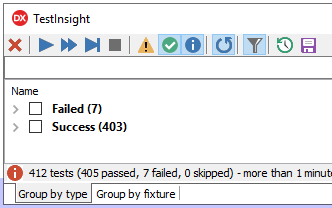
But it does: both “Success” and “Warnings” are counted as “passed”.

TL;DR: ensure the yellow “Warning” triangle is enabled
–jeroen
Posted in Delphi, Development, Software Development, TestInsight | Leave a Comment »
Posted by jpluimers on 2021/08/03
When configuring a web-based kiosk for someone with Alzheimer’s disease, I wanted to start Chrome in full-screen kiosk mode.
Chrome full-screen kiosk mode
The secret for full-screen kiosk mode is to pass the -start-fullscreen command-line option. Thanks [WayBack] User ginomay89 – Super User for answering that in [WayBack] tablet – How to set Google Chrome to automatically open up and in full screen – Super User.
Finding chrome
At first I thought about differentiating on the chrome.exe location that you can find in the registry. This turned out to be depending on how you install Chrome:
- locally for the current user by a non-local-administrator user (by default the location is under
%LocalAppData%)
- globally for all users by a local-administratator user (by default is under
%ProgramFiles(x86)%)
Oddly, there is no way (not even by denying UAC elevation!) for a local administrator to install Chrome for only the current user.
This is odd, as when non-local-administrator denies UAC, the installation is locally to the user.
Then I remembered there are two ways for Windows to find an application
- On the
PATH
- Via the start menu (which includes anything on the
PATH)
The cool thing is that the start command does the latter, so I came up with this batch file that starts chrome with the -start-fullscreen parameter that will initiate kiosk mode with the default chrome settings:
start "Chrome Kiosk Mode" chrome --start-fullscreen
In case I want to compare the registry settings
Basically sorting out the registry settings would mean parsing the references to chrome.exe (often with extra parameters) in the below registry key/value-name pairs.
One day I might need to do this for different reasons, but currently the start trick suffices.
Read the rest of this entry »
Posted in Batch-Files, Development, Power User, Scripting, Software Development, Windows | Leave a Comment »
Posted by jpluimers on 2021/08/03
The most current Lex and Yacc for Delphi is [WayBack] GitHub – RomanYankovsky/ndyacclex: Parser generator toolset for Delphi (Yacc & Lex).
It came up during a funny Twitter thread, where one of the Delphi team members asked for it, despite – after decades of asking – there still being no official Delphi grammar available from the Delphi team, nor Google Search skills [WayBack].
Basically a parser generator is only as useful as the grammar you have for it.
There is no open source grammar for Delphi yet, so the best you can start with is from the same author: [WayBack] GitHub – RomanYankovsky/DelphiAST: Abstract syntax tree builder for Delphi
With DelphiAST you can take real Delphi code and get an abstract syntax tree. One unit at time and without a symbol table though.
Relevant tweets:
–jeroen
Posted in Delphi, Development, Software Development, Undocumented Delphi | 1 Comment »
Posted by jpluimers on 2021/07/29
Reminder to self (as I keep forgetting how versatile extension methods can be):
[WayBack] Mark Pintar sur Twitter : “The nice thing about extension methods is one can add it to most types. Even works of int, float and other primitive types… “
An interesting way of allowing methods on enumerated types is by using extension methods: [WayBack] Unity sample MonoBehaviour explaining how to associate simple strings with enums. · GitHub.
A more elaborate example from [WayBack] NoraGrace-Chess/Position.cs at master · ericoldre/NoraGrace-Chess · GitHub is below the fold.
Via:
using System;
using System.ComponentModel;
using UnityEngine;

public class EnumDescription : MonoBehaviour
{
    public enum PlayerState
    {
        Unknown,
        [Description("Alive and kicking")]
        Alive,
        [Description("Dead as a duck")]
        Dead
    }

    // Start is called before the first frame update
    void Start()
    {
        var state = PlayerState.Dead;
        Debug.Log("Player is " + state.GetDescription());
    }
}

public static class EnumExtensions
{
    public static string GetDescription(this Enum value)
    {
        var type = value.GetType();
        var name = Enum.GetName(type, value);
        if (name != null)
        {
            var field = type.GetField(name);
            if (field != null)
            {
                if (Attribute.GetCustomAttribute(field,
                  typeof(DescriptionAttribute)) is DescriptionAttribute attr)
                    return attr.Description;
            }
        }
        return name;
    }
}
Read the rest of this entry »
Posted in .NET, C#, Development, Software Development | Leave a Comment »


 The Wiert Corner - irregular stream of stuff