The Wiert Corner – irregular stream of stuff

Jeroen W. Pluimers on .NET, C#, Delphi, databases, and personal interests

  • My badges

  • Twitter Updates

  • My Flickr Stream

  • Pages

  • All categories

  • Enter your email address to subscribe to this blog and receive notifications of new posts by email.

    Join 1,835 other subscribers

Archive for the ‘Software Development’ Category

Working around [Fatal error] F2084 Internal errors like AV101E53EB-R0000000C-0

Posted by jpluimers on 2020/03/17

A few notes from my response to [WayBack] [Fatal error] F2084 Internal error : AV101E53EB-R0000000C-0 I’m getting this when trying to do some code completion. Any idea ? – Stéphane Wierzbicki – Google+:

This compiler related error usually made it go away for me either when it occurs during project compilation or when using code completion: Close the IDE. Delete your DCU files. Then restart the IDE.

Starting fresh gives a high chance if fixing this unless it is indeed a compiler related error in which case it returns. For that you need to trim down your code to see under which circumstances.

Reasoning (please shoot at it when things are wrong/missing):

Both the IDE code completion and the project compilation use the compiler. The DCU cache is shared between these compiler instances. The DCU cache depends on internal memory structures. Various pointer related errors (both from the IDE, compiler and 3rd party extensions) can damage this cache.

Especially weak IDE uses of the compiler are the find symbol and rename symbol functionalities. I’ve stopped using those about a decade ago.

Sometimes the F2084 (which I often mistype as F2048) is indeed an error in the compiler. Over the years, some of them have been fixed too. See my earlier articles on F2084.

–jeroen

Posted in Conference Topics, Conferences, Delphi, Development, Event, F2084, Software Development | Leave a Comment »

bash – How to add a progress bar to a shell script? – Stack Overflow

Posted by jpluimers on 2020/03/17

From [WayBackbash – How to add a progress bar to a shell script? – Stack Overflow (thanks Mitch Haile!):

You can implement this by overwriting a line. Use \r to go back to the beginning of the line without writing \n to the terminal.

Write \n when you’re done to advance the line.

Use echo -ne to:

  1. not print \n and
  2. to recognize escape sequences like \r.

Here’s a demo:

echo -ne '#####                     (33%)\r'
sleep 1
echo -ne '#############             (66%)\r'
sleep 1
echo -ne '#######################   (100%)\r'
echo -ne '\n'

–jeroen

Posted in *nix, *nix-tools, bash, bash, Development, Power User, Scripting, Software Development | Leave a Comment »

worksheet function – How to add or subtract to, or increment, column letters in Excel? – Super User

Posted by jpluimers on 2020/03/13

Edit 20260626: For Search Engine Optimisation, =ADDRESS(ROW(),COLUMN()) is the formula that gets you the absolute address of the current cell.

[WayBack] worksheet function – How to add or subtract to, or increment, column letters in Excel? – Super User:

Here’s the best I’ve found so far: =SUBSTITUTE(ADDRESS(1,( COLUMN() + 1 ),4),1,"")The part in the middle marked in bold is the only part that changes. In this example, it’s taking the current column and adding 1, so returning B if it’s in column A and AA if it’s in column Z.

It is related to the question and answer [WayBack] Formula to return just the Column Letter in excel – Super User:

FYI on your original formula you don’t actually need to call the CELL formula to get row and column you can use:

=ADDRESS(ROW(),COLUMN())

Then as an extension of that you can use MID & SEARCH to find the $ and trim down the output so you are just left with the letter:

=MID(ADDRESS(ROW(),COLUMN()),SEARCH("$",ADDRESS(ROW(),COLUMN()))+1,SEARCH("$",ADDRESS(ROW(),COLUMN()),SEARCH("$",ADDRESS(ROW(),COLUMN()))+1)-2)

edit You can even simplify this further:

=MID(ADDRESS(ROW(),COLUMN()),2,SEARCH("$",ADDRESS(ROW(),COLUMN()),2)-2)

And it is part of a much more elaborate answer

Read the rest of this entry »

Posted in Development, Excel, Office, Power User, Software Development | Leave a Comment »

0.30000000000000004.com

Posted by jpluimers on 2020/03/12

Cool! It’s about Floting Point Math. Which means that in most programming languages 0.1 + 0.2 does not equal 0.3: [WayBack0.30000000000000004.com

–jeroen

Posted in Development, Software Development | Leave a Comment »

Installing SourceTree 3.x for Windows on an air-gapped machine

Posted by jpluimers on 2020/03/11

Since the “account.json” SourceTree search did not help me much, below are the steps for installing SourceTree for Windows 3.x on an air-gapped machine.

Prerequisites:

Steps:

  1. Run Process Explorer on the target system
  2. Run the SourceTreeSetup installer on the target system
  3. When registering, click on the “BitBucket” button on the target system
  4. In Process Explorer, find out the web browser process that the setup kicks off and grab the command-line, which looks like this when running Chrome as default browser:
    "%LocalAppData%\Google\Chrome\Application\chrome.exe" -- "https://bitbucket.org/site/oauth2/authorize?response_type=code&client_id=123456789012345678&state=authenticated&redirect_uri=http://localhost:34106/"
  5. Copy the URL bit https://bitbucket.org/site/oauth2/authorize?response_type=code&client_id=123456789012345678&state=authenticated&redirect_uri=http://localhost:34106/ over and paste it on a machine that has internet access
  6. Logon, and follow the steps until the URL look like this: http://localhost:34106/?state=authenticated&code=876543210987654321
  7. Copy that URL over to a web-browser on the target system and execute it
  8. Finish the installation steps on the target system

Now a new file should be in %LocalAppData%\Atlassian\SourceTree\accounts.json suitable for SourceTree 3.x. In the future you might be lucky enough to copy that to a target system before installing.

I was not so lucky, because my accounts.json was SourceTree 2.x based, which the SourceTree 3.x setup modifies, but is still not happy with.

Note these number differ on each request:

  • 123456789012345678 is a base64 encoded request ID
  • 876543210987654321 is a base64 encoded response ID
  • 34106 is a random TCP port where the installer is listening on to get the authentication information

Fiddler

Initially, I had Fiddler steps in the above, but found out I did not need those. One thing that complicated this is that Fiddler had been removed from Chocolatey for a while, so I was not sure it would stay as a product:

SourceTree

Now has an MSI installer:

Has old steps for 2.x versions to get around the above hoopla:

–jeroen

Posted in Development, DVCS - Distributed Version Control, Software Development, Source Code Management, SourceTree | Leave a Comment »

Bad surprise of the day: SysUtils.TEncoding in XE2+ defaults to ANSI, while in XE it defaulted to UTF-8.

Posted by jpluimers on 2020/03/11

Bad surprise of the day: SysUtils.TEncoding in XE2+ defaults to ANSI, while in XE it defaulted to UTF-8 .Among other things this means that TStringList… – Eric Grange – Google+

Source: Bad surprise of the day: SysUtils.TEncoding in XE2+ defaults to ANSI, while i…

Delphi

Eric Grange's profile photo

+Stefan Glienke Indeed, you’re right. The issue must be deeper somewhere. Don’t have time to investigate too much, I’m bypassing the RTL now (also have to work around the limitation that for utf-8 the TEncoding.GetString method returns an empty string if one character in the buffer isn’t utf-8)

Asbjørn Heid's profile photo

I wouldn’t trust the RTL at all with loading non-ascii text, we’ve had it hang on invalid UTF-8 codes more than once.

–jeroen

Posted in Ansi, Delphi, Development, Encoding, Software Development, UTF-8, UTF8 | Leave a Comment »

Practical Deep Learning for Coders 2018 · fast.ai

Posted by jpluimers on 2020/03/11

I’ve read this twice and need to re-read this a few times, so from my reading list then need to follow the course one day: Practical Deep Learning for Coders 2018 · fast.ai [WayBack].

… deep learning course based on Pytorch (and a new library we have built, called fastai), with the goal of allowing more students to be able to achieve world-class results with deep learning. … this course, Practical Deep Learning for Coders 2018 [WayBack], … The only prerequisites are a year of coding experience, and high school math (math required for understanding the material is introduced as required during the course).

Related: [WayBackThe Matrix Calculus You Need For Deep Learning – Terence Parr and Jeremy Howard

Via:

–jeroen

Posted in Development, Python, Scripting, Software Development | Leave a Comment »

The last thing you need to do when you cause link rot is to list the page as “online banking is down”

Posted by jpluimers on 2020/03/10

Nice example on how not to copy with link rot: as a bank is to indicate “internet banking is unavailable” scares your customers away.

[WayBack] Jeroen Pluimers on Twitter: “dit heet overigens link rot, en gebruiksvriendelijke sites proberen dat te voorkomen; is zeker niet gecompliceerd en eigenlijk ook niet complex: het is een kleine moeite om dat in je ontwerp en onderhoud-proces mee te nemen. 1/2 …

[WayBackJeroen Pluimers on Twitter: “de huidige down-melding zet sowieso je klanten volledig op het verkeerde been, dus daar moet zeker iets aan gebeuren. 2/2 “I.v.m. een storing kunt u geen gebruik maken van Internet Bankieren. Internet Banking is unavailable”…”

–jeroen

ABNAMRO

Posted in Conference Topics, Conferences, Development, Event, LifeHacker, Power User, Software Development, Usability, User Experience (ux), Web Development | Leave a Comment »

Start Together. Finish Together – Hacker Noon

Posted by jpluimers on 2020/03/10

I need to read more Hacker Noon stuff:

It may seem counterintuitive, but… Start Together. Finish Together – Hacker Noon [WayBack]

Via a mention of the “non developers” point of view, who are the key persons to do this whole “start/finish together” mantra wit: [WayBack] “Their mental model is that developers/designers are this tiny little pipe, and you have to play this intricate game of Tetris to get the most amount of… – Marjan Venema – Google+ (who does great coaching, so be sure to check out her postings)

–jeroen


Posted in Agile, Development, Software Development | Leave a Comment »

Some tools useful for analysing PDF documents

Posted by jpluimers on 2020/03/05

A while ago, I wanted to analyse the difference of some PDF documents: why they had suddenly grown to twice their size.

[WayBack] Jeroen Pluimers en Twitter: “dat genereren kun je overigens zien als je dezelfde downloads doet, maar dan een fikse periode uit elkaar.…”

There are quite a few tools on [WayBack] Browse Internal PDF Structure – Super User and [WayBack] Best tool for inspecting PDF files? – Stack Overflow, including:

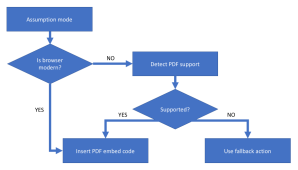
They also made me discover [WayBack] GitHub – pipwerks/PDFObject: A lightweight JavaScript utility for dynamically embedding PDFs in HTML documents documented at [WayBack] PDFObject: A JavaScript utility for embedding PDFs 
This particular case

The quickest way to analyse these for me was [WayBack] PDF Object Browser based on [WayBack] GitHub – brendandahl/pdf.js.utils: PDF.js Utility Files which is also the foundation of [WayBack] Test PDF Creator.

It runs in your web browser as local JavaScript, so it is pretty OK to load a PDF file into it: it does no “phone home”.

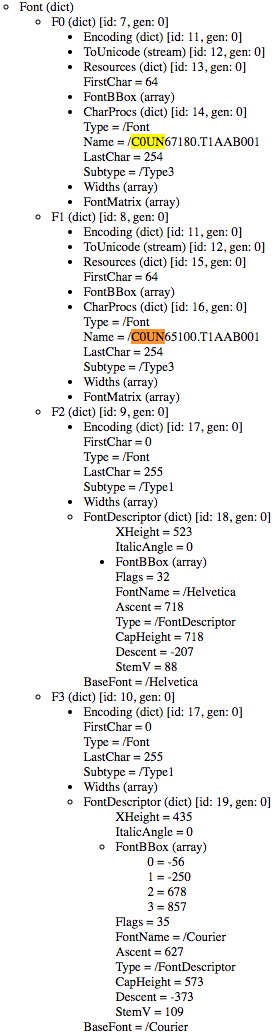
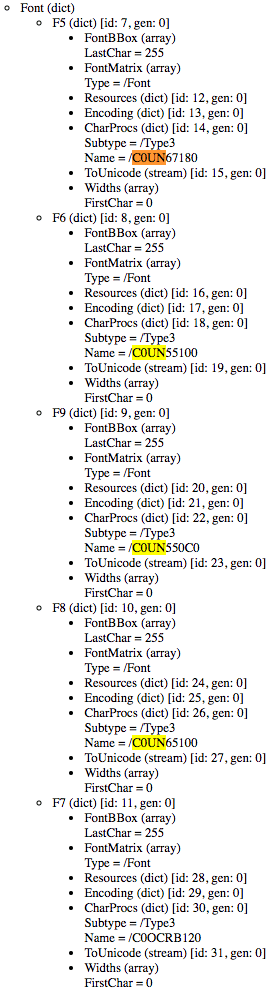
In this case, for generating PDF files with the same content, ABN AMRO added five Type 3 fonts of which one font was not used at all, and two others used to be Type 1 fonts.

Type 1 fonts (wikipedia)

Type 1 (also known as PostScriptPostScript Type 1PS1T1or Adobe Type 1) is the font format for single-byte digital fonts for use with Adobe Type Manager software and with PostScript printers. It can support font hinting.

It was originally a proprietary specification, but Adobe released the specification to third-party font manufacturers provided that all Type 1 fonts adhere to it.

Type 1 fonts are natively supported in Mac OS X, and in Windows 2000 and later via the GDI API.[2] (They are not supported in the Windows GDI+, WPF or DirectWrite APIs.)

Type 3 fonts (wikipedia)

Type 3 font (also known as PostScript Type 3 or PS3T3 or Adobe Type 3) consists of glyphs defined using the full PostScript language, rather than just a subset. Because of this, a Type 3 font can do some things that Type 1 fonts cannot do, such as specify shading, color, and fill patterns. However, it does not support hinting. Adobe Type Manager did not support Type 3 fonts, and they are not supported as native WYSIWYG fonts on any version of Mac OS or Windows.

So far for optimised PDF rendering…

Being in software development for this long, I am constantly reminded that The inmates are running the asylum – Wikipedia. I can definitely recommend reading “The Inmates Are Running the Asylum: Why High Tech Products Drive Us Crazy and How to Restore the Sanity”, by Alan Cooper:

–jeroen

Posted in Development, EPS/PostScript, PDF, Power User, Software Development | Leave a Comment »