The Wiert Corner – irregular stream of stuff

Jeroen W. Pluimers on .NET, C#, Delphi, databases, and personal interests

  • My badges

  • Twitter Updates

  • My Flickr Stream

  • Pages

  • All categories

  • Enter your email address to subscribe to this blog and receive notifications of new posts by email.

    Join 1,860 other subscribers

Archive for the ‘bash’ Category

Some scripts and tips for easing the maintenance of a postfix based SMTP system

Posted by jpluimers on 2021/11/24

A few scripts and tips I found Googling around.

Deleting queued messages by regular expression pattern

I have seen the below delete-from-mailq.pl script numerous time, usually without any attribution (for instance [Wayback] Postfix Flush the Mail Queue – nixCraft and  [Wayback] postfix-delete.pl – Following script deletes all mail from the mailq which matches the regular expression specified as the first argument · GitHub).

The earliest version I could find was in [Wayback] ‘Re: delete messages from mailq’ – MARC by [Wayback] ‘Ralf Hildebrandt ‘ posts – MARC:

--- snip ---
#!/usr/bin/perl

$REGEXP = shift || die "no email-adress given (regexp-style, e.g. bl.*\@yahoo.com)!";

@data = qx</usr/sbin/postqueue -p>;
for (@data) {
  if (/^(\w+)\*?\s/) {
     $queue_id = $1;
  }
  if($queue_id) {
    if (/$REGEXP/i) {
      $Q{$queue_id} = 1;
      $queue_id = "";
    }
  }
}
                                
#open(POSTSUPER,"|cat") || die "couldn't open postsuper" ;
open(POSTSUPER,"|postsuper -d -") || die "couldn't open postsuper" ;

foreach (keys %Q) {
  print POSTSUPER "$_\n";
};
close(POSTSUPER);
--- snip ---

And then use:
% delete-from-mailq "^test"


Tips

[Wayback] How do I check the postfix queue size? – Server Fault

Lots of great answers and pointers to useful guides/software there.

qstat

[Wayback] Postfix Bottleneck Analysis points to [Wayback] Postfix manual – qshape(1): qshape - Print Postfix queue domain and age distribution, then explains about different scenarion and queues:

postqueue

postqueue -p | tail -n 1

Last line in the postqueue -p shows how many requests and size:

-- 317788 Kbytes in 11860 Requests.

View queues size

I tried finding the original posting of the below script, but could not. If you find it, please let me know.

#!/usr/bin/env perl

# postfix queue/s size
# author: 
# source: http://tech.groups.yahoo.com/group/postfix-users/message/255133

use strict;
use warnings;
use Symbol;
sub count {
        my ($dir) = @_;
        my $dh = gensym();
        my $c = 0;
        opendir($dh, $dir) or die "$0: opendir: $dir: $!\n";
        while (my $f = readdir($dh)) {
                if ($f =~ m{^[A-F0-9]{5,}$}) {
                        ++$c;
                } elsif ($f =~ m{^[A-F0-9]$}) {
                        $c += count("$dir/$f");
                }
        }
        closedir($dh) or die "closedir: $dir: $!\n";
        return $c;
}
my $qdir = `postconf -h queue_directory`;
chomp($qdir);
chdir($qdir) or die "$0: chdir: $qdir: $!\n";
printf "Incoming: %d\n", count("incoming");
printf "Active: %d\n", count("active");
printf "Deferred: %d\n", count("deferred");
printf "Bounced: %d\n", count("bounce");
printf "Hold: %d\n", count("hold");
printf "Corrupt: %d\n", count("corrupt");

Various commands

[Wayback] Inspecting Postfix’s email queue – Tech-G explaining about:

  • mailq
  • postqueue -p
  • postcat -vq XXXXXXXXXX (where XXXXXXXXXX is the message ID)
  • postqueue -f / postfix flush
  • postsuper -d to delete messages

More of these in [Wayback] Postfix Mail Queue Management – Linux Hint and [Wayback] Postfix Bottleneck Analysis: queues.

Makefile

Based on [Wayback] Using “make” for Postfix file maintenance

MAPS = relays.db aliases.db transport.db relocated.db \
        virtual.db sender_checks.db rejected_recips.db \
        helo_access.db

all : $(MAPS)

aliases.db : aliases
        newaliases

%.db : %
        postmap $*

This is my Makefile that runs fine on Tumbleweed (note: all 8-space indents are TAB characters):

MAPS =  /etc/aliases.db \
        transport.db \
        virtual.db \
        helo_access.db \
        canonical.db \
        sasl_passwd.db \
        relocated.db \
        relay.db \
        access.db \
        relay_ccerts.db \
        sender_canonical.db

all : $(MAPS)

aliases.db : aliases
        @echo "Rebuilding $@."
        newaliases

%.db : %
        @echo "Rebuilding $@."
        postmap $*

In the future, I might try [Wayback] Makefile.postfix · GitHub, though I think it is convoluted:


## Postfix: Makefile to update *.db files
POSTCONF= /usr/sbin/postconf
POSTMAP= /usr/sbin/postmap
default: postmap
postmap: Makefile.postmap
@echo 'Updating database files …'
$(MAKE) -f Makefile.postmap
Makefile.postmap: main.cf
@echo 'Updating $@ …'
@set -e; \
rm -f $@.$$$$.tmp; \
echo 'POSTMAP=$(POSTMAP)' >>$@.$$$$.tmp; \
echo 'postmap::' >>$@.$$$$.tmp; \
config_directory="$(PWD)"; \
{ $(POSTCONF) -c $(PWD) || kill $$$$; } \
|tr ' ' '\n' \
|sed -n \
-e 's/,$$//' \
-e 's#^hash:\$$config_directory/##p' \
-e 's#^hash:'"$$config_directory/##p" \
|sort -u \
|while read mapfile; do \
echo "postmap:: $$mapfile.db" >>$@.$$$$.tmp; \
echo "$$mapfile.db: $$mapfile" >>$@.$$$$.tmp; \
echo " \$$(POSTMAP) $$<" >>$@.$$$$.tmp; \
done; \
mv $@.$$$$.tmp $@


[Wayback] Ralf Hildebrandt

Ralf Hildebrandt is an active and well-known figure in the Postfix community. He’s a systems engineer for T-NetPro, a German telecommunications company and has spoken about Postfix at industry conferences and contributes regularly to a number of open source mailing lists.

Co-author of this book: [Wayback: Book of Postfix State-of-the-Art Message Transport ISBN 9781593270018] (which used to have its own site: [Wayback: The Book of Postfix]

Book of Postfix

State-of-the-Art Message Transport

By Patrick KoetterRalf Hildebrandt

Publisher: No Starch PressRelease Date: March 2005Pages: 496

Best practices for Postfix–the popular alternative to Sendmail. Developed with security and speed in mind, Postfix has become a popular alternative to Sendmail and comes preinstalled in many Linux distributions as the default mailer. The Book of Postfix is a complete guide to Postfix whether used at home, as a mailrelay or virus-scanning gateway, or as a company mailserver. Practical examples show how to deal with daily challenges like protecting mail users from spam and viruses, managing multiple domains, and offering roaming access.

This is a great review of the book: [Wayback] The Book of Postfix (Ralf Hildebrandt, Patrick Koetter)

Related

For my postfix studies… « The Wiert Corner – irregular stream of stuff

–jeroen


Posted in *nix, *nix-tools, bash, Communications Development, Development, Internet protocol suite, Makefile, postfix, Power User, Scripting, SMTP, Software Development | Leave a Comment »

checkbashisms(1) – Linux man page

Posted by jpluimers on 2021/11/17

Even with lots of experience, one learns new things every day.

A while ago, I discovered checkbashisms which checks sh shel scripts (usually with extension .sh) scripts to they do not contain code specific to bash.

[Wayback] checkbashisms(1) – Linux man page

checkbashisms, based on one of the checks from the lintian system, performs basic checks on /bin/sh shell scripts for the possible presence of bashisms. It takes the names of the shell scripts on the command line, and outputs warnings if possible bashisms are detected.

Note that the definition of a bashism in this context roughly equates to “a shell feature that is not required to be supported by POSIX”; this means that some issues flagged may be permitted under optional sections of POSIX, such as XSI or User Portability.

In cases where POSIX and Debian Policy disagree, checkbashisms by default allows extensions permitted by Policy but may also provide options for stricter checking.

The source by now is a Perl script (it used to be a bash script) of which you can find the latest version here: [Wayback] scripts/checkbashisms.pl · master · Debian / devscripts · GitLab

Not installed by default

Virtually no distribution has checkbashisms installed by default.

In fact, the package containing checkbashisms heavily varies by distribution.

For OpenSuSE, it is in a package by itself: [Wayback] openSUSE Software: package checkbashisms

checkbashisms

Tool for Checking /bin/sh Scripts for Possible Bashisms

checkbashisms performs basic checks on /bin/sh shell scripts for the possible presence of bashisms. It takes the names of the shell scripts on the command line, and outputs warnings if possible bashisms are detected.

–jeroen

Posted in *nix, *nix-tools, bash, bash, Development, Power User, Scripting, sh, Sh Shell, Software Development | Leave a Comment »

Some bash parameter propagation links that hopefully will work with ash/dash too

Posted by jpluimers on 2021/10/27

For my link archive; I started with [Wayback] dash get all parameters quoted – Google Search:

–jeroen

Posted in *nix, *nix-tools, ash/dash, ash/dash development, bash, bash, Development, ESXi6, ESXi6.5, ESXi6.7, ESXi7, Power User, Scripting, Software Development, Virtualization, VMware, VMware ESXi | Leave a Comment »

Some links on xargs simulation in PowerShell

Posted by jpluimers on 2021/10/13

On nx, I’m used to xargs which allows to convert from a pipe of output into arguments passed to a command. This is useful, as many commands only accept arguments as parameters.

In PowerShell, you can usually avoid an xargs equivalent because commandlet output is a stream of objects that you can post-process using . I for instance used that in PowerShell: recovering from corrupt empty *.nupkg files after a disk was accidentally full during update.

Here are some xargs equivalency examples:

Read the rest of this entry »

Posted in *nix, *nix-tools, bash, CommandLine, Development, Power User, PowerShell, PowerShell, Scripting, Software Development, xargs | Leave a Comment »

Google Cloud Shell: connecting to cloud storage buckets

Posted by jpluimers on 2021/09/28

One of the drawbacks of Google Cloud Shell is that it will delete the home directory after 120 days of not using it: [WayBack] Deletion notice for my Google Cloud Shell home directory – Stack Overflow

This is documented [WayBack] here:

If you do not access Cloud Shell for 120 days, we will delete your home disk. You will receive an email notification before we do so and simply starting a session will prevent its removal.

This only applies to the home directory of your Cloud Shell instance (you may want to store it on Cloud Storage anyway if you want to keep it). Any other Google services you use will be unaffected.

I hardly use the cloud shell, as it is a last resort to shell out from overly protected networks. Fewer and fewer environments restrict so much, so I’ve bumped into the home directory deletion a few times now.

I might use it more in the future, as I recently discovered there is a URL trick so you can start a cloud shell with parameters like an initial git repository: [WayBack] Open in Cloud Shell  |  Google Cloud

The Open in Cloud Shell feature allows you to publish a link that opens the Cloud Console and either automatically clones a Git repository into Cloud Shell or starts Cloud Shell with a custom image. It also allows for instructions to be printed to the terminal to help users interact with the content.

The Open in Cloud Shell feature helps developers experiment with code samples and APIs without having to worry about downloading Cloud SDK, installing required dependencies, or searching for relevant source files. This page explains how to add this feature to your Git repository.

Currently, only GitHub and Bitbucket repositories are whitelisted. If you would like to add a different repository, send feedback with the repository type you’d like to use with Open in Cloud Shell.

Setting up the home directory with my scripts can be a curse, so I have contemplated on these kinds of solutions:

  • store scripts in Google Drive, and mount part of Google Drive into the Cloud Shell
  • store scripts in Google Cloud Storage
  • script the setup of the home directory via a bash script in a gist

Some links that will hopefully help me with that:

  • [WayBack] Use the Google Cloud Shell to Upload files to Google Drive : DataHoarder
  • [WayBack] Open Your Repository In Google Cloud Shell – Daisuke Maki – Medium
  • [WayBack] gsutil – Google cloud storage – Download file from web – Stack Overflow

    mount the bucket in your Cloud Shell using gcsfuse:

    Create a directory in your Cloud Shell user home

     mkdir ~/mybucket
    

    Now mount your bucket in that directory using gcsfuse:

     gcsfuse bucket_name ~/mybucket
    

    Change the current directory to mount point directory:

     cd mybucket
    

    (if you want to have some fun run “df -h .” to see how much space you got in that mount point)

    seems to work for all file sizes:

     curl http://speedtest.tele2.net/10GB.zip | gsutil cp - gs://YOUR_BUCKET_NAME/10GB.zip
    

    Basically curl “streams” the data directly to the bucket.

  • [WayBack] Limitations and restrictions  |  Cloud Shell  |  Google Cloud

    Usage limits

    Cloud Shell inactivity: If you do not access Cloud Shell for 120 days, your home disk will be deleted. You will receive an email notification before its deletion and simply starting a session will prevent its removal. Please consider a different solution on Google Cloud storage for sensitive data you wish to store long term.

    Non-interactive usage: Cloud Shell is intended for interactive use only. Non-interactive sessions will be ended automatically after a warning. Note that Cloud Shell sessions are capped at 12 hours, after which sessions are automatically terminated. You can use a new session immediately after.

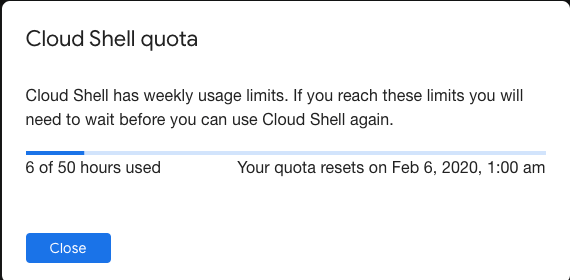
    Weekly usage: Cloud Shell also has weekly usage limits. If you reach your usage limit, you’ll need to wait until the specified time (listed under Usage Quota, found under the three dots menu icon) before you can use Cloud Shell again.

    Restoring a session after a service limit violation: If your session is terminated or cannot be established because you exceeded a service limit, Cloud Shell will display an error with a link to a form that allows you to appeal the limit violation. Click the feedback link and submit the form with more information about the tasks you were performing before your session was terminated.

–jeroen

Posted in bash, Development, Google, GoogleCloudShell, GoogleDrive, Internet, Power User, Scripting, Software Development, SpeedTest | Leave a Comment »

firewalld: show interfaces with their zone details and show zones in use

Posted by jpluimers on 2021/08/26

A while ago openSUSE switched to firewalld as a fronte-end for iptables. Tumbleweed was first in 2018, so I wrote a reminder: On my research list: migrate from OpenSuSE SuSEfirewall2 to firewalld « The Wiert Corner – irregular stream of stuff.

The core concept of firewalld is zones, which some people find hard to understand: [Archive.is/WayBack] Firewalld on Leap 15 – why is it so complicated ? : openSUSE.

Another concept is interfaces and how they bind to zones. [Wayback] Masquerading and Firewalls | Security Guide | openSUSE Leap 15.2 shows more of that.

The final concept is services that bind one or more aspects (like ports or addresses) to a service name [Wayback] Documentation – Manual Pages – firewalld.service | firewalld.

Other interesting bits of information:

Below are some examples on what I learned, especially finding details about active interfaces and the zones they are bound to.

All of them are based on:

  • the xargs shell trick (I known you can do some of them without the trick, but I try to use common patterns in my solution so I do not have to remember which boundary case fails
  • the echo -n trick to skip the newline output
  • the [WayBack] firewall-cmd options (which kind of care commands)
    • --get-active-zones:

      Print currently active zones altogether with interfaces and sources used in these zones. Active zones are zones, that have a binding to an interface or source. The output format is:

      zone1
        interfaces: interface1 interface2 ..
        sources: source1 ..
      zone2
        interfaces: interface3 ..
      zone3
        sources: source2 ..

      If there are no interfaces or sources bound to the zone, the corresponding line will be omitted.

    • --list-interfaces:

      List interfaces that are bound to zone zone as a space separated list. If zone is omitted, default zone will be used.

    • --get-zone-of-interface=<zone>:

      Print the name of the zone the interface is bound to or no zone.

    • --info-zone=<zone> (which shows far more information than the manual indicates):

      Print information about the zone zone. The output format is:

      zone
        interfaces: interface1 ..
        sources: source1 ..
        services: service1 ..
        ports: port1 ..
        protocols: protocol1 ..
        forward-ports: forward-port1 ..
        source-ports: source-port1 ..
        icmp-blocks: icmp-type1 ..
        rich rules: rich-rule1 ..

Two more notes before the examples:

  1. My first hunch was to use --list-all-zones, but that shows details of all un-used zones as well.
  2. I am not fully sure about the --list-interfaces to list *all* interfaces. I might replace this later with ls /sys/class/net (see [WayBack] linux – List only the device names of all available network interfaces – Super User).

Other useful commands

Besides lising zones and interfaces, you might be interested in services and ports:

# firewall-cmd --list-services
dhcpv6-client ssh
# firewall-cmd --list-ports

List used zones

The first only shows the zone names

# firewall-cmd --list-interfaces | xargs -I {} sh -c 'firewall-cmd --get-zone-of-interface={}'
public

The second both zones and interfaces:

# firewall-cmd --get-active-zones 
public
  interfaces: ens192

When there are no bound interfaces

OpenSuSE by default does not bind interfaces to zones; it means any interface uses the default zone. That means the --list-interfaces commands in this blog post fail.

You can check this behaviour by running this command:

# ls /sys/class/net | xargs -I {} sh -c 'echo -n "interface {} has zone " ; firewall-cmd --get-zone-of-interface={} | xargs -I [] sh -c "echo [] ; firewall-cmd --info-zone=[]"'
interface eth0 has zone no zone
interface lo has zone no zone
interface wlan0 has zone no zone

Alternatives:

  1. Finding the default zone
    # firewall-cmd --get-default-zone
    public
    
  2. Details of the default zone
    # firewall-cmd --info-zone=$(firewall-cmd --get-default-zone)
    public
      target: default
      icmp-block-inversion: no
      interfaces: 
      sources: 
      services: dhcpv6-client ssh
      ports: 
      protocols: 
      masquerade: no
      forward-ports: 
      source-ports: 
      icmp-blocks: 
      rich rules: 

You can see that here the public zone is marked default which means it binds to any interface that is not bound to a specific zone.

List used zone details

# firewall-cmd --list-interfaces | xargs -I {} sh -c 'firewall-cmd --get-zone-of-interface={} | xargs -I [] sh -c "firewall-cmd --info-zone=[]"'
public (active)
  target: default
  icmp-block-inversion: no
  interfaces: ens192
  sources: 
  services: dhcpv6-client ssh
  ports: 
  protocols: 
  masquerade: no
  forward-ports: 
  source-ports: 
  icmp-blocks: 
  rich rules: 

List interfaces and their zones:

# firewall-cmd --list-interfaces | xargs -I {} sh -c 'echo -n "interface {} has zone " ; firewall-cmd --get-zone-of-interface={}'
interface ens192 has zone public

List interfaces and their zone details:

# firewall-cmd --list-interfaces | xargs -I {} sh -c 'echo -n "interface {} has zone " ; firewall-cmd --get-zone-of-interface={} | xargs -I [] sh -c "echo [] ; firewall-cmd --info-zone=[]"'
interface ens192 has zone public
public (active)
  target: default
  icmp-block-inversion: no
  interfaces: ens192
  sources: 
  services: dhcpv6-client ssh
  ports: 
  protocols: 
  masquerade: no
  forward-ports: 
  source-ports: 
  icmp-blocks: 
  rich rules: 

Verifying if dns service is available, then allow it on public

Verify if a DNS is in the enabled services:

# firewall-cmd --list-services
dhcpv6-client ssh

Here no DNS service is enabled, so I need to figure out if any DNS service is available to be enabled.

This lists all the services that can be enabled in a zone:

# firewall-cmd --get-services

On my system, this returned the following list:

RH-Satellite-6 amanda-client amanda-k5-client amqp amqps apcupsd audit bacula bacula-client bb bgp bitcoin bitcoin-rpc bitcoin-testnet bitcoin-testnet-rpc bittorrent-lsd ceph ceph-mon cfengine cockpit condor-collector ctdb dhcp dhcpv6 dhcpv6-client distcc dns dns-over-tls docker-registry docker-swarm dropbox-lansync elasticsearch etcd-client etcd-server finger freeipa-4 freeipa-ldap freeipa-ldaps freeipa-replication freeipa-trust ftp ganglia-client ganglia-master git grafana gre http https imap imaps ipp ipp-client ipsec irc ircs iscsi-target isns jenkins kadmin kdeconnect kerberos kibana klogin kpasswd kprop kshell ldap ldaps libvirt libvirt-tls lightning-network llmnr managesieve matrix mdns memcache minidlna mongodb mosh mountd mqtt mqtt-tls ms-wbt mssql murmur mysql nfs nfs3 nmea-0183 nrpe ntp nut openvpn ovirt-imageio ovirt-storageconsole ovirt-vmconsole plex pmcd pmproxy pmwebapi pmwebapis pop3 pop3s postgresql privoxy prometheus proxy-dhcp ptp pulseaudio puppetmaster quassel radius rdp redis redis-sentinel rpc-bind rsh rsyncd rtsp salt-master samba samba-client samba-dc sane sip sips slp smtp smtp-submission smtps snmp snmptrap spideroak-lansync spotify-sync squid ssdp ssh steam-streaming svdrp svn syncthing syncthing-gui synergy syslog syslog-tls telnet tentacle tftp tftp-client tile38 tinc tor-socks transmission-client upnp-client vdsm vnc-server wbem-http wbem-https wsman wsmans xdmcp xmpp-bosh xmpp-client xmpp-local xmpp-server zabbix-agent zabbix-server

I was searching to see if dns was available, so I split the string with tr, then searced with grep:

# firewall-cmd --get-services | tr " " "\n" | grep dns
dns
dns-over-tls
mdns

To get details, use the firewall-cmd --info-service=servicename like this:

# firewall-cmd --get-services | tr " " "\n" | grep dns | xargs -I [] sh -c "firewall-cmd --info-service=[]"
dns
  ports: 53/tcp 53/udp
  protocols: 
  source-ports: 
  modules: 
  destination: 
  includes: 
dns-over-tls
  ports: 853/tcp
  protocols: 
  source-ports: 
  modules: 
  destination: 
  includes: 
mdns
  ports: 5353/udp
  protocols: 
  source-ports: 
  modules: 
  destination: ipv4:224.0.0.251 ipv6:ff02::fb
  includes: 

So for named (bind), I need the dns service to be enabled:

# firewall-cmd --zone=public --add-service=dns --permanent
success

Now a –list-services will not show dns as we changed the --permanent configuration, not the current configuration:

# firewall-cmd --list-services
dhcpv6-client ssh

So you need to --reload the --permanent settings:

# firewall-cmd --list-services --permanent
dhcpv6-client dns ssh
# firewall-cmd --reload
success
# firewall-cmd --list-services
dhcpv6-client dns ssh

–jeroen

Posted in *nix, *nix-tools, bash, bash, Development, iptables, Linux, openSuSE, Power User, Scripting, Software Development, SuSE Linux, Tumbleweed, xargs | Leave a Comment »

linux – How can I find all hardlinked files on a filesystem? – Super User

Posted by jpluimers on 2021/08/25

[WayBack] linux – How can I find all hardlinked files on a filesystem? – Super User

use the following line (for sure you have to replace /PATH/FOR/SEARCH/ with whatever you want to search):

find /PATH/FOR/SEARCH/ -xdev -printf '%i\t%n\t%p\n' | fgrep -f <(find . -xdev -printf '%i\n' | sort -n | uniq -d) | sort -n

this scans the filesystem only once, shows inode, number of hardlinks and path of files with more than one hardlink and sorts them according to the inode.

if you are annoyed by error messages for folders you aren’t allowed to read, you can expand the line to this:

find /PATH/FOR/SEARCH/ -xdev -printf '%i\t%n\t%p\n' 2> /dev/null | fgrep -f <(find . -xdev -printf '%i\n' 2> /dev/null | sort -n | uniq -d) | sort -n

It uses these commands:

–jeroen

Posted in *nix, *nix-tools, bash, bash, Development, fgrep, find, Power User, Scripting, Software Development | 1 Comment »

bash – Search for a previous command with the prefix I just typed – Unix & Linux Stack Exchange

Posted by jpluimers on 2021/08/18

[WayBack] bash – Search for a previous command with the prefix I just typed – Unix & Linux Stack Exchange answered by [WayBack] John1024:

What you are looking for is Ctrl-R.

Type Ctrl-R and then type part of the command you want. Bash will display the first matching command. Keep typing CtrlR and bash will cycle through previous matching commands.

To search backwards in the history, type Ctrl-S instead. (If Ctrl-S doesn’t work that way for you, that likely means that you need to disable XON/XOFF flow control: to do that, run stty -ixon.)

This is documented under “Searching” in man bash.

Comment by [WayBack] HongboZhu:

Ctrl-Q to quit the frozen state, if you already hit Ctrl-S without turning off flow control first and got your terminal frozen.

A far more elaborate answer with many other tips is from [WayBack] Peter Cordes:

Read the rest of this entry »

Posted in *nix, *nix-tools, bash, bash, Development, Power User, Scripting, Software Development | Leave a Comment »

UUOC apparently is/was a thing: useless use of cat

Posted by jpluimers on 2021/08/16

A while ago I bumped into UUOC: [WayBack] cat (Unix): Useless use of cat – Wikipedia.

For me the post important reason to choose between cat and a redirect is realising from the above article:

  • input redirection forms allow command to perform random access on the file, whereas the cat examples do not.
  • cat written with UUOC might still be preferred for readability reasons, as reading a piped stream left-to-right might be easier to conceptualize

I ended up at UUOC through [WayBack] bash – Calling multiple commands through xargs – Stack Overflow.

Invoking multiple commands with the same xargs parameter.

The above question also led me to two better solutions for my original xargs problem.

I liked both below solutions.

The first (by [WayBack] ckhan) uses sh as subshell and substitutes the parameter with a readable name.

The second (by [WayBack] shivams) uses a function which gets way more readable code when the command-line gets longer.

[WayBack] shell – xargs : using same argument in multiple commands – Unix & Linux Stack Exchange:

  1. you’ll want to explicitly execute a subshell:
    echo 95 | xargs -n1 -I_percent -- sh -c '[ _percent -ge 95 ] && echo "No Space on disk _percent% full -- remove old backups please"'

    Note also I’m using _percent instead of {} to avoid extra quoting headaches with the shell. It’s not a shell variable; still just an xargs replacement string.

  2. An alternative way, which is more readable, is to define a separate function which contains all your other commands and then call that function with xargs in a sub-shell.Hence, for example:
    myfunc(){
      [ "$1" -ge 95 ] && echo "No Space on disk $1% full -- remove old backups please"
      echo "Another command echoing $1"
    }
    
    export -f myfunc
    
    echo 95 | xargs -n1 -I_percent -- sh -c 'myfunc "_percent"'

–jeroen

Posted in bash, Development, Scripting, Software Development | Leave a Comment »

Listing information on all active interfaces on MacOS part 1: getting the active interface names

Posted by jpluimers on 2021/07/29

Listing Listing information on all active interfaces on MacOS is a process involving multiple pieces, which then can be combined together.

Listing all active interfaces try 1

This involves both the -l (list with optional criteria) and -u parameter (the up criterion) as per excerpts from the [Archive.is] ifconfig(8) [osx man page] / [WayBack] ifconfig Man Page – macOS – SS64.com:

NAME
     ifconfig -- configure network interface parameters

SYNOPSIS
     ...
     ifconfig -l [-d] [-u] [address_family]
     ...

DESCRIPTION
     The ifconfig utility is used to assign an address to a network interface and/or configure network interface parameters.

     The following options are available:

     ...

     address_family
             Specify the address family which affects interpretation of the remaining parameters.  Since an interface can receive transmissions
             in differing protocols with different naming schemes, specifying the address family is recommended.  The address or protocol fami-
             lies currently supported are ``inet'', ``inet6'', and ``link''.  The default is ``inet''.  ``ether'' and ``lladdr'' are synonyms
             for ``link''.

     ...

     The -l flag may be used to list all available interfaces on the system, with no other additional information.  Use of this flag is mutually
     exclusive with all other flags and commands, except for -d (only list interfaces that are down) and -u (only list interfaces that are up).

Example:

ifconfig -l -u

Each interface on one line:

ifconfig -l -u | xargs -n1 echo

The problem is that on my system, it also lists bridges as active, whereas they are not:

# ifconfig -l -u | xargs -n1 echo
lo0
en1
en2
en0
p2p0
awdl0
bridge0
utun0
en10

# ifconfig bridge0
bridge0: flags=8863<UP,BROADCAST,SMART,RUNNING,SIMPLEX,MULTICAST> mtu 1500
    options=63<RXCSUM,TXCSUM,TSO4,TSO6>
    ether 6a:00:02:9a:23:f0 
    Configuration:
        id 0:0:0:0:0:0 priority 0 hellotime 0 fwddelay 0
        maxage 0 holdcnt 0 proto stp maxaddr 100 timeout 1200
        root id 0:0:0:0:0:0 priority 0 ifcost 0 port 0
        ipfilter disabled flags 0x2
    member: en1 flags=3<LEARNING,DISCOVER>
            ifmaxaddr 0 port 5 priority 0 path cost 0
    member: en2 flags=3<LEARNING,DISCOVER>
            ifmaxaddr 0 port 6 priority 0 path cost 0
    Address cache:
    nd6 options=201<PERFORMNUD,DAD>
    media: 
    status: inactive

So this is where the MacOS and BSD documentation is inaccurate.

Interface types

The above interfaces are many more than just ethernet or WiFi interfaces; there is a list at [WayBack] macos – What are en0, en1, p2p, and so on, that are displayed after executing ifconfig? – Stack Overflow by [WayBackmcint:

In arbitrary order of my familarity / widespread relevance:

lo0 is loopback.

en0 at one point “ethernet”, now is WiFi (and I have no idea what extra en1 or en2 are used for).

fw0 is the FireWire network interface.

stf0 is an IPv6 to IPv4 tunnel interface to support the transition from IPv4 to the IPv6 standard.

gif0 is a more generic tunneling interface [46]-to-[46].

awdl0 is Apple Wireless Direct Link

p2p0 is related to AWDL features. Either as an old version, or virtual interface with different semantics than awdl.

many VPNs will add additional devices, often “utun#” or “utap#” following TUN/TAP (L3/L2)virtual networking devices.

More on AWDL at [WayBack] ios – What is AWDL (Apple Wireless Direct Link) and how does it work? – Stack Overflow.

Listing all active interfaces try 2

Read the rest of this entry »

Posted in *nix, *nix-tools, Apple, bash, Development, ifconfig, Mac OS X / OS X / MacOS, Power User, Scripting, Software Development | Leave a Comment »